

PIUSI B.SMART
- 6.00
- 4.0
- Installs
- 50.00K
- Price
- Free

Screenshots

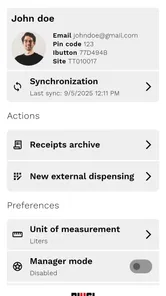
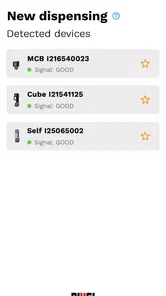
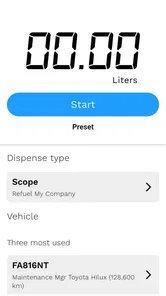
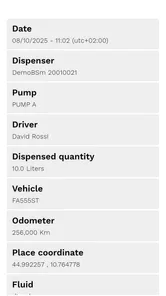
Analysis by Reviewed
Managing fuel use across several vehicles is one of those jobs that looks simple until records become scattered between paper notes, driver messages, pump readings, and office spreadsheets. PIUSI B.SMART is built for that particular problem: it is an Auto & Vehicles app from Piusi S.p.A designed to help a fleet keep a closer eye on consumption. I found its strongest appeal in the way it turns refuelling into a more organized fleet-management task rather than leaving every driver or manager to remember what happened.
The app is free and suitable for Everyone, which makes it easy to consider without adding a software purchase to the fleet budget. It has reached over 50 thousand installs and holds a 4.0 average from more than 180 ratings, so there is a useful amount of real-world adoption without suggesting that it will suit every operation. The current version is 2.4.2, and it runs on Android 7.0 or later. Those details matter if you are planning to use an older phone or hand down a spare device to a driver.
How clearly the app supports everyday fleet work
I focus here on how a dedicated fuel-recording workflow can make everyday fleet information easier to interpret, while also looking at the habits and setup that determine whether it helps in practice. That leads naturally to the next section: what a manager should prepare before asking drivers to use it.
Readability and navigation in a busy workday
My first impression is that B.SMART makes more sense when viewed as a practical control point for a fleet than as a general fuel calculator. Its purpose is focused: connect fuel activity with the vehicles and people responsible for it, then use that information to understand consumption. That focus is helpful because a fleet manager does not need another broad business app filled with unrelated screens.
For someone who spends most of the day moving between a yard, workshop, office, and vehicles, clear grouping is more important than decorative design. The useful mental model is to separate the people using the system, the vehicles being fuelled, and the refuelling events themselves. Even before looking for advanced reporting, I would approach the app through those three questions: who used the fuel, which vehicle received it, and what does the record say about consumption?
That approach also helps a new user learn the app without memorizing every menu. A supervisor can begin with a small, controlled group of vehicles, confirm that the records make sense, and only then expand the workflow. I prefer this gradual start to putting an entire fleet into a new system on the first day, because a wrongly assigned vehicle or incomplete driver record can make later comparisons confusing.
The app is likely to be most comfortable for users who can read compact mobile screens and who already understand basic fleet terminology. A dispatcher or fleet administrator may find the focused layout easier than a large enterprise platform with dozens of modules. On the other hand, a driver who only needs to complete a quick task may need simple instructions from the manager before using it independently. The difference is not technical ability alone; it is whether the user understands what information the fleet expects at each refuelling step.
More From Our News Desk

 Gmail
GmailGmail in a Busy Inbox: Who Benefits Most?
From first account to crowded workday, Gmail earns its place through dependable search and flexible sorting—but its best fit depends on how much inbox maintenance you can tolerate.

 Prime Video
Switching to Prime Video: What Changes in Your Viewing Routine
Prime Video can make a compelling second home for streaming, but switching means learning a different catalog, rental layer, and route from browsing to playback.

 Universal TV Remote Control
Universal TV Remote Control Works Best as a Reliable Backup
A phone remote earns its place through quick setup and reliable habits. Here is how to get more from Universal TV Remote Control—and where its limits show.

 Weather - By Xiaomi
Weather by Xiaomi Review: Clear at a Glance, Less Clear Up Close
Xiaomi’s weather app makes everyday forecasts quick to scan, but its calm surface can leave useful details and recovery paths harder to find than they should be.

 X
XX Under Pressure: Can It Recover When Posting Goes Wrong?
A resilience-focused review of X, examining setup, mistaken posts, interruptions, weak connections, and the gaps that matter when recovery needs to be dependable.

 Clash of Clans
Clash of Clans Is Won Between the Battles
Its raids are quick; its community is a long-term project of coordination, teaching, rivalry, and shared responsibility—with all the friction that entails.
Latest News



I would also recommend setting up a consistent vocabulary before inviting several people to use the system. Vehicle names, internal identifiers, and driver names should follow one recognizable pattern. That small preparation is easy to overlook, but it directly affects readability later. If one person uses a registration number, another uses a nickname, and a third uses a vehicle type, the app may still hold the records, but the resulting overview will be harder for a busy manager to interpret.
Motor and sensory considerations
Because this is a mobile app used around vehicles and fuel equipment, physical context matters as much as the screen itself. A driver may be wearing gloves, standing outdoors, carrying paperwork, or trying to work quickly before moving the vehicle. In that situation, a workflow that is easy at a desk may feel less convenient beside a pump. I would not treat the phone interface as the only part of the experience; the surrounding routine determines how accessible it feels.
For users with limited fine-motor control, the best practical approach is to reduce unnecessary interaction. Prepare the fleet records in advance, keep the device within easy reach, and avoid asking drivers to search through long lists when an administrator can organize the setup beforehand. This is not a special feature claim about B.SMART; it is a sensible way to make a focused fleet tool less demanding during a physical task.
Users with reduced vision may benefit from a larger phone, stronger system text settings, and good lighting, but I would test the actual screens on the devices used by the team rather than assume every adjustment will work perfectly. A manager can also create a short written routine with the exact order of actions. That helps someone who finds small labels or unfamiliar icons difficult to distinguish, especially when the app is being used for the first time.
For users with hearing loss, a visual workflow is naturally preferable to one that depends on spoken instructions. A supervisor can provide the setup steps in writing and use visible records to confirm whether a refuelling event has been entered correctly. For users with cognitive or learning differences, consistent names and a one-task-at-a-time procedure can make a substantial difference. The fleet should avoid changing terminology from one shift to another, even if the app itself allows flexible organization.
There is a useful distinction here between accessibility and training. B.SMART can be made easier to use through preparation, but that does not mean every user will find it immediately effortless. A person who is comfortable with smartphones but unfamiliar with fleet records may still need guidance about why each entry matters. I would give new drivers a short demonstration using a non-critical example, then check their first few records rather than leaving them to guess.
Situational access for drivers, supervisors, and small fleets
The strongest everyday scenario I can imagine is a small delivery company with a handful of vans. At the start of a shift, the manager knows which vehicles are assigned to which drivers. During the day, fuel activity is captured through the B.SMART workflow instead of being reconstructed from memory at the end of the week. Later, the manager can look for unusual consumption patterns, missing records, or a vehicle that deserves a closer mechanical check.
That scenario shows why the app is more useful for a fleet than for a private motorist. An individual driver normally has little need to coordinate multiple people and vehicles. A company, contractor, workshop, or organization responsible for shared vehicles has a different problem: it needs a repeatable record that can be understood by someone who was not present at the pump. B.SMART is aimed at that shared responsibility.
It can also help when staff work different schedules. A night-shift driver may not be able to explain a fuel event to the office immediately, while the manager may need to review activity later. A digital record is more practical than relying on a message sent between shifts, provided everyone follows the same process. This is one of the app’s less obvious strengths: it can reduce dependence on one person’s memory, which is often where fleet administration becomes fragile.
For a small operation, the free price is particularly relevant. A company can try the workflow without first committing to a subscription decision, while a manager can judge whether the discipline of recording fuel activity is worth maintaining. The trade-off is that “free” does not remove the need for setup, training, and regular review. If nobody checks the records, the app cannot turn inconsistent habits into reliable management automatically.
Situational access also includes the phone itself. A shared device may be practical for a yard or workshop, but it can create confusion if several people use the same session or fail to identify themselves correctly. A personal device may be more convenient for drivers, but it requires a clear company process for ownership and handover. Before deployment, I would decide whether the workflow belongs to individual drivers, a shared fleet tablet, or an office-controlled device, then keep that choice consistent.
Where it compares well with ordinary alternatives
The usual alternative is a mixture of fuel receipts, handwritten mileage notes, and a spreadsheet maintained by one administrator. That approach can work for a very small fleet, particularly when the same person drives and manages the vehicles. Its weakness appears when records arrive late, receipts go missing, or several people describe the same vehicle differently. B.SMART offers a more purpose-built route for organizing consumption around fleet activity.
A general expense app may be better when the main goal is accounting, receipt storage, or reimbursement. A spreadsheet may be better when the manager wants complete freedom to design custom columns and formulas. A full fleet-management platform may be better for a large organization that needs maintenance, routing, compliance, and broader operational controls in one place. I would choose B.SMART when fuel management is the central concern and the operation benefits from a dedicated workflow rather than a blank grid or an oversized suite.
The comparison is not simply about having more features. A spreadsheet can be extremely powerful in experienced hands, but it depends heavily on the person who designed it. B.SMART’s value is the attempt to keep the fleet’s fuel records connected to the relevant vehicle and user activity. That can make the information more approachable for a supervisor who does not want to build formulas or maintain a complex template.
There is a trade-off in that focus. If your business needs detailed maintenance histories, route planning, driver scheduling, or broad accounting integration, this app should not be treated as a complete replacement for every other system. It is more sensible to view it as a focused tool for consumption oversight. Using it alongside an existing process may be better than forcing it to handle responsibilities it was not designed to cover.
Practical ways to make the workflow more inclusive
My first recommendation is to assign setup responsibility to one person who understands both the vehicles and the users. That person should establish names and check the initial records before the app becomes part of a busy shift. This reduces the reading burden for everyone else and prevents drivers from having to make administrative decisions while standing beside a vehicle.
Second, create a short visual or written routine for the most common task. Keep it limited to the actions a driver actually performs, using the same wording as the app wherever possible. A separate, more detailed guide can be kept for supervisors. Splitting those instructions is important: giving every driver the full management explanation may make a simple task feel unnecessarily complicated.
Third, review patterns at a regular, predictable time rather than asking staff to interpret every record immediately. A manager can look at the accumulated information calmly, while drivers can focus on completing the process accurately. This separation supports people who find multitasking difficult and makes unusual entries easier to investigate without blame.
Fourth, test the workflow in the real environments where it will be used. Try it in daylight and poor weather, with the phone in a protective case, and with the gloves or clothing drivers normally wear. A process that works perfectly in an office demonstration may be awkward in a yard. Finding that out early is more useful than assuming the app alone determines the experience.
Remaining barriers and points of friction
The biggest barrier is likely to be consistency. B.SMART can organize information, but the quality of the result depends on people entering or confirming the right details at the right time. A rushed driver, a shared device, or an unclear vehicle list can create records that look complete while still being difficult to trust. The manager needs a simple checking habit, especially during the first stage of adoption.
Another limitation is the dependence on mobile interaction in a physical setting. Small controls, glare, wet screens, gloves, and interruptions can all make a short task feel longer. I would avoid introducing the app during the busiest part of a shift. Let users practice when there is time to ask questions, then introduce it into live work once the sequence feels familiar.
Older phones deserve attention too. The minimum operating-system requirement is Android 7.0, so compatibility is reasonably broad, but an old device may still have a smaller screen, slower performance, or a worn battery. A fleet should test the actual hardware rather than relying only on the operating-system requirement. This is especially important when a company plans to use one shared phone for a whole yard.
There is also a human barrier for workers who are uncomfortable with digital monitoring. Even when the goal is better fuel control, drivers may worry that every entry is being used to judge them. Managers should explain that the purpose is to understand vehicle consumption and improve records, not simply to create another layer of surveillance. Clear expectations and fair follow-up will matter more than any individual screen.
Finally, B.SMART may not be the right choice for someone seeking a broad personal driving app. If you only need directions, occasional fuel-price information, or a private mileage note, a simpler consumer tool may be easier. This app makes the most sense when several vehicles, users, and refuelling records need to be considered together. Choosing it for a one-car routine could add structure without delivering much practical benefit.
My inclusive verdict for fleet use
After looking at the app through the needs of different users and working conditions, I see PIUSI B.SMART as a focused and sensible option for organizations that want a clearer fuel-consumption routine. Its free availability, Everyone age rating, and support for Android 7.0 or later lower the initial barrier to trying it. The adoption figures and 4.0 average also suggest that it has found a meaningful audience, although I would still test it with the actual team and devices before making it central to operations.
Its real strength is not flashy complexity; it is giving a shared fleet a more deliberate way to connect fuel activity with vehicles and users. That can help a manager spot patterns, question unusual consumption, and reduce the dependence on paper notes or one person’s spreadsheet. The benefit becomes greater when the company prepares names, trains drivers, and reviews records consistently.
I would recommend it to small and medium-sized fleet teams, contractors, workshops, and organizations where fuel oversight is important but a large fleet suite would be excessive. I would be more cautious for users who need extensive accessibility customization, a broad all-in-one fleet platform, or a completely hands-off process. The app can support inclusive use when the surrounding workflow is designed thoughtfully, but it should not be presented as a substitute for testing, training, or practical accommodations.
For me, the fairest conclusion is that B.SMART is worth trying when the problem is scattered fuel information rather than general vehicle management. Start with a limited group, use consistent vehicle and driver names, test the process in real working conditions, and review the first records closely. If that trial makes consumption easier to understand without burdening drivers, the app has earned a place in the fleet’s routine. If the operation needs accounting, maintenance, routing, and accessibility controls all under one roof, a different solution will probably be the better long-term fit.
PIUSI B.SMART Frequently Asked Questions
What devices can I use PIUSI B.SMART on?
PIUSI B.SMART is an app for Android and iOS devices, so you can use a compatible smartphone or tablet to manage supported PIUSI equipment. On Android, the device needs to run version 7.0 or later. Before downloading, consider which phone or tablet will be used at the dispensing area and make sure its operating system meets that requirement.
Who develops PIUSI B.SMART, and is it intended for individual motorists?
PIUSI B.SMART is developed by Piusi S.p.A and is designed for managing fuel use with compatible PIUSI equipment. Its fleet-management focus makes it more relevant to businesses, workshops, farms, transport companies, and other organizations that dispense fuel for their operations than to motorists looking for a personal fuel-finding or vehicle-maintenance app. The app is free to download, but using it depends on a suitable equipment setup.
What is PIUSI B.SMART used for?
PIUSI B.SMART is a mobile management app designed to work with compatible PIUSI fuel dispensing and fluid management equipment. After connecting to a supported device, users can monitor dispensing activity, identify authorized operators, review transactions, and manage usage information from a smartphone or tablet. It is mainly intended for businesses, workshops, farms, transport companies, and other organizations that need better control over fuel distribution.
Is PIUSI B.SMART compatible with every PIUSI pump or fuel system?
No. PIUSI B.SMART is intended for specific PIUSI B.SMART-compatible equipment and may require a compatible controller, pump, or accessory to function correctly. Before downloading, check the model information supplied with your installation or consult PIUSI documentation to confirm compatibility. Simply installing the app will not turn an unsupported pump into a connected system, and some features may vary depending on the hardware configuration.
Does PIUSI B.SMART require an internet connection or Bluetooth?
The connection method depends on the compatible PIUSI equipment and the installation setup. The app may communicate with hardware using Bluetooth or another supported local connection, while certain synchronization, account, or reporting functions can require internet access. Users should enable the necessary phone permissions, including Bluetooth or location access when requested by the operating system, and remain close enough to the equipment during initial pairing.
Pros
- Remote monitoring helps track fuel usage and tank levels.
- Supports multiple users with permission-based access.
- Compatible with PIUSI smart dispensing equipment.
- Digital records simplify fuel management and reporting.
- Can reduce unauthorized fueling through user identification.
Cons
- Requires compatible PIUSI hardware to provide its full functionality.
- Initial setup may be complicated for smaller businesses.
- Some features depend on a stable internet connection.
- Not useful for users without managed fuel storage equipment.
- Advanced monitoring may require additional paid hardware or services.











