Phone Call App & WiFi Call Any
- 4.02K
- 4.1
- Installs
- 1.00M
- Price
- Free

Screenshots
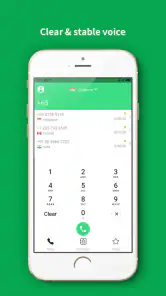

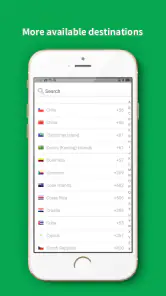
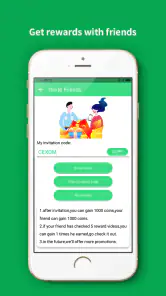
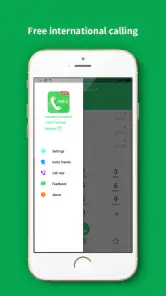
Analysis by Reviewed
Before choosing a Wi-Fi calling app, I’d think about what problem I actually need it to solve. If weak mobile reception is the issue, a calling app can be useful only when you have a working internet connection; it cannot create Wi-Fi where there is none. If I mainly want an everyday calling experience tied to my existing phone service, my carrier’s calling features or the phone’s built-in options may be simpler. For reaching people who already use an internet-calling service, that service may be more convenient. The right choice depends on whether a backup route for calls matters more than keeping everything in one familiar dialer.
Phone Call App & WiFi Call Any is aimed at that backup-use case. It is a free communication app from Clear Phone Call & Global WiFi Calling, with a 4.1 average from around 37,000 ratings and more than a million installs. It is rated for Everyone, and its current version is 1.5.4. Those details suggest an established option, but they do not tell me whether it will suit a particular person’s call habits; the practical test is whether the people I need to reach can be contacted in the way I expect.
When an extra calling route is useful
A realistic example is arriving at a hotel where the room has poor cellular reception but the Wi-Fi works. I could use the app to try making a call rather than walking outside to find a signal. It may also be useful at home if one corner of the house has weak reception, or while travelling when I have reliable Wi-Fi and want another way to stay in touch. I would still keep ordinary calling available for emergencies or moments when internet access is unreliable.
One practical tip is to test the app with a non-urgent call before depending on it during travel. Check that it opens properly, that the person you need can be reached, and that both sides can hear clearly from the place where you expect to use it. Wi-Fi quality can vary from room to room, so a call that works beside the router may not be as steady elsewhere. This simple test helps separate an app issue from a weak or congested connection.
What Makes It Tick?
Let’s dive into what makes Phone Call App & WiFi Call Any tick. The app allows you to make calls using Wi-Fi, bypassing the need for cellular reception. It’s like having a backup plan in your pocket for those times when network signals are playing hide and seek.
Setting it up is a breeze. Just install the app, sign in using your credentials, and you’re good to go. The interface is user-friendly, making it easy even for those who aren’t the most tech-savvy. It’s compatible with both Android and iOS, which means no one’s left out from the party.
Features Galore
The app comes packed with features that make communication seamless. You can sync your contacts, ensuring you don’t have to manually enter numbers. Plus, it supports both voice and video calls. So, whether you’re catching up with a friend or attending an important meeting, you’re covered.
You May Like

Clash of Clans Is Won Between the Battles

Android Auto Makes the Case for Quieter Car Software

MobiOffice: Transforming Mobile Productivity with Seamless Integration

EA SPORTS FC™ Mobile Soccer: Redefining Mobile Sports Gaming

How Microsoft OneDrive Became a Mobile Productivity Giant

How Google Translate Breaks Language Barriers Effortlessly
One cool feature I found was the ability to record calls. This comes in handy if you need to revisit a conversation or take notes later. Just remember to inform the other party before hitting that record button!
"The real game-changer is the quality of the calls over Wi-Fi. Crisp, clear, and without the dreaded echoes."
A less obvious trade-off with contact syncing is convenience versus clutter: I would review the contacts the app can access and keep the call list focused on people I might actually contact through it. For recorded conversations, I’d also consider where the recording is stored and whether everyone is comfortable with it before using that option. Rules about recording differ by place, so consent is a sensible habit even when a call is informal.
Choosing between calling options
Compared with a phone’s built-in calling tools, a separate app means one more place to set up and check. In return, it gives me a distinct internet-based route to try when cellular coverage is poor. Compared with messaging apps, the appeal is more direct voice calling rather than having a conversation depend on text first; messaging may still be the better choice when the other person is already active there or when a voice call is inconvenient.
I would skip this option if I need a guaranteed connection in places without Wi-Fi, or if I want every call and contact handled through one standard phone interface. It is also worth remembering that “free” describes the app’s price, not necessarily every possible use: in-app purchases range from $0.99 to $9.99 per item. I would check what an optional purchase covers before paying, and avoid assuming that Wi-Fi calling is automatically cost-free in every situation.
Making a call plan that works in real life
For me, the sensible way to use a second calling app is to decide in advance which calls belong there. I might reserve it for a family member who is hard to reach at home, or for a short check-in when travelling and connected to dependable Wi-Fi. Keeping that purpose narrow makes it easier to remember which app to open and reduces the chance of discovering a setup problem when a call is urgent.
There is a useful distinction between having internet access and having a good calling connection. A network can load a page yet still struggle with a live conversation if it is crowded, unstable, or weak where I am standing. Before an important call, I would move closer to the router, pause other bandwidth-heavy activity if possible, and make a brief test call. These are ordinary troubleshooting steps, but they matter more for a real-time call than for browsing.
I would also make sure the person I am calling knows which route I am using. If they expect a regular phone call, an internet-based call can be confusing if the caller identity or incoming-call screen looks unfamiliar. A quick message beforehand can prevent a missed connection, especially with relatives who do not often use calling apps. That small bit of coordination is part of the real cost of keeping a separate route available.
Who is likely to get the most from it?
This app makes the most sense for someone who has Wi-Fi in the places where cellular reception lets them down and who is comfortable keeping an extra communication app on their phone. It may suit a traveller who wants to test an internet route from a hotel or a person whose home has a stubborn dead spot but usable broadband. The key is having both a stable connection and a practical reason to call through the app.
It is less compelling for someone whose carrier service already works reliably everywhere they make calls. In that case, the extra setup and separate call history may add friction without solving a daily problem. I would also think twice if the people I call are unlikely to answer calls from an unfamiliar app or if my routine depends on a single, consistent dialer. A backup is valuable only when I remember to use it and the person on the other end can respond.
For older relatives or anyone who prefers a very simple phone routine, I would not install it and assume the job is done. I would set it up together, make a test call, and show them what to tap when the usual signal is poor. If explaining two calling routes creates more confusion than the weak reception causes, a carrier-supported option or a familiar messaging service may be the kinder choice.
Questions I would settle before relying on it
A common practical question is whether the app can reach the exact person I need. I would not infer that every number or every destination will work simply because the app offers internet calling. I would test the contacts that matter most, using a casual call first, and keep another way to reach them available. That is more useful than waiting until a time-sensitive conversation to learn whether the route suits both sides.
Another question is whether the app replaces my regular phone service. I would treat it as separate from the carrier’s normal calling unless I have deliberately confirmed how it fits into my own setup. It should not be my only plan for urgent calls, and I would keep the ordinary phone option ready for places where Wi-Fi drops or is unavailable. Thinking of it as a supplement prevents an unrealistic expectation of uninterrupted coverage.
People also want to know whether there are charges. The app itself is free, while optional in-app purchases are offered at different price points. Before selecting one, I would inspect the purchase details in the app and decide whether it addresses a need I actually have. I would not buy anything merely because I assume it is required for basic calling, nor assume that every call carries no possible cost beyond the app itself.
Finally, I would check call quality in the situations where I expect to use it, rather than judging it from one successful call. Try a quiet room and a typical spot with weaker Wi-Fi, then listen for delays, dropouts, or difficulty hearing. If the result is inconsistent, the connection may be the limiting factor, and switching apps may not solve it. A few realistic tests offer a clearer decision than relying on a general promise of good sound.
Why You Should Give It a Try
If you travel frequently or live in an area with spotty network coverage, this app is a game-changer. Imagine being able to make calls from anywhere with a Wi-Fi connection, even if you’re overseas. No more expensive roaming charges or searching for that elusive network signal.
And it’s not just about the convenience. The app also prioritizes privacy and security, ensuring your calls remain between you and the person you’re contacting. In today’s digital age, that’s an important assurance.
In conclusion, Phone Call App & WiFi Call Any is more than just an app; it’s a lifeline for those who rely heavily on staying connected. Whether you’re using it for business or pleasure, the app provides a reliable and efficient means of communication. So, why not give it a whirl and see how it transforms your calling experience?
My recommendation is to treat it as a useful second route, not a replacement for every way you communicate. If you already rely on internet calls and want another option to try in weak-signal spots, it may earn a place on your phone; if your priority is predictable service without Wi-Fi, stick with your usual carrier setup. That distinction is what makes the app worth considering without expecting it to solve every connectivity problem.
Make the switch gradually
I would add the app to my routine in stages rather than move all my calling habits over at once. First, I would install it and make a low-stakes call while connected to a familiar network. Next, I would try it in the place where poor cellular reception is actually a problem. Only after those checks would I count it as a dependable backup for that location. This approach keeps the learning curve small and makes it easier to notice whether the issue is the connection, the setup, or the person I am trying to reach.
There is also a small but important housekeeping task: decide how you will tell which calls came through the app and which were made through your usual phone service. If you are keeping track of a work conversation, a family check-in, or a call that needs a follow-up, knowing where to look later can save time. I would avoid splitting conversations across several apps without a reason; a simple personal rule, such as using this one only when the normal signal is poor, keeps the arrangement manageable.
For someone comparing it with a carrier’s Wi-Fi calling, the deciding question is not which label sounds more reassuring. It is whether the option already built into the phone works with their service and handles the places they care about. If it does, a separate app may not be worth the extra step. If the built-in route is unavailable or does not fit the person’s calling habits, this app offers another path to try. Neither approach can compensate for an unreliable internet connection, so the local network remains central either way.
Compared with internet messaging services, the app is most useful when the goal is to place a voice call rather than start a text exchange or persuade someone to install the same chat platform. But that advantage depends on the recipient being reachable through the app’s calling setup. When a contact already uses a familiar messenger every day, that established habit may win on convenience. I would choose the route the other person is most likely to answer, not the one with the broadest-sounding description.
The overall trade-off is straightforward: another route can help in a particular dead spot, but it also asks me to maintain another app, remember how it works, and test it before depending on it. With its free download, Everyone content rating, and a 4.1 average from around 37,000 ratings, it is easy to consider; the rating is a useful sign of broad interest, not a guarantee that every network and recipient will behave the same way. The best reason to keep it is a recurring situation that the usual phone setup does not handle well.
So I would recommend trying it if you can name a specific place or routine where Wi-Fi is available but ordinary reception is not. Make a test call there, confirm that the person you need can answer, and keep your standard calling option ready as a fallback. If those checks go well, it can be a practical extra tool. If they do not, or if you rarely encounter weak coverage, there is little reason to complicate a phone routine that already works.
Phone Call App & WiFi Call Any Frequently Asked Questions
Can I use Phone Call App & WiFi Call Any without WiFi?
The app is designed for internet-based calling, so WiFi is not the only possible connection: mobile data can also provide access to the internet it needs. If neither connection is available, the app cannot place an internet call. Keep in mind that using mobile data may count toward your carrier’s data allowance, so WiFi can be preferable when you want to manage data use.
Will the person I call need to install Phone Call App & WiFi Call Any too?
Whether the person you are calling needs the app depends on how the call is placed and the destination involved. The app is presented as a WiFi and internet calling option, but it does not mean every recipient automatically uses the same service. Before relying on it for an important call, check the available calling options in the app and make sure the person can be reached through one of them.
Can Phone Call App & WiFi Call Any replace my regular phone service?
It can offer an internet-based way to place calls, especially when WiFi or mobile data is available, but that is not necessarily a complete replacement for a regular phone service. Access to the internet is essential, and conventional cellular service may still be useful when you need connectivity outside WiFi coverage or have no mobile data. Consider your usual calling needs before relying on the app alone.
What internet connection do I need for calls in Phone Call App & WiFi Call Any?
The app’s calling depends on an internet connection through WiFi or mobile data. A stable connection matters because interruptions or weak connectivity can affect a conversation, even when the app itself is working normally. If you plan to use it while traveling or in an area with uneven coverage, try the connection you expect to rely on before depending on the app for an important call.
Does Phone Call App & WiFi Call Any support international calls?
The app is described as a global internet WiFi phone caller, and it can be used internationally when you have a stable internet connection. That may be useful when traveling and trying to avoid relying on roaming for internet-based calls. Actual calling options can depend on the destination and the choices available in the app, so check those details before making plans around a particular international call.
Pros
- High-quality voice calls over WiFi.
- No SIM card required for app functionality.
- Supports international calling for free.
- User-friendly interface with easy navigation.
- Minimal data consumption during calls.
Cons
- Limited to WiFi availability for calls.
- Occasional app crashes reported by users.
- In-app ads can be intrusive at times.
- Requires permissions to access contacts.
- Not available on all devices.

- Category
- Communication
- Version
- 1.5.4











