Peegle Live - Live Stream
- 174.00
- 2.4
- Installs
- 1.00M
- Price
- Free

Screenshots
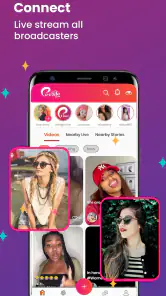


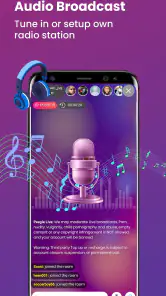



Analysis by Reviewed
Peegle Live is a social entertainment app from Peegle Live that puts live interaction at the center of the experience. I approached it as a place to watch people broadcast, join conversations, and decide whether the atmosphere of a particular room is worth staying for. It is free to install, aimed at mature users aged 17 and over, and sits in the social category rather than trying to be a private messaging tool or a polished video-production suite.
My first impression was that the app makes more sense when treated as a browsing habit than as a destination with one fixed purpose. You open it, look through available live content, enter a room that catches your attention, and then decide how actively you want to participate. That simple loop is also its main strength: there is little need to prepare anything before exploring. The weaker side is that the quality of the experience depends heavily on the room you choose and on how comfortable you are with an open-ended social environment.
How Peegle Live feels in everyday use
The baseline workflow is straightforward. I would open the app with a specific intention—finding something to watch for a few minutes, joining a conversation, or checking whether a familiar creator was active—rather than expecting a carefully organized entertainment catalog. That small change in mindset matters. Live platforms are rarely as predictable as on-demand video services, and Peegle Live is better when I accepted that discovery would be part of the experience.
A realistic use case is an evening when I have a short break but do not want to commit to a full episode or a long video. I can browse live rooms, enter one that seems relevant, listen for a while, and leave without having to finish anything. If the conversation feels repetitive or the room is not welcoming, moving on is usually more sensible than trying to force value from it. The app works best in these small windows of casual use.
For someone who enjoys direct social contact, live content can feel more immediate than recorded clips. The appeal is not necessarily production quality. It is the possibility of seeing a conversation develop in real time and deciding whether to participate. That makes the app more personal than a conventional short-video feed, but also less controlled. A live room can be engaging one moment and uninteresting the next.
I would not describe the experience as a replacement for every social platform. A messaging app is better when I need a private, focused exchange. A mainstream video platform is usually stronger when I want dependable search, polished recommendations, or content I can pause and return to later. Peegle Live occupies a narrower space: spontaneous social viewing with the chance to interact.
What I would do before settling into a room
My most useful habit was to spend a little time observing before becoming active. I would listen to the tone of a room, notice whether the host was responding to viewers, and decide whether the conversation matched what I wanted at that moment. This is more effective than entering every room with the expectation that it will immediately be entertaining.
More From Our News Desk

Clash of Clans Is Won Between the Battles

Android Auto Makes the Case for Quieter Car Software

MobiOffice: Transforming Mobile Productivity with Seamless Integration

EA SPORTS FC™ Mobile Soccer: Redefining Mobile Sports Gaming

How Microsoft OneDrive Became a Mobile Productivity Giant

How Google Translate Breaks Language Barriers Effortlessly
I also found it helpful to separate watching from participating. Some sessions are better as background entertainment, while others reward comments and direct involvement. Treating every room as a conversation can make the app feel demanding. Treating every room as passive video can make its social purpose seem limited. Choosing one mode at the start gives the session a clearer shape.
Another practical point is to protect personal boundaries. Because the app is built around social interaction and carries a mature age rating, I would avoid sharing personal contact details, location information, or anything I would not want repeated in a public conversation. That is not a criticism unique to this app; it is simply a sensible rule for live social spaces where exchanges can move quickly.
Settings and choices that deserve attention
Before using Peegle Live regularly, I would review the account and device settings that affect how often I am interrupted. Notifications can be useful if I genuinely want updates from people I follow or rooms I revisit, but too many alerts can turn a casual app into a constant distraction. My preference would be to keep only the notifications that support a clear reason for returning.
I would also pay attention to how the app behaves on my connection and device. Live video can consume attention and network capacity more quickly than text-based social apps, so I would avoid starting long sessions when I need reliable bandwidth for work, navigation, or a call. If the viewing experience becomes unstable, switching tasks or leaving the room is more practical than repeatedly refreshing.
Payments deserve deliberate handling. The app is free, but it includes in-app purchases ranging from $1.49 to $374.99 per item. That is a wide enough range to make accidental spending a real consideration, especially in a live environment where social pressure or excitement can influence decisions. I would set a personal limit before interacting with any paid elements and confirm what a purchase does before approving it.
The best setting is often a personal spending boundary, not a visual preference. Live apps can make small actions feel immediate, and a series of minor purchases can become difficult to track. I would treat every paid interaction as optional, never as a requirement for belonging in a room. If the social experience feels dependent on spending, that is a strong signal for me to step back.
The mature rating is another factor I would take seriously. It tells me that Peegle Live is not an app I would hand to a child or use casually on a shared family device without considering who might open it. The rating does not determine whether every room will suit every adult, but it does set a clear expectation that the social environment requires judgment.
Repeatable habits that make browsing faster
Experienced use is less about discovering a secret feature and more about reducing wasted time. I would build a small routine: open the app, scan the available live options, test one or two rooms briefly, and stay only when the host, topic, and pace fit my purpose. This avoids spending most of a short break scrolling without actually watching anything.
When I find a room that consistently suits me, I would use the app’s ordinary follow or return behavior where available rather than relying on memory. The benefit is not just convenience. A small group of familiar destinations makes the experience more predictable while still leaving room for discovery. I would keep that group selective, because following too many accounts can recreate the same clutter that made browsing slow in the first place.
A second useful pattern is to separate discovery sessions from social sessions. During discovery, I would sample rooms and leave quickly if they do not fit. During a social session, I would stay longer, participate, and accept that the value comes from interaction rather than constant novelty. Mixing these goals can make the app feel disappointing because a room that is excellent for conversation may not be exciting as a quick visual browse.
I would also avoid judging a room from its opening seconds alone when the conversation is clearly in progress. Live content has a different rhythm from edited media; a pause or slow start does not always mean the whole session lacks value. At the same time, patience should not become obligation. If the room remains unsuitable after a reasonable sample, leaving is the efficient choice.
For creators or regular hosts, the trade-off is sharper. The app can offer a direct way to meet viewers, but live interaction demands consistency and attention. I would prepare a simple topic or activity before starting, keep the conversation moving, and avoid assuming that viewers will stay without a reason. Since the platform is social entertainment rather than a full production workspace, I would use it for immediacy and contact, not for elaborate broadcast workflows.
Where it differs from familiar alternatives
Compared with a conventional social feed, Peegle Live feels less edited and less predictable. A feed is efficient when I want a rapid sequence of short posts selected by an algorithm. Here, the value comes from entering a live setting and seeing what develops. That can feel more human, but it also means I may spend more time searching for a room that fits my mood.
Compared with video-calling apps, the purpose is broader and more public. A call is usually arranged around people I already know, while a live social platform is built around discovering hosts and viewers beyond my immediate circle. I would choose Peegle Live for open-ended interaction, not for a private meeting or a structured appointment.
Compared with large, established live-streaming services, the main question is not whether Peegle Live has every creator or category I might want. I would choose it when its particular social atmosphere and available rooms are enough for me. If I need deep search, highly specialized communities, extensive playback tools, or a very mature creator ecosystem, another service may be a better fit.
That comparison also explains the app’s mixed reception. Peegle Live has an average rating of 2.4 from around 3.3 thousand ratings, with around 174 written reviews, while its install count has passed one million. Those figures suggest a meaningful audience but also a noticeable gap between people who find the experience useful and people who encounter friction. I would not treat popularity alone as proof of quality; I would use the app for a short trial and judge whether its rooms and interaction style suit me.
Limits that become clearer with regular use
The biggest limitation is variability. The app can provide an engaging room, but it cannot guarantee that every visit will be worthwhile. Live entertainment depends on who is active, how well a host manages the room, and whether the current audience matches my interests. Users who prefer predictable, edited content may find this uncertainty tiring.
There is also a social cost to participation. Joining a room can be easy, but meaningful interaction requires attention, patience, and a willingness to encounter personalities that do not suit me. I would not recommend the app to someone looking for a quiet, tightly controlled experience. It is also a poor choice for anyone who dislikes public interaction, spontaneous conversations, or the possibility of encountering mature material.
Spending is another boundary. The free entry point is useful for trying the platform, but the presence of purchases means I would not use it impulsively when bored or emotionally caught up in a room. The highest listed purchase level is $374.99 per item, so parental controls, device purchase authentication, and a clear personal budget are sensible safeguards. I would never assume that free installation means every meaningful interaction is free.
Performance and attention can become friction points as well. Live viewing asks for more continuous focus than scrolling through text, and long sessions can make the app feel repetitive if I am not actively interested in the room. My solution would be to use it in defined blocks and leave when the original reason for opening it has been satisfied.
Version 6.5 is the current version, and the app supports devices running Android 8.0 or later. For an Android user with an older phone or an earlier operating system, compatibility should be checked before planning to rely on it. On a supported device, I would still keep the app updated through the normal store process, particularly because live services depend on ongoing technical changes.
Who should try it, and who should skip it
I think Peegle Live is most suitable for adults who enjoy discovering live personalities, can tolerate uneven room quality, and want something more interactive than a standard video feed. It may also suit someone who has a few spare minutes and likes the possibility that a casual visit can turn into a conversation.
I would recommend caution for users who are highly sensitive to interruptions, spending prompts, or unfiltered social environments. If your main goal is private communication, choose a messaging or calling app. If you want polished entertainment with dependable pacing, an on-demand video service will probably be more satisfying. If you are under the mature age threshold, this is not the appropriate app to use.
For creators, I would consider it only if the appeal of direct live contact outweighs the work of maintaining an engaging presence. It is not enough to appear online; the room needs a reason for viewers to stay. For viewers, the opposite is true: there is no need to commit to every room. Selectivity is the skill that makes the platform more enjoyable.
My final assessment after using it as a routine social app
Peegle Live is most successful when I use it intentionally rather than endlessly. Its free access makes experimentation easy, its live format can create a stronger sense of presence than recorded posts, and its social focus gives it a clear identity. The developer, Peegle Live, has built an app for spontaneous interaction rather than a universal replacement for messaging, video libraries, or private calls.
My recommended workflow is simple: decide whether I want to watch or participate, scan rooms with patience but not obligation, keep notifications under control, and establish a firm purchase boundary before becoming invested in the social atmosphere. I would also treat the mature rating as a real part of the product, not as a minor label.
In the end, I would suggest trying it to adults who enjoy live discovery and do not need every session to be perfectly organized. I would skip it in favor of more focused alternatives when privacy, predictability, advanced playback, or strict spending control matters more than spontaneous interaction. Peegle Live can be enjoyable, but the best results come from using it as a deliberate short-form social habit, not as an always-on replacement for every other kind of entertainment.
Peegle Live - Live Stream Frequently Asked Questions
What age rating does Peegle Live have, and is it suitable for younger users?
Peegle Live is rated Mature 17+, so it is intended for adults rather than children. Live video and social interaction can expose users to unpredictable conversations and content, as well as contact from people they do not know. Parents and guardians should consider the rating before permitting access and use device-level parental controls where appropriate.
What should I consider before creating a profile or sharing personal information?
As with any social app, think carefully about the details you include in a profile or share in chats and broadcasts. Live content can make it easy to reveal identifying information unintentionally, such as your location or daily routine. Review privacy settings and available blocking or reporting options, and avoid sharing sensitive details with people you have only met through the app.
What is Peegle Live - Live Stream?
Peegle Live - Live Stream is a social live-streaming app designed for watching and hosting real-time broadcasts. Users can explore live video content, interact with streamers through chats and reactions, and potentially build their own audience by going live. The experience generally focuses on entertainment, social discovery, and direct communication rather than pre-recorded video browsing.
Is Peegle Live - Live Stream free to download and use?
The app is free to download, but some features may involve optional in-app purchases, virtual gifts, coins, subscriptions, or other paid items. In-app purchases range from $1.49 to $374.99 per item. Before spending money, review the pricing information shown inside the app and check whether purchases are processed through Google Play or the App Store. Availability of specific monetization features may differ by country, account, and platform.
Do I need an account to watch live streams on Peegle Live?
You may be able to browse or watch some live content without completing a full registration, although an account is usually required for interactive features. Signing in can allow you to follow creators, send messages, participate in chats, receive notifications, and possibly start your own broadcasts. Registration requirements may vary, so check the current login options presented when launching the app.
Pros
- Easy-to-use interface for browsing live streams and discovering new creators.
- Interactive live chats make it simple to engage with streamers and other viewers.
- Supports real-time broadcasting for sharing moments directly from a mobile device.
- Wide range of content categories helps users find streams matching their interests.
- Regular live activity provides fresh content instead of relying only on recorded videos.
Cons
- Stream quality can vary considerably depending on the broadcaster’s connection.
- Busy chats may become difficult to follow during popular live broadcasts.
- Some features or interactions may require in-app purchases or virtual gifts.
- The app may consume significant battery and mobile data during extended viewing.
- Content moderation may not be consistent across every live stream.

- Category
- Social
- Version
- 6.5