

Pedal Commander
- 248.00
- 3.5
- Installs
- 100.00K
- Price
- Free

Screenshots
Analysis by Reviewed
Pedal Commander is the kind of automotive app that makes an immediate impression because it connects your phone to a throttle response controller rather than trying to replace a traditional driving tool. I tested it with the mindset I would use for any vehicle accessory: enjoy the first few drives, then check whether it still earns attention once the novelty wears off. My overall reaction is positive but measured. The app can make everyday driving feel more responsive, yet its lasting value depends heavily on whether you actually want to adjust throttle behavior regularly.
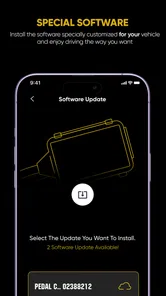
Listed in the Auto & Vehicles category, it is a free app from VITALEN AUTO PERFORMANCE INC. The application itself is aimed at users of the company’s Bluetooth-enabled controller, so it is important to understand the relationship between the phone software and the physical device. Installing the app alone does not turn a standard vehicle into a performance car. Its practical purpose is giving you a way to manage the controller’s settings from your phone.
What the first week feels like
I’d use this section to set expectations for the learning curve: the first week is less about finding a dramatic setting and more about noticing which pedal response stays comfortable across ordinary trips. I’d pay attention to the moments that tend to expose poor fit—parking, stop-and-go traffic, and smooth starts—before deciding whether the extra control belongs in my routine.
A quick change from ordinary pedal behavior
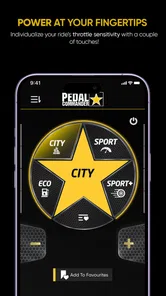
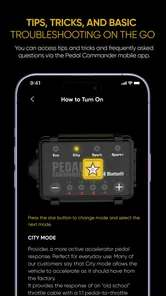
The strongest part of the first-week experience is the sense of control. Instead of accepting the vehicle’s original accelerator response as fixed, I could use the app as an adjustment point for how quickly the car reacts to pedal input. That difference is most noticeable when the factory response feels lazy in normal traffic or when I want a calmer feel during parking and low-speed maneuvering.
I would not describe the result as adding engine power. That distinction matters. A throttle response controller changes how the vehicle interprets pedal movement; it does not magically create extra horsepower. The car may feel more eager because the response arrives sooner, but the underlying engine, transmission, tires, and brakes remain the same. Anyone expecting a full performance upgrade will probably be disappointed.
The first few drives naturally encourage experimentation. I found myself switching between settings to compare how the vehicle reacted when pulling away from a stop, merging, or climbing a hill. That experimentation is useful, but it can also become the app’s first trap: a new control invites constant adjustment even when one comfortable setting would be enough.
Where the app is genuinely useful
A realistic everyday scenario is a commute that includes both crowded streets and an open road. In slow traffic, a less aggressive response can make small pedal movements easier to manage, especially when inching forward or parking. Once traffic clears, a sharper setting can make the accelerator feel less delayed. The benefit is not that the vehicle becomes fundamentally different; it is that the response can be matched more closely to the situation.
More From Our News Desk

 Gmail
GmailGmail in a Busy Inbox: Who Benefits Most?
From first account to crowded workday, Gmail earns its place through dependable search and flexible sorting—but its best fit depends on how much inbox maintenance you can tolerate.

 Prime Video
Switching to Prime Video: What Changes in Your Viewing Routine
Prime Video can make a compelling second home for streaming, but switching means learning a different catalog, rental layer, and route from browsing to playback.

 Universal TV Remote Control
Universal TV Remote Control Works Best as a Reliable Backup
A phone remote earns its place through quick setup and reliable habits. Here is how to get more from Universal TV Remote Control—and where its limits show.

 Weather - By Xiaomi
Weather by Xiaomi Review: Clear at a Glance, Less Clear Up Close
Xiaomi’s weather app makes everyday forecasts quick to scan, but its calm surface can leave useful details and recovery paths harder to find than they should be.

 X
XX Under Pressure: Can It Recover When Posting Goes Wrong?
A resilience-focused review of X, examining setup, mistaken posts, interruptions, weak connections, and the gaps that matter when recovery needs to be dependable.

 Clash of Clans
Clash of Clans Is Won Between the Battles
Its raids are quick; its community is a long-term project of coordination, teaching, rivalry, and shared responsibility—with all the friction that entails.
Latest News



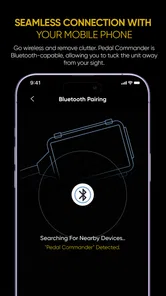
That flexibility is more useful than a single permanent “sport” setting. Many aftermarket controls are designed around one physical adjustment or a fixed driving character. The Bluetooth approach makes changes more convenient because I can make them from the phone instead of reaching for a separate control. Still, convenience only matters if the connection is dependable and if I am comfortable making adjustments before driving rather than while distracted on the road.
My practical advice is to begin with one moderate setting and use it for several trips. Do not judge the app after a single enthusiastic launch. A response that feels exciting in an empty stretch may become tiring in traffic, and a setting that feels dull at first may prove easier to live with during a long commute. The best early test is a mixture of parking, city driving, highway merging, and ordinary stop-and-go conditions.
Compatibility is the first question to settle
The app is not a universal vehicle tuning tool. It is intended to work with the company’s throttle response controller, so a reader should confirm that the physical controller is appropriate for their vehicle before building expectations around the software. This is also why the free download should not be confused with a complete free performance solution.
The application is rated for Everyone, which makes it broadly accessible from an age-rating perspective. That rating says little about driving judgment, however. Adjustments should be made while parked, and a new response should be tested carefully in a safe, familiar area. A sharper pedal reaction can make a vehicle feel less forgiving if the driver is heavy-footed or not yet accustomed to the change.
Does it earn a place after the novelty fades?
Here I’d weigh the app’s longer-term usefulness against the simple alternative of leaving the vehicle’s response alone. My test would be whether I still have a clear reason to change settings after the initial comparisons; if not, a settled choice can be a perfectly good outcome, and the app need not become another thing I check on every drive.
Month-to-month value depends on your driving habits
After the initial curiosity, I think the app settles into one of three roles. For some drivers, it becomes a useful seasonal or situational control. For others, it turns into a set-and-forget tool. A third group will stop opening it once the first-week comparison drives are over. The difference is not necessarily a flaw in the software; it reflects how much value a person gets from changing throttle behavior.
If your vehicle feels frustratingly slow to respond, the app can remain worthwhile because the adjustment addresses a complaint you notice every day. Drivers who alternate between relaxed commuting and more alert back-road driving may also appreciate having a choice rather than living with one factory calibration. In those cases, the app has recurring value because it solves a repeated problem.
On the other hand, if you already like your vehicle’s factory response, the application may not become part of your routine. There is no reason to open a control app simply because it exists. Once you have found a setting that feels natural, the phone may spend most of its time in your pocket. That is not a failure, but it does weaken the case for treating the app as an essential daily companion.
The public response suggests a mixed but meaningful level of interest. It has passed one hundred thousand installs, with an average rating of 3.5 from around seven hundred ratings and about two hundred forty-eight written reviews. I read that combination as a reason to keep expectations realistic: enough drivers find the concept useful to support a substantial audience, but the experience is not universally effortless or transformative.
What separates it from ordinary alternatives
The usual alternative is to leave the car’s factory throttle mapping alone. That option is free, predictable, and maintenance-free, but it offers no way to tailor the response when the original feel does not suit you. Another alternative is a vehicle drive mode, when the car includes one. Built-in modes can be more integrated, yet they may change several driving characteristics at once rather than focusing specifically on accelerator response.
A mechanical or fixed controller can also provide adjustment without relying on a phone. That may appeal to drivers who dislike opening an app, pairing a device, or keeping another control in their routine. Pedal Commander’s advantage is not that it eliminates every inconvenience; it is that Bluetooth access can make changes more flexible and easier to organize from a familiar screen.
The trade-off is important: the more adjustable the system becomes, the more discipline the driver needs. A fixed setting encourages consistency. A phone-controlled system encourages comparison and tinkering. I see that as the app’s most non-obvious long-term trade-off. The same flexibility that makes the first week interesting can create fatigue if you keep chasing a perfect response.
Three smart ways to use it without overthinking it
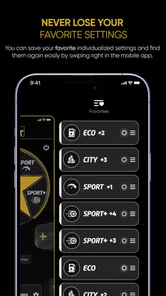
Use a two-setting routine rather than constant experimentation. Keep one comfortable response for traffic and one livelier choice for open-road driving, then stop changing things every few minutes. This reduces distraction and makes it easier to notice whether the difference is genuinely useful.
Evaluate smoothness, not just excitement. A setting that feels fast during a short test may make parking, wet-road starts, or passenger comfort worse. Judge it by how naturally you can control the car over a full week, not by the strongest first impression.
Recheck the setting after service or seasonal changes. If the vehicle receives maintenance, gains different tires, or your driving conditions change, the response that once felt ideal may no longer suit you. A brief parked review of your preferred setting is more sensible than assuming the old choice remains perfect.
These habits also answer a question many buyers have after installation: do you need to adjust the app every time you drive? In my view, no. The better workflow is to choose deliberately, drive consistently, and revisit the setting only when the vehicle or the situation gives you a reason. The app is most helpful as an occasional control panel, not as a dashboard game.
The maintenance burden is small, but not zero
Software maintenance is usually easier than maintaining a mechanical performance modification, but the app still adds another link to the driving setup. The current version is 3.3.25 and it supports devices running Android 7.0 or later. That makes it accessible to many older Android phones, though anyone using an aging handset should still consider whether the phone remains reliable enough for Bluetooth-based vehicle adjustments.
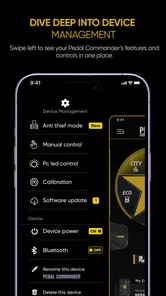
The real maintenance burden is behavioral. You need to keep the phone available when you want to change settings, remember to make adjustments while parked, and avoid treating the app as something to operate during an active drive. If Bluetooth connection behavior becomes inconsistent, the convenience advantage can quickly disappear. A physical control may be preferable for someone who wants fewer digital steps.
There is also a cost distinction worth understanding. The app is free to install, while in-app purchases range from $0.99 to $9.99 per item. That means the download price is not the whole ownership question. Before spending anything inside the application, I would first confirm what is required for the controller you own and whether the available controls solve a problem you actually experience. Paying for options you rarely use is the fastest way to turn a useful accessory into an expensive novelty.
I would also keep the vehicle’s original behavior in mind. If the car develops hesitation, jerking, warning lights, or inconsistent acceleration, the app should not be used to mask the issue. Throttle response adjustment is not a substitute for diagnosing an engine, transmission, sensor, or pedal problem. That is a practical boundary that protects both the vehicle and the driver’s expectations.
Where long-term fatigue comes from
The biggest source of fatigue is repetition. At first, every change feels informative. After several drives, the differences can become subtle, and opening the app may feel like work compared with simply driving. If your preferred setting rarely changes, the software’s active role becomes smaller than its initial presentation suggests.
Another source of fatigue is the mismatch between perceived sharpness and real usefulness. A faster-feeling pedal can be enjoyable, but it can also make smooth driving require more restraint. That matters when carrying passengers, approaching a tight parking space, or driving on a surface where traction is limited. The more aggressive the response, the less pedal travel may be needed for the same movement, so a setting that suits spirited solo driving may be poor for relaxed family use.
Some drivers may also tire of relying on a phone for a vehicle function. Even when the Bluetooth connection works as intended, pairing and navigation through settings add mental overhead. Someone who enjoys vehicle customization will likely see that as part of the fun. Someone who wants to start the car and leave the phone alone may prefer the factory setup or a simpler physical control.
The app’s rating of Everyone does not change that practical reality. It is approachable as software, but throttle response is still a driving matter. New drivers, nervous drivers, and anyone who tends to react abruptly should prioritize a predictable, gentle setup over the most dramatic response. The strongest setting is not automatically the best setting, and it is certainly not the best choice for every vehicle or driver.
Who should keep using it?
I think it is a good fit for an owner who already has the compatible controller, notices a real delay in the factory pedal response, and enjoys making small adjustments to the driving experience. It is also a reasonable choice for someone whose routine changes between congested urban streets and faster open roads. In those cases, the ability to adapt the response can remain useful beyond the first week.
It is less convincing for a driver seeking more engine output, faster lap times, or a complete performance transformation. The app cannot replace suspension, tires, braking improvements, or proper engine tuning. It is also not the best match for someone who dislikes Bluetooth accessories, rarely changes vehicle settings, or wants a completely invisible modification with no new routine.
Before installing it, I would ask myself a simple question: what recurring driving annoyance am I trying to solve? If the answer is vague curiosity, the first-week appeal may be enough, but long-term value is uncertain. If the answer is a specific complaint about sluggish pedal response, the app has a much stronger case because its purpose connects directly to an everyday need.
My long-term verdict
Pedal Commander earns lasting space when its adjustability becomes part of a sensible driving habit, not when it is treated as a permanent novelty. I like the idea of having more control over accelerator response, and the Bluetooth approach is more convenient than manually dealing with a separate adjustment in some situations. The app is especially appealing to drivers who understand that it changes response rather than creating power.
My reservation is that the value can shrink once the preferred setting is found. At that point, the software becomes an occasional tool, and the physical controller and connection experience matter as much as the app itself. The free installation is inviting, but the possible in-app purchases mean I would approach the setup carefully and spend only after confirming that the extra control is useful in my own vehicle.
VITALEN AUTO PERFORMANCE INC has built an app with a clear purpose rather than a collection of unrelated automotive features. That focus is a strength. It also means the audience is naturally limited to drivers who want throttle response control. For those drivers, the application can make a familiar car feel more adaptable from day to day. For everyone else, the factory response may be simpler, calmer, and easier to live with.
After the first-week excitement, I would keep it installed if I regularly switch between driving conditions and genuinely notice the difference. I would skip it if I was only hoping for extra horsepower or if I knew I would never adjust the setting after the initial test. In my experience, that is the fairest conclusion: useful and specific, but valuable because it solves a particular problem rather than because every driver needs another app in the car.
Pedal Commander Frequently Asked Questions
What information should I check before installing Pedal Commander?
Before setting up Pedal Commander, make sure you have the correct app and a compatible smartphone. It is an Auto & Vehicles app from VITALEN AUTO PERFORMANCE INC, and the app is rated for Everyone. Its purpose is to work with the Pedal Commander throttle-response controller, so the app is most useful to people who own or are considering that device.
Is the Pedal Commander app free, and are there any in-app purchases?
Pedal Commander is free to download, while in-app purchases are listed at prices ranging from $0.99 to $9.99 per item. That means the initial download does not cost anything, but some optional purchases may involve a charge. Check the purchase details shown in the app before confirming anything, especially if you share a device or payment method with someone else.
What is Pedal Commander, and how does it work?
Pedal Commander is a throttle response controller designed to change how quickly your vehicle reacts to accelerator-pedal input. It does not add engine horsepower or rewrite the engine computer’s performance settings. Instead, the device modifies the electronic signal between the accelerator pedal and the throttle system, allowing drivers to choose sharper, smoother, or less sensitive response characteristics through its controls or companion app.
Is Pedal Commander compatible with every car, truck, or SUV?
No. Compatibility depends on the vehicle’s make, model, year, engine configuration, and electronic throttle-pedal connector. Before purchasing or installing it, users should check the official compatibility list and select the exact vehicle application. A controller intended for one model may not fit another, even if both vehicles come from the same manufacturer, so confirming the part and connector is essential.
Does Pedal Commander increase horsepower or improve fuel economy?
Pedal Commander generally does not increase the engine’s actual horsepower, torque, or maximum speed. Its purpose is to alter throttle response, which can make a vehicle feel more immediate or easier to control. Fuel economy may improve or worsen depending on the selected mode and driving habits. Aggressive settings can encourage harder acceleration, while Eco-style settings may help some drivers use the accelerator more gently.
Pros
- Quick throttle-response adjustments without mechanical modifications.
- Multiple driving modes suit commuting
- towing
- and spirited driving.
- Compact plug-and-play design is easy to install and remove.
- Settings can be changed conveniently from the companion mobile app.
- May make sluggish electronic throttles feel more responsive.
Cons
- It does not increase engine horsepower or improve the vehicle’s top speed.
- Compatibility depends on the exact vehicle model and throttle system.
- Aggressive settings can make acceleration feel abrupt or less smooth.
- The device and optional accessories can be expensive for a throttle tuner.
- Incorrect installation or removal may cause warning lights or connection issues.











