

Paid Apps Sales Pro
- 79.00
- 4.3
- Installs
- 10.00K
- Price
- $0.99

Screenshots
Analysis by Reviewed
I tend to browse for apps with a particular need in mind, so the appeal of Paid Apps Sales Pro is its focus on spotting price changes in paid apps. Instead of relying only on whatever a store happens to recommend, I can use a dedicated place to notice offers and decide whether anything is worth a closer look. The app is a shopping tool from Power Mind Apps, and its central idea is simple: make it easier to discover paid apps when their prices change.
A deal alert is a prompt, not a purchase plan
That distinction matters in practice. An alert can tell me to investigate an app, but it cannot tell me whether I need it, whether it suits my device, or whether its current offer is genuinely useful to me. I treat notifications as a shortlist to review rather than a reason to install immediately. That small habit helps avoid filling a phone with apps that seemed attractive only because they were on sale.
The app costs $0.99, so I’d weigh that one-time decision against how often I actually look for paid-app offers. It has a 4.3 average from around 1,200 ratings, and more than 10,000 installs. Those figures suggest it has found an audience, but they don’t guarantee that every alert will match my interests. I’d view it as a specialist shopping companion, not a replacement for checking an app’s details in the store before downloading.
Discovering Hidden Gems
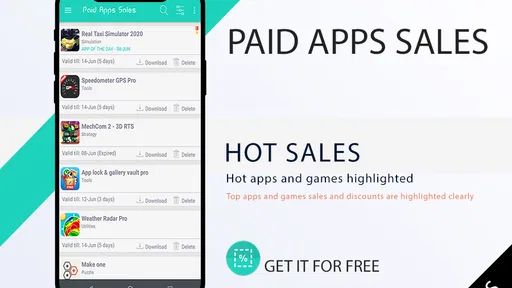
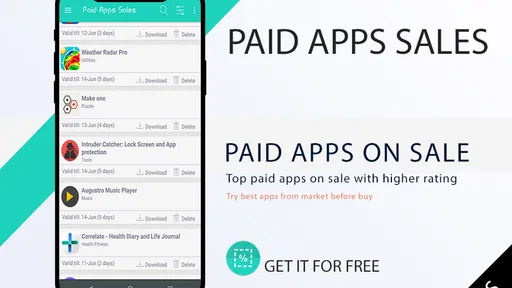
Paid Apps Sales Pro is like having your own personal shopper for apps. It scours the app stores, hunting down the best deals on paid apps that have temporarily dropped to free or are heavily discounted. I was amazed at how many quality apps I discovered that I might have never come across otherwise. Whether it’s productivity tools, educational content, or just some fun games to pass the time, this app has got you covered.
User-Friendly Interface
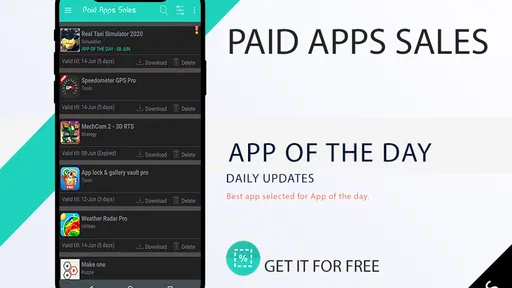
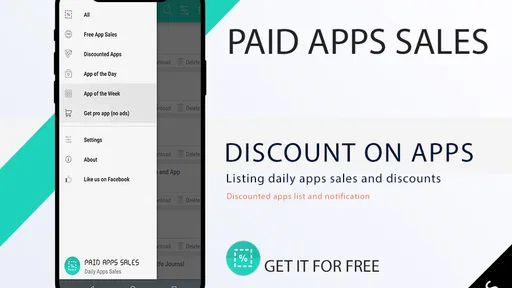
One of the first things that struck me about this app was its clean and intuitive interface. As soon as I opened it, I was greeted with a list of current deals, sorted by genre and availability. No complicated menus or confusing buttons – just straightforward and easy to navigate. It made finding deals a breeze, which I greatly appreciated.
For a practical routine, I’d check the deal list when I have a few minutes rather than browse whenever a notification arrives. If I’m looking for a note-taking tool, for example, I can scan with that need in mind and compare any tempting option with the apps I already use. A discounted alternative only helps if it fits the way I work; otherwise, the apparent saving can turn into clutter. This is also a sensible way to avoid buying an app simply because its price looks unusually low.
Customizable Notifications
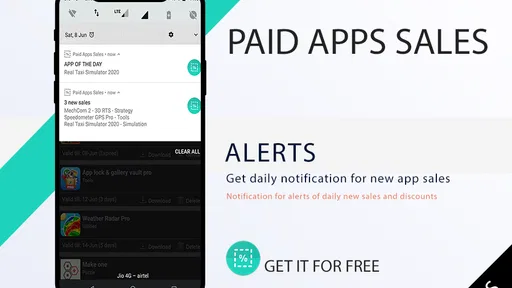
Let’s be honest, nobody likes to be bombarded with notifications. Fortunately, Paid Apps Sales Pro offers customizable notification settings that allow you to tailor alerts to your preferences. Want to be notified only when there’s a sale on productivity apps? You got it. Prefer to keep an eye on games? No problem. This feature ensures you only get the notifications that matter to you.
More From Our News Desk

 Gmail
GmailGmail in a Busy Inbox: Who Benefits Most?
From first account to crowded workday, Gmail earns its place through dependable search and flexible sorting—but its best fit depends on how much inbox maintenance you can tolerate.

 Prime Video
Switching to Prime Video: What Changes in Your Viewing Routine
Prime Video can make a compelling second home for streaming, but switching means learning a different catalog, rental layer, and route from browsing to playback.

 Universal TV Remote Control
Universal TV Remote Control Works Best as a Reliable Backup
A phone remote earns its place through quick setup and reliable habits. Here is how to get more from Universal TV Remote Control—and where its limits show.

 Weather - By Xiaomi
Weather by Xiaomi Review: Clear at a Glance, Less Clear Up Close
Xiaomi’s weather app makes everyday forecasts quick to scan, but its calm surface can leave useful details and recovery paths harder to find than they should be.

 X
XX Under Pressure: Can It Recover When Posting Goes Wrong?
A resilience-focused review of X, examining setup, mistaken posts, interruptions, weak connections, and the gaps that matter when recovery needs to be dependable.

 Clash of Clans
Clash of Clans Is Won Between the Battles
Its raids are quick; its community is a long-term project of coordination, teaching, rivalry, and shared responsibility—with all the friction that entails.
Latest News



The useful trade-off is between catching a short-lived deal and keeping your phone quiet. I’d start with the subjects I genuinely shop for, then broaden the alerts only if I find the stream too narrow. If you are casually curious about sales but rarely act on them, opening the app occasionally may be more comfortable than receiving regular prompts. If you routinely search for paid tools, alerts can instead save you from having to remember to check every day.
Efficient Search and Filter Options
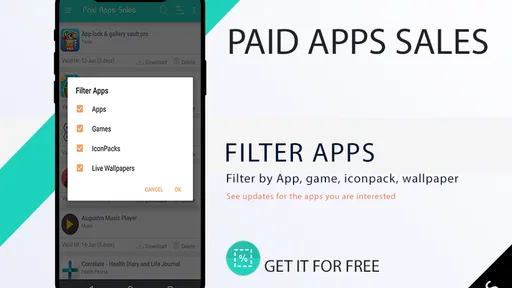
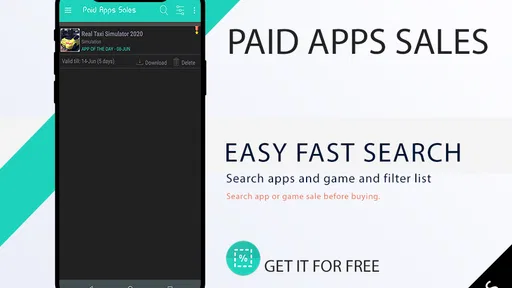
Searching for specific apps is a cinch with the app’s efficient search and filter options. You can filter apps by price, genre, or even by the level of discount. This functionality saves time and helps you pinpoint exactly what you’re looking for without endless scrolling.
Compared with browsing a general app-store front page, a sales-focused app puts the price opportunity first, which is useful when I’m open to discovering something outside my usual searches. The reverse is true when I already know exactly which app I need: going straight to the store is more direct, and I can check the app’s full details there before making a decision. I would use the filters to narrow a browsing session, not assume that a discount alone makes an app the best choice.
Before installing anything I find, I’d check its compatibility, description, and recent user feedback in the relevant store. That extra step is especially worthwhile for paid software, where a low price does not remove the risk of choosing an app that lacks a feature I rely on. The app is rated for Everyone, runs on Android 6.0 or later, and is currently at version 1.26. It was released on July 4, 2019, and those details make it easier to judge whether it fits an older Android device as well as a newer one.
There is also a platform distinction worth keeping in mind. The details here describe the Android release, so I would not assume the same version or compatibility applies to an iPhone. If you switch between Android and iOS, check the appropriate store and device before building a routine around alerts. That matters more than it might for a casual browser, because the deal itself is only useful if you can actually install the app on the device you plan to use.
When a deal fits an ordinary day
Imagine that I’m waiting for a train and have a few minutes to browse. I’m not trying to solve an urgent problem; I’m curious whether there is a useful paid app in a category I already care about. A quick scan can surface a candidate I would not have searched for by name. I save the decision for later, look at the app’s store page when I have time, and compare its purpose with what is already on my phone. That makes the discovery feel intentional rather than like an impulse purchase squeezed into a commute.
The same approach works for a family tablet or a device used for a hobby, but I would first think about who will use the app and how often. A discounted learning tool or game is not automatically a good fit just because it is affordable. Check that it suits the intended user, then consider whether the device has room for another installation and whether the app’s description matches the need. The Everyone age rating is a useful broad indicator, but I would still review the individual app’s information before installing it for someone else.
What the bargain-hunting workflow can and cannot do
The main practical benefit is reducing the effort of remembering to look for price changes. Instead of repeatedly searching the store without a clear target, I can let a focused discovery tool bring possible offers into view and then decide which deserve a proper check. That is most helpful when I’m open to alternatives. It is less helpful when I need a particular app today, because a deal alert is not a substitute for searching for that exact product or confirming that it meets a specific requirement.
I also would not treat a displayed discount as proof of long-term value. A lower price changes the cost of trying an app, not whether it is reliable, well suited to my routine, or better than an option I already own. My rule is to name the problem first—organizing receipts, learning a skill, or finding a game for a particular moment—and then see whether a deal actually answers it. If I cannot explain why I would use the app next week, I leave it alone.
There is a small but important choice between browsing broadly and keeping the process focused. Broad exploration can uncover unexpected categories, but it also increases the number of offers that need evaluation. Narrowing attention to a few interests makes alerts more useful and decisions faster, though it may mean missing an appealing app outside those subjects. I’d begin with a short list of real interests and only expand it after noticing that I’m consistently looking beyond them.
How it compares with ordinary store browsing
A standard app-store search is still my better option when I know exactly what I want, need to compare detailed descriptions, or want to inspect the app’s current information before installing. The store is where I would make the final decision. This app’s different role is discovery: it draws attention to paid apps whose pricing makes them worth checking, rather than making me start from a blank search box or depend entirely on the store’s usual recommendations.
That difference also explains why it is not automatically useful to every shopper. People who install only free apps may rarely benefit from a tool centered on paid-app offers. Someone who buys apps only when a specific need arises may find a direct search faster. But if I enjoy trying paid tools and games, and I am happy to examine each candidate before acting, the dedicated feed gives me a reason to browse that a general storefront may not provide as conveniently.
Small checks that make alerts more worthwhile
When an alert catches my attention, I would check the title and purpose first, then open the relevant store page to confirm that the offer still makes sense and that the app supports my device. After that, I would read the description for the exact feature I want rather than relying on a category label. This simple sequence prevents two common mistakes: chasing a price without a use case, and assuming that an app’s broad topic tells me everything about what it can do.
I’d also keep a mental distinction between “interesting” and “needed.” A discovery app is doing its job if it introduces something worth investigating; it does not need to turn every alert into a download. If an offer is not right for me today, I can move on without feeling that I have lost money. That mindset is particularly useful when several tempting listings appear close together, since it keeps the decision anchored to usefulness instead of urgency.
In conclusion, Paid Apps Sales Pro is a fantastic tool for anyone looking to expand their app library without breaking the bank. It’s not just an app for deal hunters; it’s for anyone who appreciates quality apps and loves the thrill of finding a bargain. So, if you’re ready to discover some hidden gems and make the most out of your smartphone, give this app a try. Trust me, your wallet will thank you!
Who will get the most from it?
I’d recommend it most to people who enjoy trying paid apps, have a few categories they regularly shop in, and are willing to check an offer before acting on it. Its value is less obvious for someone who downloads very few apps, sticks entirely to free options, or wants a specific purchase immediately. In those cases, a direct store search is simpler, and paying for a deal-finding tool may not fit the way you shop.
For me, the best use is as a light discovery habit: set alerts around genuine interests, scan when convenient, and treat each result as a lead rather than an endorsement. That approach makes the app’s focused role clearer and helps keep bargain hunting practical. If that sounds like how you already browse, it can be a handy addition; if not, the ordinary app-store search may be all you need.
Paid Apps Sales Pro Frequently Asked Questions
What does Paid Apps Sales Pro cost to download?
Paid Apps Sales Pro is a paid shopping app, priced at $0.99. That is the cost to get the app, separate from any price charged for apps or games you choose to download through its deal listings. Before installing, check the purchase details shown for your device in its app store so you know the charge that will apply.
What devices and age group is Paid Apps Sales Pro intended for?
Paid Apps Sales Pro is rated Everyone, so its content rating is suitable for a general audience. The Android version requires Android 6.0 or later. Check that your device meets this requirement before downloading; the app is listed for Android, and you can use the compatibility details displayed by your app store to confirm it works with your particular device.
What is Paid Apps Sales Pro and how does it work?
Paid Apps Sales Pro is an app designed to help users discover and purchase paid apps that are currently on sale or being offered for free. By aggregating deals from various app stores, it provides a centralized platform to browse and track discounts on premium apps. Users can customize notifications to receive alerts about specific app categories or individual apps they are interested in. The app ensures that users never miss out on a deal, saving them money while exploring new and exciting apps.
Is Paid Apps Sales Pro available for both Android and iOS devices?
Yes, Paid Apps Sales Pro is available for both Android and iOS platforms. It ensures that users from both ecosystems can benefit from the app's features, such as deal tracking and notifications. The application is optimized for both platforms, offering a seamless user experience regardless of the device. Users can download it from the Google Play Store or the Apple App Store, depending on their device's operating system.
How does Paid Apps Sales Pro notify users about app sales?
Paid Apps Sales Pro provides users with multiple notification options to ensure they stay updated on the latest app sales. Users can opt to receive push notifications directly to their device, keeping them informed in real-time whenever a favorite app goes on sale. Additionally, they can customize daily or weekly email alerts that summarize current deals. This flexibility allows users to choose the notification method that best suits their preferences and lifestyle.
Pros
- Track app discounts easily.
- User-friendly interface.
- Notifications for price drops.
- Comprehensive app database.
- Customizable watchlist.
Cons
- Limited to paid apps only.
- Ads in free version.
- Occasional app crashes.
- No trial version available.
- Requires internet connection.











