

OBD2 Scanner: Code Fix Guide
- 12.00
- 3.1
- Installs
- 10.00K
- Price
- Free
Screenshots
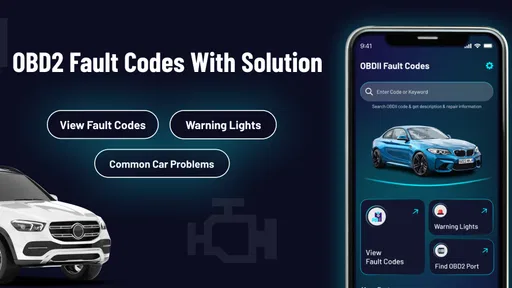
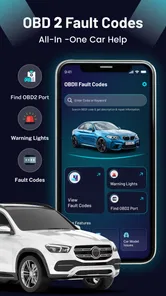
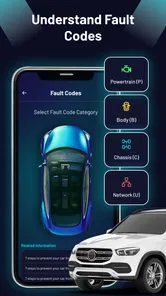
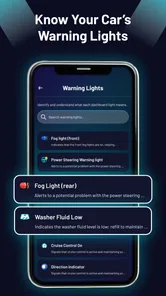
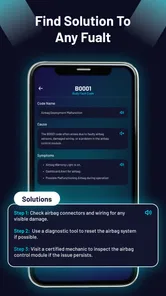
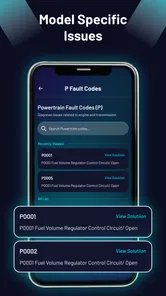
Analysis by Reviewed
I used OBD2 Scanner: Code Fix Guide as a quick reference when I wanted to understand a dashboard warning without immediately reaching for a workshop appointment. It is a free Auto & Vehicles app from AMA Technology, aimed at explaining OBD2 fault-code meanings, possible fixes, and warning-light situations. The important distinction is that it works as a guide rather than as a replacement for a physical diagnostic reader. That makes it useful in the first few minutes after a warning appears, but it also sets a clear limit on what it can actually tell you.
The app has a straightforward appeal: if your car has shown a check-engine light and you do not know whether the issue is urgent, a plain-language reference can be reassuring. I found the concept more useful for orientation than for final diagnosis. It can help me form sensible questions before speaking to a mechanic, avoid guessing at unfamiliar code names, and decide whether I should stop driving. It cannot, by itself, prove which component has failed or confirm that a repair has solved the underlying problem.
How the guide fits into real car troubleshooting
The short store description calls it an OBD2 Scanner, but the longer summary makes its role clearer: it provides fault-code meanings, repair guidance, and warning-light help without requiring a scanner. In everyday terms, I would treat it as a digital handbook for the information stage of troubleshooting. It is not the same thing as plugging a Bluetooth reader into the vehicle and retrieving a live code from the car.
That difference matters because many drivers use “scanner” to mean a device that communicates with the vehicle. This app does not remove the need for that device when no code is already available. If a warning light appears and I have no code, I still need a compatible reader, a repair shop, or another diagnostic method to identify the actual fault. The app becomes more valuable once I have a code to interpret or need help understanding the general significance of a warning.
I like this approach for a first pass because automotive codes can look intimidating. A short combination of letters and numbers does not tell most people whether they are looking at an emissions issue, a sensor problem, an ignition concern, or something that needs immediate attention. A guide can turn that first moment of confusion into a more organized conversation with a technician.
It is also useful for people who buy used cars or maintain more than one vehicle. A code reference can help compare what a seller says with what the dashboard is showing, or help me record the wording of a problem before clearing anything. That last point is important: clearing a warning without understanding why it appeared can make later diagnosis harder. I would use the app to document and interpret the situation, not to hide it.
What I would do when a warning appears
My practical workflow would begin with safety rather than the app. If the vehicle is losing power, overheating, smoking, making severe mechanical noise, or showing a red warning symbol, I would stop in a safe place and seek professional help. A code guide is not a substitute for those basic decisions. For a steady check-engine light with normal driving behavior, I would note when it appeared, how the car felt, and any recent maintenance before consulting the guide.
More From Our News Desk

 Gmail
GmailGmail in a Busy Inbox: Who Benefits Most?
From first account to crowded workday, Gmail earns its place through dependable search and flexible sorting—but its best fit depends on how much inbox maintenance you can tolerate.

 Prime Video
Switching to Prime Video: What Changes in Your Viewing Routine
Prime Video can make a compelling second home for streaming, but switching means learning a different catalog, rental layer, and route from browsing to playback.

 Universal TV Remote Control
Universal TV Remote Control Works Best as a Reliable Backup
A phone remote earns its place through quick setup and reliable habits. Here is how to get more from Universal TV Remote Control—and where its limits show.

 Weather - By Xiaomi
Weather by Xiaomi Review: Clear at a Glance, Less Clear Up Close
Xiaomi’s weather app makes everyday forecasts quick to scan, but its calm surface can leave useful details and recovery paths harder to find than they should be.

 X
XX Under Pressure: Can It Recover When Posting Goes Wrong?
A resilience-focused review of X, examining setup, mistaken posts, interruptions, weak connections, and the gaps that matter when recovery needs to be dependable.

 Clash of Clans
Clash of Clans Is Won Between the Battles
Its raids are quick; its community is a long-term project of coordination, teaching, rivalry, and shared responsibility—with all the friction that entails.
Latest News



Next, I would obtain the exact code if possible. Guessing from a vague description such as “the engine light came on” is much less useful than working from the actual code. Once I had it, I would use the app to understand the terminology and likely systems involved. I would then check simple context: whether the fuel cap is secure, whether the issue began after a repair, and whether symptoms match the explanation. Those checks do not prove a repair, but they prevent a code lookup from becoming a random parts-shopping exercise.
A more advanced habit is to keep the code, symptoms, and date together in a note rather than relying on memory. If the warning returns, that history can help show whether the issue is intermittent or connected to recent work. The app is particularly helpful in that workflow because its value is not limited to the moment of the first warning. It can serve as a reference while I prepare better information for a mechanic.
What the free access really means
The app is free to install, which makes it easy to try before spending money on a dedicated scanner or paid repair information service. That free entry is the strongest part of its value proposition for a casual driver. I can use it as an initial reference without committing to a hardware purchase, and that is reasonable for someone who only sees a warning light occasionally.
There are in-app purchases ranging from $0.99 to $35.99 per item. I would therefore separate the free starting point from the paid value. The existence of optional purchases does not automatically make the app poor value, but I would not assume that every useful explanation or advanced resource is included at no cost. Before paying, I would look carefully at what a particular purchase unlocks and ask whether it solves my actual problem rather than simply adding more reference material.
For a driver who needs one quick explanation, free access may be enough. For someone expecting a complete workshop-grade diagnostic system, even the highest listed purchase would not change the central limitation: a guide cannot read vehicle data unless it is connected to suitable hardware or given information from another source. Paying for more content may improve reference value, but it does not turn the phone into a universal physical scanner.
That is why I see the cost question as practical rather than emotional. The app is worth trying because the initial barrier is low. Paid content could make sense for a person who regularly works on vehicles or wants a broader reference, but I would only consider it after confirming that the specific material is relevant to my vehicles and level of knowledge. A free app is not automatically a bargain if it encourages unnecessary repairs; a paid guide is not automatically useful if the car still needs proper testing.
Where it saves time and where it cannot
The app’s best contribution is translation. It can help turn an unfamiliar fault-code label into a starting point for research and discussion. That saves time compared with searching random forum posts, where advice may be based on a different engine, a different model year, or a completely different symptom. A focused guide is easier to use when I need a quick explanation before deciding what to do next.
It can also reduce a common mistake: treating a code as the name of a part that must be replaced. In real troubleshooting, a code often points toward a system or condition rather than proving that one component has failed. A sensor code, for example, may be connected to wiring, a connector, air leaks, power supply, or another underlying issue. I would use the app to identify the area of concern, then test the possibilities instead of ordering the first part mentioned.
That is one of the most important trade-offs. A guide can make me better informed, but it can also create false confidence if I read a possible fix as a guaranteed diagnosis. The useful question is not “Which part do I buy?” but “What should be checked next, and what evidence would confirm the fault?” Readers who approach the app with that mindset will get more value from it.
The app is less suitable when I need live sensor readings, freeze-frame information, readiness monitors, bidirectional controls, or a way to erase codes. Those tasks belong to diagnostic hardware and software designed to communicate with the vehicle. If I am diagnosing a recurring fault, preparing for an emissions inspection, or working on a complicated electrical issue, a proper scanner and service information will usually be the better choice.
Everyday scenarios where it makes sense
Imagine I am driving home and the check-engine light comes on steadily. The car feels normal, so I park safely and record the circumstances. I borrow or use a compatible reader, retrieve the code, and consult the app to understand its general meaning. I can then decide whether to arrange a prompt inspection, check an obvious maintenance item, or avoid a long trip until I know more. The app does not make the decision for me, but it gives me a clearer vocabulary and reduces the panic of an unexplained symbol.
A second scenario involves buying a used vehicle. If the seller mentions a previous warning or says a light was recently cleared, I would not treat the guide as proof of the car’s condition. I would use it to understand any codes found during an independent inspection and to ask more precise questions. I would also want a technician to examine the vehicle because a clean dashboard does not guarantee that an intermittent problem has disappeared.
For a home mechanic, the guide can be a convenient first reference beside a toolbox. The key is to pair it with a disciplined process: verify the code, inspect the related wiring and connectors, check for matching symptoms, and test before replacing parts. That workflow is more valuable than simply memorizing code definitions. The app can support the reasoning process, but it does not perform the measurements.
For a new driver, the app may be most useful as a confidence aid. Automotive terminology can feel inaccessible, especially when a warning appears late at night or far from home. A readable explanation can help someone communicate with roadside assistance or a repair shop. Still, I would not encourage a beginner to perform repairs based only on a short explanation. Understanding the issue and safely fixing it are separate steps.
Comparing it with the usual alternatives
The most obvious alternative is a dedicated OBD2 reader. Hardware wins when I need the actual code, live information, or confirmation that a fault has returned. It costs more than simply installing a free guide, and compatibility and app support can vary, but it provides a direct connection to the vehicle. For repeated troubleshooting, that direct access is more important than having a larger collection of explanations.
Another alternative is a repair shop or mobile mechanic. Professional diagnosis is the better route when the vehicle has serious symptoms, multiple warning lights, or a problem that affects braking, steering, engine temperature, or drivability. The app can help me understand the conversation and avoid feeling lost, but it cannot replace professional inspection. In that sense, it works best alongside a mechanic rather than against one.
General web searches and owner forums can offer more vehicle-specific detail, especially for known model problems. Their weakness is uneven quality. I may find a useful experience from another owner, but I may also find advice that skips testing or applies only to one engine variant. The app’s advantage is speed and focus; the web’s advantage is breadth. I would use the app to establish the basic meaning, then consult reliable vehicle-specific material when the repair decision becomes expensive or technically complex.
Manufacturer service information is stronger for exact procedures, wiring diagrams, specifications, and model-specific testing. It is also more demanding to interpret and may not be convenient for a casual driver. The guide occupies a simpler middle ground: more organized than random searching, but far less authoritative than complete service documentation. That position is useful as long as I remember what kind of tool I am holding.
Usability, trust, and the current release
AMA Technology presents the app as a focused automotive reference rather than a broad driving companion. Its current version is 1.1.9, and the app supports devices running Android 5.1 or later. That makes it accessible to people using older Android hardware, which is practical for a tool that may spend most of its time installed but unused until a warning appears.
The app is rated for Everyone, so its subject matter is presented for a general audience rather than a restricted age group. I would still treat automotive advice as something that requires adult judgment, especially when it involves lifting a vehicle, working near moving parts, or deciding whether it is safe to continue driving. A friendly interface can make information easier to approach, but it does not remove physical risk.
The app has an average rating of 3.1 from around 210 ratings, with 12 written reviews. I read that as a reason to keep expectations measured. It has enough public use to show that the concept is reaching drivers, but the rating does not support treating it as a universally trusted diagnostic authority. My own standard would be simple: use the explanations as guidance, verify important details with the vehicle manual or a qualified technician, and avoid paying for content until I understand its practical benefit.
Its install base is over 10 thousand, which suggests that it is not an entirely unknown experiment. Still, popularity is not the same as diagnostic accuracy. For this kind of app, the quality of the explanations and the fit with my particular vehicle matter more than the number of installations. I would judge it by whether it helps me ask better questions and take safer next steps.
Who will get the most value
I think the app is a good fit for occasional drivers who want a plain starting point when a dashboard warning appears. It is also sensible for people who already have access to an OBD2 reader but want help interpreting the result. In that combination, the hardware retrieves the information and the guide helps make it understandable.
It can be useful for a used-car shopper, a beginner learning basic vehicle terminology, or a home mechanic who wants a quick reference before opening more detailed service documentation. The low entry cost makes it easy to keep available for those moments when a warning appears at an inconvenient time.
I would be more cautious recommending it to a professional technician or an experienced diagnostic specialist. Those users usually need manufacturer-specific procedures, test values, wiring details, and live data rather than general explanations. They may still find a quick reference convenient, but it should not be their primary technical resource.
I would also skip relying on it if my main goal is to control vehicle modules, monitor sensors in real time, pass an inspection, or diagnose a fault that affects safety. A physical scanner, professional software, or a qualified workshop is better suited to those needs. The app is not the right purchase simply because the store name includes “Scanner.” Its real strength is interpretation and orientation.
My buy-or-skip verdict
I would try OBD2 Scanner: Code Fix Guide if I wanted a free first step for understanding fault codes and warning lights. The free access gives it a sensible place in a driver’s toolkit, especially when paired with a borrowed or separately purchased reader. I like it most as a calm reference that helps me move from “What does this mean?” to “What should I verify next?”
I would not buy optional content automatically. The available in-app purchase range, from $0.99 to $35.99 per item, makes it important to judge each purchase against a specific need. If I only face an occasional warning, the free experience may be enough. If I maintain vehicles regularly, paid material might be worthwhile, but only after checking that it adds practical depth rather than repeating basic definitions.
My final view is favorable but deliberately limited: this is a useful guide, not a complete diagnostic system. It can save time, improve communication with a mechanic, and prevent some uninformed guesses. It cannot read a car on its own, confirm a failed part, or make a risky vehicle safe to drive. The best value comes from using it as the interpretation layer in a careful troubleshooting workflow.
So I would recommend it to curious drivers, beginners, and anyone who wants a low-cost way to understand an OBD2 code before taking the next step. I would skip it as a primary tool if I need live diagnostics or professional repair data. Used within its proper boundaries, it is a practical companion; used as a promise of instant diagnosis, it will disappoint.
OBD2 Scanner: Code Fix Guide Frequently Asked Questions
What devices and operating systems can run OBD2 Scanner: Code Fix Guide?
OBD2 Scanner: Code Fix Guide is an Auto & Vehicles app for Android, with a minimum operating-system requirement of Android 5.1. Before downloading, check that your device meets this requirement and has enough available storage. The app is rated for Everyone, but device compatibility can still depend on your operating-system version and the app store available on your device.
Who develops OBD2 Scanner: Code Fix Guide, and what do users think of it?
The app is developed by AMA Technology and focuses on helping drivers look up OBD2 fault-code meanings, possible fixes, and warning-light information. It has a 3.1 average from about 210 ratings, with around 12 written reviews, so user experiences may vary. These figures can provide a general sense of reception, but they do not guarantee that the app will suit every vehicle or troubleshooting need.
What is OBD2 Scanner: Code Fix Guide used for?
OBD2 Scanner: Code Fix Guide is designed to help vehicle owners understand diagnostic trouble codes reported by an OBD2 scanner. It provides explanations of common engine and system faults, possible causes, and general repair guidance. The app is best viewed as an educational reference for troubleshooting rather than a replacement for professional diagnostic equipment or a qualified mechanic.
Can OBD2 Scanner: Code Fix Guide scan my car directly?
The app itself should not be assumed to communicate directly with your vehicle unless it specifically supports a compatible OBD2 adapter and lists connection instructions. In most cases, users enter or look up a code obtained from a separate scanner. Before downloading, check the app’s current feature description, supported adapters, and connection requirements, because compatibility can vary between Android and iOS devices and between different vehicle models.
Does the app provide exact repair instructions for every diagnostic code?
The guide can help explain what a code generally means and suggest common areas to inspect, but a code does not always identify one failed component with certainty. Several problems, such as wiring damage, vacuum leaks, sensor faults, or low battery voltage, can trigger similar codes. Use the information as a starting point, confirm the diagnosis with proper testing, and seek professional assistance for complex or safety-related repairs.
Pros
- Works with many standard OBD2-compatible vehicles.
- Provides clear explanations for common diagnostic trouble codes.
- Useful for beginners learning basic car diagnostics.
- Can help identify issues before visiting a mechanic.
- Convenient reference tool for roadside troubleshooting.
Cons
- Requires a separate compatible OBD2 adapter to read vehicle data.
- Vehicle coverage may vary by manufacturer and model year.
- Code descriptions cannot replace professional mechanical diagnosis.
- Some advanced features may require an in-app purchase.
- Incorrect repairs can result from relying only on displayed codes.











