OBD JScan
- 576.00
- 4.7
- Installs
- 100.00K
- Price
- Free
Screenshots
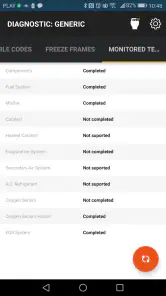
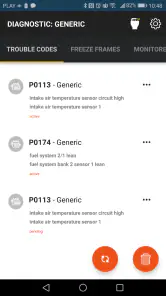
Analysis by Reviewed
I judge a car diagnostic app by how well it helps me make the next sensible decision, not by how many readings it can display. OBD JScan is aimed at Jeep, Chrysler, and Dodge owners who want more insight than a dashboard warning light provides. I’d consider it when investigating a symptom before a workshop visit, while remembering that interpreting a reading and repairing its cause are separate jobs.
Where setup can slow you down
The first hurdle is not the download; it is having a compatible OBD2 adapter and getting a dependable connection between it and the vehicle. I would check that the adapter is seated properly and that the ignition is in the state the vehicle requires before assuming the app is at fault. If the phone cannot connect, restarting the app and checking the adapter connection are sensible first steps. A diagnostic session is much less frustrating when the car is parked safely and there is time to work through the connection rather than rushing beside a road.
There is also a vehicle-fit question worth answering before relying on any advanced function. The app’s focus is specific, and diagnostics can vary across models and equipment. I would confirm that the function I need applies to my particular vehicle before planning a repair around it. A broad code reader may be a simpler choice if all I need is a basic engine warning check on an unrelated make; this app is more appealing when a Jeep, Chrysler, or Dodge owner wants to explore beyond that narrow task.
A calmer diagnostic workflow
When a warning appears, I’d first record the code and any useful live readings before clearing anything. Clearing a code can make the dashboard look better temporarily, but it does not repair the underlying fault, and the original information may help a technician understand what happened. I’d then compare the reading with the symptoms: a code is a lead, not a verdict. If the vehicle behaves oddly, I would avoid treating a single explanation in the app as permission to keep driving or attempt a repair beyond my skill level.
For a practical example, imagine a check-engine light coming on before a commute. I would use the app while parked to read the code, note what it reports, and decide whether the symptoms call for stopping, arranging help, or making a workshop appointment. That gives me a more informed conversation with a mechanic without pretending the phone has inspected every component. Keeping notes from one session to the next can also help distinguish a recurring issue from a one-off warning.
Who gets the most from it
OBD JScan is a free Auto & Vehicles app from Clever Software, with a 4.7 average from around 2,700 ratings and more than 100,000 installs. It is rated for Everyone and supports Android 5.0 or later. The app has been available since May 24, 2018, and its current version is v17.11.2025.12:45. Optional in-app purchases range from $0.99 to $169.99 per item, so I would check what a needed function costs before building a plan around it.
I see the strongest fit for a hands-on owner who is comfortable connecting an adapter, reading technical information, and using that information to ask better questions or guide a carefully chosen DIY check. Someone who only wants a quick generic code lookup may be happier with a simpler reader. A professional mechanic may also prefer dedicated workshop equipment for routine work, while this app’s appeal is having Jeep, Chrysler, and Dodge diagnostics available through a phone-based setup.
It also suits an owner who does not want every warning to turn into an immediate guess about a replacement part. The useful middle ground is to gather information, check whether it matches the car’s behavior, then decide whether the next step is a basic inspection or professional diagnosis. I would not buy an adapter or count on a paid function until I had checked that both suit the vehicle and the task I actually have in mind.
What to check before chasing a fault
A good first session is deliberately modest. I’d identify the vehicle details the app asks me to select, connect the adapter with the car stationary, and begin with the problem that brought me there rather than browsing every available screen. If the app presents readings, I’d note the conditions under which they were taken: whether the engine was running, whether the warning was present, and what the car was doing. That context can make a later comparison far more useful than a screenshot with no explanation.
Live values are most helpful when I have a question to test. For example, if the concern is that the engine is running unusually hot, a temperature reading is a clue to consider alongside the dashboard display and the vehicle’s behavior, not a standalone safety clearance. I would avoid staring at the phone while driving; if a reading needs observation under particular conditions, I’d arrange a safe way to collect it or ask a qualified person to help. The app is a diagnostic aid, not a reason to take attention away from the road.
Using advanced functions with care
The mention of service-oriented functions such as ABS bleeding and throttle relearns is attractive, but those are not casual trial-and-error buttons. Before starting any procedure, I’d verify that it is intended for the exact vehicle and situation, understand what the procedure is meant to accomplish, and make sure I can stop safely if something does not go as expected. If I cannot explain why I need the function or what result I’m looking for, I would leave it to a technician rather than experimenting.
This is also where the app’s free entry point needs a little planning. It costs nothing to install, but optional purchases can apply, and the range runs from under a dollar to well over a hundred dollars per item. I would treat that as a reason to identify the specific capability first, then check its availability and cost in the app before buying anything. The sensible comparison is not “free app versus paid app”; it is the full cost of the app function and a suitable adapter versus the cost and convenience of another tool or a workshop visit.
When a connection or reading seems wrong
If a connection fails, I would change one thing at a time rather than repeatedly tapping through menus. Reseat the adapter, confirm the vehicle is in the required ignition state, close and reopen the app, and try again while parked. If it still does not connect, the adapter, phone, vehicle, or their compatibility may be involved; that is a better working assumption than deciding immediately that the car has developed a fault. A stable physical connection is a prerequisite for trusting what follows.
If a reading seems surprising, I would repeat the check under comparable conditions and compare it with the vehicle’s symptoms. A value that looks unusual on its own can be misleading, especially when I do not know the normal range for that specific vehicle and operating state. I would not clear codes just to see whether they return before recording what is currently present. Keeping a brief note of the warning, the conditions, and any changes gives a mechanic something more concrete to work with.
Where a phone tool has limits
Compared with a basic handheld code reader, a phone-based app can be more convenient for exploring information and monitoring readings, but it adds an adapter and a connection step. Compared with professional diagnostic equipment, it is easier to keep at hand but should not be treated as a complete workshop substitute. The right choice depends on the job: a simple generic reader may be enough for a quick engine-code check, while a Jeep, Chrysler, or Dodge owner seeking vehicle-focused diagnostics may have a clearer reason to try this app.
It is not the best fit for someone who wants a guaranteed diagnosis, does not want to learn what codes mean, or expects an app to make a vehicle safe to drive. Nor would I recommend it as the only tool for a repair that involves safety-critical systems or a procedure the owner has not performed before. In those cases, a qualified mechanic and suitable equipment matter more than the convenience of reading information from a phone.
Ratings can help set expectations, but they cannot establish whether a particular feature works with one exact vehicle or adapter combination. The app has a 4.7 average, which suggests that many users find value in it, but I would still judge fit by my own model, the task, and the hardware I plan to use. Its Everyone content rating describes its app-store age classification; it does not mean every diagnostic operation is suitable for every driver to attempt.
Ever wondered what’s really going on under the hood of your car? Well, I’ve got just the app for you. Let me introduce you to OBD JScan. You might be thinking, "Not another car diagnostic app!" but believe me, this one stands out in the crowd. I took it for a spin, and here’s what I found out.
Getting Started with OBD JScan
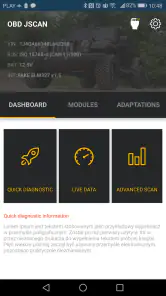
First things first, you’ll need an OBD2 adapter. Once you’ve got that, downloading OBD JScan was a breeze. Available on both Android and iOS, it didn’t take long to get up and running. The user interface is sleek and intuitive, making it easy even for someone like me who isn’t a tech whiz. Just plug in the adapter, launch the app, and voila! You’re all set to explore the depths of your car’s diagnostics.
Features That Impress
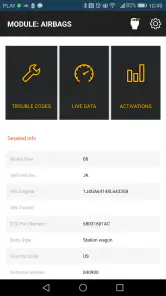
Now, onto the juicy bits. The app offers a plethora of features that cater to both amateur car enthusiasts and seasoned mechanics. You can read and clear trouble codes, which is a lifesaver when that pesky check engine light comes on. But that’s not all; you can also monitor real-time data such as engine RPM, coolant temperature, and fuel system status. For those who love diving into data, this is a dream come true.
One feature that particularly caught my attention was the ability to perform advanced functions like ABS bleeding and throttle relearns. These are typically features you’d expect in more expensive tools, so having them in a mobile app is fantastic.
Performance and Usability
Performance-wise, the app runs smoothly without any noticeable lag. The connection between the app and the OBD2 adapter is stable, which is crucial when you’re in the midst of diagnosing a problem. The developers seem to have done a solid job in ensuring compatibility with a variety of car models, which is always a plus.
One thing I really appreciated was the detailed explanations provided for each diagnostic trouble code. It’s like having a mini mechanic in your pocket, helping you understand what each code means and suggesting potential fixes. This feature alone can save you a trip to the mechanic, or at least give you a clue about what’s going on before you head in.
Making the information useful
The real value is not simply seeing a list of codes; it is turning that list into a better next step. I would take a photo or write down the exact code and any symptoms before discussing a repair, then ask whether the proposed fix addresses the cause or only clears the warning. That small habit can prevent a rushed parts purchase based on a code description alone. It is especially useful when the car still drives normally and I need to decide whether to book service soon or keep monitoring it.
If the warning returns after a repair, I would compare the new result with my original notes instead of assuming the first repair failed. The timing, symptoms, and any changed readings can help separate a recurring issue from a different problem. I would still leave diagnosis of a persistent or serious fault to a professional, but arriving with a clear history makes the conversation more focused and helps avoid starting from zero.
Final Thoughts
So, is OBD JScan worth your time? Absolutely. It’s packed with features that can turn any car owner into a savvy diagnostician. Whether you’re a DIY enthusiast or just someone who wants to save a few bucks on car diagnostics, this app is a must-have. Plus, the combination of its user-friendly interface and comprehensive features makes it a standout choice in the crowded world of car diagnostic tools.
In conclusion, if you’re serious about maintaining your vehicle and want to understand what’s happening under the hood, give OBD JScan a try. It’s more than just an app—it’s your car’s new best friend.
OBD JScan Frequently Asked Questions
Who develops OBD JScan, and what devices can run it?
OBD JScan is an Auto & Vehicles app developed by Clever Software. It is available for Android devices running Android 5.0 or later, making it worth checking your device’s operating system before downloading. The app is free to install and is rated for Everyone. Its focus is vehicle diagnostics for Jeep, Chrysler, and Dodge, so drivers of those makes are the clearest audience for it.
What is OBD JScan and how does it work?
OBD JScan is a mobile application designed for car enthusiasts and mechanics, allowing them to diagnose vehicle issues through an OBD-II adapter. Once connected to your car's OBD-II port, the app retrieves data from your car's computer, providing real-time diagnostics and insights into your vehicle's performance and potential issues. It's compatible with many car models, offering a user-friendly interface for both Android and iOS devices.
Is OBD JScan compatible with my vehicle?
OBD JScan supports a wide range of vehicles, particularly those manufactured after 1996, which typically include an OBD-II port. However, compatibility may vary depending on the make, model, and year of your vehicle. It's advisable to check the app's official website or user manual for a detailed list of supported vehicles to ensure your car is compatible before downloading the app.
What features does OBD JScan offer?
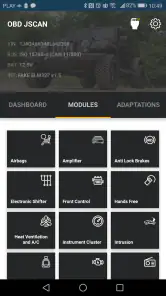
OBD JScan provides a comprehensive suite of features including real-time vehicle diagnostics, reading and clearing trouble codes, live data monitoring, and enhanced diagnostics for certain car brands. Additionally, it offers features like service resets, module coding, and adaptation, making it a robust tool for both professional mechanics and DIY enthusiasts. The app's intuitive design makes it easy to navigate and use.
Do I need any additional equipment to use OBD JScan?
Yes, to use OBD JScan, you will need an OBD-II adapter that connects to your vehicle's OBD-II port. This adapter communicates with the app on your mobile device, allowing you to access the vehicle's diagnostic information. There are various OBD-II adapters available, both wired and wireless, and it's crucial to ensure that the adapter is compatible with the app and your vehicle for optimal performance.
Pros
- User-friendly interface
- Real-time data monitoring
- Supports many car models
- Affordable pricing
- Customizable dashboard
Cons
- In-app purchases required
- Limited advanced features
- Occasional connectivity issues
- Not available on iOS
- Requires Bluetooth adapter
- Category
- Auto & Vehicles
- Version
- v17.11.2025.12:45











