OAN Live
- 312.00
- 3.3
- Installs
- 50.00K
- Price
- Free

Screenshots
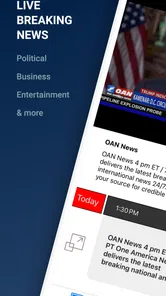

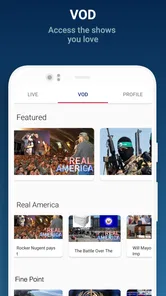





Analysis by Reviewed
I approached OAN Live as a straightforward way to follow One America News Network on a phone, but the real test was not simply whether it could open a news stream. The more useful question is whether it fits the way you actually consume news: quick checks during the day, longer viewing at home, or a dedicated source you keep available when you want live coverage. My experience is that it can be convenient for viewers already interested in OAN, although it is less compelling if you want a broad news reader that combines many publishers in one place.
This is a free news and magazines app from Herring Networks Inc., with a Everyone 10+ content rating. It has passed the early trial stage as a mobile product, having been released in March 2022, and its audience has grown beyond 50 thousand installs. The store listing identifies it as OAN Live, but that short label does not tell you much about the day-to-day experience. What matters is how quickly you can get from opening the app to the coverage you came to see, and what happens when that simple path breaks.
Getting past the first points of friction
I start this section with a practical distinction: a slow opening does not always mean the app itself is broken. I check the connection and give the screen a moment before repeating taps, then test whether other online services are responding. That small pause can save time and helps me decide whether the next step should focus on the phone, the network, or the app.
Why a simple live-news app can still feel awkward
When I use a focused news app, I expect a short route: launch it, identify the current content, and start watching or reading. A live-oriented application has less room for confusion than a large portal because users are usually arriving with a clear intention. They may be checking a developing story, catching up during a break, or leaving coverage on while doing something else. Any delay at that point feels more noticeable than it would in a general magazine app.
The first place users can get stuck is mistaking a loading pause for a broken installation. Live content depends on more than the app itself. The phone needs a usable connection, the service needs to be reachable, and the operating system needs to let the application complete its startup work. If the opening screen remains unchanged, I would first wait briefly and check whether other internet-based apps are responding before repeatedly tapping the same control.
A second source of friction is expecting the app to behave like a full newspaper archive. OAN Live is best understood as a focused way to access One America News Network rather than as a neutral news aggregator. That distinction affects what you should look for. If your routine depends on comparing many outlets, saving articles from different publishers, or scanning a large collection of topics, a broader news reader may suit you better.
The most important practical expectation is to treat this as a dedicated OAN access point, not a complete replacement for every news tool on your phone. That mindset makes the interface easier to judge. Its value is concentration and directness; its trade-off is a narrower range of sources and workflows.
More From Our News Desk

Weather by Xiaomi Review: Clear at a Glance, Less Clear Up Close

X Under Pressure: Can It Recover When Posting Goes Wrong?

Clash of Clans Is Won Between the Battles

Android Auto Makes the Case for Quieter Car Software

MobiOffice: Transforming Mobile Productivity with Seamless Integration

EA SPORTS FC™ Mobile Soccer: Redefining Mobile Sports Gaming
What I would check before blaming the app
If the app opens but content does not appear, I use a simple sequence. I confirm that the phone is connected, switch between available connection types when possible, and try another online service. This separates a general connectivity problem from an issue limited to the app. I also check whether the device has enough free storage and whether the operating system is behaving normally, because low space or a heavily loaded phone can make even a small news application feel unreliable.
Next, I close the app completely and open it again rather than repeatedly refreshing an unresponsive screen. If the problem returns, restarting the phone is a sensible second step. These actions sound basic, but they are useful because they clear temporary application and network states without changing personal settings or removing anything important.
I would also confirm that the device date and time are set correctly. Incorrect system time can interfere with secure internet connections, and the resulting symptom may look like a content or login problem. This is a general device check rather than an OAN-specific feature, but it is particularly worthwhile when other online services work inconsistently.
Another useful check is the application’s store page. If an update is available, installing it can resolve compatibility problems between the current app build and a newer phone environment. I would avoid downloading unofficial copies or modified packages. For a news application that handles network content, staying with the normal Android or iOS distribution route is the safer and more predictable choice.
A sensible setup routine
My recommended setup is deliberately unexciting. Install the official app, open it once on a stable connection, and give the initial screen time to finish loading. Then test it in the place where you expect to use it most often. A phone that works on home Wi-Fi may behave differently on mobile data, and a stream that starts comfortably at a desk may be less practical during a commute.
Before relying on it for an important viewing moment, I would run a short test rather than waiting until a major story is already underway. Open the app, start the available content, leave it for a few minutes, and check whether the phone remains responsive. This gives you an early sense of whether your connection, battery condition, and device performance are suitable for your routine.
Because the app is free to download, it is easy to try without committing money at the beginning. The listing also shows in-app purchases of $5.99 per item, so I would pay attention to any purchase prompt and read its wording before confirming anything. Free installation does not automatically mean every part of an app experience is free. If you only want to test the basic viewing path, there is no reason to rush through a payment screen.
The average rating is 3.3 from around 569 ratings, while the listing contains around 312 reviews. I read that as a sign to keep expectations practical rather than assuming the app will be equally smooth on every phone. Ratings are useful as a warning to test the workflow yourself, but they do not tell me whether a particular problem comes from the app, a network, or an individual device.
Recovering a routine when playback or loading fails
When a live-news workflow stops working, I try to identify the exact failure point. If the app does not open, I focus on restarting it, checking for an update, and restarting the phone. If it opens but the content does not load, I test the connection and wait briefly before trying again. If content begins and then stops, I look at connection stability and whether other services are also struggling. Different symptoms deserve different fixes; reinstalling immediately can erase useful clues.
Changing networks is one of the most informative tests. If the app works on Wi-Fi but not on mobile data, the likely issue is not the installation itself. Data restrictions, weak coverage, or a device setting may be involved. If it works on mobile data but not on a particular Wi-Fi network, the local network deserves attention. I would not keep changing several settings at once, because that makes it difficult to know which action helped.
Closing other demanding applications can also help on an older or busy phone. Live content needs a stable connection, but the device still has to keep the app in memory and process the incoming material. If the phone is nearly full, removing unused downloads or clearing ordinary space can be more useful than repeatedly reinstalling the news app.
Reinstallation is best saved for later in the process. I use it when the app consistently fails after a restart, a connection check, and an update check. Before doing that, I make sure I know any sign-in details I may need and understand that local app state can be removed. A clean installation can clear corrupted temporary files, but it is not a universal answer to service interruptions.
When the app is not the cause
News applications are especially sensitive to timing. A sudden surge of interest around a major event can make users notice delays that were not visible during ordinary use. That does not prove the app is at fault, and it is a reason to avoid judging reliability from one brief incident. I look for a pattern across different times and connections before reaching a conclusion.
The phone itself can also create misleading symptoms. Battery-saving modes may restrict background activity, while aggressive memory management can close an app that has been left idle. A weak signal can produce pauses that resemble a failed stream. Screen-lock behavior, device heat, and limited storage may all change how comfortable long viewing feels, even when the application has launched correctly.
There is also a difference between an app problem and a content expectation. If you open OAN Live hoping to find a multi-source headline dashboard, a deep archive, or a personalized reading system, the narrower experience may feel incomplete even when it is functioning normally. In that situation, the better answer may be using this app for OAN coverage and a separate aggregator for comparison and wider discovery.
That combination can be more useful than forcing one application to do everything. I might use the focused app when I specifically want its network, then switch to a general news reader when I want several perspectives on the same event. This is not a criticism of the app’s purpose; it is a recognition that focused coverage and broad comparison are different jobs.
Everyday ways I would use it
One realistic scenario is a short midday check. I open the app during a break, look for the current coverage, and decide quickly whether I want to stay with it or return to work. In that situation, the app’s focused identity is helpful because I am not navigating a large collection of unrelated publishers. The trade-off is that I need another source if I want a wider snapshot of what is happening beyond OAN’s presentation.
Another use is keeping it available at home for planned viewing. I would test the connection in advance, keep the phone charged, and use a stable network rather than assuming mobile data will always be sufficient. If I wanted a longer session, I would also consider the phone’s screen and battery behavior. A convenient live-news tool is only convenient if the device can support the way I intend to watch.
A less obvious use is as a deliberately limited news routine. Some people become distracted by endless headlines and prefer opening one chosen source at a specific time. OAN Live can support that habit because it is not trying to be an all-purpose news marketplace. The limitation becomes part of the benefit: fewer places to browse, but also less breadth when you need context from outside that network.
I would not recommend making it the only news source for someone who values strong cross-checking. A single network’s presentation can be useful for following that network, but important stories deserve comparison with other reputable sources. The app can occupy one place in a balanced routine without being expected to provide every angle.
How it compares with ordinary alternatives
Compared with a general news aggregator, OAN Live is more specialized. Aggregators are usually better for quickly comparing headlines, topics, and publishers in one feed. They can also be more suitable when your interests change throughout the day. OAN Live makes more sense when the destination is already clear and you want a direct route to One America News Network.
Compared with a mobile browser, a dedicated app may feel more convenient for repeated access because it has its own place on the phone and avoids starting from a blank browser tab. The browser remains more flexible, however, especially if you want to move between multiple sources or search for background information immediately. I see the app as a focused shortcut, not a universal replacement for browsing.
Compared with television or a larger-screen viewing setup, the phone is more portable but less comfortable for extended sessions. That matters if you plan to follow coverage for a long period. The app is strongest when convenience and access matter more than a large display. For relaxed viewing at home, another screen may be preferable, while the phone is useful for checking in away from it.
The free entry point also makes comparison easy: you can test whether the focused workflow suits you before deciding whether any in-app purchase is relevant to your needs. I would judge it by repeated use over several ordinary days, not by one launch. Does it open when you need it? Does your connection handle the content? Do you actually prefer a dedicated OAN destination to a broader feed? Those answers matter more than a generic feature checklist.
Who should install it, and who should skip it
I think OAN Live is worth trying for viewers who specifically follow One America News Network and want a direct mobile option. It can also suit someone who prefers a narrow, intentional news routine rather than an endless mixed feed. The free download lowers the barrier to testing that fit, and the Everyone 10+ rating makes its intended audience relatively broad.
I would skip it if your main goal is source comparison, international breadth, extensive personalization, or a single place for many publications. A general news app or browser-based routine will likely be more efficient for that. I would also skip relying on it as your sole emergency information channel. Any internet-based app can be affected by connection, device, or service conditions, so important information should not depend on one access route.
Users who dislike troubleshooting should perform the initial test before building the app into a daily habit. A few minutes spent checking it on the intended network can prevent frustration later. If loading is inconsistent from the start, the app may not be the right fit for that device or connection, even if it works well for someone else.
My practical verdict
After looking at the complete workflow rather than only the store summary, I see OAN Live as a focused tool with a clear audience. Its strongest quality is directness: if I want One America News Network on my phone, I know why I am opening it. Its main weakness is the same narrow focus, because it does not replace the broader discovery and comparison offered by ordinary news aggregators or a browser.
I would install it, test it on both the connection I normally use and the device I plan to carry, and keep a second news source for context. I would also treat any $5.99 in-app purchase prompt carefully instead of assuming that free installation covers everything. If the app opens reliably and its focused coverage matches your routine, it can be a convenient addition. If you want a complete, multi-source news environment, choose a broader alternative and use this only when you specifically want OAN.
In short, my recommendation is conditional but positive: try it for direct OAN access, not as your entire news system. That is the fairest way to judge this free News & Magazines app, and it keeps the practical limitations visible instead of turning a specialized tool into a promise it was never designed to fulfill.
OAN Live Frequently Asked Questions
Who develops OAN Live, and where should I download it?
OAN Live is developed by Herring Networks Inc. To reduce the risk of installing an altered or unofficial copy, look for the app through the official Google Play or Apple App Store listing and check that the developer name matches. The app is listed in the News & Magazines category, so it is designed for people seeking news-related content rather than a general entertainment library.
What is OAN Live and what kind of content does it offer?
OAN Live is a news streaming application focused on delivering live and on-demand programming from One America News Network. After opening the app, users can typically access news coverage, commentary, interviews, political discussions, and other network programming in one place. The exact selection may vary by region, platform, and current broadcast schedule, so availability can change over time.
Is OAN Live free to download and use?
The app is free to download, but that does not necessarily mean every feature or stream is available without payment. In-app purchases are listed at $5.99 per item, so review the purchase details displayed in the app before confirming a transaction. Access can also depend on the platform, your location, or account requirements. Check the current listing and in-app terms before relying on full access.
Can I watch OAN Live on Android and iPhone devices?
OAN Live may be offered for supported Android and iOS devices, although compatibility can depend on the operating-system version, device model, and the app’s current release. Before installing, review the requirements shown in Google Play or the App Store. Keeping your device and the application updated can also help prevent playback, login, or stability problems.
Does OAN Live support live streaming and on-demand viewing?
The main purpose of OAN Live is to provide access to network programming, which may include live broadcasts as well as selected on-demand content. In testing any streaming app, the experience can vary with internet speed, server availability, and regional restrictions. If a program is unavailable, it may be limited by licensing, scheduling, or account permissions rather than a device problem.
Pros
- Live coverage of OAN programming and breaking news in one place
- Simple interface makes switching between available streams straightforward
- Useful for viewers who prefer a conservative news perspective
- Video content can be watched on demand when live broadcasts are missed
- Provides direct access to OAN’s original shows and reporting
Cons
- Content may feel politically one-sided compared with broader news platforms
- Some features or streams may require an active subscription
- Video quality and playback stability can depend heavily on your connection
- Availability of certain content may vary by location or licensing rights
- Background playback and casting options may be limited on some devices













