NRA
- 22.00
- 3.1
- Installs
- 10.00K
- Price
- Free

Screenshots
Analysis by Reviewed
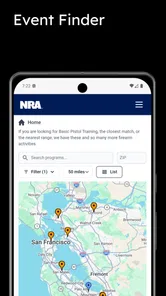
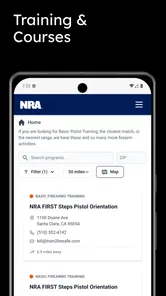
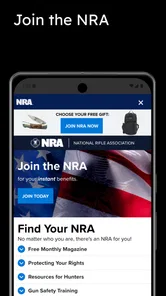
I approached NRA as a household information app rather than something I would open casually for general headlines. It brings together NRA news, training resources, events, a digital ID card, and member benefits in one place. That combination gives it a clear audience: people connected to the National Rifle Association of America who want a more direct way to keep up with its content and member-related information.
My overall impression is mixed but fairly clear. The app is useful when its focused purpose matches your needs, especially if you want training material and event information beside your membership tools. It is less convincing as a replacement for a broad news reader, and I would not install it on a shared family device without first deciding who should use which parts of it. The content rating is Teen, so age and household context matter here even before the practical question of account access comes up.
How NRA fits into a shared household
When I think about NRA on a shared household device, the useful question is less about who can browse and more about who should handle account-specific screens. I’d agree on that boundary before the first handoff, then use shared browsing for a concrete task—such as comparing training resources or discussing an event—rather than turning the app into everyone’s default news feed.
A practical scenario for a shared phone or tablet
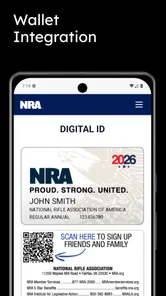
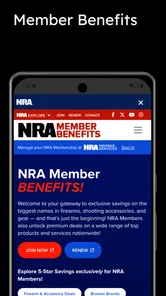
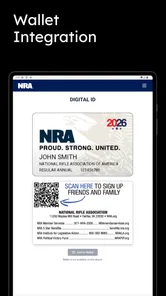
Imagine a household where one adult follows NRA news, another person is interested in training resources, and a teenager occasionally uses the same tablet for unrelated tasks. In that situation, the app can be convenient because several NRA-related needs sit under one roof. The member can check benefits or display the digital ID card, while the person arranging a course or event can look through the relevant resources without switching between separate services.
That convenience has a limit: this is not a general-purpose family news hub. The app is built around one organization, so its usefulness depends on whether the household actually wants that organization’s news and services. I would not add it simply because everyone in the home reads news. A standard news app will usually be better for comparing many viewpoints, following local reporting, or building a broad daily reading routine.
The shared-device angle is most useful when the device belongs to the household but the account-related material belongs to one person. I would treat the digital ID card and member benefits as personal information, even if the app itself is installed on a communal tablet. Before handing that tablet to someone else, I would close the relevant screen and avoid leaving the account area open. That is a simple habit, but it matters more here than it would with an ordinary magazine app.
What each person can realistically use
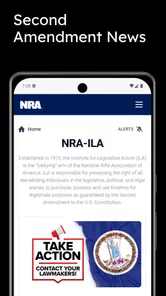
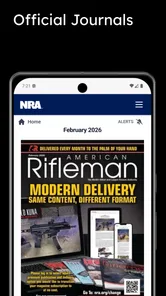
The news area is the easiest part to share because it is naturally suited to browsing. A household member can open it to catch up on NRA-related developments without needing to understand the rest of the app. Training resources may appeal to a different person, particularly someone who is already looking for structured information connected with firearm education. Events provide another practical reason for shared use: one person can research what is happening while another handles scheduling or travel.
More From Our News Desk

Weather by Xiaomi Review: Clear at a Glance, Less Clear Up Close

X Under Pressure: Can It Recover When Posting Goes Wrong?

Clash of Clans Is Won Between the Battles

Android Auto Makes the Case for Quieter Car Software

MobiOffice: Transforming Mobile Productivity with Seamless Integration

EA SPORTS FC™ Mobile Soccer: Redefining Mobile Sports Gaming
The digital ID card is different. I would not think of it as a household document or something to pass around casually. It is tied to the member experience, so the person whose membership it represents should remain the primary user. The same caution applies to member benefits. Even when family members are coordinating plans together, the account holder should be the one checking personal membership information and deciding what is shown on screen.
This separation creates a useful household workflow. One person can use the public-facing news and resource sections for discovery, while the member keeps control of the identity and benefit-related areas. It is not a formal multi-user system, and I would not pretend that it is. Instead, the app works best when the family agrees on a simple boundary: shared browsing is fine, but account-specific material stays with its owner.
Setting boundaries before handing over the device
During setup, I would first decide whether the app is being installed for one member or for general household access. That decision affects where the device is stored, who may open it, and whether the digital ID card is comfortable to use there. If the phone is personal, the arrangement is straightforward. If the tablet is shared, I would establish a clear rule that nobody else changes account details or explores member sections without permission.
I would also check the device’s operating system before planning around the app. NRA supports Android devices running version 5.0 or later, which covers a wide range of older hardware. That is helpful for households keeping an older phone or tablet in circulation, although compatibility alone does not guarantee that an aging device will feel quick or comfortable for reading. A larger screen may make news and event details easier to scan, while a small phone is more convenient for carrying a digital ID card.
The app is free to install, which removes an obvious barrier for a household that wants to test it. Still, “free” does not mean every family member needs access. I would avoid installing it on every device automatically. Start with the device used by the member, see whether the training and event sections are genuinely useful, and then decide whether a shared device adds value or just creates another place where personal information is visible.
One practical tip is to separate browsing time from account-management time. I would use the app for news or training research when other people are nearby, but handle the digital ID card and member benefits privately. That small distinction prevents the most common shared-device confusion: treating an app that contains public-style content as though every screen inside it were public.
Using the app to coordinate training and events
The strongest household use case, in my view, is coordination. A person can review training resources, another can discuss which event is relevant, and the member can keep the benefit and identity sections organized. This is more useful than simply reading headlines because it turns the app into a reference point for a specific plan. For example, someone preparing for a training-related activity could first browse the resources, then check event information, and finally keep the membership tools available for the person responsible for them.
I would not rely on the app alone as a complete household calendar or messaging system. Its role is to provide NRA-related information, not to replace the family’s normal planning tools. After finding an event, I would copy the important details into the household calendar or share them through the family’s usual method. That avoids making everyone open the app just to remember a date or appointment.
This workflow also reduces duplication. Instead of each household member independently searching for the same information, one person can investigate the relevant section and summarize the result. The app then becomes a source for coordination rather than another stream of notifications competing for attention. That is a better fit for its focused design and helps prevent the news area from distracting from the practical reason for opening it.
Training resources deserve a careful approach. I would use them as a starting point for learning and planning, not as a substitute for in-person instruction, local requirements, or professional judgment. The app’s presence on a device does not make every reader equally prepared to interpret training material. In a household, an experienced adult should guide a younger or less experienced user through any serious subject matter rather than simply handing over the tablet and assuming the app explains everything needed.
News reading compared with ordinary alternatives
Compared with a typical news aggregator, NRA offers a narrower but more purposeful experience. If I want a wide mix of national, local, international, and specialist reporting, I would choose a mainstream news app or a collection of publisher apps instead. Those alternatives are better for comparing coverage and building a balanced daily briefing. NRA makes more sense when I specifically want news and resources connected to the organization behind it.
Compared with a mobile website, the app’s advantage is concentration. The news, training material, events, digital ID card, and member benefits are presented as parts of one destination rather than as separate browser tasks. That can save time for an existing member who repeatedly checks the same kinds of information. The trade-off is that a dedicated app takes up space on the device and may encourage a person to use an organization-specific source when a wider information diet would be more appropriate.
I also see a difference between this app and a standalone membership tool. A pure membership app might be easier for someone who only wants an ID card or benefit details. NRA adds editorial and training content, which gives it more reasons to open, but also makes the experience more layered. If your only goal is to show membership information, the broader app may feel like more than you need. If you want the surrounding news and resources, that extra scope becomes its main advantage.
Teen rating, trust, and household conversations
The Teen content rating should be taken seriously in a shared home. It does not mean every teenager will find the app unsuitable, but it does mean I would not treat it like a child-oriented reading app. The subject matter can involve firearms, training, membership, and organizational news, so an adult should decide whether it fits the young person’s maturity and the family’s expectations.
I would explain the difference between reading information and taking action. A teenager might be allowed to browse news or learn general concepts, while event registration, membership decisions, or training arrangements remain with an adult. That boundary is especially important when the same device contains a digital ID card. Trust should include both content judgment and account privacy, not just whether the young person can navigate the interface.
There is also a viewpoint question. Because the app comes from the National Rifle Association of America, its news and resources naturally reflect that organization’s perspective. I would encourage anyone using it for serious news to compare important topics with independent reporting and other credible sources. That is not a criticism of having a focused source; it is simply the sensible trade-off of choosing an organization-specific app over a general news service.
Performance expectations and everyday friction
The current release is version 1.0.8, which tells me I would approach the experience as a relatively young product rather than a mature platform with years of refinement behind it. I would keep expectations realistic around polish and workflow consistency. A focused app can be perfectly useful without having the depth of a major news reader, but small areas such as navigation, account handling, or content organization matter more when several functions are combined.
The public store response is also modest. NRA has an average rating of 3.1 from around thirty-eight ratings, with roughly twenty-two written reviews. I would not treat that as a final verdict, because the sample is small, but it is enough to justify testing the app personally before making it central to a household routine. The app has reached over ten thousand installs, so it is not an entirely unknown release, yet its feedback history is still limited compared with established news platforms.
For me, the main friction is not the price or the installation process. It is deciding which parts deserve regular attention. News can pull the user into repeated browsing, while events and training resources may be occasional needs. I would keep a shortcut to the app if I were actively coordinating NRA-related activities, but I would not make it my default news destination unless its focused coverage genuinely matched my interests.
Who should install it, and who should skip it
I would recommend NRA to an existing member who wants a single place for organization-related news, training resources, events, a digital ID card, and member benefits. It is also worth considering for a household that regularly coordinates around those topics and can maintain a clear boundary around the account holder’s personal information. The free price makes a trial relatively easy, provided the device meets the minimum operating-system requirement.
I would skip it if I only want broad, neutral, or highly customizable news coverage. A general news app will be a better everyday choice for that purpose. I would also skip it for a young child, for a family that does not want firearm-related content on a shared device, or for anyone who has no connection to NRA membership, training, events, or benefits. Installing a specialized app without a specialized need usually creates clutter rather than value.
Another reason to choose an alternative is if several people need separate accounts on the same device. I would not assume that this app provides household profiles or convenient account switching. The safer approach is to keep the member’s use personal and let others view only what the account holder is comfortable sharing. If a family needs formal parental controls, separate profiles, or detailed activity management, those needs should be handled by the device’s own settings or another service rather than expected from this app.
My household verdict
After looking at it through a shared-device lens, I see NRA as a specialized companion for members, not a universal family app. Its value comes from bringing several connected functions together: organization-focused news, training resources, event information, a digital ID card, and member benefits. That combination can simplify a household plan when one person is the member and other people occasionally help with research or scheduling.
The best way to use it is deliberately. Install it on the member’s main device first, keep account-specific screens private, use the news and resource sections for informed discussion, and move confirmed event details into the household calendar. For teenagers, make the content and privacy boundaries explicit instead of treating the app as ordinary entertainment or general news.
My recommendation is therefore conditional but positive for the right audience. If NRA-related information is already part of your household’s routine, the app is a convenient place to gather it. If you are searching for a broad news reader, a child-friendly family tool, or a multi-account membership manager, I would choose something else. The real strength is focused coordination, not universal appeal, and recognizing that distinction will determine whether the app feels useful or unnecessary in your home.
NRA Frequently Asked Questions
What devices and operating systems can run the NRA app?
The NRA app is an app in the News & Magazines category, and its current version is 1.0.8. Android devices need Android 5.0 or later to install it. If you use an iPhone or iPad, check the Apple App Store listing for the requirements that apply to your device before downloading.
Who publishes the NRA app, and what kind of content should I expect?
The NRA app is published by the National Rifle Association of America. It is intended for people looking for NRA-related news, training resources, events, a digital ID card, and member benefits. Its focus is organizational information and services rather than a general-purpose news feed, so it may be most relevant to members and people interested in NRA activities.
What is the NRA app used for?
The NRA app is designed to give members and interested users convenient access to National Rifle Association information and services from a mobile device. Depending on your account and location, it may provide news, articles, educational resources, membership details, event information, alerts, and other organization-related content. Its exact features can change with updates, so reviewing the current store description is recommended before downloading.
Is the NRA app free to download and use?
The app is free to download, but some content, services, courses, events, or membership benefits may require payment or an active NRA membership. Downloading the application does not necessarily include access to every feature. Before making a purchase or joining through the app, check the displayed pricing, subscription terms, renewal conditions, and any regional differences shown in the Apple App Store or Google Play.
Do I need an NRA account or membership to use the application?
You may be able to browse certain public information without signing in, but an NRA account or membership can be required for personalized features. These may include managing your profile, viewing member benefits, accessing restricted educational material, registering for events, or receiving account-specific updates. If you do not already have an account, the app may provide registration options, although availability and requirements can vary by region.
Pros
- Provides firearm safety education and training resources.
- Includes updates on NRA programs
- events
- and activities.
- Offers access to membership information and benefits.
- Presents articles and videos on shooting and outdoor topics.
- Useful for users interested in Second Amendment advocacy.
Cons
- Content may strongly reflect the NRA’s political viewpoints.
- Some features may require membership or external account access.
- The app may feel less useful to users outside the United States.
- Notifications can include advocacy
- fundraising
- or promotional messages.
- Information may focus more on organization news than practical tools.











