Next Spaceflight
- 2.27K
- 4.8
- Installs
- 500.00K
- Price
- Free
Screenshots
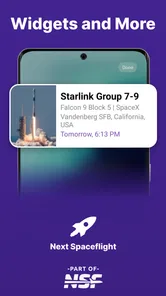
Analysis by Reviewed
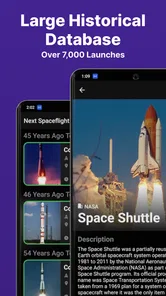
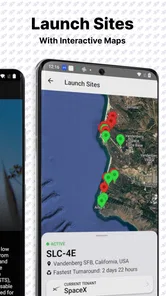
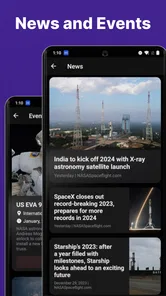
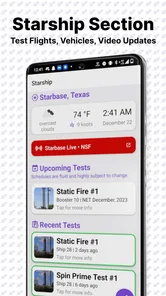
I opened Next Spaceflight expecting a simple launch calendar, but I found something more useful: a focused way to follow a busy spaceflight schedule without constantly searching through unrelated headlines. The app is made by NASASpaceflight LLC and belongs to the news and magazines category, although it feels more like a specialist reference tool than a conventional news reader. Its central job is to help me see upcoming launches involving organizations such as SpaceX, NASA, ULA, Starship, ISRO, Roscosmos, and others in one place.
That focus is the reason I would recommend it to a friend who regularly asks, “When is the next launch?” It is free, rated for Everyone 10+, and has built a strong audience, with a 4.8 average from around 17 thousand ratings and more than 500 thousand installs. Those figures do not automatically make an app good, but here they match my impression: it is a practical companion for space enthusiasts, students, families, and anyone who wants launch information organized around events rather than general news stories.
How the app works in everyday use
The first useful distinction is that this is not trying to replace a full news website. I would not open it for broad coverage of science policy, astronomy discoveries, or long-form reporting. I use it when I want to identify a launch, understand where it sits in the schedule, and keep an eye on a mission that matters to me. That narrower purpose makes the experience calmer than scrolling through a general news feed.
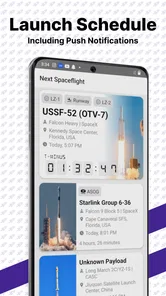
The schedule is also more helpful than a plain list of headlines because a launch is an event with a changing time, a vehicle, an operator, and a destination or mission context. When I am planning to watch a launch, those details matter more than a large article archive. The app gives the schedule a clear job: help me decide what to follow and when I should pay attention.
A realistic example is a weekday morning when I see that a launch I care about is expected later in the day. Instead of opening several tabs to check whether it is still planned, I can use the app as my starting point, then decide whether I need a live stream or deeper reporting. It does not eliminate the need for official updates, but it reduces the first part of that search.
Readability and navigation
For me, the strongest accessibility quality is the app’s narrow information structure. A person who is interested in launches does not have to work through a general-purpose news feed before reaching the relevant information. The subject itself provides a useful filter. That is especially valuable for readers who find crowded interfaces tiring or who prefer one clear task at a time.
The schedule format also supports quick scanning. I can look for an upcoming event, compare it with other entries, and decide which ones deserve closer attention. This is different from reading a long article where the launch date may be buried in the text. For a user checking the app briefly between other tasks, that difference is important.
More From Our News Desk

Weather by Xiaomi Review: Clear at a Glance, Less Clear Up Close

X Under Pressure: Can It Recover When Posting Goes Wrong?

Clash of Clans Is Won Between the Battles

Android Auto Makes the Case for Quieter Car Software

MobiOffice: Transforming Mobile Productivity with Seamless Integration

EA SPORTS FC™ Mobile Soccer: Redefining Mobile Sports Gaming
I also like the way a dedicated launch tool can support different levels of knowledge. A newcomer can begin with the basic question of what is launching next, while a more experienced follower can use the same schedule to track several providers and mission types. The app does not force every reader into a long explanation before showing the core information.
There is a trade-off, though. A schedule is efficient only when I already understand what I am looking at. Someone unfamiliar with launch vehicles, mission abbreviations, or the difference between a provider and a spacecraft may need additional context. I would not treat the app as a complete beginner’s course in spaceflight. It is better at organizing events than teaching the entire subject from the ground up.
On a smaller phone screen, dense event information can also demand careful reading. The most important detail may be the date or launch status, while other details are useful only after I have chosen an event. I find it easier to use the app when I slow down and inspect one launch at a time instead of trying to absorb the whole schedule in one glance.
Motor and sensory considerations
From a motor perspective, a schedule-based app can be less demanding than a media-heavy news service. I do not need to swipe through endless stories to find a specific launch. A short session can involve opening the app, locating an event, and reading its details. That makes it suitable for people who prefer limited interaction or who find repeated scrolling uncomfortable.
It is also a good fit for users who want information without depending on video. Space coverage often pushes live streams, animated explainers, and rapidly changing social posts. Those formats can be engaging, but they are not convenient for everyone. I can use this app as a text-centered checkpoint before deciding whether to watch anything else.
For sensory-sensitive users, the focused subject may be an advantage because it avoids the constant mixture of unrelated breaking news, advertisements, and dramatic headlines common in broader news apps. I find the experience easier to approach when I want factual scheduling information rather than a stream designed to keep me browsing.
Still, I would be careful about assuming that a focused interface solves every accessibility need. People with low vision may need to adjust their device settings and test whether the text presentation works comfortably for them. People who rely on screen readers should try the current version on their own device, since the usefulness of a schedule depends on how clearly event labels and details are announced. I can recommend the app’s simple purpose, but I cannot promise that every person will experience its interface in the same way.
The same caution applies to users with motor limitations. Fewer steps are helpful, but the exact comfort of tapping, scrolling, and moving between schedule entries depends on the phone, operating system settings, and personal needs. My practical advice is to begin with one or two missions rather than exploring the entire calendar immediately. That makes it easier to judge whether the navigation feels manageable.
Situational access for real life
One of the app’s best qualities is that it works as a quick reference during moments when I do not want a full news session. I might be commuting, waiting for an appointment, or talking with someone who has just heard about a launch. In those situations, a launch schedule is more useful than a general search because it keeps the question in view: what is planned, and which event should I investigate next?
It is also useful for planning around a shared viewing experience. If friends or family want to watch a launch, the app can help us identify the event before we move to a live broadcast or official mission page. For a classroom or informal science club, it can provide a starting point for choosing a mission to discuss. The value is not that it explains everything, but that it gives the group a common event to investigate.
Parents may appreciate the subject matter and the Everyone 10+ age rating, particularly when introducing older children to launch vehicles and space agencies. I would still use it alongside explanation and supervision, because a schedule alone does not explain every technical or historical detail. A child who wants stories and visual lessons may prefer an educational astronomy app, while a curious teenager who wants to follow real missions may find this much more engaging.
For international users, the broad range of launch providers is a meaningful strength. The app is not limited to one company or one national program, so it can support a wider view of spaceflight. That matters when a user follows launches from different regions or wants to compare how often different organizations appear in the schedule. The benefit is breadth within a specific subject, not broad news coverage across every topic.
I would not rely on it as the only source immediately before a launch. Schedules can change, and launch operations are affected by weather, technical checks, range conditions, and other factors. My preferred workflow is to use the app to discover and track the event, then check the relevant official source when the viewing time is close. That division of labor is sensible: the app is the organizer, while official channels remain important for last-minute confirmation.
Useful habits that are easy to overlook
My first practical tip is to treat the schedule as a planning board rather than a news feed. Instead of opening it repeatedly without a purpose, I look ahead for missions I genuinely care about, note the expected timing, and return when I am ready to follow one. This reduces the temptation to turn every possible launch into an obligation.
Second, I separate discovery from verification. The app is excellent for showing me what deserves attention, especially when several providers are active. Once I have selected an event, I look for the mission’s official information before making travel plans, setting up a group viewing, or assuming the launch will happen at the first listed time. This is a small habit, but it prevents a schedule from becoming a source of false certainty.
Third, I use the app to broaden my viewing choices. It is easy to follow only the most visible companies, but a multi-provider schedule reminds me that spaceflight includes more than the launches appearing most often in my social feeds. That makes the app valuable for building a more balanced understanding of the industry.
A fourth insight is that the app can serve as a conversation tool. If a friend is interested in Starship, NASA, or another program, I can start with a concrete upcoming event instead of sending them a general article. The conversation becomes easier because we have a date and mission to discuss. For newcomers, that is often a better entry point than a large archive of technical stories.
Where the experience still has limits
The biggest limitation is the app’s specialization. If I want detailed reporting, interviews, mission analysis, or a continuous stream of space news, I need another source. A traditional news app may be better for readers who want one place covering space alongside politics, technology, science, and world events. A general search engine may be better for someone who only checks a launch once or twice a year.
There is also a risk of misreading a planned schedule as a promise. I see the app as a useful snapshot, not a guarantee. Launches move, and a reader who is new to the subject may not realize how normal those changes are. The app would be a poor choice for anyone who needs legally or operationally definitive timing without checking an official source.
Another limitation concerns context. A launch entry can tell me what to investigate, but it may not answer why the mission matters, what the payload will do, or how the vehicle fits into a larger program. I often leave the app to find that explanation elsewhere. That is not a failure of its core purpose, but it does mean the app works best as one part of a personal spaceflight information routine.
Accessibility also remains personal rather than universal. The focused design helps me avoid information overload, but users with specific visual, motor, or assistive-technology requirements should test the current experience directly. Device settings can improve comfort, yet they cannot guarantee that every label, control, or schedule detail will be presented in the ideal way for every reader.
The app has been available since November 12, 2017, and its current version is 4.3.0. It supports devices running Android 6.0 or later. For someone using an older phone, that minimum requirement is worth checking before investing time in setting up a launch-tracking routine. For most readers, the more important question is whether they want a dedicated schedule at all.
Who should use it and who should skip it
I would recommend it to regular spaceflight followers, students who want a convenient mission calendar, families planning to watch launches, and readers who are tired of searching across multiple sites for the next event. It is particularly appealing if you follow more than one organization, because its value grows when your interests extend beyond a single provider.
I would also suggest it to people who prefer concise, task-focused information. If you want to check a launch without entering a noisy social feed, this is a sensible starting point. Its free price removes the need to make a financial commitment before deciding whether the schedule fits your routine.
I would skip it if your interest is occasional and casual. Someone who hears about one launch every few months may get everything needed from a web search and an official broadcast page. I would also choose a broader news service if I wanted analysis and reporting in the same place, or a dedicated educational resource if my main goal were learning basic astronomy and rocket science.
For users with accessibility needs, I would frame the recommendation as a trial rather than a guarantee. The clear subject and limited purpose are promising, but comfort depends on the device and the way each person interacts with text and controls. Start with a short session, inspect one event, and see whether the schedule is readable and navigable in your setup.
My inclusive verdict
After using it as a launch-planning tool, I see Next Spaceflight as a strong specialist app with a clear role. It does not try to be every kind of space resource, and that restraint is a benefit. I can open it with one question, find a relevant event, and decide what to do next without being pulled into a much larger news cycle.
Its inclusive strength comes from focus: fewer unrelated topics, a practical schedule, and a format that can support short reading sessions instead of demanding constant browsing or video watching. That can help users with limited time, sensory preferences, or a desire for a calmer way to follow launches. Its weaknesses are just as important: it cannot replace official last-minute confirmation, deep reporting, or a full educational guide, and individual accessibility needs still require personal testing.
My final recommendation is straightforward. If launches are a regular interest, install it and make it your discovery and planning layer, while using official sources for final confirmation. If you only want broad science news or occasional background reading, choose a wider app instead. For the audience it serves, though, this free News & Magazines app is thoughtful, focused, and genuinely useful.
Next Spaceflight Frequently Asked Questions
What should I check before downloading Next Spaceflight?
Next Spaceflight is a spaceflight-focused app in the News & Magazines category, built around rocket launch schedules and mission information. Before installing, consider whether that focus matches what you want: it is intended for following launches and related events, rather than serving as a general astronomy or space-science reference. It is free to download, and its age rating is Everyone 10+.
Which devices and operating systems support Next Spaceflight?
The Android version requires Android 6.0 or later, so check your device’s operating system before downloading. The current version is 4.3.0. Next Spaceflight is also available on iOS, though compatibility depends on the requirements shown for your device in its app store. Checking those requirements first can help avoid installing an app that your phone or tablet cannot run.
Which space agencies and launch providers can I follow in Next Spaceflight?
Next Spaceflight covers launches from a range of organizations, including SpaceX, NASA, ULA, Starship, ISRO, and Roscosmos. This makes it useful if you follow more than one launch provider and want their schedules together in one app. The available mission details and event information can vary by launch, but the focus is on helping users keep track of spaceflight activity across organizations.
What is Next Spaceflight, and what can I use it for?
Next Spaceflight is an app for following rocket launches, space missions, and related aerospace events. It provides launch schedules, mission details, countdown information, vehicle and payload data, and updates about upcoming flights. It is useful for space enthusiasts who want a convenient way to track launches from different providers and agencies in one organized place.
Does Next Spaceflight provide accurate and up-to-date launch information?
The app gathers launch information from published schedules and mission updates, but launch dates and times can change frequently because of weather, technical issues, range availability, or other operational reasons. Next Spaceflight is helpful for monitoring planned events, although users should still confirm critical details through the official launch provider or space agency before traveling to a viewing location.
Pros
- Covers upcoming launches
- missions
- and space events in one place.
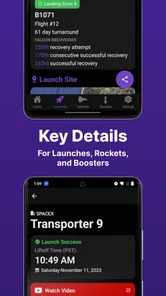
- Provides detailed mission pages with launch vehicles and payload information.
- Useful launch calendar helps track schedules across different space agencies.
- Includes notifications for upcoming launches and schedule changes.
- Clean interface makes browsing spaceflight news and missions straightforward.
Cons
- Launch times can change frequently as mission schedules are updated.
- Some advanced tracking and notification features may require extra setup.
- Information may feel overwhelming for casual users unfamiliar with spaceflight.
- Coverage quality can vary depending on the mission and available public data.
- Frequent alerts may become distracting if notification settings are not adjusted.











