NewsON - Local News & Weather
- 1.36K
- 3.3
- Installs
- 100.00K
- Price
- Free

Screenshots

Analysis by Reviewed
I judge a local-news app by a few practical things: can I find coverage that matters to my area, can I catch up when a broadcast time does not suit me, and does it make checking the news feel simpler rather than adding another chore? NewsON - Local News & Weather is built around local television coverage, so it suits viewers who want broadcasts rather than only headlines and short written updates.
It is a free news and magazines app from NewsON, with an average rating of 3.5 from around 2.9 thousand ratings and more than 100 thousand installs. It is rated Everyone 10+, first released in 2015, and version 4.2.1 requires Android 7.0 or later. Those details help set expectations: this is an established app with a sizeable audience, but its rating suggests the experience may not be equally smooth for everyone.
Choose it for broadcasts, not just headlines
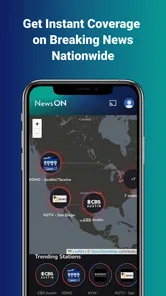
The key decision is whether watching local news is how you prefer to stay informed. Many news apps put written stories first, which is faster when you want to scan several topics. NewsON’s appeal is the broadcast format: it can make a developing local story easier to follow when you want context from a newscast instead of a headline alone. Its coverage is described as nationwide, but the usefulness for you still depends on finding stations relevant to your location or the places you follow.
That distinction matters if you are comparing it with a general news aggregator. An aggregator can be better for quickly gathering stories from many publishers; a local station’s broadcast can be better when you want the familiar structure of a newscast and a sense of what is being covered in a community. I would treat NewsON as a way to access that kind of viewing, not as a complete replacement for every news source or for emergency services.
What works well in everyday use
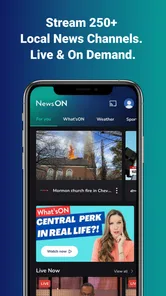
First off, let’s chat about the primary feature of NewsON - Local News & Weather: its ability to stream live local news broadcasts. I was genuinely impressed by how seamless it was to access news from various local stations across the U.S. Whether you’re interested in the latest political updates, traffic alerts, or community events, this app has got you covered. It’s like having a TV in your pocket, but better, because you can watch news from different regions!
Weather Updates at Your Fingertips
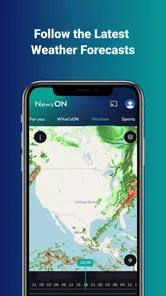
Now, onto the weather updates. The app doesn’t just stop at news; it also offers detailed weather forecasts. What I love most is the real-time weather alerts that keep me prepared for any sudden changes, be it rain or shine. The interface is user-friendly, and the information is presented in a way that’s easy to digest, even if you’re just glancing at your phone for a quick update.
Navigation and User Experience
The user interface is straightforward, making navigation a breeze. It’s perfect for those of us who aren’t exactly tech-savvy. I found it super easy to switch between news channels and check the weather, all within a few taps. Plus, the app loads quickly, which is a huge plus when you’re in a hurry.
More From Our News Desk

Weather by Xiaomi Review: Clear at a Glance, Less Clear Up Close

X Under Pressure: Can It Recover When Posting Goes Wrong?

Clash of Clans Is Won Between the Battles

Android Auto Makes the Case for Quieter Car Software

MobiOffice: Transforming Mobile Productivity with Seamless Integration

EA SPORTS FC™ Mobile Soccer: Redefining Mobile Sports Gaming
Another thing I’ve got to mention is the customization options. You can set your preferences to receive notifications from specific channels or about particular types of news. This personalization really makes the app feel like it’s tailored to your needs.
A useful way to fit local coverage into a busy day
Imagine checking local coverage while getting ready for work, then returning to a broadcast later when you have time to pay attention. That is where the mix of live viewing and catch-up access can be more useful than a stream that only works at a scheduled hour. I would use it to understand the local angle on a story, then switch to written reporting if I need a quick detail or a broader national perspective.
One practical tip is to decide which stations and subjects you actually want to follow before enabling every notification option. A focused setup can make alerts more useful, while notifications about too many topics can turn a news app into background noise. Likewise, if you are checking a forecast before leaving home, treat the app as a convenient reference rather than relying on any single source for urgent safety decisions.
Staying Informed, Anytime, Anywhere
One of the standout features for me was the ability to watch news broadcasts on-demand. Missed the live news at 6 PM? No problem! You can catch up on what you missed at your convenience. This flexibility is fantastic for anyone with a busy schedule.
That on-demand option also changes how I would use the app when following a story across the day: I can fit a newscast around my own schedule rather than keeping the television on in the background. The trade-off is that video is less convenient than text when I am in a hurry, somewhere quiet, or trying to check one fact quickly. For those moments, a text-led local news app or a station’s written coverage may be a better companion.
Where it may not be the right fit
NewsON makes the most sense for people who enjoy watching local broadcasts, want to catch up after a live airing, or have an interest in news from more than one region. It is less compelling if you mainly want concise headlines, searchable articles, or a single place to compare written reporting from many outlets. In those cases, a news aggregator or a local publisher’s own app may match your habits better.
There is also a simple viewing trade-off: streaming video asks for more attention than scanning a few lines of text. If you expect to watch while commuting or in places where audio would be disruptive, plan to use it when you can focus instead. I would keep a separate source for fast checks and use NewsON when the broadcast itself adds value.
Switching over without making it your only source
Trying NewsON does not require a change to your whole news routine: start by checking whether the local stations you care about are available, then use live or on-demand broadcasts for stories where local context matters. Keep your existing text source for quick updates, and compare coverage when a story has wider implications. This small, selective approach lets you see whether its broadcast-first style earns a place in your day before you depend on it as a regular habit.
Overall, NewsON - Local News & Weather is a robust app that brings local news and weather updates right to your fingertips. It’s a must-have for anyone who wants to stay informed without the hassle of switching between multiple platforms.
So, if you’re looking for a reliable source for your local news and weather, give this app a try. It’s like having a personal news anchor ready to update you anytime. I’d say it’s definitely worth a download!
NewsON - Local News & Weather Frequently Asked Questions
Can I watch NewsON while traveling outside my local area?
NewsON is designed to bring local TV news to your mobile device, so it can be useful when you are away from home as well as when you are in your usual area. The app offers live and on-demand broadcasts from local stations across the United States, letting you catch up on coverage from places you care about. Availability of particular stations may vary by location.
What kind of content can I watch in NewsON?
NewsON focuses on local television news, with live broadcasts, previous newscasts, and news clips. That makes it suited to viewers who want local reporting rather than a general collection of entertainment videos. You can use it to follow coverage from stations around the country and keep up with local events, weather, and other important stories.
What is NewsON and how does it work?
NewsON is a mobile app that provides users with access to live and on-demand local news broadcasts and clips from over 275 trusted local TV stations across the United States. By using the app, you can watch local news anytime, anywhere, ensuring you are always informed about what’s happening in your area. It’s a convenient way to stay updated on local events, weather, and important news.
Is NewsON free to use or are there any subscription fees?
Yes, NewsON is completely free to use. There are no subscription fees required to access the content. Users can watch live and on-demand news broadcasts without any cost. This makes NewsON an excellent option for those who want to stay informed about local news without having to pay for a cable subscription or any additional services.
Can I customize my news feed on NewsON?
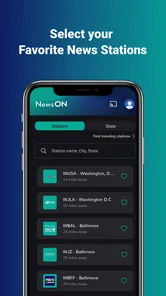
Yes, NewsON allows users to customize their news feed to focus on their preferred local stations and news topics. You can select your favorite stations to prioritize them and receive updates tailored to your interests. This customization feature ensures that you receive the most relevant news and content that matters to you, making your experience more personalized.
Pros
- Access to local news channels
- Weather updates included
- No subscription required
- User-friendly interface
- Supports multiple devices
Cons
- Limited international coverage
- Ad-supported content
- Occasional streaming issues
- Requires stable internet
- Limited customization options











