Newsmax
- 12.54K
- 3.2
- Installs
- 1.00M
- Price
- Free

Screenshots







Analysis by Reviewed
I’d treat Newsmax as one destination in a broader news routine, rather than the only place I check. It’s a free news and magazines app from Newsmax Media, aimed at readers who want to follow politics and major events alongside subjects such as finance and health. Its simple premise is appealing, but a news app is only useful if it fits the way you actually read and watch the news—and if you know what to do when something doesn’t load as expected.
Where a single-publisher feed can fall short
Newsmax is most useful when I want a quick update or a familiar place to check its coverage. The trade-off is that a focused publisher app cannot replace the breadth of a general news aggregator, where stories from many outlets sit side by side. If I need to compare how different organizations report the same developing story, I’d open another source as well. That’s not a reason to avoid Newsmax; it’s a sensible way to keep a single outlet’s perspective in context.
It may also be a poor fit if you want a highly tailored reading experience, a quiet feed with no alerts, or a single app that organizes every publisher you follow. Before turning on notifications, I’d ask whether I want immediate prompts or prefer to check headlines at chosen times. A notification can help surface an important update, but frequent interruptions can make following the news feel more stressful than useful.
Decide what you want from a news app
The choice between a publisher’s app and a general aggregator comes down to what you want to do after opening it. An aggregator is handy when your priority is scanning coverage from several outlets in one place. Newsmax makes more sense if you specifically want to keep up with Newsmax’s reporting and prefer a direct route to its articles and broadcasts. I wouldn’t expect either format to do the other’s job perfectly: the first can make comparison easier, while the second keeps one publisher’s material easy to find.
That distinction matters most during a fast-moving story. I’d use Newsmax to see what it is reporting, then check another established outlet if I need to understand how accounts differ or what details remain unsettled. This small habit takes longer than relying on one feed, but it reduces the risk of mistaking a single framing for the whole story. Readers who rarely compare sources may prefer an aggregator; readers who already have a deliberate source mix may appreciate a direct publisher app.
Small setup choices that help
Newsmax is free and rated for Everyone, so it’s easy to try without making it a purchase decision. It has been available since March 13, 2014, and has reached over a million installs. Its average rating is 3.1 from around 33,000 ratings, with roughly 12,000 written reviews. I see those figures as a reminder to test the app against your own needs rather than assume its straightforward presentation will suit every reader.
For a calmer start, I’d first decide which subjects I genuinely want to follow, then adjust any available feed preferences before relying on the home screen as a complete picture of the day. I’d also be selective about alerts: keep only the prompts that help me act or understand a developing story, and turn off the rest if they become noise. These small choices make a bigger difference to daily usefulness than opening the app repeatedly without a plan.
More From Our News Desk

Weather by Xiaomi Review: Clear at a Glance, Less Clear Up Close

X Under Pressure: Can It Recover When Posting Goes Wrong?

Clash of Clans Is Won Between the Battles

Android Auto Makes the Case for Quieter Car Software

MobiOffice: Transforming Mobile Productivity with Seamless Integration

EA SPORTS FC™ Mobile Soccer: Redefining Mobile Sports Gaming
If you are setting it up for someone else, I’d keep the first visit simple: open a few sections together, see which topics they actually want, and decide whether alerts suit their routine. That is more useful than enabling every prompt immediately and trying to sort out the interruptions later. If the reader is more comfortable with articles than broadcasts, begin with reading; if they mainly want a quick visual update, try the video side when they have time to watch.
A practical routine might be checking the headlines over breakfast, saving a longer read for a break, and using live coverage when I can give it my attention. If I’m in a meeting, commuting with a weak connection, or trying to conserve mobile data, articles may be more convenient than a live stream. I’d switch between reading and watching based on the moment instead of expecting one format to work everywhere.
Getting Started with Newsmax
First things first, downloading the Newsmax app is a breeze. Available on both Android and iOS, it took me just a couple of minutes to have it up and running. Once inside, the interface is refreshingly simple, which is a huge relief if you're tired of overly complicated news apps. You’re greeted with a clean layout that prioritizes content over clutter, making navigation a walk in the park.
Make reading and watching fit the moment
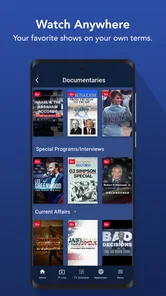
One of the standout features of Newsmax is its live TV streaming option. You can watch news broadcasts in real-time, which is awesome if you want to stay updated on breaking news as it happens. I found the streaming quality to be surprisingly good, with minimal buffering, even on my not-so-great internet connection.
Besides live TV, the app offers a plethora of articles covering a wide range of topics. Whether you’re into politics, world events, or health, there’s something for everyone. The articles are concise yet informative, which is perfect for someone like me who’s always on the go. I particularly appreciate the push notifications for major news events, ensuring I'm always in the loop.
The two formats are useful in different situations, so I wouldn’t treat one as a replacement for the other. A short article is easier to check discreetly during a spare moment, while a live broadcast asks for attention and a reasonably steady connection. If I want background awareness while doing something else, I’d be careful not to confuse having a broadcast on with having absorbed its details. For a specific fact I need to revisit, reading is usually the more practical choice.
A realistic weekday routine might be to glance at headlines with breakfast, read one story during a lunch break, and watch a broadcast later when I’m settled. That avoids trying to stream while moving through areas with unreliable reception or tapping through headlines when I should be focused elsewhere. It also gives me a natural point to decide whether a story deserves more time or whether I have already got the update I wanted.
What the app’s point of view means in practice
What truly sets Newsmax apart is its commitment to providing a variety of perspectives. In a world where media bias is a hot topic, this app does a commendable job of presenting different viewpoints. It encourages users to think critically about the news, which is something I find incredibly valuable.
Moreover, the app's customization options are a delightful touch. You can tailor your news feed according to your interests, which means you’re not bombarded with news that doesn’t matter to you. The user-friendly design ensures that making these adjustments is quick and easy.
I’d still separate personalization from balance. Choosing subjects that interest me can make the feed more relevant, but it doesn’t automatically provide a full range of reporting on those subjects. For an issue with real consequences—health decisions, financial choices, or a major political development—I would use the app as a starting point and look for additional reporting before drawing a conclusion. That’s a sensible trade-off for any publisher-specific source, not a reason to dismiss the convenience of a focused feed.
One useful way to avoid a narrow routine is to pick a small number of topics to follow in Newsmax and separately decide which other outlets I consult for context. That keeps the app from becoming a pile of headlines I never read, while also making clear what it is meant to do for me. If I find myself opening it only for alerts and never reading the underlying stories, I’d reconsider whether those alerts are helping or simply adding noise.
When it deserves a place in your routine
In conclusion, if you're searching for a reliable news app that delivers a straightforward and uncluttered experience, Newsmax might just be the answer. Its live TV feature, diverse range of articles, and customizable news feed make it a strong contender in the news app arena. Plus, the emphasis on multiple perspectives is a breath of fresh air in today's media landscape.
So, go ahead, give it a try, and see if it becomes your go-to source for all things news. Trust me, you might just find yourself pleasantly surprised!
When a loading problem may be elsewhere
If an article or stream stalls, I wouldn’t immediately assume the app itself is broken. I’d check whether other apps can reach the internet, switch between Wi-Fi and mobile data if practical, and reopen Newsmax. For a live broadcast, I’d also give the connection a moment to stabilize; streaming is less forgiving than reading text when signal quality changes. If headlines load but video does not, that points me toward checking the connection and trying again before changing unrelated settings.
When the whole app behaves oddly, a basic recovery sequence is more useful than repeatedly tapping the same control: close and reopen it, check that the device has a working connection, and see whether the issue persists later. I’d avoid assuming that reinstalling will preserve personal preferences, so I’d try simpler checks first. If the problem affects only one story or one format, I’d use another available article or return to it later rather than let a single interruption derail my news routine.
It also helps to notice exactly what failed. If text opens but a broadcast does not, I’d troubleshoot the video path first rather than treating every part of the app as unavailable. If nothing loads, I’d check general connectivity before changing settings inside the app. If only one article seems stuck, moving to another story gives me a quick way to tell whether the issue is isolated. These checks are low effort and avoid making several changes at once, which can make the original problem harder to understand.
When the cause may be outside the app
News reading depends on more than the app: the device, the network, and the format all affect what feels smooth. A weak signal may show up first in live video, while text can still be usable. If other services are also slow, I’d wait for the connection to improve rather than repeatedly reopening the same screen. If only Newsmax is affected, I’d close and relaunch it, then try again later before concluding that the problem is permanent.
For anyone wondering whether the app is suitable for a quick commute, my answer depends on the connection and the task. I’d use articles for a short check when the signal is uncertain and save streaming for a stable connection and a moment when watching is safe and convenient. I wouldn’t try to catch a broadcast while driving or expect live coverage to behave like an offline article. That simple distinction makes the app easier to use without turning every interruption into a troubleshooting project.
Who will get the most from it
I can see Newsmax working well for someone who wants its particular coverage close at hand, likes a mix of articles and live viewing, and is comfortable checking another outlet when they need a wider comparison. It is less compelling for readers who want one neutral-feeling dashboard of many publishers or who dislike push alerts and video-oriented news. The useful question is not whether it can replace every news source, but whether its mix of coverage and formats earns a regular place in yours.
It may suit readers who already know they want this publisher’s coverage and value having articles and live viewing together. It is a weaker match for someone whose main goal is to see many publications in one feed, keep all news completely interruption-free, or avoid video altogether. If that describes you, a multi-source aggregator or a reading-focused alternative may be the better primary app, with Newsmax as an optional secondary source rather than the center of your routine.
For a new user, the practical question is whether the app can be used without creating extra work. I’d try it for a few ordinary news checks, not just during a major breaking event, and notice whether I naturally return to its coverage. If I am constantly switching elsewhere to find the subjects I care about, that is a sign the fit is limited. If it gives me a convenient route to the stories and broadcasts I want while leaving room to compare coverage, it has earned its place.
For me, the best test is a normal day: check a few headlines before work, open a longer article during a quiet break, and save live coverage for a time when watching is convenient. If that rhythm feels easy and the subjects match what I follow, the app has a practical role. If I find myself seeking broader context elsewhere every time, I’d keep it as a supplementary source rather than make it my default.
Newsmax Frequently Asked Questions
Is Newsmax available for both Android and iOS?
Newsmax is an app in the News & Magazines category, designed for people who want to follow news on a mobile device. Before downloading, check the app store on your device for its current availability and compatibility. The app is free, and its content rating is Everyone, so it is presented as suitable for a general audience.
How much space does Newsmax take up, and what device requirements should I check?
Before installing Newsmax, check the app’s listing in the store you use to see whether your device meets its current requirements and has enough available storage. Requirements can differ between devices and software versions. Newsmax is a free news app, so you can review those details before choosing to download it and decide whether it fits your device.
Is Newsmax suitable for readers who want news across several subjects?
Newsmax is aimed at readers who want politics, breaking news, world events, finance, and health in one app. Its News & Magazines focus makes it a broad option for keeping up with current stories rather than an app dedicated to just one subject. The app is free, and its content rating is Everyone.
What is Newsmax and what can I expect from this app?
Newsmax is a news app that provides users with access to a wide range of news articles, videos, and live TV content covering politics, current events, health, finance, and more. Users can expect a user-friendly interface, real-time updates, and a variety of perspectives on major issues, making it a comprehensive source for staying informed.
Who develops Newsmax, and is it an established app?
Newsmax is developed by Newsmax Media and has been available since March 13, 2014. It has over one million installs, with around 33,000 ratings and 12,000 reviews. Those figures indicate an established presence among news apps, though individual experiences can vary. Considering the app’s content and audience can help you decide whether it suits your reading habits.
Pros
- User-friendly interface
- Diverse news categories
- Real-time news updates
- High-quality video content
- Customizable notifications
Cons
- Content may be biased
- Limited international news
- Frequent ads
- Requires account for full access
- App occasionally lags











