News 12
- 3.22K
- 4.4
- Installs
- 1.00M
- Price
- Free

Screenshots

Analysis by Reviewed
I judge a news app less by its first few minutes than by whether it still earns a place on my phone once the novelty wears off. News 12 is a free local-news app from News12 Engineering, and its appeal is clearest when you want nearby reporting to be a regular part of your day rather than another endless feed. The app has a 4.4 average from around 10,000 ratings, with over a million installs, so it has found a sizable audience. Its first-week value is easy to understand; its lasting value depends on whether local coverage is what you actually come back for.
Where it fits into an everyday routine
The most useful way I’d work it into a routine is with a specific reason to check: a quick look before leaving home, a local issue affecting the day, or a developing story I want to follow. For example, if a road closure or community event might change my plans, a local-news app can be more relevant than a national headline feed. I’d check the app when I have a moment, then decide whether I need to read further or move on. That keeps news from turning into constant background noise.
This local focus is also the main trade-off. If you want broad international coverage, deep specialist reporting, or a single place to compare stories from many publishers, a national outlet or news aggregator may suit you better. I’d use News 12 alongside those options, not assume it replaces them. The app makes most sense for readers whose everyday questions are about what is happening close to home.
Staying useful after the first week
Over time, the value of any local news app comes down to whether its coverage remains relevant to your area and interests. I’d treat notifications as something to tune rather than accept by default: keep only the alerts that would genuinely change what you do, and silence the rest if they start interrupting work or meals. That simple habit can preserve the useful part of timely updates without making every headline feel urgent.
A practical tip is to open the app with a question in mind instead of scrolling until something catches your eye. You might be checking on a local development, looking for an update on a story, or catching up after being away from your phone. This gives the app a clear job and makes it easier to tell whether it is still earning space. If you mainly want a broad daily briefing, a publication with a stronger national or international focus may be a better everyday starting point.
What to expect from the commitment
News 12 is free, rated for Everyone, and its current version is 7.2.10; it was released on March 5, 2012, and requires iOS 8.1 or later. Those details make it straightforward to consider as a no-cost option, but the bigger commitment is attention, not money. A busy news feed can become tiring if you check it reflexively, so I’d make it part of a deliberate routine rather than a reason to reach for my phone every few minutes.
My recommendation is conditional: try it if local coverage is the kind of information you repeatedly need, and judge it by whether it helps answer real questions in your week. Skip it if you rarely follow local news or want one app to cover every subject and region in depth. It can be a useful companion without needing to become your only news source.
More From Our News Desk

Weather by Xiaomi Review: Clear at a Glance, Less Clear Up Close

X Under Pressure: Can It Recover When Posting Goes Wrong?

Clash of Clans Is Won Between the Battles

Android Auto Makes the Case for Quieter Car Software

MobiOffice: Transforming Mobile Productivity with Seamless Integration

EA SPORTS FC™ Mobile Soccer: Redefining Mobile Sports Gaming
First Impressions Matter
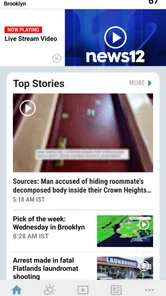
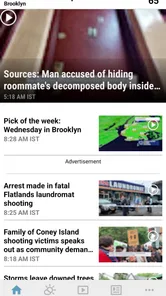
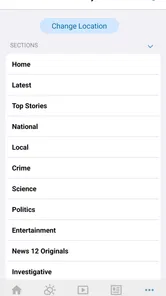
From the moment I opened the News 12 app, I was greeted with a sleek and user-friendly interface. It's intuitive, which means you don't need to be a tech whiz to navigate through it. The app opens up to a well-organized homepage that showcases top stories, local news, and trending topics. It's like having the world at your fingertips!
Features That Stand Out
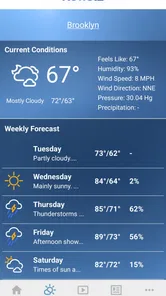
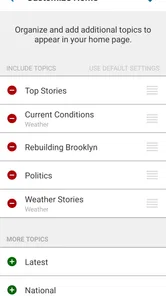
One of the coolest features of News 12 is its customizable alerts. You can tailor notifications to your interests, ensuring you receive updates on topics that matter most to you. Whether it's breaking news, weather updates, or sports, you're in control. And let me tell you, the push notifications are timely and never miss the mark.
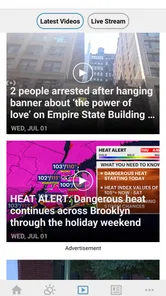
Another standout feature is the live streaming option. You can catch up on live broadcasts from your local news station directly within the app. This is perfect for those moments when you need to stay informed on the go. Plus, the video quality is impressive, even on a shaky Wi-Fi connection!
User Experience
The app's performance is smooth as butter. I've used several news apps in the past, but the seamless scrolling and quick load times on News 12 are unmatched. It doesn't lag or freeze, even when switching between different sections or watching live streams. This makes the whole experience enjoyable and stress-free.
Search functionality is another aspect worth mentioning. It's efficient and brings up relevant results quickly. Whether you're searching for a specific article or just browsing through categories, finding content is a breeze.
My Final Thoughts
In a world overflowing with news apps, News 12 stands out by offering a blend of reliability, customization, and user-friendliness. It caters to a broad audience, from news junkies to casual readers. If you're looking for an app that keeps you informed without overwhelming you, this is it.
To sum it up, News 12 has become my go-to app for staying updated with the world. Its features are designed with the user in mind, making news consumption a delightful experience. So, if you're ready for a fresh, engaging way to keep up with current events, give News 12 a try. Trust me, you won't be disappointed!
Making the first week count
During the first few days, I’d avoid trying to follow every section or alert at once. Start with the local stories you already care about, then notice whether the app helps you understand what is changing around you. That is a better test than judging it by how many headlines appear on a busy day. The useful question is not whether the feed looks full, but whether its coverage gives you context you can act on or discuss.
A realistic routine might be checking headlines over breakfast, then returning only if a story affects a commute, school schedule, neighborhood event, or local decision. If a developing item matters, search can help you revisit it instead of relying on memory or repeatedly scrolling the homepage. This small workflow turns the app into a reference point rather than a habit of opening it whenever there is a spare minute.
Readers who are new to local reporting may also find it helpful to compare a headline with the article’s details before sharing it. Headlines are designed to be quick entry points; the fuller story is where I’d look for what happened, where, and what remains uncertain. That pause is especially useful when a topic is moving quickly or could affect plans.
What local coverage does better—and what it cannot replace
Compared with a general news aggregator, a local station’s app has a narrower purpose. That focus can be a strength when the question is about nearby events: a national feed may devote little attention to a town-level change, while a local outlet is more likely to make it part of its regular coverage. For day-to-day awareness, that difference can matter more than having a large volume of headlines.
The reverse is just as important. A local app is not the best single destination for readers who want extensive global reporting, specialist analysis, or a broad range of editorial perspectives in one place. I’d pair it with a trusted national publication if those needs are part of my routine. For major decisions, I would also compare coverage and consult relevant official sources rather than treating one news app as the final authority.
It is also worth distinguishing a live broadcast from an article. Watching a stream can be useful when a story is unfolding and I want to hear a local report directly, but it asks for more time and attention than scanning text. If I only need a quick practical update, reading is usually the more efficient choice; if I want the atmosphere and spoken explanation of a developing event, live video may be worth opening.
Keeping alerts and video from taking over
Alerts are most valuable when they signal something I would otherwise need to know promptly. I’d begin with a restrained setup, then change it only after seeing which notifications prove useful in ordinary life. A notification that repeatedly arrives at an inconvenient time is not valuable just because it is about news; turning it off can improve the experience without giving up the option to check the app manually.
Live streaming deserves similar restraint. It can bring a local broadcast to a moment when a television is not available, but video is a poor fit for every setting: it may be awkward in a quiet workplace, during a commute, or when I only have a few seconds. I’d save it for times when watching is genuinely more useful than reading and rely on a written update when I need discretion or a quick answer.
One practical maintenance habit is to review the app’s place in my routine every few weeks. If I open it often but rarely find anything relevant, I can reduce alerts or stop treating it as a daily check-in. If it consistently helps me plan around local developments, keeping it installed makes more sense. This is not a feature hidden in a menu; it is a way of preventing a useful news source from becoming another source of digital clutter.
Who is likely to keep it installed
I’d recommend trying it to someone who follows a particular local area, wants nearby reporting within easy reach, and is comfortable using a focused app alongside broader sources. It may be especially handy for people whose days are shaped by community developments and who prefer checking a local outlet over searching several websites whenever something happens.
It is less suited to someone who rarely cares about local stories, expects comprehensive world news, or wants a single app that gathers and compares many publishers. Readers who dislike notifications can still choose a quiet, manual-check routine, but anyone who finds even a small news feed distracting may be happier with a scheduled visit to a newspaper or a browser bookmark instead. The best choice depends on whether local information solves a recurring problem for you.
There are a couple of practical points worth checking before relying on it. The app is free, and its Everyone age rating makes it broadly accessible, but that does not mean every story will feel suitable for every reader; news can cover serious events. The stated minimum operating system is 8.1, so anyone using an older device should check compatibility before planning around the app. These details are simple, but they can save frustration when deciding whether it fits a household or an older phone.
Long-term value without the novelty
News 12 has been available since March 5, 2012, and version 7.2.10 reflects its current release. Its longevity is useful context, but I would still judge it by the quality of the habit it supports today. A long-running app can become part of a routine when its local coverage stays relevant; it does not automatically deserve attention simply because it has been around for years.
Its audience is substantial, with around 3,200 written reviews alongside its ratings. I take that as a sign that many people have chosen to engage with it, not as proof that it will suit every location or reading style. Local relevance is personal: the same app can be a regular source for one reader and an occasional check for another, depending on what is happening nearby and how much local news they want.
My lasting verdict is that this is best treated as a purposeful local companion, not an all-purpose news destination. Give it a place on your phone if it helps answer questions that come up repeatedly in your area; keep notifications selective and use live video when watching adds something. If the local angle rarely changes what you know or do, uninstalling it is a reasonable choice. The app earns lasting space through recurring relevance, not novelty, and that is the fairest test I’d use.
News 12 Frequently Asked Questions
Is News 12 available for my device?
News 12 is a news and magazines app for Android and iOS. Its current version is 7.2.10, and it requires Android 8.1 or later. Before downloading, check that your device’s operating system meets that requirement. The app is free, and its content rating is Everyone, making it broadly suitable for users who want local news on a mobile device.
Who makes News 12, and is it widely used?
News 12 is developed by News12 Engineering and focuses on local news. It has been available since March 5, 2012, and has more than 1 million installs. The app has an average rating of 4.4 from around 10,000 ratings, with roughly 3,200 written reviews, giving prospective users a sense of its standing among people who have tried it.
What is the primary function of the News 12 app?
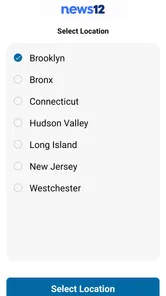
The News 12 app is designed to provide users with the latest local news, weather updates, traffic reports, and live streaming of news broadcasts. It offers personalized news alerts and notifications, ensuring that users stay informed about important events in their area. The app is specifically tailored for users in the areas serviced by News 12, making it a go-to source for regional news coverage.
Is the News 12 app free to download and use?
Yes, the News 12 app is free to download on both Android and iOS platforms. Users can access a wide range of features without any cost, including live streaming of news broadcasts and receiving personalized news alerts. However, some features may require users to sign up or create an account for a more personalized experience.
How do I customize notifications on the News 12 app?
To customize notifications on the News 12 app, navigate to the settings menu within the app. Here, you can choose which categories of news you want alerts for, such as breaking news, weather updates, or traffic reports. This allows you to tailor the app’s notifications to match your interests and stay informed about topics that matter most to you.
Pros
- User-friendly interface for quick navigation
- Real-time news updates and alerts
- Comprehensive coverage of local news
- Customizable news feed based on interests
- High-quality video content available
Cons
- Limited international news coverage
- Frequent ads can disrupt user experience
- Occasional glitches in live streaming
- Requires stable internet for optimal use
- Limited offline functionality











