New York Post for Phone
- 6.40K
- 3.4
- Installs
- 500.00K
- Price
- Free

Screenshots


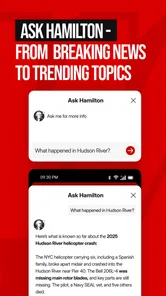





Analysis by Reviewed
Before I make any news app part of my routine, I ask a simple question: does it help me notice what matters without making me feel that every headline needs an immediate reaction? I approach New York Post for Phone as a quick way to follow one publication’s take on the day, with sports and celebrity coverage alongside news. That mix can be convenient, but it also makes it worth thinking about how I read, what I share, and which choices I make on my phone.
Start with the kind of news experience you want
This is a free news and magazines app from NYP Holdings, Inc., and its identity is tied to the New York Post rather than to a collection of publishers. I see that as its main trade-off: one recognizable editorial voice can make browsing feel consistent, while a broader aggregator is more useful when I want several outlets’ approaches side by side. Neither format is automatically better. It depends on whether I’m looking for a particular publication’s coverage or a wider scan of reporting.
The app has an average rating of 4.1 from around 13,000 ratings, with more than 500,000 installs. Those figures suggest it has reached a substantial audience, but they don’t tell me whether its tone, story selection, or reading pace will suit me. I’d treat the first few visits as a chance to decide that for myself, rather than assuming popularity means it will become my preferred source.
Make a small, deliberate first visit
When I first open a publisher-specific news app, I find it useful to browse before building a habit around it. I’d look at the range of headlines, open a few stories from different subjects, and notice whether I’m getting the mix I actually want. That’s a better test than judging it from one striking headline or a single visit during a busy news cycle.
I’d also separate the app’s editorial selection from my own priorities. A story appearing prominently tells me what the publication has chosen to foreground; it doesn’t automatically make that story the most important one for my day. If I need to understand a policy change, make a work decision, or assess a developing event, I’d use this app as one reading stop and check other reputable coverage before drawing a firm conclusion.
Reading quickly, and deciding what deserves attention
I use a quick scan of the feed as a starting point, not a verdict on what matters. When a headline catches my eye, I pause to ask whether I want a brief update, the full story, or a second perspective before I give it more of my attention. That small distinction helps me read with purpose rather than letting the pace of a news feed set the agenda.
A familiar feed with a distinct editorial voice
Hey there, fellow app enthusiasts! Today, I’m diving into the intriguing world of the New York Post app, available on both Android and iOS. If you're as obsessed with keeping up with the latest news as I am, this app might just become your new best friend. It's like having the entire newsroom right in your pocket, and I’m here to tell you all about my experience with it.
More From Our News Desk

Weather by Xiaomi Review: Clear at a Glance, Less Clear Up Close

X Under Pressure: Can It Recover When Posting Goes Wrong?

Clash of Clans Is Won Between the Battles

Android Auto Makes the Case for Quieter Car Software

MobiOffice: Transforming Mobile Productivity with Seamless Integration

EA SPORTS FC™ Mobile Soccer: Redefining Mobile Sports Gaming
Let me start by saying, the New York Post app has a sleek and user-friendly interface. The moment you open it, you’re greeted with a clean layout that makes navigation a breeze. Whether you’re a tech-savvy millennial or someone who just wants to casually browse the news, this app caters to all. The developers clearly put a lot of thought into making it as intuitive as possible.
The Content Galore
Now, let's talk about the content. Oh boy, where do I even start? The app delivers a wide range of news, from politics to entertainment, and everything in between. It's like having a never-ending buffet of information. What really caught my eye is the way they present stories. Each article is rich with detail, and the inclusion of multimedia elements like videos and images makes the reading experience more engaging.
I particularly love the ‘Trending’ section. It’s perfect for those days when I want a quick snapshot of what’s hot in the world. And if you’re someone who, like me, enjoys a good gossip column, you’re in for a treat. The gossip section is spicy enough to keep you entertained for hours.
Use the mix to build a realistic routine
For a practical routine, I’d use the app in short visits rather than treating its feed as a complete daily briefing. On a commute, a quick scan of trending stories can show me what people are talking about; later, I can open a story that genuinely affects my work or plans and read it with more attention. That separation matters: a popular headline is a useful signal of current conversation, not proof that it is the most important story of the day.
The mix of news, sports and celebrity coverage gives the app a particular rhythm. It can work well when I want both serious headlines and lighter reading in one place, or when a major game and the day’s entertainment stories are part of what I’m following. If I’m researching a complicated issue, though, I’d compare coverage with other established news sources rather than rely on one publication’s framing. A newspaper app is a convenient front door, not a substitute for checking context.
Performance and Usability
Performance-wise, this app is a champ. I noticed minimal lag, and the articles load pretty quickly. The app doesn’t hog your phone’s resources, which is a huge plus for those of us who have a gazillion apps running at the same time. Also, the offline reading feature is a lifesaver for when you’re stuck in places with no internet connection—hello, subway commutes!
Another thing that deserves a shoutout is the notification system. It keeps you updated with breaking news without being too intrusive. You know those apps that bombard you with notifications until you eventually mute them? Thankfully, the New York Post app doesn’t fall into that category.
Pay attention to alerts and device choices
News apps can make it easy to move from a headline to a long reading session, so I try to be deliberate about when I open one. A notification is a prompt to look, not an obligation to interrupt dinner or a meeting. If alerts don’t fit your day, check the notification choices available in your phone’s settings and keep only the interruptions you actually want. I would also review the app’s permission prompts on the device before granting access: allow only what makes sense for a feature you intend to use, and revisit that choice if your habits change.
That cautious approach is especially useful with a publication that combines breaking news, sports and celebrity stories. A dramatic headline can be compelling, but I’d read beyond the alert before sharing it or treating it as settled fact. For a fast-moving story, compare later updates and consult another source when the details matter. The app’s Teen content rating is a reminder that its material is not necessarily aimed at very young children; families who share a device may want to consider that when deciding who can browse freely.
If privacy and account choices are central to your decision, take a moment to inspect the controls presented by the app and your operating system rather than assuming a particular setting exists. I wouldn’t grant optional access just to get through a screen without understanding why it is requested. The same principle applies to notifications and any sign-in choices: use only what you need, and make a quick check of the available options before settling into a routine. This doesn’t take long, and it puts the decision in your hands.
What to check when a story matters
A useful habit is to distinguish between reading for awareness and reading to verify. For a quick sense of what is attracting attention, browsing the feed may be enough. If I’m about to repeat a claim in a group chat or use a news item to make a practical decision, I open the full story, check its context, and look for confirmation elsewhere. This takes longer, but it reduces the chance that a punchy headline becomes the whole story in my mind.
For a developing event, I’d also avoid treating an early notification as the last word. Details can change as reporting progresses, so returning to the story later and checking another outlet is a sensible workflow. That is not a criticism unique to this app; it is a good rule for any fast-moving news source. The advantage of having a publication’s feed close at hand is speed, while the responsibility to compare and interpret remains mine.
Who will enjoy it, and who may prefer another route
I’d recommend trying it if you like a lively, broad mix of headlines and lighter coverage, especially if you already enjoy the New York Post’s editorial style. It is less suited to someone who wants a narrowly focused, highly customized briefing or a single neutral-seeming source for every subject. Readers who mainly want international reporting, local updates outside the publication’s strengths, or a quieter experience may be happier pairing a different news app with a separate sports or entertainment source.
Compared with a general-purpose news aggregator, this app offers a more direct connection to one publisher’s selection and presentation. That can make browsing feel coherent, but it also means the range of perspectives is not the same as comparing several outlets in one feed. My practical tip is to use it for stories and topics you want to follow, then broaden the reading when a decision, claim or developing event calls for more context. The best alternative depends on whether you value one publication’s voice or a wider cross-outlet overview.
A scenario where the distinction matters
Picture checking headlines while waiting for a train, then seeing a story that could affect a plan you’re making that evening. I’d use the app’s quick scan to notice the issue, but I wouldn’t rely on a brief headline to settle what happened or what comes next. I’d read the full article when I have time, then compare it with another source if the details influence my decision. That workflow lets the app serve as a convenient alert to a topic without turning convenience into overconfidence.
The same approach works for sports and entertainment, though the stakes are different. If I only want a quick catch-up, a short visit can be enough; if I’m looking for a fuller account or a particular perspective, I’d seek out coverage devoted to that subject. The app’s breadth is handy when I want variety, but it does not mean every reader will want every part of that mix in one place.
Final Thoughts
In conclusion, the New York Post app is a solid choice for anyone looking to stay informed on the go. With its vast array of content, user-friendly interface, and reliable performance, it's a must-have for news junkies everywhere. So why not give it a try? After all, staying informed has never been this easy or enjoyable.
Whether you’re a news aficionado or just someone who likes to keep up with the latest happenings, this app has something for everyone. So go ahead, download it, and let me know what you think! Happy reading!
It’s free, and the current version is 4.13.3-Google; it requires Android 9 or later, while the app was released on August 16, 2011. If you’re on Android, check that your device meets the minimum requirement before installing. I’d start by browsing without turning every alert on, then decide whether its mix and pace deserve a regular place on your home screen. For me, it makes the most sense as a quick, distinctive window into the day—not as the only window I use.
A cautious way to decide
If you’re wondering whether you need an account to make it worthwhile, or whether there are particular privacy controls within the app, I’d inspect the choices shown on your own device rather than make assumptions. I’d take the same measured approach to any permission prompt: understand what is being requested, decide whether it relates to something I plan to use, and decline or revisit access when it does not. Keeping control of notifications through the phone’s settings is also a straightforward way to make the app fit around your routine instead of letting alerts set the pace.
My cautious verdict is that this is most appealing as a convenient publisher-specific read for someone who enjoys its mix and voice. It is less compelling as a sole source for readers who prioritize a broad range of viewpoints, a tightly tailored briefing, or coverage centered elsewhere. I’d give it a short trial, judge the stories and reading experience for myself, and keep another source in the rotation for important or disputed topics. That gives me the convenience of a lively feed without asking one app to do every job.
New York Post for Phone Frequently Asked Questions
Is the New York Post app available for my phone?
The New York Post for Phone is a mobile app for following the publication’s news, sports, and celebrity coverage. It is listed for Android, and its Android requirements are worth checking before you download. If you use an iPhone, look for the app in the iOS App Store and confirm that the listing matches the New York Post app you want.
How current is the news in the New York Post app?
The app is designed for readers who want news throughout the day, with the latest news, sports, and celebrity gossip updated 24 hours a day. That makes it suitable for checking in more than once, rather than relying only on a single daily edition. As with any news app, the stories available can change as coverage develops.
How popular is the New York Post app?
The app has more than 500,000 installs, an average rating of 4.1, and around 13,000 ratings. Those figures suggest it has reached a substantial audience, while individual experiences can still differ depending on reading habits and device. If user feedback matters to you, it can be useful to read recent reviews as well as considering the overall rating.
Who publishes the New York Post app, and what kind of app is it?
The New York Post app is a news and magazines app published by NYP Holdings, Inc. It brings the publication’s news coverage to a phone, with a focus that includes current events, sports, and celebrity stories. If you are looking for a mobile way to follow the New York Post, this is its dedicated phone app.
What is the New York Post app and what features does it offer?
The New York Post app provides users with access to breaking news, sports, entertainment, and opinion pieces from the reputable New York Post. It features real-time updates, multimedia content including videos and photo galleries, and personalization options to tailor news feeds to individual preferences. Users can also save articles for offline reading and receive notifications for important news events.
Pros
- User-friendly interface for easy navigation.
- Access to a wide range of news categories.
- Real-time news updates and notifications.
- High-quality multimedia content available.
- Customizable reading preferences.
Cons
- Ads can be intrusive at times.
- Limited offline reading capabilities.
- Requires account for some features.
- Occasional app crashes reported.
- No option for dark mode interface.












