New York Magazine
- 15.00
- 4.0
- Installs
- 10.00K
- Price
- Free

Screenshots
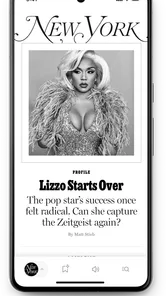
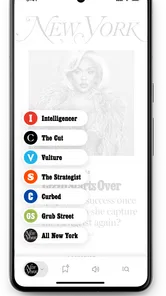

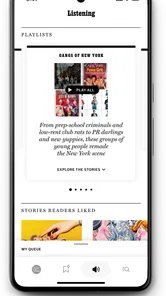
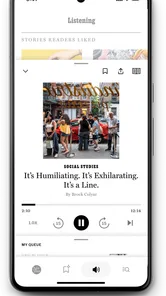
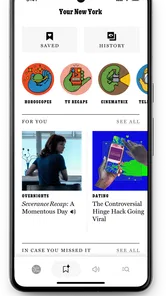
Analysis by Reviewed
I found the New York Magazine app most useful when I treated it as a shared doorway into the magazine’s journalism rather than as a complete replacement for every news source in the house. I tested it with the kind of routine many households actually have: one person checking headlines during breakfast, another opening a longer article later, and someone else picking up the phone to browse for culture, politics, or city-focused coverage. That pattern immediately exposed both its appeal and its boundaries.
This is a free News & Magazines app from Vox Media Engineering, released on February 4, 2025. Its store summary describes it as the new New York Magazine app, but that short line does not tell you much about how it fits into daily reading. In my experience, its value depends less on using it constantly and more on whether the magazine’s particular editorial voice matches what you want from a news-and-culture app.
The app has a Teen content rating, so I would not treat it as a children’s reading environment. That does not make it unsuitable for a household phone, but it does mean adults should decide whether the material and tone are appropriate for younger people who may use the same device. The household question is therefore not simply whether the app works; it is who is using it, what they expect to read, and whether one shared screen needs to serve several different reading habits.
How the app fits into a shared household routine
When several people share a phone or tablet, I find it helps to keep recommendations separate from the reading session itself: tell someone which article caught your eye, then let them open it when they have time. That small habit makes the app easier to share without turning one person’s browsing into everyone’s routine. It also leads to a practical question: how should a household handle the first setup?
A practical morning and evening workflow
Imagine a parent opening the app briefly before work, a partner returning to it after dinner, and a teenager using the same tablet for unrelated tasks. The first reader may want a quick sense of what is worth opening, while the second may prefer to settle into a longer piece. That makes the app better suited to intentional browsing than to a rigid household news timetable.
I would use it this way: open it when I have a few uninterrupted minutes, scan the available editorial choices, save the most relevant reading mentally or by keeping the page open, and return later when I can concentrate. I would not make it the only source for urgent developments. A magazine app can be excellent for perspective and distinctive writing while still being less convenient than a live breaking-news service when the household needs immediate confirmation of an event.
The shared-device advantage is simple. A person does not need a separate news routine on every phone to discover something interesting. One reader can hand over the device and point to an article, or leave the app open for another household member. That works especially well when family members enjoy discussing the same topics but do not necessarily read at the same speed.
More From Our News Desk

Weather by Xiaomi Review: Clear at a Glance, Less Clear Up Close

X Under Pressure: Can It Recover When Posting Goes Wrong?

Clash of Clans Is Won Between the Battles

Android Auto Makes the Case for Quieter Car Software

MobiOffice: Transforming Mobile Productivity with Seamless Integration

EA SPORTS FC™ Mobile Soccer: Redefining Mobile Sports Gaming
The trade-off is equally important: shared browsing can blur personal boundaries. If the app is left open, the next person may see the previous reader’s place, topic choices, or unfinished article. That is not a flaw unique to this app, but it is a reason to close the reading session deliberately rather than assuming a common device behaves like a private one.
What I would expect from the reading experience
For me, the strongest reason to install this particular app is the chance to read New York Magazine’s mix of news, politics, culture, and city-oriented coverage in a dedicated space. I prefer that kind of focused editorial identity to an endless feed where every item competes for attention. The app feels more appropriate for readers who want a publication’s point of view, not merely a pile of links.
That focus can also narrow its usefulness. If your household wants local weather, sports scores, financial alerts, or a broad international news dashboard, this should sit alongside other tools rather than replace them. I would pair it with a general news source when someone needs breadth, and with a dedicated reading or bookmarking method when several people need to track separate articles on one device.
One non-obvious benefit of a publication-specific app is conversational continuity. Instead of saying “I saw something online about that,” I can refer to a particular article or section from the same editorial environment. In a household, that can make shared discussion easier because people are starting from a common source. The limitation is that a common source should not be mistaken for a complete account of a complicated issue; I still prefer comparing important claims with independent reporting.
Setting boundaries before sharing the device
The app is free, which removes the most obvious barrier to trying it. I would still establish a simple household rule: each person should close the article they were reading when finished, and nobody should assume that an open screen represents the interests of the next reader. That small habit matters more than elaborate coordination when several people use one phone or tablet.
Because the app is presented as a dedicated magazine experience, I would also separate “shared discovery” from “private reading.” A family member can recommend an article aloud or show it briefly, then hand the device back without turning every reading choice into a group activity. This is particularly useful for adults sharing a tablet with children, where the Teen rating makes casual unsupervised browsing a poor assumption.
I would not promise a child that the app is a controlled educational library. The age label should be treated as a practical signal for adult judgment, not as proof that every article will suit every teenager. A younger reader may encounter subjects, language, or opinions that require context. If a child is using the household device, I would stay involved in choosing what they read rather than relying on the app name alone.
Another useful boundary concerns notifications and attention. I would allow the app to occupy a deliberate reading slot rather than checking it every few minutes. Magazine-style reading rewards concentration, and a shared device already creates enough interruptions. If another family member needs the phone, the reader should be prepared to stop without assuming the app will preserve every stage of a session exactly as expected.
Accounts, identity, and household coordination
When several people use one device, the first question is whether everyone should browse under the same identity. I would not create a shared account casually, because a common login can make personal reading and household reading indistinguishable. If the app asks for account access during setup, each adult should decide whether to use an individual account or keep the experience limited to ordinary browsing, based on the choices shown on the device.
I am deliberately cautious here because the right arrangement depends on the actual setup screen and the household’s priorities. What I can say from a user perspective is that the app should not be treated as a family profile manager. Its purpose is reading New York Magazine, not organizing separate household identities. If personal separation matters, use separate devices or agree on clear sign-out and handoff habits rather than expecting magazine software to solve that problem.
Coordination works best when it is lightweight. One person can send a message naming an article, mention the topic at dinner, or leave the app open to a specific piece for another adult. I would avoid building a complicated shared queue unless the household already has a reliable way to track recommendations. Otherwise, interesting articles become obligations, and the app starts feeling like another task list.
A particularly effective workflow is to distinguish “read now” from “tell someone about it.” If I find a piece that suits my partner, I can recommend it without taking over their reading time. If we are using one tablet, I would note the article title in a household message rather than leaving the screen unlocked. That preserves privacy while keeping the useful part of shared discovery.
Age, trust, and editorial judgment
The Teen rating affects how I would place the app in a home. I am comfortable describing it as a publication for older readers and teenagers with appropriate adult awareness, but I would not install it on a child’s device and assume the rating removes the need for supervision. The subject matter of a magazine can vary widely from one article to another, and a general age label cannot replace a parent’s knowledge of a child’s maturity.
Trust also applies between adults. A shared reading device may contain open pages that reveal political interests, personal concerns, or sensitive cultural topics. Nobody should interpret another person’s reading history from a single article. The app is a window into journalism, not a household monitoring tool, and it works better when family members respect that distinction.
For teenagers, I see a useful opportunity when an adult reads alongside them. The app can become a starting point for discussing how a magazine frames an issue, which details receive attention, and where another source might add context. That is more valuable than simply handing over the phone. The limitation is that it requires an involved adult; the app itself should not be expected to teach media literacy automatically.
I would also be selective about when a shared household reads together. A weekend discussion about culture or city life can be enjoyable, while trying to debate every political article during a rushed weekday morning can create unnecessary friction. The app’s strongest household role is as a source of conversation when people have time, not as a compulsory family briefing.
How it compares with ordinary alternatives
Compared with a general news aggregator, this app offers a clearer publication identity. Aggregators are better when I want many outlets, rapid scanning, or a broad overview. New York Magazine is the better choice when I want to spend time with the magazine’s own selection and voice. The decision is not about which format is universally superior; it is about whether curation or breadth matters more at that moment.
Compared with reading the publication in a mobile browser, a dedicated app can feel more intentional. I am less likely to mix the article with unrelated tabs, social posts, and search results. That separation helps when I want a focused session on a shared tablet. On the other hand, a browser is often easier for households that do not want another app installed or that switch frequently between publications.
Compared with social media, the app is a calmer starting point for reading. Social feeds are useful for discovery, but they add comments, recommendations, and constant competition for attention. I would choose this app when I want to evaluate an article on its own terms. I would choose social platforms only when I specifically want a wider public conversation around the piece, while remembering that popularity is not the same as reliability.
Compared with a newspaper-style app that covers every major beat, this one is more specialized. That specialization is its strength for readers who already value New York Magazine’s editorial world. It is a weakness for someone who expects one installation to handle every household member’s interests, from emergency updates to children’s entertainment. In a shared home, the sensible approach is to give it one defined role rather than forcing it to become the entire news system.
Version, adoption, and what that means for a new user
The current version is 1.0.37, and the app has attracted over ten thousand installs. Its average rating is 4.0 from roughly forty ratings, with around fifteen written reviews. I read those figures as early signals rather than a final verdict: enough people have tried it to show real interest, but not enough to make a small household decision based on popularity alone.
The relatively new release context matters to me because a first version can feel like a work in progress even when the central idea is sound. I would install it with realistic expectations, check how comfortably it fits my own phone or tablet, and judge the day-to-day reading flow after several sessions rather than after one glance. A household should be especially patient when different people have different expectations of navigation and article discovery.
One practical tip is to test the handoff before recommending it to everyone. Open an article, leave the app, let another adult use the device, and then return to the reading session. That simple exercise reveals whether your household is comfortable with shared access, whether the screen state is confusing, and whether a separate browser workflow would actually be easier. It is a more useful test than merely checking whether the app launches.
Who should install it, and who should skip it
I would recommend it to someone who already enjoys New York Magazine or wants a focused way to explore its journalism on a phone. It also suits a couple or household that likes exchanging thoughtful articles and can respect separate reading time. The free price makes experimentation easy, and the dedicated format gives the publication a clearer place in a daily routine than a random link discovered in a social feed.
I would hesitate to recommend it as the only app for a household that needs comprehensive, real-time coverage. It is also not my first choice for a young child, for someone seeking a tightly controlled family reading environment, or for a reader who wants every article from many publications in one neutral stream. In those cases, a general news service, a browser, or a more deliberately managed reading setup may be more practical.
There is another trade-off for people who dislike editorial framing. The app’s identity is part of its appeal, but that also means the selection and presentation are not designed to satisfy every viewpoint or every subject equally. I prefer to know what kind of publication I am reading and then supplement it when the topic matters. Readers who want an impersonal, source-neutral dashboard may feel more comfortable elsewhere.
My household verdict
After using it as a shared reading option, I see New York Magazine as a focused magazine companion rather than a household command center. Its best use is deliberate: one person discovers an article, another reads it later, and the family keeps expectations clear about privacy, age, and the difference between magazine coverage and urgent news.
I like that it is free and specific. I also like that it gives a shared device a natural conversation starter without requiring everyone to consume the same feed at the same time. The limitations are just as clear: the Teen rating calls for adult judgment, a common device needs considerate handoffs, and readers who need broad or breaking coverage will want another source beside it.
My recommendation is therefore conditional but positive. Install it if New York Magazine’s editorial perspective is already meaningful to you, or if you want a focused source for thoughtful household discussion. Before making it a family default, test the reading handoff, agree on basic account and privacy boundaries, and decide which person is responsible for judging age-appropriate articles. With those expectations in place, the app earns a useful place on a shared device without pretending to be something it is not.
New York Magazine Frequently Asked Questions
Who publishes and maintains the New York Magazine app?
The New York Magazine app is developed by Vox Media Engineering. It is the mobile home for New York Magazine, a publication focused on reporting and commentary across city life, politics, culture, and other subjects. If you already read the magazine on another platform, the app offers a way to explore its coverage on a phone or tablet.
What age group is the New York Magazine app intended for?
New York Magazine is rated Teen, so it is intended for a teenage audience and older. Its reporting and features cover news, culture, entertainment, and lifestyle topics, which may include mature themes or discussions of current events. Parents and guardians can review the app’s content and device-level controls to decide whether it is suitable for a younger reader.
What is New York Magazine, and what can I read in the app?
New York Magazine is a digital publication covering New York City, politics, culture, entertainment, food, fashion, technology, science, and lifestyle topics. The app brings together the magazine’s latest articles, features, opinions, guides, and recurring sections in a mobile-friendly format. It is designed for readers who want both city-focused reporting and broader commentary on current events and culture.
Is the New York Magazine app free to download and use?
The app is free to download, but access to all articles and premium features can depend on New York Magazine’s subscription policy. Some stories may be available without signing in, while other content may require a paid digital subscription or an existing membership. Before downloading, check the current App Store or Google Play listing and the publisher’s subscription terms for pricing and access details.
Does New York Magazine require a subscription?
A subscription may be required to read the full selection of articles, especially premium journalism, archives, exclusive features, and certain special sections. The exact limits can change over time, so users should review the offers shown inside the app before subscribing. If you already have a qualifying New York Magazine account, you may be able to sign in and use your existing access.
Pros
- Sharp
- well-reported coverage of New York culture and city life.
- Distinctive editorial voice makes articles engaging and memorable.
- Strong mix of politics
- food
- entertainment
- and lifestyle content.
- Useful recommendations for restaurants
- events
- and local experiences.
- Clean layout makes long-form stories comfortable to read on mobile.
Cons
- Many articles may require a subscription to read in full.
- Some content is highly focused on New York and less useful elsewhere.
- Frequent notifications can feel excessive without careful customization.
- The app may use significant data when loading images and rich media.
- Certain sections can feel opinionated rather than strictly objective.











