

NAPA PROLink
- 237.00
- 2.9
- Installs
- 100.00K
- Price
- Free
Screenshots
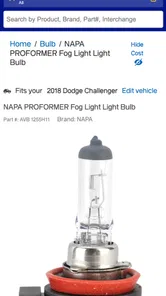
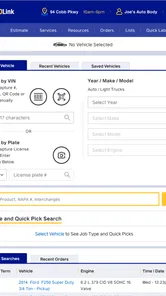
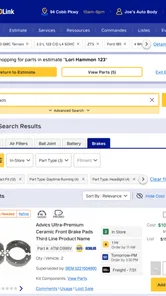
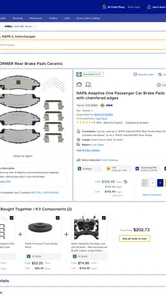
Analysis by Reviewed
If you regularly need to identify or source replacement parts, NAPA PROLink is aimed at making that job easier on a phone. I see its strongest fit in repair shops and among people already accustomed to buying from NAPA: it puts a parts-search workflow in your pocket, rather than trying to be a general car-maintenance guide. It is a free Auto & Vehicles app from NAPA PROLink, rated for Everyone, and its focus is practical rather than entertaining.
What free access means in practice
The app is free to download, so there is no purchase price to weigh against its usefulness. That makes it relatively easy to try as a companion to your existing parts-ordering routine. Free access alone does not make it valuable to every driver, though: the benefit depends on whether you need to search for NAPA parts often enough to justify adding another tool to your phone.
Where it can save a shop a step
The useful payoff is less about browsing for fun and more about reducing small delays. If a customer calls with a repair question, a technician can search while checking the vehicle rather than leaving the work area to consult a catalog or make an initial call. Used that way, the phone becomes a quick lookup point; it does not replace the judgement needed to confirm that a part is right for a particular repair.
A sensible habit is to keep the vehicle details and any known part number close at hand before searching. That can help avoid choosing an item based only on a broad description, especially when several parts appear plausible. I would still verify fitment and availability before promising a customer a repair time. A search result is a useful starting point, not a substitute for checking the exact vehicle and the store’s current stock.
When another route may suit you better
For someone who buys parts from several retailers, a retailer-specific app may be less convenient than a general search or the websites and apps of those other suppliers. Likewise, a driver who only needs a part once in a while may be perfectly well served by calling a local store. The app makes most sense when NAPA is already part of your regular workflow and you want a faster way to look things up.
The app has been available since March 29, 2013, and version 2.5.39 is the current release. It has an average rating of 2.9 from 507 ratings, alongside 237 written reviews, and has passed 100K installs. Those figures suggest that it has found an audience, while the modest average is a reason to keep expectations measured rather than assume every user will find the experience smooth. I would try it on a low-pressure lookup before relying on it during a busy repair.
How to make a first search useful
For a first run, I would pick a job whose requirements I already understand, rather than using the app to identify an unfamiliar component from a vague symptom. Start with the vehicle information you can verify and add a part number if you have one. Comparing the result against what you know is a practical way to judge whether the search process suits you without making a costly repair decision depend on an untested workflow.
More From Our News Desk

 Gmail
GmailGmail in a Busy Inbox: Who Benefits Most?
From first account to crowded workday, Gmail earns its place through dependable search and flexible sorting—but its best fit depends on how much inbox maintenance you can tolerate.

 Prime Video
Switching to Prime Video: What Changes in Your Viewing Routine
Prime Video can make a compelling second home for streaming, but switching means learning a different catalog, rental layer, and route from browsing to playback.

 Universal TV Remote Control
Universal TV Remote Control Works Best as a Reliable Backup
A phone remote earns its place through quick setup and reliable habits. Here is how to get more from Universal TV Remote Control—and where its limits show.

 Weather - By Xiaomi
Weather by Xiaomi Review: Clear at a Glance, Less Clear Up Close
Xiaomi’s weather app makes everyday forecasts quick to scan, but its calm surface can leave useful details and recovery paths harder to find than they should be.

 X
XX Under Pressure: Can It Recover When Posting Goes Wrong?
A resilience-focused review of X, examining setup, mistaken posts, interruptions, weak connections, and the gaps that matter when recovery needs to be dependable.

 Clash of Clans
Clash of Clans Is Won Between the Battles
Its raids are quick; its community is a long-term project of coordination, teaching, rivalry, and shared responsibility—with all the friction that entails.
Latest News



There is also a useful distinction between finding a candidate and completing a purchase decision. A listing or search result can narrow the options, but the final check should still account for the exact vehicle configuration and the store’s current availability. If timing matters, confirm before driving over or telling a customer when the vehicle will be ready. That extra step is less convenient than trusting a screen, but it is the sensible trade-off for avoiding a wrong part or wasted trip.
Where it fits beside catalogs and calls
Compared with a paper catalog, a phone search can be easier to consult at the vehicle and may reduce the need to leave the work area. Compared with calling a store, it can give you a way to investigate before asking someone to check a detail. But those alternatives still have strengths: a knowledgeable counter person can help clarify an uncertain request, while a catalog may be dependable when phone access or a smooth app session is not available. I would treat PROLink as another route into a NAPA parts search, not as a universal replacement for either one.
That difference matters most when the job is unusual. A routine replacement that you have handled before is a good candidate for a quick mobile lookup. If the repair involves a confusing symptom, an uncommon vehicle configuration, or a part you cannot confidently identify, asking a person or consulting a more complete reference may be the safer first move. The convenience is real only when the result is clear enough to act on responsibly.
Lists and repeat work need a little discipline
Customized lists and order history can be useful for repeat work, but I would use them as memory aids rather than unquestioned templates. A recurring service may involve familiar parts, yet the vehicle details still need checking each time. Keeping a list tidy and tied to the work you actually perform can make later searches more efficient; copying an old choice without confirming the current job can turn convenience into an avoidable mistake.
For a small shop, a simple routine could be to use the app to find likely items, record or revisit recurring needs, and then verify the final selection before placing an order. That separates the quick lookup from the decision that affects a customer’s repair. It also helps avoid expecting the app to manage the whole job: its value here is in supporting parts-related steps, not replacing the shop’s own process for diagnosis, approval, and scheduling.
Hey there! If you're in the auto repair business or just someone who loves tinkering with cars, I have something exciting to share. Let me introduce you to NAPA PROLink, the app that's becoming a game-changer for many in the automotive world. Now, before I dive into the details, let me just say that this app is not just about buying car parts; it's a whole new experience.
Simplifying Your Auto Parts Search
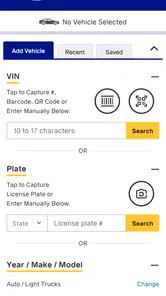
First things first, let's talk about how NAPA PROLink makes your life easier. Remember those days of flipping through thick catalogs or making endless phone calls to find that one elusive car part? Yeah, me too. But with this app, everything is just a few taps away. It's like having a super organized parts store right in your pocket.
A User-Friendly Experience
One thing I absolutely love about this app is its user-friendly interface. Whether you’re a tech whiz or someone who struggles with smartphones, you'll find this app a breeze. The search function is intuitive, and you can filter parts by vehicle type, part number, or even brand. Plus, the app remembers your previous searches, which is a neat little feature for those of us who are a bit forgetful.
Features That Stand Out
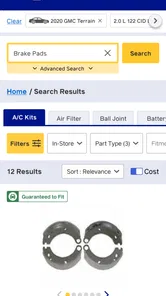
But wait, there's more! The app isn’t just about finding parts. It offers detailed product descriptions, availability status, and even pricing information. This means you can make informed decisions without any guesswork. Plus, the app connects you directly to your nearest NAPA store, so you can check if the part is in stock before you make the trip. How cool is that?
And if you're a professional in the automotive sector, the app has a feature that allows you to manage your orders efficiently. You can track your order history, create customized lists, and even set your preferences for future orders. It's like having a personal assistant, minus the coffee runs!
Putting the search into a real repair
Imagine you are halfway through a brake job and discover that a needed replacement part is missing. Rather than stop to browse a paper catalog, you can use the app to search, check the product information and availability, then decide whether a NAPA store is a practical next stop. The useful move is to confirm the vehicle details carefully and treat the result as a lead to verify, not as an automatic guarantee of fit or stock. That small check can prevent an avoidable trip or a mismatch at the counter.
For a shop, customized lists and order history may help with repeat jobs: they give you a place to revisit familiar items instead of starting every search from scratch. I’d use those tools to organize recurring needs, while still checking that the vehicle and part are right for the job in front of me. For a one-off DIY repair, the app is more of a convenient lookup than a reason to change where you buy parts.
Who should try it, and who can skip it
I’d recommend giving it a try if you work on vehicles regularly, source parts through NAPA, and want search and ordering tasks available from your phone. It may also suit a hands-on owner who wants to check a part before visiting a store. If you mainly use other suppliers, rarely buy parts, or prefer discussing fitment with a person, the usual retailer’s app, website, or a direct call may be a better match. The right choice depends on your buying routine, not on the number of tools installed.
For me, the strongest reason to keep it is convenience within a NAPA-centered workflow; the clearest reason to skip it is that a single-retailer tool has limited value if your shopping is spread elsewhere. Since it costs nothing to download, trying a simple search is a low-commitment way to judge whether it fits your routine. Just keep the final decision grounded in careful fitment and availability checks. If those basics work well for you, it can earn a useful place in your repair workflow; if not, a call or another supplier’s search may be just as practical.
My practical verdict
I would start with a straightforward search, then judge the app on whether it helps with the way I already source parts. Its free access makes that trial easy to justify, but it does not guarantee that every search will be smooth or that the app will suit a shop with a mixed-supplier routine. The modest average rating reinforces my preference for testing it before depending on it under pressure, rather than assuming the experience will fit every user.
Ultimately, the best reason to use it is a regular need to find NAPA parts from your phone. For that person, search tools and order-related features can be convenient additions to an existing workflow. For an occasional repair, an uncertain fitment question, or shopping spread across retailers, a phone call or another supplier’s own catalog may be the better first choice. I’d keep it if it saves me a step on real jobs, and skip it if it adds one.
NAPA PROLink Frequently Asked Questions
Is NAPA PROLink free to download?
NAPA PROLink is free to download, so it can be a convenient option for shops and automotive professionals who want to search for NAPA AUTO PARTS from a mobile device. The app is intended to support parts lookup and shop workflows; downloading it does not, by itself, mean that any parts ordered through it are free.
Who develops NAPA PROLink, and what is its age rating?
NAPA PROLink is developed by NAPA PROLink and is rated Everyone. Its focus is automotive parts and shop use, rather than entertainment, so the rating is suitable for a broad audience. Mechanics, repair-shop staff, parts retailers, and other users can consider whether its professional-oriented purpose fits the way they need to source parts.
What is NAPA PROLink and how does it work?
NAPA PROLink is a comprehensive auto parts solution designed for automotive professionals. It provides access to an extensive catalog of auto parts, making it easy to find and order parts directly from the app. Users can search by vehicle specs, part number, or keyword, ensuring they get the exact part needed. Additionally, it offers real-time inventory updates and order tracking, streamlining the procurement process for garages and automotive service providers.
Is NAPA PROLink suitable for personal use or only for businesses?
NAPA PROLink is primarily designed for automotive professionals such as mechanics, repair shops, and auto parts retailers. While individuals might be able to use the app, its features are tailored to meet the needs of businesses in the automotive industry, offering tools and integrations that support high-volume transactions and inventory management. Therefore, it might be more beneficial for business use rather than personal use.
Does NAPA PROLink offer real-time inventory updates?
Yes, NAPA PROLink provides real-time inventory updates, allowing users to see the availability of parts instantly. This feature is crucial for professionals who need to make quick decisions based on part availability. By accessing up-to-date inventory data, users can prevent delays in service due to out-of-stock items and efficiently manage their ordering process.
Pros
- User-friendly interface for easy navigation.
- Comprehensive vehicle diagnostics tool.
- Regular updates with new features.
- Wide range of compatible vehicles.
- Efficient customer support service.
Cons
- Requires stable internet connection.
- Subscription required for full features.
- Occasional app crashes reported.
- Limited offline functionality.
- Initial setup can be time-consuming.











