N+ Univision
- 0.00
- 0.0
- Installs
- 50.00K
- Price
- Free

Screenshots






Analysis by Reviewed
I spent time with N+ Univision as a news and magazine app, and my first impression is that it tries to bring several ways of following current events into one place. Instead of limiting the experience to written reports, it brings together articles, videos, podcasts, columns, and live television. That mix makes it more useful for people who move between quick updates and longer-form coverage during the day.
The app is developed by Tritón Comunicaciones S.A. de C.V. and is available free of charge. That matters because the decision is not whether the app is worth a subscription, but whether its particular combination of formats is worth adding to your daily news routine. It is aimed at Everyone, runs on Android 7.0 or later, and the current release is version 1.0.5 (308).
How N+ Univision fits into everyday news use
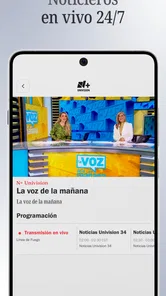
I found the strongest idea here in the variety of ways to consume information. A written article suits the moment when I want to read carefully, while a video is more convenient when I want the main points without staying on a page. Podcasts make sense during a commute or while doing household tasks, and live TV is useful when an event is unfolding and I prefer a continuous broadcast rather than individual updates.
That range also changes how I would use the app compared with a traditional newspaper app. A newspaper-style application usually makes reading the center of the experience. N+ Univision feels broader: it can serve as a reading tool, a viewing destination, and an audio option depending on the situation. The practical advantage is not simply having more sections; it is being able to switch formats without looking for a separate service every time my attention or schedule changes.
For example, I could check an article during a short break, return to the topic through a video later, and choose a podcast when I am away from the screen. I would not treat those formats as interchangeable, because each one has a different rhythm. The article is better for scanning details, the video can provide a more immediate presentation, and the podcast is the least demanding when I cannot look at the phone. The app’s value comes from that flexibility.
The live television component gives it a different role from an ordinary collection of news stories. When I want ongoing coverage, a live channel can feel more natural than repeatedly refreshing a page. At the same time, live viewing asks more from the user: it requires a suitable moment to watch and may be less convenient than reading a short article. I see it as an additional reason to keep the app installed, not as a replacement for every other format.
What the free model means in practice
Because the app is free, there is no purchase decision to calculate before trying it. I can install it, explore its mix of content, and decide whether it fits my habits without committing money. That is a meaningful advantage for casual readers who are comparing several news sources or for someone who wants a second way to follow events without adding another paid service.
More From Our News Desk

Weather by Xiaomi Review: Clear at a Glance, Less Clear Up Close

X Under Pressure: Can It Recover When Posting Goes Wrong?

Clash of Clans Is Won Between the Battles

Android Auto Makes the Case for Quieter Car Software

MobiOffice: Transforming Mobile Productivity with Seamless Integration

EA SPORTS FC™ Mobile Soccer: Redefining Mobile Sports Gaming
Free access does not automatically make every news app equally valuable. The real question is whether I will use more than one part of the experience. If I only want occasional headlines, a mobile browser may already be enough. If I regularly read articles, listen to podcasts, watch videos, and use live television, the app has a clearer reason to occupy space on my phone.
I also appreciate that the free status makes the app easier to recommend to family members or friends who are not ready to pay for a news subscription. The Everyone age rating broadens that audience, although the subject matter of current events can still vary in tone and seriousness from one item to another. The rating describes access suitability, not a guarantee that every story will feel light or family-oriented.
There is a useful distinction between free access and free value. I would judge the value by how quickly the app helps me find the format I need. If the home experience presents articles, videos, podcasts, columns, and live TV in a way that is easy to understand, the absence of a purchase cost becomes a strong advantage. If I have to search too much to move between those formats, the same breadth could feel like clutter.
Where the content mix is most useful
The written side should appeal to readers who want to pause, reread, and choose their own pace. Columns add an opinion-oriented layer that differs from straightforward reporting, so I would approach them as a way to understand viewpoints rather than as a substitute for every factual update. Keeping those two reading modes mentally separate is one of the best habits for using the app well.
Videos are a better match for visual explanations and for moments when I want a more guided presentation. They can be easier to consume than a long article, but they are also less flexible if I need to jump directly to one detail. My practical tip is to use videos for orientation and articles for checking the information I want to remember or revisit.
Podcasts are particularly valuable for people whose news time happens away from a screen. I would use them while walking, commuting, or preparing food, then return to written coverage when a topic deserves closer attention. This two-step workflow is more useful than choosing one format permanently: audio keeps me informed when my hands are busy, while text helps me examine a subject later.
Columns can make the app feel less like a stream of urgent updates and more like a broader publication. They are useful when I want interpretation, context, or a distinct editorial voice. The trade-off is that opinion requires more active judgment. I would not let a persuasive column stand alone when I need to understand the basic facts of a developing story.
Live television is the most situational feature in the lineup. It can be the best option during a major event or when I want a continuous news presence in the background. It is less efficient when I only have a minute to spare. In that case, a short article or a quick video is likely to serve me better.
Small habits that make the app easier to manage
My first recommendation is to decide why I am opening the app before browsing. If I need a fast update, I would go directly to written coverage. If I have time to understand a subject, I would look for a video or column. If I am away from the screen, I would choose a podcast. This simple choice prevents the wide content mix from turning into aimless scrolling.
A second useful habit is to treat the app as a format hub rather than assuming every item deserves the same amount of attention. News consumption can become tiring when every headline competes for immediate focus. I would use articles for priority topics, audio for background awareness, and live TV only when the ongoing broadcast itself is important.
A third trade-off is between convenience and depth. Having several formats in one app saves time, but it can also encourage jumping from one presentation to another without finishing anything. I would avoid opening a video, switching to a column, and then moving to live TV simply because each option is visible. Choosing one format for one purpose makes the experience calmer and more productive.
Another practical approach is to use the app at different points in the day. A written check-in works well when I have a quiet moment. Audio fits a screen-free period. Live television belongs to a longer, more focused window. That schedule uses the app’s range without requiring me to consume every type of content every day.
How it compares with common alternatives
Compared with reading news through a browser, an installed app can feel more focused because the content is gathered in a dedicated space. The browser remains better for searching across many publishers or checking a source outside this app. I would choose N+ Univision when I want its particular editorial ecosystem and multiple media formats, not when I need the widest possible web search.
Compared with a text-first news application, this app offers more variety through video, podcasts, columns, and live TV. That is a clear advantage for people who dislike staying with one medium. The compromise is that a text-first app may feel more efficient for someone who only wants to scan headlines and read articles with minimal distraction.
Compared with a standalone podcast app, N+ Univision is more convenient if I want audio connected to a wider news experience. A dedicated podcast platform may be preferable for someone whose main priority is managing a large audio library across many publishers. The same logic applies to live television: the app is convenient as part of a broader news destination, while a dedicated television service may suit viewers who primarily want channel browsing.
In other words, I would not call it the universal replacement for every news tool. Its strongest position is between a conventional news reader and a multimedia news service. It makes the most sense when I value one place for several formats and do not want my routine divided among separate applications.
Who should install it and who should pass
I would recommend it to readers who want flexibility, especially those who alternate between articles, video, audio, columns, and live coverage. It is also a sensible low-risk choice for someone testing a new news source because the app is free and supports Android 7.0 or later. The broad age rating makes it accessible to a wide audience, though individual stories still deserve personal judgment.
It should also work well for households with different news habits. One person may prefer reading, another may choose podcasts, and someone else may want live television. Having those options together can be more convenient than maintaining separate apps for each activity.
I would be more cautious about recommending it to a reader who wants only a very minimal headline list. The breadth that makes the app interesting may be unnecessary if the goal is simply to scan a few alerts and close the phone. I would also point someone toward a more specialized alternative if they need a broad, publisher-neutral search across many sources rather than one specific news environment.
It is not my first choice for someone who wants deep control over a large podcast collection, a dedicated video library, or an extensive live-channel guide. Those users may prefer tools designed around one medium. N+ Univision is more compelling when the ability to change formats matters as much as the individual format itself.
My verdict on its value
After looking at the app as a daily news companion, I think its free access and multimedia approach give it a convincing reason to try. The strongest benefit is practical: I can match the content type to the moment instead of forcing every update into a written article. That makes it especially useful for busy routines, screen-free periods, and events where live coverage feels more appropriate.
The main limitation is also clear. More options can mean more browsing, and the app will not be equally useful to everyone. A reader who wants only fast text updates may find a simpler tool more efficient, while a dedicated audio or television user may want deeper controls in a specialized service.
For me, the decision is straightforward: I would install it if I wanted a free news app that combines reading, video, podcasts, columns, and live television in one experience. I would skip it if my needs were narrowly focused on one format or on searching across a wide range of unrelated publishers. As a general-purpose news companion, N+ Univision earns its place through flexibility rather than through a single standout function, and that is a useful kind of value when my news habits change throughout the day.
N+ Univision Frequently Asked Questions
Is N+ Univision available for my device, and who publishes it?
N+ Univision is a News & Magazines app published by Tritón Comunicaciones S.A. de C.V. It is available for Android devices running Android 7.0 or later. The app is free to download, and its current version is 1.0.5 (308). Check your device’s operating-system version before downloading to make sure it meets the minimum requirement.
What is N+ Univision, and what content can I watch with it?
N+ Univision is a streaming and news-focused app connected with Univision’s Spanish-language programming. Depending on your location and the current service offering, it may provide live news, breaking stories, interviews, documentaries, entertainment coverage, and selected video clips. The available catalog can change by region, so users should check the app description and in-app listings before downloading.
Is N+ Univision free to download and use?
The app is free to download. Access to every feature or program is not necessarily guaranteed without restrictions. Some videos and live content may be available at no cost, while other programming could require an eligible television-provider login, account, subscription, or may include advertising. Review the sign-in screen, terms, and subscription information carefully before assuming that all content is free.
Do I need an account or a TV-provider subscription to use N+ Univision?
Requirements can vary depending on the content you want to access and your country. Basic news articles or selected videos may be available without signing in, while live channels, premium programming, or expanded on-demand content may ask you to create an account or verify a participating television provider. If you do not have qualifying credentials, some sections may remain unavailable.
Can I watch N+ Univision outside the United States or while traveling?
Availability is often determined by licensing agreements, regional rights, and the country associated with your device or account. Some N+ Univision content may work internationally, but live broadcasts and certain videos can be blocked outside supported territories. Travelers should not rely on the app as a universal replacement for television access, and should confirm regional availability before downloading or subscribing.
Pros
- Live Univision programming and news are easy to access on mobile.
- Includes popular Spanish-language shows
- sports
- and entertainment content.
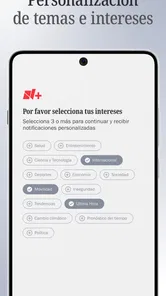
- Personalized recommendations help you discover relevant programs.
- The interface is generally simple to navigate and browse.
- Available on both Android and iOS devices.
Cons
- Content availability varies by location and licensing agreements.
- Some features may require a participating TV provider login.
- Video quality depends heavily on your internet connection.
- Advertising can interrupt free viewing and live programming.
- The app may use significant mobile data during extended streaming sessions.











