myQQ – Quick Quack
- 221.00
- 4.5
- Installs
- 100.00K
- Price
- Free

Screenshots

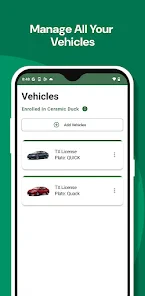
Analysis by Reviewed
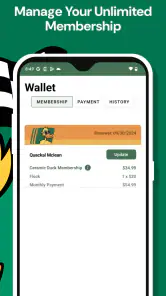
I judge a car-wash app by a simple question: does it make a routine stop easier, or add another chore to the queue? Quick Quack’s app is aimed at people who already use, or are considering, the company’s wash service. Its clearest role is helping members manage an Unlimited Membership, so its value depends less on having a long list of extras and more on whether it fits the way you plan and make car-wash visits.
I’d think of it as a companion to Quick Quack rather than a general car-care tool. If you usually decide on a wash while driving past a location, it may not change your routine much. If you like keeping membership details close at hand and prefer to handle practical tasks on your phone, it has a more obvious place in your day. That distinction matters: an app can be well suited to regular customers while offering little reason for someone who washes elsewhere to install it.
Designed around a membership task
The focus on managing a wash membership gives the app a narrower purpose than a general auto-and-vehicles app. I see that as both its advantage and its limit. A dedicated companion can keep the task of handling a Quick Quack membership separate from maps, payment tools, and other car-related apps. But if you are looking for vehicle maintenance reminders, repair advice, fuel tracking, or a way to compare wash providers, this is not the tool I’d choose for those jobs.
That narrower scope also makes it easier to decide whether the app belongs on your phone. Ask yourself whether you expect to use a Quick Quack Unlimited Membership. If the answer is yes, having a membership-focused app may be useful. If you are only looking for a one-off wash or have no reason to interact with Quick Quack, the app’s central purpose may not match your needs. I would not install it expecting a broad collection of car-care features.
The app is free, and Quick Quack Car Wash is its developer. It sits in the auto-and-vehicles category and is rated for Everyone. It has a 4.5 average from around 1,700 ratings, with more than 100,000 installs. Those figures suggest that it has found an audience among people interested in the service, but popularity alone does not tell me whether it will suit your circumstances. The useful question is still whether its membership-management role lines up with how you wash your car.
Readability and navigation in everyday use
For a practical app, I value screens that let me understand what to do without having to study the interface. Membership tasks tend to be occasional rather than something I open every day, so a familiar, straightforward path matters more than elaborate design. When you return after a gap, you want to find the relevant account or membership area quickly, not remember a complicated sequence of menus.
The app’s current version is 4.2.0, and it supports devices running Android 7.0 or later. That gives readers a useful baseline when checking whether an older phone is eligible. Still, the operating-system requirement does not tell you how comfortable the interface will feel on your particular device. Screen size, text scaling, contrast settings, and the condition of the phone can all affect how easy it is to read and tap through an app.
My practical tip is to set it up at home, not for the first time in a busy wash queue. That gives you a chance to check that you can sign in, locate the membership-related controls, and understand the screens at your own pace. It is a small bit of preparation that can prevent avoidable stress later, especially if you dislike handling account tasks while other cars are waiting behind you.
Motor, sensory, and situational considerations
Using a phone while arranging a car wash can involve more than tapping through a calm screen. Bright sunlight can make a display harder to read, cold weather can make precise taps less comfortable, and a busy queue can make it tempting to hurry. I recommend completing any account or membership steps before you start driving or enter a crowded wash area. The app is most useful when you can give it your attention rather than trying to operate it in motion.
That point is especially relevant for people who have limited hand mobility, tremors, low vision, or sensory sensitivities. I would test the app in a quiet setting and see whether the text, buttons, and navigation work for you with your phone’s own accessibility settings. Features built into a device can sometimes help with readability or interaction, but the experience will vary by phone and by individual. I would not assume that a particular display or control is comfortable for everyone.
If you help a family member manage a membership, think through whose phone and account should be used before arriving. Keeping the login process and membership details organized can reduce last-minute handoffs in a noisy or distracting setting. This is not a special feature claim; it is a practical way to make any account-based service easier to use when one person handles the planning and another is in the car.
How it compares with common alternatives
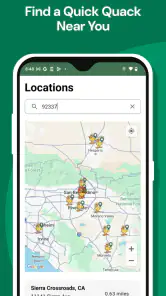
Compared with a general map app, myQQ has a more specific job: it is tied to Quick Quack membership management, while maps are better for checking routes and planning a drive. Compared with a car-care organizer, it is not a substitute for tracking maintenance or repairs. And compared with relying on a paper note or trying to remember membership details, an app can be a more convenient place to start when you need to handle your relationship with the wash service.
The trade-off is that a dedicated service app makes the most sense when you actually use that service. If you choose washes based on whichever business is nearest, compare prices across providers, or rarely wash your vehicle, a general map or browser search may be more flexible. If you have a Quick Quack membership and want a phone-based way to manage it, the dedicated app is more directly relevant than those alternatives. I would decide based on that real-world habit, not on the assumption that every car owner needs another app.
A realistic example is a driver who washes regularly and wants to take care of membership matters before leaving home. They can open the app while planning the trip, check the relevant account area, and then focus on driving once they set off. Someone who remembers the task only after pulling into a queue has a less comfortable workflow. The app cannot make a rushed situation a good time to manage an account, so a little advance planning is part of getting value from it.
Where the convenience has limits
Membership management is a useful purpose, but it does not mean every part of a car-wash visit can or should be handled in the app. I would avoid assuming that it replaces every conversation with staff or answers questions about a specific wash, location, or membership circumstance. If you have a question that affects whether you should visit or how your membership applies, checking directly with Quick Quack is a safer choice than relying on an assumption based on an app screen.
There is also a practical dependency: an app-based workflow requires a compatible phone and a willingness to use it for account tasks. Anyone who prefers not to create or manage accounts on a mobile device may find a more direct, in-person conversation easier. Likewise, if your phone is older than the supported Android baseline, the minimum operating-system requirement is worth checking before you plan around the app.
For a first visit, I would not make the app my only plan until I had confirmed that I could access the membership information I need. Testing the sign-in process in advance is a simple safeguard. If you are helping someone else, make sure they are comfortable with the way the account is handled and know how to get help if something is unclear. These steps are ordinary, but they matter more when a service is tied to a real-world visit and a busy environment.
The app is a stronger fit for people who already know they want to use Quick Quack and value having a digital route to membership management. It is a weaker fit for drivers who want a one-stop car-care dashboard, people who do not use the wash service, or anyone who would rather keep service arrangements offline. I would also pause before relying on it during a time-sensitive visit if I had not yet tried the relevant tasks in a relaxed setting.
A useful fit when the service is already part of your routine
Quick Quack’s app is best judged as a focused companion, not as a complete guide to owning or maintaining a car. If you are a regular customer, putting membership management on your phone may make the administrative side of a familiar errand easier to handle. If you are comparing washing options or only need a wash occasionally, its specialized purpose gives you less reason to keep it installed.
For me, the most sensible approach is to install it only when there is a clear membership-related reason, explore it before a visit, and keep other tools for jobs it is not designed to do. That avoids expecting it to replace maps, vehicle records, or direct customer support. It also gives people who need more time, larger text, or a quieter setting the chance to decide whether the experience works for them without pressure.
There are a few practical questions worth settling before relying on it. Is your device running a supported system? Can you comfortably read and operate the screens? Can you access the membership area before you arrive? If the answers are yes, the app has a straightforward role in planning a Quick Quack visit. If any answer is no, a different route—such as handling the matter another way or asking the company for help—may be more comfortable.
My overall view is that the app’s value comes from matching a specific service and a specific habit. It is not something I would recommend to every driver simply because it is free or popular. But for someone managing a Quick Quack Unlimited Membership, it can be a sensible digital companion, provided they are comfortable using a phone for that task and do not expect it to solve unrelated car-care needs.
Getting Started with myQQ – Quick Quack
First off, downloading and setting up myQQ – Quick Quack is a breeze. It’s available on both Android and iOS, so no one’s left out. Once you’ve got it installed, you’re greeted with a super friendly interface that’s easy to navigate, even if you’re not exactly a tech wizard. I was pleasantly surprised by how intuitive it is to use. If you've ever felt overwhelmed by complicated app layouts, this one's a breath of fresh air.
Features that Make a Splash
Now, onto the features. One thing that stands out about myQQ is its versatility. Whether you’re looking to organize your day with its robust scheduling tools, or you’re in need of some light-hearted entertainment, this app has got your back. I spent a good chunk of time exploring its quirky games section. It’s filled with quick, fun games that are perfect for killing time while waiting for your coffee or just taking a break from work.
Another feature that caught my attention is the community aspect. You can connect with friends, share tips, and even challenge each other in the games. It’s like having a little social hub in your pocket, which is great for staying connected without the need for multiple apps.
Why You Might Love It
What I really appreciate about myQQ – Quick Quack is its ability to cater to both the organized and the playful sides of us. It’s not often you find an app that juggles these two aspects so well. Plus, the app doesn’t bombard you with ads, which is a huge bonus in my book. It’s refreshing to use an app where the user experience clearly comes first.
Final Thoughts
All in all, if you’re looking for an app that’s both fun and functional, myQQ – Quick Quack might just be worth a try. It’s one of those apps that doesn’t just sit on your phone taking up space – you’ll actually want to use it. So, if you’re ready to mix productivity with a side of fun, give it a download and see for yourself.
Remember, it’s not about finding the perfect app, but finding the one that fits perfectly into your daily life. And who knows, myQQ might just be that app for you!
myQQ – Quick Quack Frequently Asked Questions
Can I manage a Quick Quack Unlimited Membership through myQQ?
Yes. myQQ is designed to help you manage your Quick Quack Car Wash Unlimited Membership from your phone. It gives members a convenient place to access membership-related tools, making it easier to handle the account while on the go. The app is focused on Quick Quack membership management rather than serving as a general-purpose organizer or productivity app.
What devices and operating systems can run myQQ – Quick Quack?
myQQ is an Auto & Vehicles app from Quick Quack Car Wash, available for Android and iOS. On Android, it requires version 7.0 or later, so it is worth checking your device’s software before installing. The app is free and rated for Everyone. Its current version is 4.2.0, making it a straightforward option for members who want to manage their Quick Quack account on a compatible phone.
What is myQQ – Quick Quack and what does it do?
myQQ – Quick Quack is a versatile app designed to streamline your daily tasks with ease and efficiency. It provides quick access to a range of features that help in managing schedules, setting reminders, and organizing your tasks effectively. The app is user-friendly and aims to enhance productivity by offering a simple and intuitive interface. Ideal for users looking to optimize their time management, myQQ – Quick Quack stands out by offering unique functionalities tailored for both personal and professional use.
Is myQQ – Quick Quack available for both Android and iOS devices?
Yes, myQQ – Quick Quack is available for download on both Android and iOS platforms. Users can easily find and install the app from the Google Play Store or the Apple App Store. The app is designed to be compatible with a wide range of devices, ensuring that users can enjoy its features regardless of their preferred operating system. By being accessible on both platforms, myQQ – Quick Quack ensures a broader audience can benefit from its productivity-enhancing tools.
Does myQQ – Quick Quack require an internet connection to function?
While myQQ – Quick Quack offers several features that can be accessed offline, certain functionalities such as syncing with cloud services or receiving real-time updates require an internet connection. Users can still manage their schedules and set reminders without connectivity, but to fully utilize all the app's capabilities, it is recommended to have an active internet connection. This ensures seamless integration with online resources and maximizes the app's potential in enhancing productivity.
Pros
- User-friendly interface
- Fast performance
- Free to download
- Regular updates
- Supports offline use
Cons
- Contains ads
- Limited customization
- In-app purchases
- Occasional bugs
- Requires internet for some features

- Category
- Auto & Vehicles
- Version
- 4.2.0











