

MyIRVING
- 261.00
- 4.1
- Installs
- 100.00K
- Price
- Free
Screenshots

Analysis by Reviewed
My first impression of MyIRVING was that it is designed for a very practical moment: I am already thinking about fuel, a stop on the road, or the next visit to an Irving location, and I want that information in one place instead of searching through several screens or relying on memory. It is a free Auto & Vehicles app from Irving Oil, available to everyone, and its expanded feature set makes more sense when treated as a regular travel companion rather than an app I open only once.
The app has a focused purpose, which I appreciate. It is not trying to become a general navigation service, a full vehicle-maintenance log, or a social platform. That focus can make it useful for drivers who already use Irving locations, especially people who want a simpler way to organize fuel-related errands. At the same time, its usefulness depends heavily on whether Irving stations are part of your normal routes. If you rarely encounter them, a general map app may remain the more practical choice.
Getting from installation to a useful first visit
I’d make the first session a quick rehearsal rather than waiting until fuel is urgent: open MyIRVING while parked, explore how you reach location information, and decide what you would need to check before choosing a stop. That gives you a useful sense of the app’s role without turning setup into a project, and it sets up the next section’s practical first-visit workflow.
What to expect before you begin
MyIRVING is best approached with a specific intention. Before opening it, I would decide whether I am trying to find a convenient Irving stop, prepare for an upcoming drive, or make a routine fuel visit easier. That small change in mindset prevents the common disappointment of expecting a complete replacement for every driving app on the phone.
The app was released in January 2020 and is currently at version 6.0.0, with Android support starting at version 8.0. Those details matter if you are installing it on an older device. On a compatible phone, the sensible expectation is a focused Irving experience with expanded features, not a universal directory of every fuel provider or a substitute for turn-by-turn navigation.
Its public reception is reasonably encouraging: it holds a 4.1 average from more than five hundred ratings, with over two hundred written reviews and over one hundred thousand installs. I would read that as evidence that the app has found a real audience, while still leaving room for individual experiences to vary. A rating is useful context, but it does not tell me whether the app fits my route, my phone, or my preferred way of planning stops.
Setting it up without overcomplicating the first session
After installing it, I would keep the first session deliberately simple. Open the app when you have a stable connection, look through the main screen, and identify the action that gets you closest to an actual Irving stop. Avoid trying to explore every available option immediately. The fastest way to judge an app like this is to complete one useful task, not to memorize its entire layout.
More From Our News Desk

 Gmail
GmailGmail in a Busy Inbox: Who Benefits Most?
From first account to crowded workday, Gmail earns its place through dependable search and flexible sorting—but its best fit depends on how much inbox maintenance you can tolerate.

 Prime Video
Switching to Prime Video: What Changes in Your Viewing Routine
Prime Video can make a compelling second home for streaming, but switching means learning a different catalog, rental layer, and route from browsing to playback.

 Universal TV Remote Control
Universal TV Remote Control Works Best as a Reliable Backup
A phone remote earns its place through quick setup and reliable habits. Here is how to get more from Universal TV Remote Control—and where its limits show.

 Weather - By Xiaomi
Weather by Xiaomi Review: Clear at a Glance, Less Clear Up Close
Xiaomi’s weather app makes everyday forecasts quick to scan, but its calm surface can leave useful details and recovery paths harder to find than they should be.

 X
XX Under Pressure: Can It Recover When Posting Goes Wrong?
A resilience-focused review of X, examining setup, mistaken posts, interruptions, weak connections, and the gaps that matter when recovery needs to be dependable.

 Clash of Clans
Clash of Clans Is Won Between the Battles
Its raids are quick; its community is a long-term project of coordination, teaching, rivalry, and shared responsibility—with all the friction that entails.
Latest News



My advice is to set up the app before leaving home rather than while parked at a busy station. That gives you time to notice how the navigation is arranged and whether the information you want is easy to reach. It also avoids the awkward situation of standing beside the car, handling the phone, and trying to learn the interface while other drivers are waiting.
If the app asks you to create or sign into an account, use an address you can access easily and keep the credentials in your usual password manager. If it lets you browse without signing in, I would first test the browsing experience before deciding whether an account is worthwhile. That is a useful trade-off: an account may make personalized use more convenient, while a quick location check may not justify another login for someone who only needs occasional information.
I also recommend checking that your phone can provide a reliable location when you are ready to search nearby. If the results do not look right, do not immediately assume the app is broken. First check whether location access is enabled, whether the phone has a connection, and whether you are testing indoors or in a place where the signal is weak. These simple checks often explain confusing location results faster than repeatedly closing and reopening the app.
Your first meaningful success
The first success I would aim for is not browsing every feature. It is finding an Irving stop that fits a real trip and turning that discovery into a clear plan. Start from your current area or search around the destination you are actually heading toward. Then compare the options by distance and convenience rather than choosing the first result automatically.
This is where the app can earn a permanent place on the phone. Suppose I am leaving work with a low fuel level and need to pick up groceries before heading home. I can use MyIRVING to look for an Irving location along the general direction of travel, check whether it is more convenient than turning around later, and then use my usual navigation tool for the final route if that tool gives better driving guidance. The app handles the Irving-focused part; my map app remains responsible for the broader journey.
That two-app workflow is one of the most practical ways to use it. I would not force MyIRVING to do a job that a dedicated navigation app performs better. Instead, I would use it to identify the relevant Irving option, confirm the stop I want, and then hand the route over to the navigation app I already trust. This avoids unnecessary detours and keeps the roles clear.
For a longer drive, the same approach works before departure. I can look at the route, identify a likely Irving stop near the point where I expect to need fuel, and remember it as a fallback rather than waiting until the tank is nearly empty. The benefit is not just convenience. Planning early gives me more choices and reduces the pressure to accept the first available stop when I am tired or traveling with passengers.
Small habits that make the app more useful
One useful habit is to search from the destination area as well as from your current position. A nearby result may be convenient now but useless once you reach the next part of the trip. Looking ahead helps me avoid treating “near me” as the same thing as “best for my route.” That distinction is easy to miss in a quick search and is especially important when the road ahead offers limited opportunities to stop.
A second habit is to verify the selected location before starting the drive. I look at the address or map position and make sure it is on the side of the road and in the area I intended. This takes only a moment and protects against the classic mistake of selecting a similarly named place or a result that is close in distance but inconvenient in direction.
A third is to use the app while parked, not while moving. Even if the task seems brief, planning the stop before pulling away is safer and less stressful. If a passenger is available, they can handle the search, but I still prefer confirming the destination before the car is in motion.
Finally, I would keep the app updated when a newer version is offered, but I would not treat an update as a guarantee that every experience will be identical across phones. Version 6.0.0 is the current version identified for this review, and Android compatibility begins at version 8.0. Device settings, connection quality, and location behavior can still affect how smoothly the app feels in daily use.
Where first-time users may hesitate
The most likely confusion is understanding the app’s role. MyIRVING is not automatically the best tool for every part of a road trip. If I want traffic conditions, a complex multi-stop itinerary, cycling directions, or broad comparisons between fuel brands, I would reach for a general mapping or travel app instead. MyIRVING makes more sense when the Irving connection is central to the task.
Another possible point of friction is the difference between finding a place and navigating to it. Locating an Irving stop inside the app does not necessarily mean that the app should replace the navigation system I use every day. I treat the location result as the starting point, then use the tool that gives me the clearest route for the actual drive. That division keeps expectations realistic and prevents frustration when a specialized app does not behave like a full map service.
Search results can also feel less helpful if I use vague intentions. “Somewhere nearby” may produce several plausible choices, while a destination, neighborhood, or planned road gives me a more useful frame. When I am in an unfamiliar area, I would search before reaching the urgent stage of needing fuel. A few minutes of planning is easier than making a rushed choice with a nearly empty tank.
If the app seems slow or fails to show the expected area, I would troubleshoot in a fixed order: check the connection, confirm location access, move somewhere with a clearer signal, and retry the search. I would also close other demanding apps if the phone is older. This approach is more effective than changing several settings at once because it makes it easier to identify the actual cause.
Who will get the most from it
I think MyIRVING is a good fit for drivers who regularly pass Irving locations, families who want a straightforward way to plan fuel stops, and commuters who prefer a dedicated Irving tool over repeatedly searching a general map. It is also useful for someone new to an area who wants to understand where Irving options fit around a familiar route.
It may be especially helpful for occasional planners. I do not need to open it every day for it to be valuable. If I am preparing for a weekend drive or an unfamiliar commute, a focused search can save time and reduce guesswork. The app’s free price also makes that occasional use easy to justify, since I can keep it available without adding a purchase decision to the setup.
On the other hand, I would skip it if I do not use Irving locations or if I already have a single navigation app that gives me everything I need. Installing another app only makes sense when its Irving-specific focus adds something to my routine. Drivers who want detailed vehicle records, repair reminders, broad fuel-price comparisons, or comprehensive trip planning should look for tools built around those jobs instead.
The Everyone content rating makes it suitable for a broad household audience, but that does not mean every driver should hand it to a child to manage during a trip. The practical safety rule remains the same: the driver should set up searches and destinations while parked, with a passenger helping when appropriate.
How it compares with the usual alternatives
Compared with a general map app, MyIRVING has a narrower lens. A map app usually wins when I need many brands, traffic layers, multiple stops, or a route that includes several kinds of errands. It can also be more familiar because I already use it for restaurants, shops, and addresses. MyIRVING wins when I want an Irving-centered search without filtering a large map manually.
Compared with searching the web, the app feels more direct for a quick mobile task. A browser search can be useful when I am on a desktop or investigating a wider area, but it may involve extra pages and less consistent interaction while traveling. The dedicated app is easier to justify when fuel planning is a recurring part of my driving routine.
Compared with relying on memory, the app is obviously more dependable for route decisions. I may remember that an Irving location exists somewhere nearby, but that is not enough when I need to choose the right stop for a particular direction of travel. The app encourages me to verify the location instead of trusting an old mental map.
The trade-off is that specialization creates boundaries. I would not expect MyIRVING to replace my preferred navigation app, and I would not install it solely for general road information. Its value comes from combining its Irving focus with the broader tools already on my phone.
What I would do after the first successful use
Once I have found and used one suitable location, I would decide whether the app deserves a regular place in my driving routine. If the first experience saved me a detour or made an unfamiliar stop easier to choose, I would keep it installed and use it before longer trips. If it added no value beyond what my existing map app already provided, I would remove it rather than keeping unused apps out of habit.
For repeat use, I would build a simple personal workflow: check the route before leaving, identify an Irving option that matches the direction of travel, confirm the destination, and then switch to navigation. That process is quick enough for everyday use and deliberate enough for road trips. It also avoids the temptation to search while driving.
I would evaluate the app over several different situations rather than judging it from one rushed opening. A local commute, an unfamiliar town, and a longer drive can reveal different strengths. An app that feels unnecessary for a familiar ten-minute trip may be genuinely useful when I need to plan a stop in a place I do not know.
My overall view is positive but practical. MyIRVING is not a universal driving solution, and it should not be treated as one. It is a focused, free companion for people whose routes include Irving and who want a dedicated way to make those stops easier to plan. The best result comes from using it for Irving-specific discovery, then relying on your normal navigation tool for the complete journey.
With that expectation, the path from installation to first success is reassuringly simple: open it before the trip, find a relevant location, check that it fits your direction, and plan the stop while parked. For the right driver, that focused workflow is enough to make the app worthwhile. For everyone else, a general map app may remain the more flexible choice.
MyIRVING Frequently Asked Questions
Is MyIRVING compatible with my phone?
Before downloading, check your device’s operating system and available storage so installation can proceed smoothly. MyIRVING is an Auto & Vehicles app from Irving Oil, and its current version is 6.0.0. It requires Android 8.0 or later. The app is free, and its content rating is Everyone, making it suitable for a broad audience.
Who publishes MyIRVING, and is it an established app?
MyIRVING is published by Irving Oil for customers who want app-based access to the company’s services. It has been available since January 20, 2020, and has passed 100,000 installs. Those details can help you recognize the official app when searching the app store; check that Irving Oil is named as the developer before installing, particularly if similarly named results appear.
What is MyIRVING, and what can I use it for?
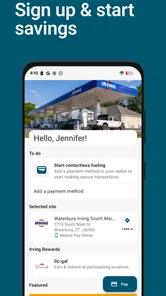
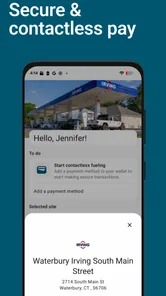
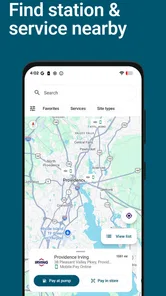
MyIRVING is the official mobile app for Irving Oil customers, designed to make everyday fuel and convenience-store visits easier. Depending on your location and account eligibility, you can use it to find nearby Irving locations, check fuel prices, explore available services, manage rewards or promotions, and access account-related features. The exact options may vary by region and may require registration.
Is MyIRVING free to download and use?
Yes, MyIRVING is free to download from the official Google Play Store or Apple App Store. However, using certain services through the app may involve normal costs associated with fuel purchases, store transactions, mobile data, or third-party payment services. Before downloading, check that your device meets the app’s operating-system requirements and that the application is officially published by Irving Oil.
Do I need an account to use MyIRVING?
Some basic features, such as browsing Irving locations or viewing general information, may be available without signing in. However, features involving rewards, personalized offers, purchase history, account management, or digital payment may require you to create an account and provide personal information. Registration details and available services can differ depending on your country, account type, and the current version of the app.
Pros
- Quick access to account balances
- transactions
- and payment details.
- Convenient mobile payment options for eligible Irving credit accounts.
- Secure sign-in features help protect personal account information.
- Digital statements reduce paper clutter and are easy to review.
- Useful alerts can help track payments and account activity.
Cons
- Features may be limited to customers with eligible Irving accounts.
- Some account updates may take time to appear in the app.
- Requires internet access for most account and payment functions.
- Support options may redirect users to external contact channels.
- App usefulness depends on Irving services available in your region.











