MyFrontier
- 13.11K
- 4.5
- Installs
- 1.00M
- Price
- Free

Screenshots
Analysis by Reviewed
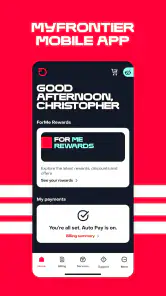
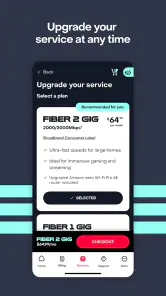
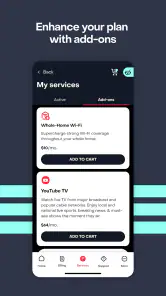
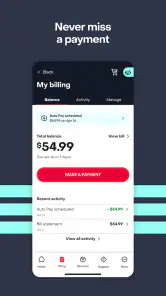
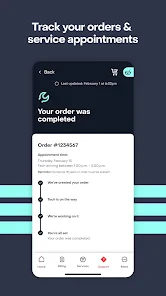
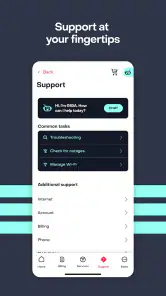
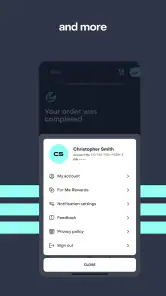
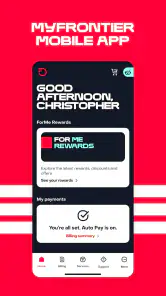
I think MyFrontier makes the most sense as a practical account companion, not an app you open for entertainment or explore just for novelty. It is a free communication app from Frontier Communications, and its 4.5 average from around 74,000 ratings suggests plenty of users find it useful. The real question for me is whether it earns a place on your phone after the first sign-in—and that depends on whether you regularly need to manage a Frontier account while away from home.
Useful from the first sign-in
The appeal is straightforward: instead of waiting until you are at a computer, you can use your phone as the starting point for handling your account on the go. That can matter when you want to check something quickly between errands or while travelling. I would approach it as a utility, not as a replacement for every way of contacting customer support; an app is most valuable when the task is simple enough to handle without a longer conversation.
Because it is tied to Frontier, the first practical question is whether you are a customer who actually needs account access. If you are, having the app ready before a billing or service question comes up can save the small but annoying step of finding the right place to begin. If you do not have a Frontier account, there is little reason to keep it installed simply because it is free.
The first-week test: choose a real task
During the first few days, I would give the app a specific job rather than browsing through it hoping to discover a reason to keep it. Start with the account matter that prompted you to install it, and note whether the phone is a comfortable way to get started. A focused first use tells you more than an abstract impression of the interface: if the account step feels straightforward when you actually need it, that is meaningful; if you prefer using a browser, that preference is useful too.
For a household where more than one person keeps an eye on service matters, the practical question is who should handle account access and when. I would avoid treating the app as a shared household noticeboard unless that is genuinely how your account is managed. Instead, decide whose phone is the convenient place to begin, and keep the login and account details handled deliberately. That small choice can prevent the app from becoming one more place where nobody knows who is responsible for following up.
Does MyFrontier earn a lasting place?
Month-to-month value comes from real account needs
I would judge the app by how often it helps you complete a task you would otherwise put off. A realistic use case is noticing an account issue while away from your laptop and wanting to look into it before it slips your mind. In that moment, mobile access can be more convenient than searching for a browser, remembering account details, and starting from scratch later. The benefit is less about a dramatic feature and more about lowering the effort involved in routine account management.
It also helps to decide what you want from it before opening the app. If you need to deal with an account matter, go in with that task in mind rather than expecting a general communication hub. That habit makes a utility app easier to keep: it has a clear job, and you can close it again once the job is done. Frontier reports more than a million installs, but the number that matters to an individual user is whether the app fits their own recurring needs.
You May Like

Clash of Clans Is Won Between the Battles

Android Auto Makes the Case for Quieter Car Software

MobiOffice: Transforming Mobile Productivity with Seamless Integration

EA SPORTS FC™ Mobile Soccer: Redefining Mobile Sports Gaming

How Microsoft OneDrive Became a Mobile Productivity Giant

How Google Translate Breaks Language Barriers Effortlessly
A realistic day when mobile access helps
Imagine you are out running errands and remember that you meant to check an account detail before the evening gets busy. The useful workflow is simple: open the app while you have the thought, sign in if needed, and see whether you can make progress on that account task. If it turns out to need a longer conversation, you have at least identified the issue while it is fresh instead of trusting yourself to remember it later. I see that as a modest but real advantage of having a customer account tool on a phone.
There is a trade-off, though. A phone is convenient for beginning a task, but it is not always the best place to read carefully, compare account details, or write a long explanation. If the matter is complicated, I would use mobile access to orient myself and then move to a more comfortable support route or a larger screen. Convenience should reduce friction, not pressure you to finish something on a tiny display when that makes mistakes more likely.
Where it fits among the alternatives
Compared with managing an account through a mobile browser, a dedicated app can be a more direct option when you expect to check in repeatedly. A browser may be enough for a one-off task, especially if you prefer not to add another app to your phone. The sensible choice is whichever route lets you handle your Frontier account comfortably; there is no need to treat installing an app as an upgrade if you rarely use the service.
For support questions that require explanation or back-and-forth, I would not assume that an account app can replace speaking with a person. Its strongest role is as a convenient first stop for account management, while a more involved issue may call for another support channel. That distinction helps set fair expectations and avoids the frustration of expecting a mobile utility to solve every kind of problem.
Which alternative suits which customer?
If you already use a mobile browser for Frontier account tasks and it gets the job done, switching just for the sake of having a dedicated icon may not improve your routine. The app makes more sense when you want a phone-first entry point you can return to, while the browser remains a reasonable choice for occasional access or for someone who wants fewer installed apps. For a complicated service concern, the better alternative may be a direct conversation with support rather than repeatedly trying to make a self-service route fit a problem that needs explanation.
I would also separate “account access” from “communication” in the broad sense. A messaging app or email client is built for conversations with other people; MyFrontier is specific to handling a Frontier relationship. If you need a general way to reach friends, family, or colleagues, this is the wrong tool. Its value comes from its narrow purpose, and that same narrowness is why it should not be judged like a daily social or messaging app.
Keeping the app without adding maintenance
My approach would be to install it when I have an immediate reason to manage my account, sign in, and then keep it only if I return to it. If your Frontier account needs attention now and then, leaving the app available can make those occasional tasks easier. If months pass without opening it, a browser may be sufficient and removing the app can be a perfectly reasonable choice.
The version is 4.31.1, and it supports Android 6.0 or later. That gives Android users an easy compatibility check before installing; the app is also rated Everyone, so its content rating is not a barrier for general audiences. I would still make the decision based on account relevance rather than ratings or install totals alone: popularity can indicate broad use, but it cannot tell you how often you personally need the service.
Small habits that make account apps more useful
One practical tip is to pair opening the app with a real account reminder, rather than checking it out of habit without a purpose. If you have a question to investigate, keep the relevant details in mind before signing in so you can make the most of the session. For anything that needs careful follow-up, write down what remains to be done in whatever task system you already trust. The app can be the place you start, but it does not need to become your only record of an unresolved issue.
I would also avoid installing it merely because the service is important and assuming that the app itself will prevent problems. It is a route to account management, not a substitute for paying attention to notices or keeping your own important records. That distinction keeps expectations realistic: the app can make a task more accessible when you choose to deal with it, but the habit of following through still belongs to you.
Limits that affect long-term use
The main trade-off is that the app’s value is closely tied to being a Frontier customer. It is not a general-purpose communications tool, so it will not earn regular use from someone who has no account to manage. Even for customers, the usefulness may come in bursts rather than every day, which is normal for an account utility but worth considering if you are careful about keeping your phone uncluttered.
There is also a natural limit to how much any account app can simplify. A straightforward check may suit a mobile screen, while a matter that calls for context, careful reading, or a longer exchange may be easier through another channel. I would not interpret that as a reason the app has failed; it is a reason to match the tool to the task. Knowing when to stop self-service and seek direct help can save time and frustration.
Who should keep it—and who can skip it
I would recommend trying it to Frontier customers who expect to handle account matters from a phone, especially if waiting until they are back at a computer tends to make small tasks easy to forget. It is also a sensible option for someone who prefers a dedicated account app over returning to a browser each time. The free price removes a purchase decision, but it does not remove the question of whether another app belongs on your device.
I would skip it if you are not a Frontier customer, if your account needs are rare and the browser already works well for you, or if you expect it to serve as a general messaging and customer-support solution. People who dislike keeping dormant utilities installed can try it for a specific task and remove it later if it does not become useful. That is a better test than keeping it indefinitely just in case.
Final thoughts
My recommendation is simple: try it if you already use Frontier and want a convenient mobile route for account tasks; skip it if you only need to manage an account occasionally and prefer using a browser. MyFrontier is free, and the app has been available since May 14, 2015, but neither fact makes it essential for everyone. For the right customer, its lasting value is quiet and practical: it is there when an account task comes up, without needing to become part of your daily routine.
A Seamless Booking Experience
From the moment I opened MyFrontier, I was greeted with a clean and intuitive interface. Seriously, it's like the app knew exactly what I needed! Booking a flight was as easy as pie. You just pop in your travel details, and voila! You’re presented with a plethora of options. The app's smart algorithm even suggests the best deals, which is super handy if you're a budget traveler like me.
Managing Your Itinerary
Once your flight is booked, the app doesn't just leave you hanging. It keeps all your travel info neatly organized. You can view your itinerary, check flight status, and even get updates on gate changes. It's like having a personal assistant in your pocket! I found this feature particularly useful when I had a tight layover and needed to stay on top of things.
Extras and More
But wait, there's more! MyFrontier isn't just about booking flights. It offers a range of additional services to enhance your travel experience. Need to rent a car or book a hotel? No problem, the app has got you covered. And the best part? It’s all seamlessly integrated, so you won't be jumping between apps.
Oh, and if you're someone who loves to rack up miles, you'll be thrilled to know that the app keeps track of your rewards points. I mean, who doesn't love a free flight every now and then?
A Few Hiccups
Of course, no app is without its quirks. While I found MyFrontier to be mostly smooth sailing, there were a couple of times when the app took a while to load. It wasn’t a deal-breaker, but it’s something to keep in mind if you’re in a hurry.
Another thing I noticed was that some features are locked under a premium subscription. While the basic services are more than sufficient for most users, frequent flyers might consider investing in the premium version for added perks.
Final Thoughts
Overall, I’d say MyFrontier is a solid choice for anyone looking to simplify their travel planning. With its user-friendly design and comprehensive features, it’s like having a travel agent at your fingertips. Whether you're a frequent flyer or an occasional traveler, this app is sure to make your journeys a lot more enjoyable. So, why not give it a whirl and see how it transforms your next trip?
MyFrontier Frequently Asked Questions
Can I use MyFrontier to manage my Frontier account while away from home?
Yes. MyFrontier is designed to help you manage your Frontier account on the go, making it useful when you want to access account-management tools away from home. It is a communication app from Frontier Communications. Its focus is account management, so it is different from an airline travel app; check that this purpose matches what you need before downloading.
Is MyFrontier suitable for everyone, and what device does it support?
MyFrontier is a communication app from Frontier Communications, designed for managing a Frontier account on the go. It is rated Everyone and supports Android devices running version 6.0 or later. Its current version is 4.31.1, so checking that your device meets the operating-system requirement before downloading can help you avoid compatibility issues.
What is MyFrontier and what does it offer?
MyFrontier is a comprehensive application designed to enhance your travel experience with Frontier Airlines. It offers features such as flight booking, real-time flight status updates, check-in options, and access to your travel itinerary. Additionally, users can manage their Frontier Miles account, receive personalized travel notifications, and explore exclusive deals and promotions directly through the app.
How do I book a flight using the MyFrontier app?
Booking a flight with the MyFrontier app is straightforward. Simply open the app, navigate to the flight booking section, and enter your travel details such as departure and destination cities, travel dates, and passenger information. The app will display available flight options, allowing you to select your preferred flight and complete the booking process using various payment methods.
Can I check-in for my flight through MyFrontier?
Yes, MyFrontier allows you to check-in for your flight conveniently through the app. You can check-in up to 24 hours before your flight's departure. After checking in, you will receive a mobile boarding pass, which can be used to expedite your airport experience. This feature helps you save time by avoiding long queues at the airport.
Pros
- Intuitive interface for easy navigation.
- Comprehensive flight status updates.
- Customizable alerts for flight changes.
- Secure and fast mobile check-in.
- Frequent flyer rewards tracking.
Cons
- Limited airport maps and info.
- Occasional app crashes reported.
- Inconsistent customer support response.
- No offline mode available.
- Frequent ads can be intrusive.

- Category
- Communication
- Version
- 4.31.1











