My Total Wireless: Account App
- 5.87K
- 4.3
- Installs
- 1.00M
- Price
- Free

Screenshots

Analysis by Reviewed
When I first open a carrier account app, I want to know two things: can I quickly see what is happening with my service, and can I take care of a routine task without hunting through menus? That is the practical promise of My Total Wireless, a free communication app from Total Wireless for managing an account, checking usage, and handling refills. I’d approach it as a companion to your wireless service, not as a general messaging app or a way to compare plans from different providers.
What to expect before you begin
The useful distinction is that this app is tied to a Total Wireless account. If you already use the service, it can give you a convenient place to check account details on your phone; if you are still choosing a carrier, it is not a substitute for comparing coverage, plan terms, or costs. I’d install it when I have a clear account-management job in mind, rather than expecting it to improve the phone’s signal or replace the built-in tools I use for calls and texts.
Its focus is narrower than a full carrier-shopping app, and that is a trade-off I appreciate. For everyday account checks, one dedicated place can be simpler than opening a browser and finding the right account page. On the other hand, someone who wants to compare several carriers or manage service from another provider will get more value from that provider’s own account tools. The app is free, rated for Everyone, and has a 4.3 average from around 32,000 ratings, so it is an established option for customers who want this specific kind of access.
What’s the Buzz About?
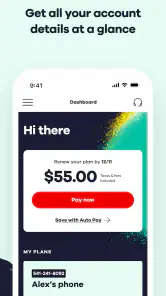
So, what exactly is My Total Wireless? In the simplest terms, it’s a mobile app designed to help you manage your Total Wireless account with ease. Gone are the days of navigating through a confusing website or waiting on hold for customer service. With this app, everything you need is literally at your fingertips.
Features That Make Life Easier
One of the standout features is the ability to monitor your usage in real time. This means you can keep track of your data, minutes, and texts without any guesswork. No more surprise charges at the end of the month! The app also allows you to refill your account directly, saving you the hassle of logging into a website or, heaven forbid, making a phone call.
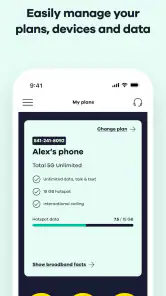
Another cool feature is that you can manage multiple lines. This is a game-changer for families or anyone managing a business with several lines. You can see who’s using what and adjust plans accordingly. It’s like having a bird’s eye view of your entire wireless world.
Getting from install to a first useful check
If this is your first time using a carrier account app, I would keep the first session simple: install it, sign in with the account details you already use, and confirm that the account information and line on screen are the ones you intend to manage. Your first meaningful success does not need to be a refill or a plan change. A clear usage check is enough to show that you have reached the right account and understand where to look next.
You May Like

Clash of Clans Is Won Between the Battles

Android Auto Makes the Case for Quieter Car Software

MobiOffice: Transforming Mobile Productivity with Seamless Integration

EA SPORTS FC™ Mobile Soccer: Redefining Mobile Sports Gaming

How Microsoft OneDrive Became a Mobile Productivity Giant

How Google Translate Breaks Language Barriers Effortlessly
That order is useful because signing in and selecting the correct line are separate things to pay attention to when more than one line is involved. Before making any account change, pause on the line name or details shown and compare them with the person you mean to help. I would treat this as a small household routine rather than a technical chore: check the line, check the usage, then decide whether anything needs doing.
A realistic example is a parent checking service before a family road trip. Rather than waiting until someone is low on data away from home, the account manager can look at usage beforehand, identify which line needs attention, and decide whether a refill makes sense. The value is not that the app predicts the trip’s needs; it is that it puts account information within reach before a rushed decision has to be made.
First setup and a useful first check
For a first-time user, I’d start by having the Total Wireless account details you normally use ready, then sign in and confirm that the account and line you care about are the ones shown. That small check matters if you help manage several lines: it reduces the chance of acting on the wrong person’s service when you are in a hurry. Once you are in, checking the usage view is a sensible first task because it gives you a baseline before you need to make a refill decision.
A realistic use case is checking your account while planning a busy week away from home. If your data use has been higher than expected, you can spot that early and decide whether to change your habits or take another account action, rather than discovering the issue when you need your phone most. I would still treat usage figures as a guide for planning, not a reason to assume every app on your phone is measured or controlled from here.
How to make usage checks more useful
I find a usage screen most helpful when I compare it with my own routine instead of treating one glance as a forecast. For example, if I have streamed more video or used navigation heavily lately, that context makes a higher data figure easier to interpret. Checking at roughly the same point in a billing or service cycle can also make changes easier to notice, without turning account management into a daily ritual.
There is a practical limit to what a carrier account view can tell you: it helps you understand service usage, but it is not the same as inspecting which settings or apps on your handset are consuming data. If a number looks surprising, I would use the phone’s own settings to investigate app-level activity, then return to the account app for the carrier-side view. Using both tools answers different questions and avoids expecting one screen to diagnose everything.
User Experience: Smooth Sailing All the Way
The first thing that struck me about the app was its user-friendly interface. It’s intuitive and straightforward, which, in my book, is the hallmark of a well-designed app. You don’t need to be a tech guru to navigate through it. Everything is laid out clearly, and the design is clean and uncluttered.
And let’s talk about performance. I’ve used apps that lag and crash, but this one runs like a dream. Whether you’re checking your usage or adding funds, the app is fast and responsive. It’s reliable, which is crucial when you’re managing something as important as your phone plan.
Refills, shared lines, and sensible checks
A refill is a more consequential action than simply viewing usage, so I would not rush through it just because the app makes account management convenient. First confirm which line you are working with, then review the account information shown before completing the action. If another family member handles the account, agree on who is responsible for refills; two people acting independently can create confusion even when both are trying to help.
For someone who manages several lines, the strongest workflow is to use the app as a central place to check each person’s situation, not as a reason to make identical decisions for everyone. One line may need attention while another does not. A quick line-by-line review is less likely to lead to an unnecessary action than assuming every member of the household has the same usage pattern.
Small habits that make account management easier
For families, I’d make a habit of checking each line before making a change and agreeing on who is responsible for refills. The convenience of seeing several lines in one place can prevent last-minute confusion, but shared access also means people should be clear about which account actions they are authorized to take. For an individual account, a quick check before a refill can help you avoid acting on stale assumptions about how much service you need.
If a screen does not immediately match what you expected, I would first verify that I am signed into the right account and viewing the intended line, then give the app another try after checking my connection. A carrier account app depends on both account access and a working network connection, so an empty or slow-loading view does not automatically mean the phone service itself has stopped working. For billing or account issues that need explanation, customer support may still be the more appropriate route.
When the website or another tool is the better choice
The app makes the most sense when I want a quick account check on the phone I already carry. A browser can be more comfortable when I am reviewing a longer account task, comparing plan details, or simply prefer working on a larger screen. The app and website are not competing solutions so much as different routes to account management; I would choose the one that makes the task clearer, especially if a decision involves several people or account details.
For handset troubleshooting, the phone’s settings remain the better place to look. For a service question that needs a person to explain what happened, customer support is more suitable than repeatedly refreshing an account screen. That distinction helps set realistic expectations: this is a convenient self-service companion, not a replacement for every carrier interaction or every diagnostic tool on the device.
Who will get the most from it?
I’d recommend it most to existing Total Wireless customers who regularly check usage, refill from their phone, or keep an eye on more than one line. It is especially handy for the family member who coordinates service for a household, because a single account-oriented workflow can be easier than asking everyone to track their own details. The app has more than a million installs and is free, making it easy to try if you are already a customer and want to see whether mobile account management fits your routine.
I would skip it if you do not use Total Wireless, or if your main goal is to shop across carriers, troubleshoot handset settings, or replace your phone’s calling and texting apps. It is also not a reason to switch providers by itself: the account app can make service easier to manage, but it does not answer whether the carrier’s plans and coverage suit your needs. That distinction is worth keeping in mind before you install it.
A few practical expectations before relying on it
One question new users often have is whether installing an account app changes their phone service. I would treat installation and account management as separate: the app is a way to access account tools, while the service itself remains the thing you are managing. If you are only exploring, start with a view-only task such as checking usage and leave any refill or account action until you are confident you have the right line.
Another useful question is whether this can replace checking usage on the phone itself. I would not use it as a complete substitute. The carrier account view is useful for understanding service consumption, while handset settings can help identify which apps are using data. Looking at both is a better troubleshooting habit than assuming either one tells the whole story.
Finally, people managing a family account may wonder whether one central view means every line should be handled in the same way. It does not. The convenience is being able to review several lines together; the judgment still needs to be line-specific. That is where the app can save time without encouraging a one-size-fits-all decision.
Final Thoughts
All in all, My Total Wireless is a fantastic tool for anyone looking to streamline their mobile service experience. It’s not just about convenience; it’s about control. You’re in the driver’s seat, and that’s a powerful place to be. If you’re tired of the headaches that come with managing your phone plan, I’d definitely recommend giving this app a try. It’s like having a little slice of peace of mind right in your pocket.
Total Wireless released the app on November 9, 2016, and its current version is R28.9.0, with Android 7.0 as the minimum operating system requirement. Those details make it useful to check compatibility before installing on an older device. My practical recommendation is to sign in, confirm the right line, and make one straightforward usage check first. If that works smoothly, you will know whether the app’s focused account tools are a good fit for the way you manage your service.
My Total Wireless: Account App Frequently Asked Questions
Can I use My Total Wireless to check how much data I have left?
Yes. My Total Wireless is designed to make data usage easier to manage, so you can use it to check your usage alongside other account details. This can help you keep an eye on your service between billing or refill tasks. The app’s purpose is account management for Total Wireless customers, rather than a general tool for tracking data across different carriers.
Can I make payments or arrange automatic refills through the app?
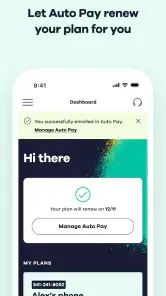
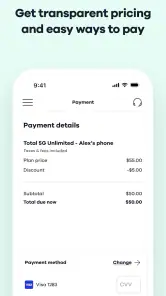
The app supports account tasks related to payments and service plans. You can review your payment history, add service plans, and enroll in Auto-Refill, making it possible to handle common service-management tasks from your phone. These options are especially useful if you prefer to keep track of your account in one place instead of managing each task separately.
Is My Total Wireless free to download, and who is it intended for?
My Total Wireless is a free communication app developed by Total Wireless for people who want to manage their phone service from a mobile device. Its store age rating is Everyone, making it suitable for a general audience. The app is intended for Total Wireless customers who want a convenient way to view and manage their account rather than handle those tasks elsewhere.
What is My Total Wireless and what features does it offer?
My Total Wireless is a mobile application designed to manage your Total Wireless account efficiently. It offers features such as checking your data usage, monitoring your account balance, and reviewing your payment history. The app also allows users to add service plans, enroll in Auto-Refill, and manage multiple lines under one account. Additionally, it provides customer support options to address any issues or queries you may have.
Is My Total Wireless app available for both Android and iOS devices?
Yes, My Total Wireless is available for download on both Android and iOS platforms. Android users can find it on the Google Play Store, while iOS users can download it from the Apple App Store. The app is designed to be user-friendly and is compatible with most smartphones, ensuring that a wide range of Total Wireless customers can access its features and manage their accounts on the go.
Pros
- Affordable plans with no contracts
- Nationwide coverage on major networks
- Easy plan management via app
- No credit checks required
- Flexible data options
Cons
- Limited customer support options
- Data speed may be throttled
- International calling not included
- No physical stores for assistance
- Limited phone compatibility

- Category
- Communication
- Version
- R28.9.0











