My SafeLink
- 4.24K
- 4.0
- Installs
- 1.00M
- Price
- Free

Screenshots

Analysis by Reviewed
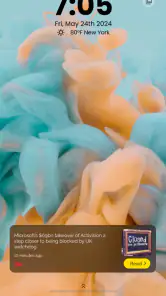
I would judge My SafeLink by one practical question: does it make reaching SafeLink easy enough that I keep using it after the first few days? This is a focused access app, not a general messaging or file-sharing tool. Its appeal is having a SafeLink entry point close to the phone’s lock screen. That can be worthwhile when checking the account is part of my routine, but a shortcut earns space only if it saves effort repeatedly.
When the shortcut feels useful
The lock-screen angle is most appealing during quick, unplanned checks. If I need to reach my SafeLink account while getting ready to leave or between errands, an access point near the phone’s starting screen could make the task feel less like a detour. It is a small convenience, not a new way to communicate, and its value depends on whether I reach for SafeLink often enough to notice the difference.
For example, I might remember that I need to check my account while waiting for a ride. I can take care of it then rather than putting it off until I have time to search through my phone. I would still be careful about where I use the shortcut: if someone else can see or handle my phone, keeping account access visible may not suit me. Convenience should fit the way I secure my device, not replace sensible care.
What to expect from an account-access app
My SafeLink is a free communication app from Mgames LLC, rated for Everyone. It has a 4.0 average from around 9,800 ratings and more than a million installs. First released on April 29, 2020, it is currently at version 1.1.9 and supports Android 7.0 and later. That gives me a sense of an established app, but popularity alone cannot say whether its particular shortcut will help with my own habits.
The main comparison is with the route I already use to reach SafeLink. If opening the service through my usual phone workflow is quick enough, another app may add little. If I repeatedly lose time finding the right access point, a dedicated route could be more useful. I would not compare it with ordinary chat apps as though they had the same job: this is about reaching SafeLink, not replacing how I call or message people.
Keeping it useful after the novelty
My SafeLink is a free communication app from Mgames LLC. It is rated for Everyone, has a 4.0 average from around 9,800 ratings, and has passed a million installs. It first appeared on April 29, 2020; version 1.1.9 supports Android 7.0 and later. Those figures suggest a well-established audience, but they do not tell me whether the shortcut will be valuable for every SafeLink customer. The deciding factor is how often I need that account access.
Month-to-month value and the alternatives
If I use SafeLink often, a direct route can become a quiet convenience that keeps paying off. If I only open the account occasionally, the initial novelty may fade and the standard way of reaching SafeLink may be perfectly adequate. I would compare it with whatever route I already use—such as opening the service through my usual phone workflow—rather than expecting it to replace a full-featured communication app. Its value is narrow by design: faster access matters, but it is not a reason by itself to change how I handle calls, messages, or other account tasks.
You May Like

Clash of Clans Is Won Between the Battles

Android Auto Makes the Case for Quieter Car Software

MobiOffice: Transforming Mobile Productivity with Seamless Integration

EA SPORTS FC™ Mobile Soccer: Redefining Mobile Sports Gaming

How Microsoft OneDrive Became a Mobile Productivity Giant

How Google Translate Breaks Language Barriers Effortlessly
Before making it part of my routine, I would check that the lock-screen placement behaves as expected on my own phone and that I am comfortable with account access being more visible there. A shortcut can save time, yet its convenience should fit the way I secure and share my device. If other people regularly handle my phone, I would be more cautious and keep access behind the protections I already trust.
Maintenance, friction, and staying power
The maintenance burden should be modest if I use it only for its intended access role: keep the app available, install updates when I normally maintain my phone, and confirm it still provides the route I rely on. The practical test is not whether it feels novel on day one, but whether it saves effort often enough to justify another app on my device. If that shortcut stops being part of my routine, removing it is a reasonable choice rather than a failure.
There is also a possible source of fatigue: a dedicated app can feel unnecessary if I already have a dependable way to reach SafeLink, or if I rarely need to check the account. I would skip it if I am looking for general-purpose private messaging, document sharing, or a broad communications hub. For those needs, a tool built around the specific task is a better match. My SafeLink makes most sense for people who want a simpler path to SafeLink itself.
A sensible way to test the habit
I would give the shortcut a short, practical trial rather than deciding based on the first impression. The useful question is not simply whether I can open it, but whether I remember to use it when I would otherwise take my usual route. If I reach for it naturally during the kinds of quick account checks I already make, that is a stronger sign of lasting value than novelty alone.
It also helps to notice when the app does not fit. If I rarely check SafeLink, I should not invent extra reasons to open it just to justify keeping it installed. If my normal route is already easy, the app may be redundant. Conversely, someone who repeatedly searches for the right entry point could find the lock-screen approach helpful even if the time saved on any single visit seems small.
Getting Started with My SafeLink
Setting up My SafeLink was a breeze. After downloading the app, I was prompted to create an account, which is pretty standard. The user interface is clean and intuitive, making navigation seamless even for those who aren't the most tech-savvy. Once logged in, it was easy to start creating secure links.
Features That Stand Out
What I loved about My SafeLink is its encryption technology. Every link you create is encrypted, ensuring that only the intended recipient can access the information. This is crucial in today's digital age where data breaches are all too common.
Another feature worth mentioning is the ability to set expiration dates for your links. This means that once the link has served its purpose, it automatically becomes inaccessible, adding an extra layer of security. Plus, you can track when your link was accessed, which is a nice touch if you're keen on monitoring your data's journey.
User Experience
Using My SafeLink felt like having my personal security guard for data. The app runs smoothly without any noticeable glitches. I appreciated the detailed help section which guides you through any potential hiccups you might encounter. It's evident that a lot of thought has gone into making this app user-friendly.
However, I did notice that the app requires a stable internet connection to function optimally. While this isn't a deal-breaker, it's something to keep in mind if you're often in areas with spotty service.
Security habits and everyday trade-offs
For anything involving account access or a link that I intend to share, I would pause to check the destination and audience before proceeding. A useful security feature does not remove the need to think about who should receive information. If I use the link-expiration option described above, I would choose a period that gives the intended person enough time to act, rather than making it so brief that I have to recreate and resend it.
Tracking access can answer a limited, practical question: whether a link has been opened. I would not treat that as proof that the recipient understood the contents or that no one else saw them. That distinction matters when deciding whether this app’s sharing tools fit a sensitive task. For casual sharing, the controls may be convenient; for highly confidential material, I would first consider whether the app and my own handling process meet the level of care the situation needs.
Who is likely to keep it installed?
I see the clearest fit for someone who relies on SafeLink and values a direct, repeatable way to get to the relevant account or sharing workflow. People who are comfortable with a focused app may appreciate not having to treat it as a complete communications suite. It is less compelling for someone who opens SafeLink only once in a while, prefers to keep the lock screen minimal, or already has a simple route that works reliably.
One question a prospective user may have is whether this is a general-purpose messaging service. I would not choose it for that purpose: its strongest case is tied to SafeLink access and the link-related tools described here, not replacing a familiar chat app. Another sensible question is whether the lock-screen convenience works equally well on every phone. I would verify the behavior on my own device before building a habit around it, since the usefulness of that placement depends on how it fits my setup.
Final Thoughts
For the right person, My SafeLink can be a useful, narrowly focused shortcut rather than something I expect to open all day. My SafeLink is worth considering if SafeLink access is a regular part of your routine and you value a direct route from the lock screen. I would not install it just because it sounds safer or assume that a convenient entry point changes how account security works. Try it if the shortcut solves a recurring annoyance; otherwise, your current way of reaching SafeLink may be enough.
So, if you're on the hunt for an app that combines security with ease of use, I'd say give My SafeLink a shot. After all, in the digital realm, you can never be too safe!
My SafeLink Frequently Asked Questions
Who publishes My SafeLink, and what kind of app is it?
My SafeLink is a communication app developed by Mgames LLC. It is intended for people who use SafeLink Wireless and want a convenient way to reach their service from a mobile device. Its store summary highlights easy SafeLink access from the lock screen and invites users to apply for Lifeline, making it especially relevant to people exploring or managing SafeLink service.
What is My SafeLink and how does it work?
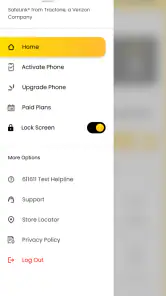
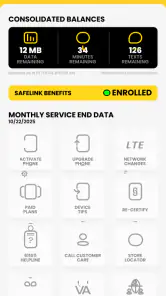
My SafeLink is a mobile application designed to provide users with secure and easy access to their SafeLink Wireless accounts. It allows users to manage their account details, check their balance, view usage history, and add airtime conveniently. The app is user-friendly, ensuring that you can handle your SafeLink services from anywhere at any time, making it an essential tool for SafeLink Wireless users.
Is My SafeLink available for both Android and iOS devices?
Yes, My SafeLink is available for download on both Android and iOS devices. You can find it on the Google Play Store for Android devices and the Apple App Store for iOS devices. This ensures that users across different platforms can conveniently access and manage their SafeLink Wireless services through their smartphones.
Do I need an active SafeLink Wireless account to use the app?
Yes, to fully utilize the My SafeLink app, you need an active SafeLink Wireless account. The app is designed to help you manage your account, so having an active account is essential to access features such as checking your balance, viewing usage, and adding airtime. If you don't have an account, you can visit the SafeLink Wireless website to sign up.
Is My SafeLink free to download and use?
Absolutely, My SafeLink is free to download and use. There are no hidden fees or charges for accessing your SafeLink Wireless account through the app. However, be mindful of any data charges from your mobile carrier when using the app if you're not connected to Wi-Fi. Always check with your provider for any potential charges.
Pros
- Easy setup and user-friendly interface.
- Strong encryption ensures secure links.
- Supports multiple file formats.
- Quick sharing of links and files.
- Cross-platform compatibility.
Cons
- Limited free version features.
- Occasional connectivity issues.
- No offline access to files.
- Ads in the free version.
- Subscription required for premium features.

- Category
- Communication
- Version
- 1.1.9











