

My Porsche
- 200.00
- 3.9
- Installs
- 50.00K
- Price
- Free

Screenshots
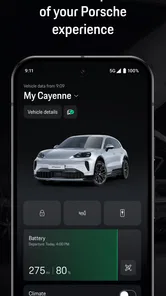
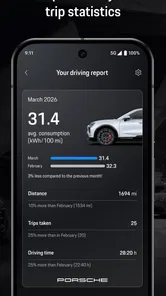
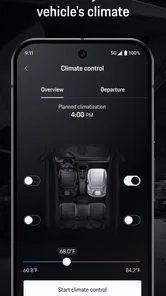
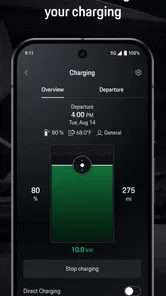
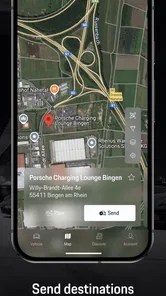
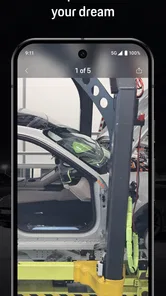
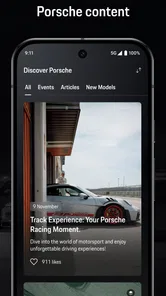
Analysis by Reviewed
If you own a Porsche, the first thing to understand about My Porsche is that it is meant to sit alongside the car rather than replace every other automotive tool on your phone. I found it most useful as a central place for Porsche-related ownership tasks and information, with a cleaner experience than jumping between general driving apps, a manufacturer website, email, and a dealer’s separate communication channels. It is a free app in the Auto & Vehicles category from Porsche Cars North America, Inc., and its store summary calls it “Your digital companion.”
That description is brief, but it points to the app’s real purpose: giving Porsche owners a dedicated digital starting point. It is not a racing game, a generic navigation app, or a vehicle marketplace. The experience is aimed at people who already have a relationship with the brand and want that relationship to be easier to manage from a phone. If you are considering a Porsche, the app may still be worth exploring, but its value becomes clearer once you have a vehicle or ownership connection to organize.
What to expect before you install My Porsche
I would approach this app with practical expectations. It is not the kind of download that becomes useful simply because it is installed. The meaningful experience depends on signing in, connecting the right vehicle or ownership details, and understanding which parts of the app apply to your situation. That is common for a manufacturer app, but it matters here because a new user may open it expecting an instant dashboard of useful information and instead find that the first stage is about establishing the account relationship.
The app has an average rating of 3.9 from nearly one thousand ratings, which suggests a mixed but generally workable experience rather than universal satisfaction. I read that as a reason to judge it by your ownership needs. If you want a direct Porsche-specific channel, the app makes sense. If you only need traffic directions, fuel prices, parking, or trip planning, a general automotive app will probably be faster and more capable.
Its audience is also narrower than the install count might suggest. The app has passed fifty thousand installs, but that does not make it a universal car companion. A Porsche owner who wants brand-specific information can gain something from it; a driver of another make will have little reason to keep it. The Everyone age rating makes it broadly accessible, although the practical usefulness still depends on the adult ownership and account details connected to the vehicle.
One useful way to think about it is as an ownership layer. Google Maps or Apple Maps may remain your everyday navigation choices. A maintenance reminder may live in your calendar. Dealer conversations may happen through phone calls or email. My Porsche is most valuable when it reduces the need to remember where each Porsche-related detail belongs. That is a modest promise, but it can save time when you are preparing for service, checking vehicle information, or trying to keep ownership details in one place.
I would not install it expecting a complete replacement for the car’s controls or every function available through a physical key, the dashboard, or a service center. Manufacturer apps often depend on vehicle configuration, region, account status, and connected services. Those differences can shape what appears after sign-in. The important point for a first-time user is not to assume that an empty or limited screen means the entire app is broken. It may mean the setup relationship has not been completed.
More From Our News Desk

 Gmail
GmailGmail in a Busy Inbox: Who Benefits Most?
From first account to crowded workday, Gmail earns its place through dependable search and flexible sorting—but its best fit depends on how much inbox maintenance you can tolerate.

 Prime Video
Switching to Prime Video: What Changes in Your Viewing Routine
Prime Video can make a compelling second home for streaming, but switching means learning a different catalog, rental layer, and route from browsing to playback.

 Universal TV Remote Control
Universal TV Remote Control Works Best as a Reliable Backup
A phone remote earns its place through quick setup and reliable habits. Here is how to get more from Universal TV Remote Control—and where its limits show.

 Weather - By Xiaomi
Weather by Xiaomi Review: Clear at a Glance, Less Clear Up Close
Xiaomi’s weather app makes everyday forecasts quick to scan, but its calm surface can leave useful details and recovery paths harder to find than they should be.

 X
XX Under Pressure: Can It Recover When Posting Goes Wrong?
A resilience-focused review of X, examining setup, mistaken posts, interruptions, weak connections, and the gaps that matter when recovery needs to be dependable.

 Clash of Clans
Clash of Clans Is Won Between the Battles
Its raids are quick; its community is a long-term project of coordination, teaching, rivalry, and shared responsibility—with all the friction that entails.
Latest News



The first setup is more important than the download
After installing, I would begin with the account you actually intend to use for Porsche ownership rather than creating a second account casually. A duplicate login can make later vehicle association and support conversations more confusing. Keep your vehicle information and any relevant ownership details nearby, and use the same personal information you normally give to Porsche or your dealer. This is one of the less obvious ways to avoid a frustrating first session: treat setup as an identity check, not as a quick tour.
The app was released on October 28, 2021, and its current version is 20.26.34-pcna+184861. That version detail matters less as a feature promise than as a reminder to keep the app updated before judging it. A manufacturer companion can change its screens and available account flows over time. If the application behaves differently from an older guide or a friend’s phone, the difference may come from the current version, the vehicle relationship, or the account region rather than from anything you did incorrectly.
Once signed in, I would take a slow look at the profile and vehicle areas before tapping through every menu. Confirm that the displayed vehicle is the one you expect and that the ownership context looks right. This is a better first check than immediately searching for advanced functions. If the wrong vehicle or incomplete profile appears, correct that foundation first; otherwise, you may spend time testing features that are not being applied to the right car.
A practical setup habit is to allow yourself a few minutes when you are parked and have stable connectivity. Do not try to complete the first association while rushing into a meeting or sitting in the driver’s seat about to leave. The app is designed for ownership management, and a calm setup gives you time to read labels, verify details, and notice whether a requested action is informational, account-related, or connected to the vehicle. Never make the phone the focus while driving; complete account work before the journey begins.
Another useful tip is to capture the app’s structure mentally rather than memorizing every button. I would identify three areas: personal account information, vehicle-specific information, and ownership support or service-related paths. The exact arrangement can evolve, but this mental map helps when you return later. If something appears missing, you can ask whether it belongs to the account, the vehicle, or the service relationship instead of repeatedly refreshing the same screen.
Your first meaningful success should be simple
For a first-time user, I would define success as confirming that the app recognizes your Porsche and that you can reach the information or ownership pathway you installed it for. That may sound less exciting than testing every available option, but it is the most reliable first milestone. Once the correct vehicle and account context are visible, later tasks become easier to interpret and troubleshoot.
My recommended first session is short. Sign in, review the vehicle connection, open the main ownership sections, and choose one task that matches your immediate need. If you are preparing for service, start with the service-related area rather than wandering through unrelated menus. If you are simply getting familiar with the car, review the vehicle information available to you and note where you would return when you need it. The goal is to create a dependable route, not to finish a tour.
A realistic example is a driver who notices a service reminder in a calendar and wants to prepare before calling the dealership. Instead of searching old emails for the vehicle details, the driver opens My Porsche, checks the associated car, and uses the relevant ownership or service path as the starting point for the conversation. Even if the final appointment still requires another channel, the app has done something valuable: it has reduced the amount of information the driver must gather manually.
This workflow also shows an important trade-off. A dedicated manufacturer app can provide context that a general reminder app cannot, but it may require more account setup. A calendar is quicker for a simple date. My Porsche is more useful when the question is connected to the specific Porsche and the broader ownership relationship. I would use both rather than forcing one app to do the other’s job.
For another everyday scenario, imagine lending the car to a family member and later needing to remember where the relevant vehicle information is stored. A general notes app may contain a copied detail, but it can quickly become outdated. A manufacturer companion is better suited to keeping the owner’s digital relationship organized, provided the account and vehicle association are correct. I would still avoid treating the app as the only source of truth for urgent matters; the vehicle’s own instruments and official service communication remain important.
The first successful action should also teach you how much the app depends on context. If a menu is available but does not lead to an immediate result, check whether it requires a connected vehicle, a completed profile, or a particular ownership situation. This is not a reason to abandon the app. It is a reason to separate “the app has no value” from “my setup is not ready for this function.” That distinction saves a lot of unnecessary reinstalling.
Where new users commonly get confused
The biggest source of confusion is expecting every Porsche owner to see the same experience. Vehicle equipment, account status, region, and connected services can affect what is relevant on screen. I would not compare your first session button by button with a screenshot from someone else. Instead, focus on whether your own vehicle is identified correctly and whether the app gives you a clear route to the task you need.
Another common mistake is treating the app as a universal remote control. My Porsche is a digital companion for ownership, but that phrase should not be interpreted as a guarantee that every physical vehicle function has a matching phone control. Some actions belong in the car, some belong with a dealer or service team, and some may depend on the vehicle and account configuration. If you need an immediate driving control, use the car’s normal controls rather than searching the phone app while moving.
Users can also confuse account information with vehicle information. If your profile is correct but the vehicle area is incomplete, signing out repeatedly is unlikely to solve the real issue. First check the association and ownership context. Conversely, if the car appears correctly but personal details are wrong, look at the account side rather than assuming the vehicle connection must be rebuilt. Thinking in these two layers makes troubleshooting more methodical.
I also recommend resisting the urge to compare the app directly with a dealer’s phone number or a generic service booking tool. Those alternatives may be better for a single urgent appointment because a person can answer a specific question immediately. The Porsche app’s advantage is continuity: it gives you a dedicated place to begin, review, and organize brand-related ownership tasks. Its weakness is that a digital pathway can feel slower when you already know exactly which person or department you need.
There is a similar trade-off with general automotive apps. They often provide broader information for mixed vehicle households, such as navigation, fuel, parking, or reminders across several brands. My Porsche is more focused. That focus is a strength if you want Porsche-specific context, but it is a poor reason to replace the general tools you already use successfully. I would keep a broad driving app for the road and use this one for the ownership relationship.
Privacy and notification choices are worth considering during setup, too. I would enable only the notifications that help me act, such as information I genuinely want to see, and review the rest later. An ownership app can become irritating if every message feels urgent. The best arrangement is one where the app supports your routine without making you check it constantly.
How to make the app useful after the first week
Once the initial setup works, the next step is to build a repeatable habit around one or two ownership moments. For me, that would be service preparation and vehicle information review. I would open the app before contacting a dealer, confirm that the correct Porsche is selected, and use the information there to make the conversation more precise. This is more useful than opening it every day without a purpose.
You can also make the app a reference point before longer trips, but I would be selective. Use it to check the Porsche-related information that matters to your preparation, then use a dedicated navigation app for live routing and traffic. This division of labor is practical: My Porsche keeps the vehicle context close, while a navigation specialist handles the road. Expecting one app to excel at both is likely to make the experience feel weaker than it needs to be.
If you share responsibility for the car with another person, agree on which account should be treated as the primary ownership reference. That small decision can prevent conflicting edits, duplicated reminders, and uncertainty about which profile is connected. I would also avoid copying sensitive or changing vehicle details into several unrelated apps unless there is a clear reason. A smaller number of trusted reference points is easier to maintain.
For buyers who are still deciding whether to purchase a Porsche, the app can help set expectations about digital ownership, but I would not use it as the sole reason to choose a vehicle. The quality of the car, dealer support, service experience, and the functions available for the specific model matter more. The application is a supporting part of ownership, not a substitute for evaluating the vehicle itself.
For existing owners who dislike account-based apps, the decision is more nuanced. If your current routine already works through the dashboard, paper records, phone calls, and a calendar, My Porsche may feel like another place to check. I would install it only if it can replace a real point of friction, such as finding vehicle information or starting service-related tasks. Digital consolidation is helpful only when it reduces work rather than adding another inbox.
Performance and convenience should also be judged over several sessions, not one opening. A first launch may feel limited because the account is still being connected or because there is no immediate task to complete. After setup, ask yourself whether you can reach your common Porsche-related destination faster than before. That is the test that matters. A polished interface is nice, but a shorter path to a real ownership task is the stronger benefit.
My recommendation for the right kind of Porsche owner
I see My Porsche as a focused companion for people who want a Porsche-specific digital home. The free price removes the main barrier to trying it, and the broad Everyone rating makes it easy to consider for a household. The developer, Porsche Cars North America, Inc., gives the app a clear brand connection, which is precisely why it can offer more relevant ownership context than a generic car organizer.
Still, I would recommend it with conditions. It is a good fit if you own a Porsche, prefer organized digital records, and are willing to complete account and vehicle setup carefully. It is less compelling if you only want navigation, if you manage several different vehicle brands from one app, or if you expect every car function to appear on the phone. In those cases, a general automotive tool, the vehicle itself, or direct dealer contact may be the better choice.
The app’s rating and roughly two hundred written reviews indicate that other users have found enough value to discuss it, while the less-than-perfect average also supports a realistic view: this is not a flawless universal solution. My own advice is to judge it by one concrete task. Install it, establish the correct account and vehicle connection, and try to complete the ownership action you most often handle manually. If that route becomes easier, keep it. If it merely duplicates tools you already use without adding Porsche-specific value, there is no need to force it into your routine.
My final impression is that the strongest benefit is organization, not spectacle. The app works best when I treat it as a calm starting point before service, vehicle administration, or other Porsche ownership questions. The key is to set it up deliberately, verify the vehicle context, and use general driving apps for general driving jobs. With that division of responsibilities, My Porsche can become a sensible part of the ownership routine rather than another app sitting unused on the phone.
My Porsche Frequently Asked Questions
What operating system does My Porsche require?
My Porsche is available for devices running Android 10 or later. Before downloading, check your phone’s operating-system version in its settings and make sure you have enough space for the app. Keeping the device’s software and the app up to date can help avoid compatibility issues and make it easier to use the Porsche ID sign-in and any connected features your vehicle supports.
Who develops My Porsche, and what kind of app is it?
My Porsche is an Auto & Vehicles app developed by Porsche Cars North America, Inc. Its store summary describes it as “Your digital companion,” reflecting its role alongside Porsche ownership rather than as a general-purpose driving or navigation app. The app is free to download and has an Everyone content rating, but the features you can use depend on your vehicle, Porsche ID, and location.
What is the My Porsche app used for?
My Porsche is the official companion app for Porsche owners and drivers. After signing in with a Porsche ID, you can view vehicle information, check selected maintenance and service details, manage appointments through participating Porsche Centres, and access connected-car functions when your model and market support them. It is designed to complement the car, not replace the vehicle’s built-in controls or the owner’s manual.
Which Porsche vehicles and features are compatible with My Porsche?
Compatibility depends on the Porsche model, model year, equipment, country, and the connected services activated for the vehicle. Newer cars generally offer more functions, while some older models may provide only basic vehicle information or limited remote services. Before downloading, check Porsche’s official compatibility information and confirm that your vehicle is linked to a Porsche ID and supported by a participating Porsche Centre.
Can I lock or unlock my Porsche and control other functions remotely?
Some compatible Porsche vehicles allow remote actions such as checking the vehicle status, locking or unlocking the doors, viewing the parking location, or managing charging and climate-related functions. Availability varies considerably by model, subscription, market, and vehicle equipment. Remote commands also require a working internet connection and may be restricted for safety or security reasons, so they should not be treated as a substitute for physically checking the car.
Pros
- Remote vehicle controls are convenient for checking status and managing selected functions.
- Service appointments and maintenance information are easy to access in one place.
- Trip data and vehicle details help owners keep track of their Porsche.
- Official Porsche content and updates provide useful ownership information.
- Clean interface makes important vehicle features quick to find.
Cons
- Many features require a compatible Porsche model and connected services subscription.
- Remote commands may respond slowly when the vehicle or phone has a weak signal.
- Some functions vary significantly by country
- model
- and vehicle equipment.
- The app can use noticeable battery and location access for connected features.
- Initial pairing and account setup may take time and require vehicle verification.











