My Movies 5 Pro - Movie & TV
- 50.00
- 4.8
- Installs
- 5.00K
- Price
- $29.99

Screenshots
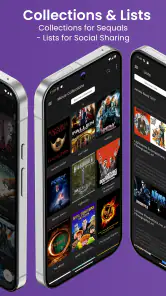
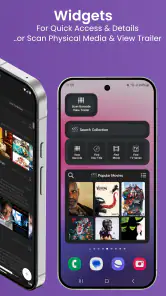
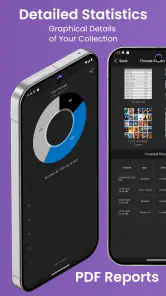

Analysis by Reviewed
I like the idea of treating a movie collection as something worth organizing, rather than relying on memory or a scattered set of notes. My Movies 5 Pro - Movie & TV is an entertainment app from Binnerup Consult for keeping track of films and television titles, whether they are part of a physical shelf or a digital library. Its appeal is clearest when you want one place to look up what you own and make sense of a collection that has grown over time.
Putting the price in context
This is a paid app listed at $29.99, not a free catalog with an optional upgrade. That makes the decision more deliberate than trying a no-cost tracker: I would want a collection substantial enough to benefit from careful cataloging before paying for it. The price is a real commitment, so the value depends on whether you will use it as an ongoing library rather than install it for a quick browse.
Because it is not a free entry point, I would first think about how often I actually need to check my collection. If I only wonder what I own once in a while, a note or a basic spreadsheet may be enough. If I repeatedly search for a particular film, compare editions before purchasing, or need a shared reference for a household shelf, the app has a clearer job to do. That difference matters more than the number of catalog fields: a paid organizer earns its place through repeated use, not through the novelty of entering titles once.
Where a dedicated catalog earns its keep
The strongest case is practical: knowing whether a title is already in your collection before buying another edition, lending a disc, or deciding what to watch. A general watchlist can help remember things you intend to see, but a collection catalog has a different job: it can represent what you actually own. Keeping those purposes distinct makes the app more useful, especially if you collect both physical releases and digital titles.
For example, when friends are choosing a film, I would use the collection as a shortlist rather than scroll through a streaming app full of titles I may not own. A useful habit is to catalog new purchases while they are still in hand, then mark viewing progress when it is fresh in mind. That small routine is more reliable than trying to reconstruct a shelf months later from memory.
A practical way to build a trustworthy library
I would start by adding the titles I reach for most often, rather than trying to document every disc and digital purchase in one sitting. That gives the catalog immediate value while keeping the first setup session manageable. After that, I would add new acquisitions as they arrive and fill in older items in small batches. The key trade-off is simple: careful records take a little attention, but rushed records can make a collection less dependable than memory.
When a title search returns a likely match, I would check the edition and format before treating the entry as definitive. Two releases can share a film title while referring to different editions, and a television title may need a more specific season or release record to be useful. This extra check is especially worthwhile before using the catalog to avoid a duplicate purchase. A quick glance at the physical case while entering it can prevent the kind of mismatch that is annoying to untangle later.
More From Our News Desk

Weather by Xiaomi Review: Clear at a Glance, Less Clear Up Close

X Under Pressure: Can It Recover When Posting Goes Wrong?

Clash of Clans Is Won Between the Battles

Android Auto Makes the Case for Quieter Car Software

MobiOffice: Transforming Mobile Productivity with Seamless Integration

EA SPORTS FC™ Mobile Soccer: Redefining Mobile Sports Gaming
Your Personal Movie Librarian
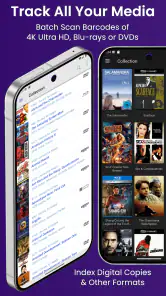
My Movies 5 Pro - Movie & TV is like having a personal librarian dedicated to your movie and TV collection. The app lets you catalog your collection with ease, whether you own the movies and shows digitally or physically. It’s as simple as scanning a barcode or searching for the title. Boom! Your collection is organized and ready to be explored.
Features That Shine
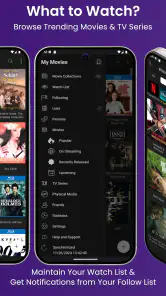
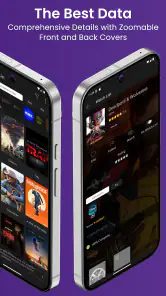
One of the standout features of the app is its extensive database. With information on over a million titles, you’re unlikely to come across a movie or show that isn’t covered. The app provides detailed information about each title, from cast members and directors to release dates and even plot summaries. It’s like having IMDb at your fingertips, but with a personal touch.
Another cool aspect is the ability to track what you’ve watched and what you still need to see. You can mark titles as watched, create watchlists, and even set reminders for upcoming releases. It’s perfect for those of us who love to binge-watch but can never remember what episode we’re on!
Making cataloging useful beyond the first search
The deeper benefit of a collection record is not just finding a title; it is making several small decisions easier. Before buying a new release, I can check whether I already own that film in another format. When someone asks to borrow a disc, I can keep track of what has left the shelf instead of relying on a vague memory. And when I have a free evening, I can browse titles I already own rather than beginning with a broad search across services.
For a shared home library, I would agree on a simple routine: whoever brings home a film adds it, and whoever watches something updates its status. That keeps the record useful to everyone without turning one person into the permanent librarian. There is a limit, though: a catalog can tell you what you have recorded, not guarantee that a disc is in its case or that a digital purchase is playable on the device you are using. I would still check the shelf or account when that distinction matters.
Useful boundaries to keep in mind
A catalog is only as dependable as the entries you keep current. Scanning or searching can get a collection started, but I would still check each match before saving it, particularly when editions share a title or a television series has several seasons. For a large shelf, doing that gradually is less tedious than turning cataloging into a weekend-long project. I would also treat a watchlist and an owned-title inventory as separate tools: wanting to watch something does not mean you have it available to play.
Compared with a streaming service’s own library, this kind of app is more useful for bringing physical and digital holdings into one record; a streaming service is better for playing a title and browsing what it currently offers. A simple spreadsheet may suit someone who only needs a short list and wants to control every field, while a dedicated catalog is a better fit when browsing title details and tracking viewing matter. I would not choose this app if I only watch whatever happens to be recommended and rarely revisit or collect titles.
Catalog, watchlist, or streaming search?
These tools can sound interchangeable, but they answer different questions. A streaming app helps me find something it can play now; a watchlist reminds me what I hope to see; a personal catalog helps me remember what I own or have collected. My Movies 5 Pro is most useful when the third question comes up often. It can sit alongside the other tools rather than replace them, because knowing a title is in a personal library is not the same as knowing which service currently carries it.
That distinction also helps set expectations about digital titles. I would record a digital purchase as part of my collection, but I would not assume the catalog itself supplies the film or guarantees access to a particular streaming service. If my main problem is choosing among films available to watch tonight, the search and recommendation tools in the services I subscribe to are more direct. If the problem is forgetting what I own across formats, a dedicated inventory is the better match.
Integration and Syncing
If you’re like me and use multiple devices, the app’s cloud syncing feature is a lifesaver. You can access your collection from your phone, tablet, or computer without missing a beat. It seamlessly integrates with various platforms, ensuring your library is always up-to-date no matter where you are.
The app also offers integration with various streaming services. This means you can quickly see if a movie or show in your collection is available to stream, saving you the hassle of searching through each service individually. It’s these little conveniences that make a big difference in the user experience.
What to expect from everyday use
A realistic routine might look like this: I bring home a Blu-ray, scan or search for its title, confirm that the record matches the edition, and add it before putting the case away. Later, when friends visit and ask what we can watch, I can browse the collection instead of guessing which films are on the shelf. If I lend the disc, the catalog is a useful reminder to update the record. None of those steps is difficult, but they work only if I make cataloging part of the habit of collecting.
I would also keep expectations modest about the role of a catalog during a movie night. It helps narrow the choice to titles I have recorded and can make browsing more intentional; it does not remove the need to decide what everyone wants to watch or check whether a digital title is currently accessible. That is a useful boundary rather than a flaw: the app organizes a library, while playback and availability remain separate concerns.
Who is likely to get the most from it?
I would recommend it most to people with a sizable DVD or Blu-ray shelf, collectors who also keep digital purchases, and anyone who often forgets what they have already watched. Someone sharing a household collection could also use a catalog to make browsing and choosing less dependent on one person remembering every title. By contrast, if you own only a handful of films or mainly stream without keeping a personal library, a free watchlist or the search tools built into your streaming apps may be enough.
It is also a better fit for people who enjoy maintaining a collection, not only people who enjoy watching films. If adding accurate entries feels like a chore, the app may become a paid list that stops reflecting reality. For a collector who regularly buys new editions or wants an organized record across formats, that upkeep can pay off in fewer duplicate purchases and easier browsing. For someone whose viewing changes with whatever is trending, there is little reason to build a detailed personal archive.
Age, compatibility, and reputation
My Movies 5 Pro is rated for teens, has a 4.8 average from around 788 ratings, and has passed 5,000 installs. It was released on November 28, 2024, and version 5.03 Build 6 runs on Android 5.0 or later. Those details make it accessible to a broad range of Android devices, but they do not change the core question: will you maintain a catalog often enough to justify a paid tool?
The rating and install count offer some context, but I would weigh them less heavily than whether the app suits my own collecting habits. A high average cannot tell me whether I will keep records up to date, and a compatible Android version does not make cataloging worthwhile by itself. Before paying, I would consider the size and variety of my collection, how often I lend or buy titles, and whether I want a dedicated record rather than another informal list.
Final Thoughts
All in all, My Movies 5 Pro - Movie & TV is a fantastic tool for any movie and TV enthusiast. It’s user-friendly, packed with features, and truly enhances the way you manage your entertainment collection. Whether you’re a casual viewer or a hardcore collector, this app is sure to make your movie nights even more enjoyable. So, why not give it a try and see how it transforms your viewing habits?
And there you have it, folks! A personal librarian in your pocket, ready to help you manage your movie and TV collection with ease. Happy watching!
My verdict on paying for a catalog
For me, the purchase makes sense when avoiding duplicate buys, keeping a mixed-format library organized, or choosing something from a known collection are recurring needs. If those situations rarely come up, the price is harder to justify and a basic list is probably the sensible choice. I would treat it as a tool for managing titles, not as a replacement for the services that actually provide or play them.
My bottom line is that I would pay for it only if I expected to return to the catalog regularly. For a collection that keeps growing, a dedicated organizer can be more useful than scattered notes because the record becomes a resource for buying, lending, and choosing. If I had just a few favorites, or wanted recommendations and playback more than ownership tracking, I would skip it and use the tools I already open for watching. The strongest reason to buy is not that it promises to change how I watch; it is that it can make a collection I already care about easier to live with.
My Movies 5 Pro - Movie & TV Frequently Asked Questions
What devices and operating systems can run My Movies 5 Pro?
My Movies 5 Pro is available for Android devices running Android 5.0 or later. It is an entertainment app for people who want to organize a movie and TV collection, so checking your device’s Android version before downloading is a sensible first step. The app’s current version is 5.03 Build 6, and the minimum operating-system requirement helps you judge compatibility.
Who develops My Movies 5 Pro, and what is its age rating?
My Movies 5 Pro is developed by Binnerup Consult and has a Teen content rating. That makes it worth checking the age classification if the app will be used on a shared device or by a younger movie fan. Its focus is cataloging and tracking a collection of movies and television shows, rather than providing the titles themselves for viewing.
What is My Movies 5 Pro and what features does it offer?
My Movies 5 Pro is a comprehensive movie and TV show cataloging app designed for film enthusiasts. It allows users to catalog their personal collections of movies and TV shows, offering features such as barcode scanning for easy entry, detailed information about the titles, personal ratings, and reviews. The app also provides options to manage digital copies and integrates with various online databases for accurate and up-to-date information.
Is My Movies 5 Pro suitable for managing large collections of movies and TV shows?
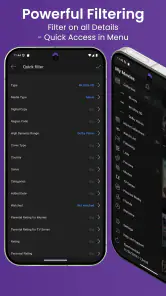
Yes, My Movies 5 Pro is particularly well-suited for managing extensive collections. It supports unlimited movie and TV show entries, which makes it ideal for serious collectors. The app provides options to categorize and sort the entries by different criteria such as genre, release date, or personal rating. Additionally, it offers backup and restore options to ensure your collection data is safe.
Does My Movies 5 Pro support synchronization across multiple devices?
Yes, My Movies 5 Pro supports synchronization across multiple devices. Users can synchronize their collections across smartphones, tablets, and computers, providing seamless access to their data from any location. This feature is particularly useful for users who want to keep their collection updated on the go, ensuring that any changes made on one device are reflected across all devices.
Pros
- Extensive movie and TV database
- User-friendly interface
- Offline viewing support
- Regular updates with new content
- Customizable watchlists
Cons
- Occasional lags in loading
- Limited free features
- Requires large storage space
- Subscription needed for full access
- Ads in free version
- Category
- Entertainment
- Version
- 5.03 Build 6











