MONOPOLY GO!Chat
- 619.00
- 4.5
- Installs
- 1.00M
- Price
- Free

Screenshots







Analysis by Reviewed
I’d consider MONOPOLY GO!Chat if the people I want to talk with are already playing MONOPOLY GO! The app is built around that particular group: friends and teammates who want a place to communicate while they play. That focus is its main appeal, but also the first question to ask before installing it. If your gaming circle is elsewhere, a general messaging app is likely to be more useful.
As a communication app from Scopely, it has a more specific purpose than a chat tool meant for work, family, and every other conversation. I see it as a companion for keeping a MONOPOLY GO! group in touch, rather than a replacement for the messaging app everyone already uses. It is free, rated for Everyone, and has a 4.5 average from around 4.7 thousand ratings. Those figures suggest interest, but the more practical test is whether your friends will actually use it.
Start with the group you want to reach
It is most useful when everyone shares the game
Before downloading, I’d ask a simple question: do I have a regular group of MONOPOLY GO! friends or teammates who would benefit from a dedicated conversation? If yes, a separate space can make coordination feel more natural. Game-related messages need not get lost among school, work, family plans, and other chats. If only one person in your circle plays, though, the app has little reason to become part of your routine.
This distinction matters because a focused chat app succeeds through participation, not just installation. A quiet group space can be less convenient than sending a quick message in a familiar messenger. I’d invite the people I actually play with first, then see whether the conversation becomes useful. Installing it alone does not solve the problem of reaching a group that prefers its existing channels.
There is also a difference between wanting to talk about a game and needing a dedicated place to do it. If your group already has an active chat that works well, switching may add another inbox without adding much value. If game conversations are scattered across unrelated threads, a purpose-built space has a clearer job: keep that shared interest together.
A better fit for coordination than general conversation
I would use it for the moments when a group wants to stay connected around MONOPOLY GO!, rather than as a universal social network. That might mean keeping a game-focused discussion easy to find or having one place for teammates to communicate. The useful benefit is organizational: separating one shared activity from the rest of your messages can reduce clutter and make it easier to pick up that conversation later.
A realistic example is a group of friends who play at different times. One person checks in during a break, another replies after work, and the conversation remains centered on the game rather than buried between unrelated plans. That does not require everyone to be online at once. It does require the group to agree that this is where game talk belongs; otherwise, people will keep messaging wherever they already are.
You May Like

Clash of Clans Is Won Between the Battles

Android Auto Makes the Case for Quieter Car Software

MobiOffice: Transforming Mobile Productivity with Seamless Integration

EA SPORTS FC™ Mobile Soccer: Redefining Mobile Sports Gaming

How Microsoft OneDrive Became a Mobile Productivity Giant

How Google Translate Breaks Language Barriers Effortlessly
For a player who mainly enjoys MONOPOLY GO! solo, or who rarely chats with teammates, the value is much thinner. The app is about communication, so I would not install it expecting it to change the game itself. Its usefulness depends on conversation being part of how you enjoy playing.
What makes a dedicated space worthwhile
The strongest case for a game-specific chat is context. When a message arrives in a general messenger, it may be mixed in with conversations about errands, appointments, and other hobbies. A dedicated group gives MONOPOLY GO! discussion a home of its own. That can make it easier to follow the thread, especially when several friends share the same interest but do not necessarily talk about it every day.
There is a trade-off: every extra app asks for attention. Notifications from a smaller, focused group can be welcome when you want to keep up with teammates, but distracting if you already have too many chats. I’d decide in advance whether I want this conversation to interrupt me or simply be available when I open the app. That small choice can determine whether a dedicated channel feels helpful or like another source of noise.
Another practical point is group size and participation. A focused space is most worthwhile when several people will contribute, not just when one organizer posts updates. If your group has a natural rhythm of sharing thoughts and responding, a separate home can keep that activity tidy. If the group tends to go quiet, an existing messenger may be the lower-friction option.
Make the conversation useful, not just separate
A dedicated chat is most valuable when it has a clear purpose beyond being a second place to say hello. I’d suggest agreeing on what the group wants to discuss there before everyone joins: perhaps quick check-ins about playing together, or simply keeping game-related conversation out of a family or work thread. That shared expectation makes it easier to decide whether the new space is earning its place.
One small but useful habit is to keep the conversation easy to scan. If several people are chatting at once, a short message about one topic is easier to follow than a string of unrelated thoughts. This is not a special feature of the app; it is a way to make any group channel more readable. It matters especially in a focused chat, because people are likely to open it looking for game-related context rather than a long catch-up on every subject.
I’d also avoid treating the channel as a live support desk for the group. People may check messages at different times, and a dedicated chat does not guarantee an immediate reply. For anything time-sensitive, use the channel your friends are most likely to notice. The specialist space works best when the group sees it as a convenient home for ongoing conversation, not a promise that everyone is available on demand.
Where it stands beside familiar messaging apps
Compared with a broad messaging app, MONOPOLY GO!Chat is easier to justify when relevance matters more than versatility. General-purpose alternatives are better for people who want one place for conversations across many parts of life. They may already be where your friends are, which is a major advantage no focused app can overcome by itself.
Compared with a group chat dedicated to gaming, this app has a narrower identity: it is specifically for MONOPOLY GO! friends and teammates. That specialization can be a benefit if the whole group shares the game. It can be a limitation if your gaming friends play different titles and want to keep all those discussions together. I would choose based on the group’s habits, not on the assumption that a dedicated app is automatically better.
The same principle applies to players who only need occasional coordination. A quick message in an existing channel may be enough, especially if everyone checks it already. A separate app makes more sense when the game conversation is frequent enough to deserve its own place. In other words, the decision is less about which kind of app is universally superior and more about whether your group’s MONOPOLY GO! talk has become hard to manage.
Joining is easy; changing habits takes more effort
Trying a free app does not carry a purchase cost, but switching still has a social cost. Your friends must know where to find the conversation, remember to check it, and decide whether to leave game talk there instead of their usual chat. If some people adopt it and others do not, messages can split between channels. That fragmentation can be worse than keeping everything in one familiar place.
I’d make the change gradually. Start with one group that has a clear reason to use a dedicated MONOPOLY GO! space. Tell everyone what belongs there, then keep unrelated conversation in the channel they already prefer. This avoids turning the app into a duplicate inbox for every topic. If the group finds the separation useful, it can become a habit; if not, there is little reason to force it.
It is also worth considering how often you want to check a game-specific conversation. For an active group, a dedicated channel may make messages easier to locate. For a casual group, the extra step of opening another app might mean people respond less often. I would not move an established, lively conversation unless the current setup is genuinely inconvenient.
Who should give it a try—and who can skip it
I’d recommend giving it a try if you regularly play MONOPOLY GO!, have friends or teammates who do the same, and want game conversations separated from everyday messages. It is particularly sensible for a group that already talks about the game but has trouble keeping those messages organized. The app has reached over one million installs, though its popularity alone does not tell me whether it suits any particular group.
I would skip it if your friends are not interested, if you rarely communicate while playing, or if your existing group chat is already working smoothly. I’d also lean toward a general-purpose messenger if you want to coordinate across several games or keep all your social conversations in one place. A specialist tool is only useful when its focus matches your actual routine.
For families or groups with a wide range of ages, the Everyone content rating is reassuring as a basic suitability signal. It does not replace the usual common sense about who you chat with and what you share. The app is a communication space, so I’d still use the same care I would in any group conversation, especially when inviting people I do not know well.
Questions I would settle before moving a group
Would I need to persuade everyone to join? In practice, yes: the app’s value depends on the people you want to reach being willing to use it. I would not send a broad invitation to every contact just because the app is available. Start with the friends or teammates who already talk about the game, and make it clear that joining is optional. If only a small part of the group wants a separate channel, keeping the existing chat may be simpler.
Would I use it instead of my usual messenger? I would not assume so. Its narrower purpose is a reason to add it only when game talk benefits from separation. A general messenger remains the more practical home for plans, family updates, and conversations that cross several interests. Think of this as a possible side channel, not a wholesale replacement.
What if I play with people who are not close friends? I would be thoughtful about what I share and who I invite, as I would in any group conversation. A shared game interest does not automatically mean everyone wants the same level of personal contact. Keeping the discussion focused on the game can make the space more comfortable for acquaintances as well as close friends.
Practical details before installing
The app is free, and its current version is 0.10.1. It requires Android 7.0 or later, so I’d check the operating system on an older device before planning to use it there. Its release date is March 30, 2026. These details are useful when deciding whether it fits a device, but they do not change the central question: will your MONOPOLY GO! group actually communicate here?
Scopely’s involvement makes the app’s connection to MONOPOLY GO! clear, and that gives it a more focused role than an unrelated chat service. Still, I would not treat the developer connection as a reason to move every conversation. Use it for the part of your social life it is meant to serve, and keep broader or unrelated discussions wherever your group already prefers.
For Android users, the minimum operating system is worth checking before asking a group to move. If one person cannot install the app on an older device, the group may end up divided between channels, which defeats much of the point of a dedicated space. I’d confirm that the people who need to join can access it before making it the group’s main place for game conversation.
Overall, I see MONOPOLY GO!Chat as a useful optional companion, not an essential download for every player. Its best argument is simple: it gives MONOPOLY GO! friends and teammates a dedicated place to communicate. Its main limitation is just as clear: if your group will not use that place consistently, a familiar messenger is more convenient. I’d install it when there is a real group ready to make it part of the routine, try it without pressure, and keep it only if it makes staying connected easier.
MONOPOLY GO!Chat Frequently Asked Questions
What is MONOPOLY GO! Chat?
MONOPOLY GO! Chat is a companion chat app for players of MONOPOLY GO!, designed to help users connect and communicate around the game. Before downloading, check the app listing to confirm which features are currently available in your region and whether it is an official companion service. It should not be confused with the MONOPOLY GO! game itself, which is installed separately.
Do I need MONOPOLY GO! to use MONOPOLY GO! Chat?
The chat app is intended for people interested in MONOPOLY GO!, so its usefulness may depend on having the game and being able to find other players there. The chat app does not replace the main game or provide its full board-game experience. Check the current store description for sign-in, account-linking, or other requirements before installing, as these details can change.
Is MONOPOLY GO! Chat free to download and use?
Check the Google Play or Apple App Store listing for the latest price and in-app purchase information before downloading. A free download does not always mean every feature is free, and optional purchases or paid services may be offered. Also review the app’s permissions and privacy information so you understand what data may be collected or shared when you create an account or chat with other players.
Can I use MONOPOLY GO! Chat on Android and iOS?
Availability can depend on your device, operating-system version, and country. Search for MONOPOLY GO! Chat in the official Google Play Store or Apple App Store and verify the publisher and compatibility details before installing. If the app does not appear in your store, it may not be supported in your region or on your device; avoid unofficial download files that could pose security risks.
Is MONOPOLY GO! Chat safe for messaging other players?
As with any social app, use care when chatting with people you do not know. Avoid sharing passwords, payment information, your home address, or other sensitive personal details, and use any available blocking or reporting tools if someone behaves inappropriately. Read the app’s privacy policy and community rules, and consider supervising younger users, since chat interactions may involve content from other players.
Pros
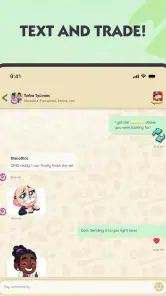
- Quick chat makes it easy to coordinate trades with friends.
- Sticker trading adds a social way to complete albums.
- Friend chat can make cooperative events more engaging.
- Useful for players who prefer messaging inside the game.
- Chat helps keep trade discussions tied to your game contacts.
Cons
- Chat features may depend on having friends who also play.
- Trade discussions can get cluttered during busy events.
- Messages may not be as convenient as a dedicated messaging app.
- Unwanted messages or trade requests may require moderation.
- Chat adds little value if you mostly play solo.

- Category
- Communication
- Version
- 0.10.1













