Mobolist: Phone Prices & Specs
- 423.00
- 4.5
- Installs
- 1.00M
- Price
- Free

Screenshots

Analysis by Reviewed
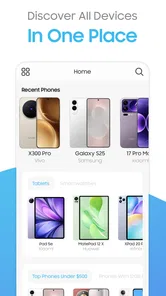
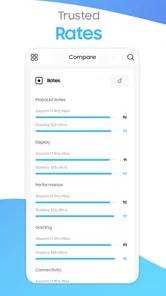
When I compare phones, I usually want a quick answer before I open a dozen manufacturer pages: what does this model offer, how does it differ from another one, and is the asking price reasonable? Mobolist: Phone Prices & Specs is built around that practical moment. It is a free News & Magazines app from Mobolist that focuses on phone prices, specifications, tablets, smartwatches, and device comparisons. I found its value less in entertainment and more in reducing the mess involved in early shopping research.
The important word here is “research.” I would not treat this app as a replacement for a retailer, an official support page, or a hands-on review. Instead, I see it as a compact reference tool for narrowing a shortlist. That distinction matters because specifications can tell me what a device has, while they do not automatically tell me how well it performs in daily use, whether a local seller is reliable, or whether a price will remain attractive after a promotion ends.
My overall impression is that Mobolist works best as a comparison companion, not as the final authority for a purchase. It has a clear purpose, a broad enough device focus to be useful beyond phones, and a free entry point. At the same time, anyone making a serious buying decision should verify the most important details before paying, especially price, regional availability, software support, and warranty terms.
What Mobolist is trying to solve
I find the most useful way to approach a device comparison is to decide what question I’m trying to answer before opening the app. Am I checking whether two models differ in a meaningful way, or just collecting options for later? Keeping that aim in view helps me separate a helpful reference from a rabbit hole, and it sets up a closer look at the choices and checks that make a comparison more dependable.
A faster starting point for device research
The usual alternative is to search the web separately for every model. That approach can work, but it often leaves specifications scattered across manufacturer pages, retailer listings, comparison sites, and review articles. Mobolist brings the research task into a more focused app experience. I can use it when I remember only part of a model name, when I want to compare two devices, or when I am deciding whether a tablet or smartwatch deserves a place on my shortlist.
That focus makes the app particularly suitable for people who enjoy researching before they buy. It is also useful for helping somebody else choose a device. For example, if a family member asks whether an older phone is still worth considering, I can begin with the core specifications and price information rather than opening many unrelated browser tabs. The app gives me a practical first pass, after which I can investigate the details that matter most to that person.
I would be less enthusiastic about it for someone who wants editorial news, long-form analysis, camera samples, or detailed ownership reports. The app belongs to the information and reference side of the News & Magazines category. Its strength is structured product information, not the kind of personal testing that reveals heating, battery endurance, display visibility outdoors, or the quality of a manufacturer’s software.
More From Our News Desk

Weather by Xiaomi Review: Clear at a Glance, Less Clear Up Close

X Under Pressure: Can It Recover When Posting Goes Wrong?

Clash of Clans Is Won Between the Battles

Android Auto Makes the Case for Quieter Car Software

MobiOffice: Transforming Mobile Productivity with Seamless Integration

EA SPORTS FC™ Mobile Soccer: Redefining Mobile Sports Gaming
Phones are only part of the picture
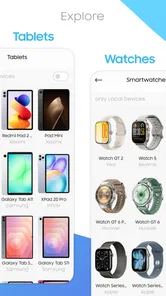
One useful aspect is the wider device scope. Phones are the obvious reason to install it, but tablets and smartwatches also appear in its purpose. That matters when a purchase decision involves an ecosystem rather than one isolated product. I might compare a phone first, then check whether a tablet offers a sensible step up for reading or whether a smartwatch fits the same general device family.
This wider scope also changes how I use the app. Instead of asking only, “Which phone has the strongest specification sheet?”, I can think about the role each device will play. A tablet may be better for documents and video, while a phone remains the more important everyday device. A smartwatch may be attractive on paper but unnecessary if I do not care about wrist notifications or fitness features. Mobolist helps with the factual side of those comparisons, while I still have to decide whether the category itself suits my routine.
What the public response suggests, and what it does not prove
The app has an average rating of 4.5 from around seventeen thousand ratings, with over a million installs. Those figures suggest that many people find the basic idea useful, and the scale gives me more confidence that the app is not an obscure experiment with no visible audience. It has also accumulated hundreds of written reviews, which can help a prospective user understand where other people encounter friction.
Still, popularity is not proof that every listing is current or that every price applies to every country. A high average can reflect a good overall experience while individual devices, regions, or updates still need checking. I treat the rating as a reason to try the app, not as a substitute for my own verification.
The version and device requirement
Mobolist is currently listed as version 3.1.3 and requires Android 8.0 or later. That requirement is fairly approachable for many Android users, but it still matters if I am testing the app on an older spare phone. Before planning to use it on a family member’s device, I would check the operating system rather than assuming that every Android handset can install it.
The release date is December 13, 2019, which gives the app a longer history than a newly launched comparison tool. Longevity can be reassuring because it indicates that the concept has had time to remain available. It does not, by itself, guarantee that every product entry is equally fresh, so I would still compare important facts with the manufacturer or a trusted local seller.
Trust, controls, and careful use
I treat careful use as part of good research, not as a reason to distrust the app. A repeatable habit is to note the exact model and configuration I’m considering, then confirm those details before acting on a price or specification. That small pause is especially worthwhile when a purchase depends on regional compatibility or a specific warranty, and it leads naturally to the practical controls I would review along the way.
What I can responsibly judge from the app’s role
Trust is especially important in a price and specification app because the information can influence a real purchase. My confidence comes from understanding the app’s stated purpose and using it within that boundary. Mobolist presents itself as a place to find device information and compare products, not as a payment service or a repair provider. That makes it sensible for discovery and shortlisting.
However, I do not assume that a displayed price is the final amount I will pay. Prices can vary by country, storage configuration, retailer, tax, currency, promotion, and stock status. A sensible workflow is to use Mobolist to identify the models worth considering, then confirm the exact configuration with an official manufacturer channel or a retailer I already trust.
The same caution applies to specifications. A specification page may tell me the processor, screen details, memory, storage, or connectivity options, but a product can have multiple regional variants. Before ordering, I would check the model number, network compatibility, charger arrangement, storage capacity, and warranty coverage. This is not a criticism unique to Mobolist; it is a normal risk whenever a comparison tool compresses complicated product information into a convenient view.
Permissions, accounts, and visible choices
My editorial standard for trust is simple: I want to know what the app visibly asks me to do, what choices it presents, and whether those choices are understandable. I would pay attention during installation and first launch to any permission prompts, sign-in requests, notification options, or privacy explanations. I would not approve a permission merely because an app is useful; I would consider whether the request makes sense for the task I want to perform.
For a comparison utility, I prefer a low-friction start. If I only want to inspect phone specifications, I would rather begin browsing than create an account immediately. If the app offers account-related controls, I would review them before saving anything or enabling notifications. The practical lesson is to separate the app’s core research function from optional personalization: use only the controls that help with the decision in front of you.
I also avoid entering sensitive information into a product-research app unless there is a clear reason. I would not share payment details simply to browse devices, and I would be cautious about typing personal information into free-form fields that are not necessary for comparison. The app’s free price makes it easy to try, while the presence of in-app purchases ranging from $1.99 to $14.99 per item means I would review any purchase screen carefully before confirming it.
Where data-sensitive moments can occur
The most data-sensitive moments are not necessarily the ordinary act of reading specifications. They are more likely to appear around account creation, optional notifications, saved preferences, purchase prompts, or any request to access information on the phone. I would slow down at those points and read the wording instead of tapping through automatically.
There is also a less obvious form of sensitivity: purchase intent. Searching repeatedly for a particular phone can reveal what I am considering, even if I never buy it. For that reason, I prefer to keep my research focused and avoid treating every recommendation or promotional prompt as a personal instruction. I would also review notification settings if alerts become distracting, because a comparison app should support my shopping process rather than constantly pull me back into it.
When I finish researching, I would clear any saved choices or sign out if the app provides those controls and I no longer need them. I would also uninstall it if I only installed it for a one-time purchase decision. That is a straightforward way to keep my device tidy and reduce the number of apps I leave active without a continuing purpose.
How I would use it in a real buying situation
Imagine that my current phone is becoming unreliable and I have three possible replacements. I would first use Mobolist to collect the basic information for each model. Rather than choosing the device with the largest number in one category, I would write down the features that affect my routine: storage, display size, connectivity, camera configuration, battery-related specifications, and the listed price for the exact version I am considering.
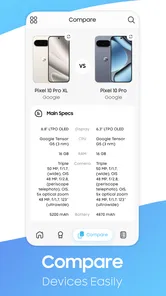
Next, I would compare the models side by side and eliminate the ones that fail a practical requirement. If I need dual-SIM support, a particular storage size, or compatibility with a network band, that requirement comes before a small performance advantage. This is one of the app’s most useful workflows: it encourages me to turn vague shopping into a list of concrete constraints.
After that, I would verify the finalists elsewhere. I would check the manufacturer’s page for software support and regional model details, read independent reviews for camera and battery behavior, and confirm the seller’s return and warranty terms. Finally, I would return to the price shown in Mobolist only as a reference point. The app saves time at the beginning, but it should not be the only source used immediately before payment.
Three practical habits that improve the experience
Compare like with like: I keep storage capacity and regional variants consistent. A comparison is misleading if one listing represents an entry model and the other represents a more expensive configuration.
Separate requirements from temptations: I decide my must-have features before browsing deeply. This prevents an impressive specification from distracting me from basics such as size, compatibility, or budget.
Use the app as a shortlist filter: I verify the final two or three candidates outside the app, especially when the purchase involves a large amount of money or a long warranty period.
These habits make a noticeable difference because comparison tools can create the illusion that every important question has been answered. In reality, they are strongest at organizing facts and weaker at explaining how those facts feel in daily use. I get better results when I let Mobolist handle the first stage and reserve hands-on reviews and official documentation for the final stage.
Where it fits beside familiar alternatives
Compared with a general web search, Mobolist feels more focused. A search engine gives me a huge range of sources, but it can also mix official specifications, retailer copy, old articles, and opinion pieces. The app’s device-centered purpose makes it easier to begin with comparable information. The trade-off is that a web search may expose more regional stores, detailed reviews, community discussions, and official support documents.
Compared with a manufacturer’s website, Mobolist is more convenient for looking across brands and device types. An official site remains better for the final confirmation of software support, accessories, warranty information, and exact regional configurations. Compared with long-form review sites, Mobolist is quicker for reference but thinner on lived experience. I would use all three sources for an expensive purchase rather than expecting one tool to cover every angle.
Compared with a retailer’s app, Mobolist can be more useful before I have chosen where to buy. Retailers are better for stock, delivery, returns, and checkout, while a comparison app is better for keeping the decision centered on the products themselves. That division is valuable: it reduces the chance that a prominent sale pushes me toward a device that does not actually match my needs.
Who should install it, and who should skip it
I would recommend trying Mobolist if you regularly compare Android phones, want a quick reference for tablets and smartwatches, or help friends and relatives make technology purchases. It is also a good fit for someone who likes to build a shortlist before visiting a store. The free price lowers the barrier to testing it, and the Everyone age rating makes it broadly approachable for general household use.
I would skip it if I want detailed photography analysis, independent battery testing, repairability guidance, or a complete buying service from search to delivery. I would also avoid relying on it alone when the exact regional variant matters, when a phone is being purchased for professional network use, or when a price difference is large enough to justify careful verification.
Another reason to skip it may be personal preference. If I already have a trusted comparison website and do not want another app on my phone, Mobolist may not add enough value. Its advantage is convenience, not a guarantee that it will replace every source I already use.
My cautious verdict
Mobolist: Phone Prices & Specs earns a place on my Android research shortlist because it addresses a real nuisance: comparing devices without jumping between unrelated pages. Mobolist, developed by Mobolist, has a clear focus, supports research across phones, tablets, and smartwatches, and has attracted a substantial audience. I appreciate that it can help me move from a vague idea such as “I need a better phone” to a more disciplined comparison.
My recommendation comes with a boundary. I would use it to discover models, organize specifications, and compare candidates, but I would confirm important facts before buying. I would pay attention to permissions and optional controls, avoid unnecessary personal information, and review any in-app purchase prompt carefully. The app is free to install, while optional items can cost from $1.99 to $14.99 each, so a deliberate approach is sensible.
If you want a compact starting point for device research, I think it is worth trying. If you want a complete verdict on real-world performance or a fully verified purchase path, pair it with official product information and independent testing. That cautious combination is where I found the app most trustworthy: not as the final word, but as a useful first filter that gives me a clearer, faster way to decide what deserves closer attention.
Mobolist: Phone Prices & Specs Frequently Asked Questions
Can Mobolist help me research tablets and smartwatches as well as phones?
Yes. Mobolist’s scope includes tablets and smartwatches alongside phones, making it useful if you are comparing more than one kind of device. You can explore product details and use the information to get a clearer sense of how devices differ. As with phone research, check that a particular model and its specifications suit your needs before making a purchase.
How can I check whether Mobolist will work on my Android device?
Before downloading, check the Android version installed on your device. Mobolist requires Android 8.0 or later, so a device running an older version will not meet its minimum requirement. The app is free to download, though it offers in-app purchases. Making sure your software is compatible first can help you avoid starting an installation that your device cannot complete.
Is Mobolist suitable for someone who is not familiar with phone specifications?
Yes. Mobolist is intended to make phone research more approachable by gathering device details in one place, so you can look up a model and review its specifications without needing to search across several sources. Terms such as RAM, storage, chipset, and display technology may still require some interpretation, but comparing those details across phones can help you understand the differences before deciding what matters most to you.
What is Mobolist: Phone Prices & Specs used for?
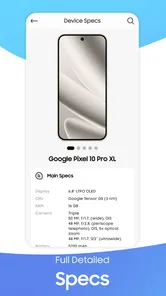
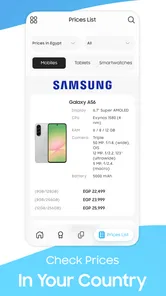
Mobolist: Phone Prices & Specs is designed to help users explore mobile phones, compare technical specifications, and check estimated prices in one place. After reviewing the app, its main value is the organized way it presents information such as display size, processor, RAM, storage, camera setup, battery capacity, operating system, and connectivity. It can be useful when researching a new phone before visiting a store or making an online purchase.
Does Mobolist provide accurate and up-to-date phone prices?
The app can be helpful for getting a general idea of how much different smartphones cost, but prices should not be treated as guaranteed final offers. Mobile prices often change because of region, retailer, promotions, taxes, storage options, and product availability. Before buying, users should confirm the current price with an official manufacturer, carrier, or trusted retailer. The displayed information may also depend on how frequently the app’s database is updated.
Pros
- Covers detailed specifications for many smartphone models.
- Helps compare prices before buying a new phone.
- Simple interface makes browsing devices quick.
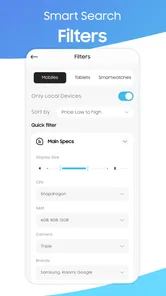
- Useful filters narrow results by brand
- price
- and features.
- Regular listings can help track newer phone releases.
Cons
- Price information may vary by country or retailer.
- Some listings may not reflect the latest market prices.
- Older or less popular models may have limited details.
- The app may require internet access for current information.
- Availability and specifications can occasionally contain errors.











