

MHD Flasher
- 176.00
- 4.5
- Installs
- 100.00K
- Price
- Free

Screenshots
Analysis by Reviewed
I approached MHD Flasher as the kind of Android tool that can make BMW tuning more convenient, but also demands more care than an ordinary vehicle app. It is not a dashboard companion or a simple maintenance reminder. Its purpose is to flash tuning software to a compatible BMW, so the quality of the experience depends as much on preparation, hardware compatibility, battery stability, and sensible decision-making as it does on the app itself.
That distinction matters. I would recommend it to an owner who already understands the basics of ECU tuning and wants a focused mobile workflow. I would not recommend treating it like a casual download that automatically makes a car faster. The app gives experienced users a practical way to manage tuning work from an Android device, while the risks and responsibilities remain very real on the vehicle side.
How I would use MHD Flasher from the first connection to a repeatable routine
I would make each session feel routine by keeping the same short checklist and recording the result before changing anything else. That gives me a reliable way to compare behavior across drives and notice when a difference may come from the car, the connection, or the calibration. From there, I would focus on recovering calmly if a session does not go to plan, rather than making rushed adjustments.
Start with the car, not the app
The most useful habit is to prepare the vehicle before opening the flashing screen. I would first make sure the BMW is in a stable condition, the phone has enough battery, unnecessary apps are closed, and the cable or interface being used is appropriate for the car and the intended operation. A flash is not the moment to discover that a connection is loose or that the vehicle battery is already weak.
This is where MHD Flasher differs from everyday Auto & Vehicles apps. A navigation app can recover from a brief interruption by recalculating a route. A tuning flash is a more sensitive process. I treat the phone as one part of a chain that includes the BMW, the diagnostic connection, the power supply, and the selected calibration. If any link is neglected, the convenience of using an app becomes less important than the quality of the preparation.
The app is free to install, but the tuning functions are connected to in-app purchases ranging from around one hundred dollars to around two hundred fifty dollars per item. I would therefore decide what I actually need before buying anything. The sensible approach is to identify the car, understand the available tuning path, and avoid paying for options simply because they appear in the interface.
Keep a baseline before changing anything
My strongest practical recommendation is to establish a baseline. Record how the car behaves before flashing: cold starts, idle quality, throttle response, warning lights, fuel use, and any existing modifications. This does not require an elaborate workshop log. A few notes and consistent observations are enough to prevent a common mistake: blaming the new calibration for a problem that was already present.
More From Our News Desk

 Gmail
GmailGmail in a Busy Inbox: Who Benefits Most?
From first account to crowded workday, Gmail earns its place through dependable search and flexible sorting—but its best fit depends on how much inbox maintenance you can tolerate.

 Prime Video
Switching to Prime Video: What Changes in Your Viewing Routine
Prime Video can make a compelling second home for streaming, but switching means learning a different catalog, rental layer, and route from browsing to playback.

 Universal TV Remote Control
Universal TV Remote Control Works Best as a Reliable Backup
A phone remote earns its place through quick setup and reliable habits. Here is how to get more from Universal TV Remote Control—and where its limits show.

 Weather - By Xiaomi
Weather by Xiaomi Review: Clear at a Glance, Less Clear Up Close
Xiaomi’s weather app makes everyday forecasts quick to scan, but its calm surface can leave useful details and recovery paths harder to find than they should be.

 X
XX Under Pressure: Can It Recover When Posting Goes Wrong?
A resilience-focused review of X, examining setup, mistaken posts, interruptions, weak connections, and the gaps that matter when recovery needs to be dependable.

 Clash of Clans
Clash of Clans Is Won Between the Battles
Its raids are quick; its community is a long-term project of coordination, teaching, rivalry, and shared responsibility—with all the friction that entails.
Latest News



I would also keep the original configuration available and avoid changing several things at once. If the car has hardware changes, maintenance issues, or other software adjustments, making one controlled change at a time gives you a much better chance of understanding the result. That habit is more valuable than chasing the most aggressive setting immediately.
For an everyday scenario, imagine preparing a BMW for a weekend trip. I would not flash it minutes before leaving. I would connect the car in a calm setting, use a stable power source, complete the process without interruptions, and then allow time for a careful drive close to home. That makes it easier to notice unusual behavior before the vehicle is far away or under heavy load.
What the first drive should tell you
The first drive should be an inspection, not a performance test. I would begin gently and pay attention to starting, idle, low-speed response, shifting behavior, and warning messages. Only after the car behaves normally would I consider evaluating the changes under more demanding conditions.
This staged approach also answers a question many new users have: does installing the app guarantee a dramatic result? No. The outcome depends on the BMW, its condition, the chosen calibration, supporting hardware, fuel, and how responsibly the owner evaluates the change. MHD Flasher can streamline the flashing workflow, but it cannot compensate for an unsuitable setup or poor maintenance.
Settings and choices that deserve a careful look
The most important setting is not necessarily the one with the most exciting name. I would prioritize compatibility and suitability over maximum output. A conservative calibration that matches the car and its hardware is usually a better starting point than selecting an aggressive option simply because it promises a stronger sensation.
Before confirming a flash, I would read every available description in the app and compare it with the actual car. Pay attention to engine configuration, modifications, fuel used, and the way the vehicle is driven. A daily commuter that must start reliably in changing weather has different priorities from a second car used for occasional spirited driving.
I would also check the phone environment. Disable interruptions that could pull attention away from the process, keep the device connected to power when appropriate, and avoid switching between apps while the flash is active. These are simple steps, but they turn the procedure into a repeatable routine rather than a rushed experiment.
Another useful habit is to separate configuration decisions from driving impressions. First decide what the car needs. Then flash it. Then evaluate it. If I change the tune and immediately start adjusting several other variables, I lose the ability to identify which change caused a benefit or a problem.
Why the free download should not be confused with a free tuning solution
The free entry point is helpful because it lets an owner explore the app and understand its workflow before committing to paid tuning functions. However, I would not describe the complete experience as free. The in-app purchase range is significant, and the total cost can become part of a larger tuning budget that may include connection equipment, battery support, maintenance, and compatible hardware.
This is one of the clearest trade-offs. Compared with visiting a specialist for every software change, a mobile tool may offer more control and convenience. Compared with leaving the car completely standard, it introduces both cost and responsibility. I would only proceed if I was comfortable researching the BMW platform and accepting that the app is a tool, not a substitute for technical judgment.
Faster patterns experienced users can build
Once the basic workflow is familiar, the biggest improvement comes from consistency. I would create a personal checklist covering vehicle condition, power stability, phone readiness, cable connection, chosen calibration, and post-flash observations. The checklist may feel excessive after several successful sessions, but it prevents small oversights when working late, in cold weather, or under time pressure.
I would also keep a simple change log. Write down what was flashed, when it was done, what hardware and fuel were in use, and how the car behaved afterward. This is especially useful when comparing two calibrations or returning to an earlier setup. Memory is unreliable when the differences are subtle, while a short record makes the comparison much clearer.
A second efficient pattern is to prepare before connecting. Decide the intended calibration and confirm the car’s condition first. The less time spent improvising with the vehicle connected, the calmer and more reliable the session becomes. This is not about rushing the flash; it is about removing avoidable decisions from the critical part of the process.
A third pattern is to schedule evaluation drives separately from installation. I would flash the car when I have enough time to complete the process and recover from any unexpected delay. Then, on another drive, I would assess normal operation. This separation reduces the temptation to judge the tune based on one brief acceleration or an emotional first impression.
Where MHD Flasher is stronger than ordinary alternatives
The app’s main advantage is focus. Many general vehicle apps concentrate on fuel tracking, service reminders, trip information, or diagnostic convenience. MHD Flasher is aimed at BMW flash tuning, so it speaks to owners who want a more direct relationship with their vehicle’s engine software rather than a broad collection of automotive utilities.
That focus can be more useful than a generic diagnostic app when the goal is specifically tuning. A conventional scanner may help identify a fault code, but it is not automatically a replacement for a dedicated flashing workflow. On the other hand, a professional tuner may provide more personal guidance, broader workshop support, and a safer choice for someone who does not want to manage the process themselves.
I see the app sitting between those options. It offers more independence than handing every change to a shop, but it requires more involvement than using a standard vehicle information app. The right choice depends on whether you value control and repeatability enough to accept the learning curve.
Limits that should shape advanced use
The most important limitation is that a mobile interface can make a complicated operation look deceptively simple. Tapping through a clean screen does not remove the mechanical and electrical consequences of the selected tune. The BMW still needs to be healthy, the supporting parts still need to be appropriate, and the owner still needs to understand what the calibration is asking from the engine.
I would be particularly cautious with cars that already have unresolved faults, inconsistent maintenance, or unknown modifications. Flashing a new calibration in that situation makes diagnosis harder. If the car is not running correctly in standard form, I would fix that first rather than expecting tuning software to hide the symptoms.
Another limitation is the Android requirement. The app supports Android devices running version five or later, which covers a wide range of hardware, but compatibility with the operating system alone does not guarantee that every phone, cable, interface, or BMW configuration will behave identically. I would verify the complete connection setup before purchasing a tuning option.
The current version is 5.26, and the app comes from MHD Tuning UG. I would keep it updated through the normal app channel, but I would also avoid updating or changing the phone setup immediately before an important flash without testing the workflow. Reliability comes from a known combination of device, connection, and procedure.
Who should use it and who should choose another route
MHD Flasher is a good fit for an informed BMW owner who enjoys learning, keeps records, understands the difference between a calibration and a repair, and is willing to prepare carefully. It also suits someone who expects to revisit the tuning process over time and wants a repeatable mobile-centered workflow rather than a one-off appointment.
I would steer a complete beginner toward professional help, especially if the car is essential for work or family transport. The same applies to anyone uncomfortable with diagnosing warning lights, checking modifications, or dealing with an interrupted process. Paying a specialist may be the better value when peace of mind matters more than direct control.
I would also skip it if the goal is simply to monitor fuel economy, read basic vehicle information, or track service intervals. Those tasks are better served by ordinary automotive apps designed around monitoring rather than flashing. Choosing a dedicated tuning tool for a monitoring-only need would add complexity without much benefit.
My final view after using it as a tuning workflow
MHD Flasher is compelling because it turns BMW flash tuning into a structured mobile process rather than an entirely workshop-bound task. Its free installation makes it easy to investigate, while the paid tuning items mean that serious use requires a deliberate budget. The app has earned a 4.5 average from around one thousand ratings, and its reach extends to over one hundred thousand installs, which gives it a visible place among BMW-focused Android tools.
I like it most when it is used with discipline: baseline first, compatible choice second, stable connection throughout, and measured evaluation afterward. The advanced advantage is not a mysterious shortcut. It is the ability to build repeatable habits around the app and make each change easier to understand.
My recommendation is therefore conditional but positive. If you already know why you want to tune your BMW and are prepared to take responsibility for the process, MHD Flasher can be a practical and focused companion for that job. If you are hoping for a one-tap performance upgrade without research, preparation, or follow-up checks, I would choose a professional tuner instead.
For an app in the Auto & Vehicles category, it is unusually specialized, and that specialization is both its strength and its boundary. It does not try to be everything for every driver. In my experience, that makes it useful for the right BMW owner, provided convenience never replaces caution.
The app is rated for Everyone, but the operation itself is best approached with adult-level responsibility and technical patience. Used that way, it becomes less about chasing a quick change and more about managing a controlled tuning workflow that you can repeat, document, and evaluate honestly.
MHD Flasher Frequently Asked Questions
Is MHD Flasher free to download, and what might cost extra?
MHD Flasher is free to download, but downloading the app does not mean every tuning feature is free to use. Some functions require separate licenses or map packages, and in-app purchases range from around one hundred dollars to around two hundred and fifty dollars per item. Check that a purchase covers your BMW’s specific setup before paying, and account for the compatible adapter as an additional requirement.
What is MHD Flasher and what is it used for?
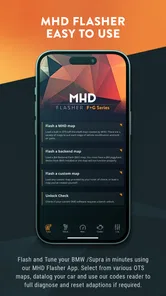
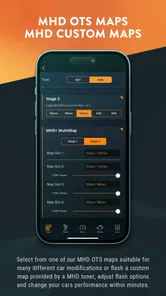
MHD Flasher is an automotive tuning application designed for compatible BMW vehicles equipped with supported engines and electronic control units. It allows users to read and flash engine maps, apply performance-oriented calibrations, monitor important parameters, and access diagnostic functions. The exact features depend on the vehicle, ECU version, adapter, and license purchased, so compatibility should be confirmed before downloading or flashing.
Is MHD Flasher compatible with my BMW and smartphone?
Compatibility is one of the most important points to check before using MHD Flasher. The app supports selected BMW models, engines, and ECU generations rather than every vehicle in the manufacturer’s range. You also need a compatible Android device or supported mobile setup, a reliable internet connection for downloads, and an approved OBD or Wi-Fi adapter. Always consult the official compatibility list before purchasing a license.
Do I need additional hardware or a paid license to use MHD Flasher?
Yes, MHD Flasher generally requires more than simply installing the application. A compatible diagnostic adapter is needed to communicate with the vehicle, and many flashing, monitoring, or map-related functions require separate licenses or paid map packages. Before starting, make sure you have the correct adapter, a charged phone, a stable vehicle power supply, and the appropriate license for your specific engine and ECU.
Is it safe to flash my car using MHD Flasher?
Flashing engine software always involves some risk, even when using a well-known tuning application. Interrupting the process, using an incompatible map, having low battery voltage, or losing the connection may cause problems with the ECU or leave the vehicle unable to start normally. For safer results, follow the developer’s instructions carefully, use a battery charger, verify every compatibility detail, and avoid experimenting with unknown files.
Pros
- Supports several MHD-compatible BMW performance modules.
- Useful for applying firmware updates without visiting a workshop.
- Clear flashing workflow for users familiar with ECU tuning.
- Can help keep compatible MHD hardware and software up to date.
- Convenient mobile solution for tuning-related maintenance.
Cons
- Requires compatible MHD hardware and a supported BMW vehicle.
- Flashing may take time and should not be interrupted.
- Incorrect use can cause ECU or vehicle-startup problems.
- Some features may require separate paid licenses or maps.
- A stable battery and reliable connection are essential during flashing.











