Messenger: Text Messages
- 64.00
- 3.7
- Installs
- 500.00K
- Price
- Free

Screenshots





Analysis by Reviewed
I’d begin with one practical distinction: Messenger: Text Messages is presented as an SMS and MMS messaging app, so I’d judge it first as a tool for ordinary phone-number conversations, not assume it works like a social network messenger. That matters when you’re choosing an app for quick notes, delivery updates, or family group texts. The name can bring other products to mind, so check that you have the text-messaging app you intended before making it your everyday inbox.
Where setup can feel unclear
The first hurdle with a messaging app is often not writing a text but deciding whether it is ready to handle your messages. If you install this app and see an empty conversation list, I wouldn’t immediately assume anything has disappeared. Check whether you opened the correct messaging app and whether the conversations you expect are associated with this device and number. A new app cannot show a conversation that was never available to it.
It also helps to test with a low-stakes message before relying on it for something time-sensitive. Send a brief text to someone you know, then ask them to reply. That simple round trip can tell you whether sending and receiving are both working, rather than leaving you to discover a problem when you’re waiting for a pickup confirmation. If the test behaves differently from your usual setup, pause before changing several settings at once; one change at a time makes it easier to spot what helped.
Checks that make daily use smoother
Before settling in, look over the app’s available settings and make sure notifications are enabled in the places your phone provides for them. Menu names vary between devices, so I’d use the labels shown on your own phone rather than follow instructions written for a different model. If a message arrives but you don’t notice it, checking notification settings is a more useful first step than repeatedly reopening the inbox.
For an important exchange, I’d also confirm the recipient before sending and keep the message short enough to be clear on a small screen. If you are moving between messaging apps, tell regular contacts which number or channel you’re using. This avoids the common mix-up where one person replies by text and the other keeps checking a separate chat service.
Seamless Interface and User Experience
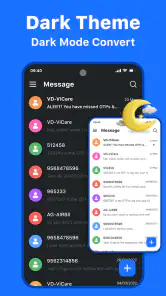
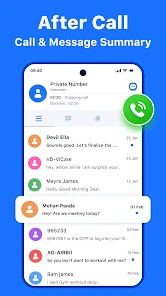
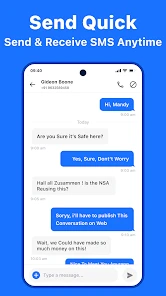
The first thing that strikes you about Messenger: Text Messages is its user-friendly interface. It's straightforward and intuitive, ensuring even the least tech-savvy individuals can navigate it with ease. From the moment you open the app, everything is where you expect it to be. The chat windows are clean, with a simple design that makes reading and sending messages a breeze. No unnecessary clutter, just pure messaging goodness.
Features That Make a Difference
Now, let's dive into the features. Beyond the basic text messaging, Messenger offers a variety of interactive elements that enhance communication. You can send emojis, stickers, and GIFs to add a bit of personality to your chats. One of my favorite features is the ability to create group chats with ease, keeping all your friends in the loop simultaneously.
You May Like

Clash of Clans Is Won Between the Battles

Android Auto Makes the Case for Quieter Car Software

MobiOffice: Transforming Mobile Productivity with Seamless Integration

EA SPORTS FC™ Mobile Soccer: Redefining Mobile Sports Gaming

How Microsoft OneDrive Became a Mobile Productivity Giant

How Google Translate Breaks Language Barriers Effortlessly
Another standout feature is its seamless integration with other apps. It's like having an all-in-one communication hub. You can make voice and video calls, send photos, and even share your location. The quality of calls is consistently crisp, making it a reliable option for staying connected with loved ones across the globe.
Security and Privacy
In today's digital age, security and privacy are paramount, and Messenger does a commendable job in this regard. The app offers features like Secret Conversations, which use end-to-end encryption to keep your chats private. It's a comforting thought, knowing that your personal messages are not vulnerable to prying eyes. However, it’s always wise to stay informed about privacy settings and use them to your advantage.
Performance and Reliability
Performance-wise, Messenger is pretty solid. It runs smoothly, with minimal lag or crashes, even when juggling multiple conversations. The app’s reliable notifications ensure you never miss an important message. However, like any app, it can occasionally be a bit of a battery drain, so it might be worth keeping an eye on your usage if you’re on the go.
Making it fit your routine
One useful way to evaluate an SMS app is to try it during a normal day rather than only opening it to browse menus. For example, I’d use a group thread to coordinate who is bringing what to a shared meal, then keep a separate one-to-one conversation for a delivery or appointment update. Those are different jobs: a group message keeps everyone aligned, while a short direct text is easier to scan when you need one clear answer.
There is a trade-off with group messaging, though. A busy thread can bury a practical detail under replies, so I’d put the key information—such as the time or meeting place—in a concise message of its own. Emojis and other expressive touches can make casual exchanges warmer, but they aren’t a substitute for spelling out details when plans depend on them. For long-running discussions or conversations built around shared media, a dedicated chat service may be more comfortable than SMS.
Choosing between messaging options
For basic communication, the usual alternatives are the messaging app already on the phone, a carrier’s default option, or an internet-based chat service. A familiar built-in inbox can be the simplest choice if it already handles your everyday texts reliably. A separate app is worth trying when you prefer its layout or want a different feel for managing conversations, but switching only makes sense if the people you contact can still reach you in the way you expect.
That distinction also answers a practical question: should you use it for every conversation? I’d consider it for ordinary SMS and MMS exchanges, especially with people who rely on phone numbers rather than the same chat platform. I wouldn’t choose it as a replacement for a service whose main appeal is internet-based group communities, or assume that every conversation feature from another product carries over. Keep the app that best matches how your contacts communicate.
When a message does not arrive
If sending or receiving suddenly stops, first check whether the problem affects one conversation or every one. A single contact issue points you toward checking the number and the thread; a broader failure is a reason to review your phone’s connection and messaging setup. Restarting the app and checking for an available update are sensible basic steps, but I’d avoid deleting conversations or changing multiple settings before you know what is wrong.
Sometimes the app is not the cause at all. A recipient may have an outdated number, a phone may be temporarily unreachable, or a message may be delayed outside the app. For something urgent, use another agreed way to reach the person instead of repeatedly sending the same text. That prevents confusion if several copies arrive later and gives you a practical fallback without treating every delay as an app failure.
Who will get the most from it
This is best suited to someone who wants a straightforward place for everyday text exchanges and is comfortable checking their phone’s messaging settings when needed. It may be less appealing if you want every contact to use one shared online platform, or if you depend on advanced organization and collaboration tools. I’d test it with a few routine conversations first, then decide whether its approach fits your habits instead of moving every important thread at once.
The app is free to download, with optional in-app purchases listed from $3.99 to $27.99 per item. It is rated for Everyone, has a 3.7 average from around 1.5K ratings, and has been installed over 500K times. Remote Control - TV Remote, TV Cast is the developer; the app was released on May 28, 2021, and its current version is 999916002.0 for devices running Android 8.0 or later. Those details give a useful snapshot, but they don’t replace trying the messaging flow that matters to you.
A sensible way to switch
If I were considering it as my main texting app, I’d make the change gradually. I would start with a few non-urgent contacts, confirm that their replies arrive in the expected thread, and leave the phone’s familiar messaging option available while I learn the new routine. This is especially useful if I depend on texts for work schedules, school pickup plans, or appointment reminders. A calm trial makes it easier to notice whether the app fits, without turning a minor setup surprise into a missed message.
For a household group, I’d also agree on what belongs in the thread. A simple “I’m on my way” or a changed meeting time suits SMS well; lengthy back-and-forth planning may be easier in a dedicated internet chat where everyone already participates. If a relative prefers plain texts and rarely uses other services, the phone-number approach is a practical advantage. If the whole group is already active in another messenger, asking everyone to switch just for one person may create more friction than it solves.
Small habits that prevent confusion
A useful habit is to treat the first message in a new conversation as a check, not proof that the entire setup is settled. Look for the reply, verify that it appears under the intended contact, and make sure notifications behave as you expect when the screen is not open. If only one person cannot receive your messages, compare the number and try a separate agreed channel before assuming a general app problem. These checks are modest, but they help distinguish a contact mix-up from a wider issue.
I’d be cautious about assuming that every feature associated with the word “messenger” belongs to this app or works between all contacts. SMS and MMS are useful for reaching people through phone numbers, while internet-based services can offer a shared space with their own accounts and capabilities. Keeping those roles separate answers a common decision point: use this for straightforward texts, and retain another service when a particular group depends on its own online tools.
What the price and ratings mean in practice
Because the app is free to download but offers paid in-app items, I’d try the basic messaging routine before spending anything. The purchase range alone does not tell me which optional item would matter to my use, so I would look at the choices shown in the app and decide whether they solve a real problem for me. If ordinary text exchanges are all I need, I would not treat a purchase as a prerequisite for evaluating whether the app belongs in my routine.
The overall rating gives a broad impression rather than a promise that the app will suit every phone or habit. With a 3.7 average across around 1.5K ratings and 64 written reviews, I’d use it as a reason to try the everyday workflow carefully, not as a substitute for testing it with the people I actually message. Its 500K-plus installs suggest it has reached a substantial audience, but the practical question remains whether texts arrive and are easy for me to manage on my own device.
My practical verdict
For someone who wants a simple route to routine SMS and MMS, this can be worth a careful trial, particularly when phone-number conversations matter more than shared online communities. I would not switch in a hurry if my current inbox already works well, or if I need specialized organization and collaboration features. The clearest approach is to test a few low-stakes conversations, check notification behavior, and keep a fallback for urgent plans while deciding.
Overall, I see Messenger: Text Messages as a possible everyday option rather than a universal replacement for every kind of chat. It makes most sense when its text-focused role matches the way your contacts communicate. Go in with that expectation, verify the basics on your own phone, and you’ll have a much better basis for deciding whether it earns a place in your messaging routine.
Messenger: Text Messages Frequently Asked Questions
Is Messenger: Text Messages suitable for everyday communication?
Messenger: Text Messages is a communication app for SMS and MMS, with a store description that emphasizes chatting faster and more simply. It may suit people looking for a straightforward way to handle text messages. The app is free to download, is rated for Everyone, and has an average rating of 3.7 from around 1,500 ratings.
What features does Messenger: Text Messages offer?
Messenger: Text Messages provides a comprehensive messaging experience, allowing users to send text messages, make voice calls, and initiate video chats. It supports multimedia sharing, including photos, videos, and voice notes. The app also offers group chats, end-to-end encryption for privacy, and the ability to customize chat themes for a personalized experience.
Is Messenger: Text Messages free to use?
Yes, Messenger: Text Messages is free to download and use. However, it requires an internet connection, either through Wi-Fi or mobile data, to function. While the app itself is free, be aware that data charges may apply if you're not connected to a Wi-Fi network. Some optional in-app purchases or features might also require payment. In-app purchases range from $3.99 to $27.99 per item.
How secure is Messenger: Text Messages?
Messenger: Text Messages is designed with security in mind, featuring end-to-end encryption for all messages, ensuring that only you and the recipient can read them. The app also offers additional security settings, such as two-factor authentication and the ability to control who can contact you, providing a safe and secure messaging environment.
Can I use Messenger: Text Messages without a Facebook account?
Yes, you can use Messenger: Text Messages without a Facebook account. The app allows users to sign up using their phone number, making it accessible to those who prefer not to link their Facebook profile. This flexibility makes it a versatile choice for users seeking a standalone messaging app experience.
Pros
- Seamless integration with Facebook.
- User-friendly interface for all ages.
- Cross-platform compatibility.
- Supports voice and video calls.
- Large collection of emojis and stickers.
Cons
- Requires Facebook account to use.
- Occasional glitches in message delivery.
- Privacy concerns with data sharing.
- Consumes significant battery life.
- Frequent app updates required.

- Category
- Communication
- Version
- 999916002.0











