Messages: Text Message, SMS
- 161.00
- 4.1
- Installs
- 500.00K
- Price
- Free

Screenshots
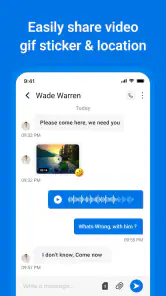
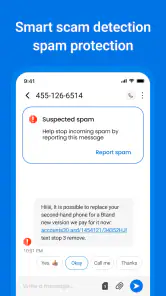
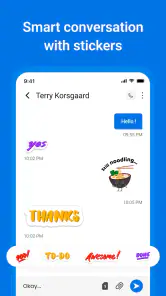
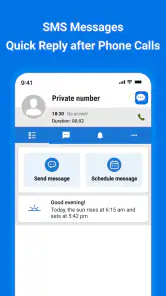
Analysis by Reviewed
I reach for a text messaging app when I need a conversation to stay simple: a quick plan, a practical update, or a message to someone who may not use the same chat service I do. Messages: Text Message, SMS is aimed at that everyday need, giving familiar texting a more customizable feel. I like the idea of keeping routine communication in one place without turning every exchange into another social feed to check.
When a straightforward text is the right tool
SMS has a useful rhythm: send a short note, let the other person answer when they can, and get on with the day. That suits things like confirming a pickup, sharing an address, or telling a family member you are running late. This app is best for people who want their texting screen to feel personal while keeping the basic task—reading and sending messages—front and center.
It is less suitable if your conversations depend on group collaboration, rich media features, or a particular chat network’s ecosystem. In those cases, a dedicated messaging service may fit better. I would also keep expectations realistic: an SMS app is not a substitute for a secure, feature-rich internet messenger simply because it offers visual customization.
There is a practical middle ground between replacing every chat tool and ignoring a new one. I would try it first for the kinds of messages that already work well as ordinary texts: a short update to a relative, an appointment reminder, or a quick question for someone whose preferred messenger I do not know. If those exchanges feel easier to identify and revisit, it has earned a place in my routine; if most of my communication depends on shared online features, it may remain a secondary option.
Making conversations easier to scan
The practical value of changing bubble colors or themes is not only decoration. A visual style that feels comfortable can make long message threads easier to follow, while a distinct notification tone for a contact can help me notice an important message without opening every conversation. I would use those options sparingly, though: too many colors and alerts can make a simple inbox feel busy rather than clearer.
Search is especially handy when a text thread doubles as a small record of daily logistics. If I need to find the time someone suggested, a keyword search can be quicker than scrolling through weeks of messages. A useful habit is to search for a distinctive word or place name rather than a common term, which should narrow down the results and reduce unnecessary browsing.
One small workflow I find useful is to put a memorable detail in the original text when plans are being arranged. A street name, venue, or unusual item is easier to search for later than a vague phrase such as “there” or “the usual.” This does not require turning texting into formal record-keeping; it simply makes the thread more useful when I need to recover one detail in a hurry.
You May Like

Clash of Clans Is Won Between the Battles

Android Auto Makes the Case for Quieter Car Software

MobiOffice: Transforming Mobile Productivity with Seamless Integration

EA SPORTS FC™ Mobile Soccer: Redefining Mobile Sports Gaming

How Microsoft OneDrive Became a Mobile Productivity Giant

How Google Translate Breaks Language Barriers Effortlessly
Customization also has a trade-off when more than one person uses or looks at a phone. A bright theme or a distinctive tone can help me recognize a conversation, but it does not make the content private, and someone nearby may still notice a notification. I would choose visual changes for readability and reserve alerts for genuinely time-sensitive contacts rather than assigning every thread its own signal.
Attention, timing, and everyday boundaries
Texting can make people feel available all the time, but the app itself does not require an instant reply. I find it helpful to treat notifications as prompts, not obligations: check a message when I have a moment, answer what needs answering, and leave less urgent conversations until later. Contact-specific tones can support that approach when there are a few people whose messages genuinely need to stand out.
For example, imagine arranging an evening pickup while working through a busy afternoon. A quick text can settle the location and timing without requiring a call or a lengthy conversation. Later, search can bring the details back when plans are underway. That small workflow is where a focused SMS app earns its place: it helps keep practical information findable without asking me to stay in a chat continuously.
I would also decide in advance which conversations deserve an audible interruption. If every contact gets a distinctive alert, the distinction disappears and the phone starts setting the pace of the day. A restrained setup—one or two useful contact tones, with the rest left quieter—makes it easier to notice something important without training myself to check every buzz immediately.
For a household coordinating errands, this can be more helpful than it first sounds. One person can send a short update about a changed pickup point; another can read it between tasks and reply when free. Texting leaves room for asynchronous answers, which is valuable when a call would interrupt work or when people are moving through different schedules. The app’s value here is not that it changes the exchange, but that its personalized thread and searchable history can make the exchange easier to manage.
First Impressions
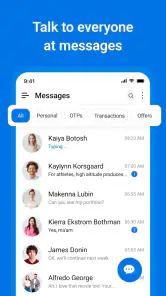
From the moment I installed Messages: Text Message, SMS, I was greeted with a clean and intuitive interface. It's like stepping into a familiar room with a fresh coat of paint. The design is sleek and minimalistic, making navigation a breeze. Unlike some apps that overwhelm you with clutter, this one knows how to keep it simple and user-friendly. I was immediately impressed by how quickly I could access all the features without feeling lost.
That familiar starting point matters because an SMS app sits in the middle of ordinary routines, not just occasional chats. I want to open a thread, understand who wrote, and get back out without learning a complicated system. A clean layout lowers that initial friction, but the real test is whether the choices remain comfortable after I have many active conversations. I would judge the app over several days of normal use, not just by the first screen.
Features that Stand Out
One of the features that caught my eye was the app's robust customization options. You can tweak the themes, change the chat bubble colors, and even set custom notification tones for different contacts. This level of personalization is perfect for those who love to give their apps a personal touch.
Another noteworthy feature is the app's powerful search functionality. We've all been there—scouring through endless messages to find that one piece of information. With this app, searching for old messages is as simple as pie. Just type in a keyword, and voila! The app swiftly retrieves relevant messages, saving you both time and frustration.
For someone moving between errands, the combination is more useful than either feature alone. I can give a frequent contact a recognizable tone, then use search later to find a specific detail in the same thread. The important distinction is that these tools improve how I handle my own SMS conversations; they do not create a shared planning space or organize tasks for everyone involved. If a group needs a single live schedule, a calendar or group chat is still the more suitable tool.
There is also a sensible way to avoid over-customizing. I would make one or two changes, use the app long enough to see whether they actually help, and only then adjust further. If every conversation has a different color and sound, recognition can become a memory test. A consistent baseline with a small number of exceptions is easier to maintain, especially if I change phones or revise my notification habits later.
Performance and Reliability
Performance-wise, the app runs smoothly without any noticeable lags or crashes. It's optimized to work seamlessly on both Android and iOS platforms, ensuring that you have a consistent experience regardless of your device. I found the message delivery to be quick and reliable, which is crucial for any communication app. No one likes waiting around for their texts to send or receive, and fortunately, with this app, that's never an issue.
Before switching your everyday conversations over, check how it fits with the messaging setup on your device and with the people you contact most. SMS depends on ordinary phone messaging rather than a shared app account, so the recipient’s habits and your phone’s default messaging arrangement matter. I would start with a few low-stakes conversations, then decide whether its layout and notification choices make daily use more comfortable.
It also helps to separate presentation from communication reach. Themes and tones can make a thread easier for you to recognize, but they do not change how another person receives a text. If someone expects group features, media sharing, or ongoing conversation across multiple devices, a mainstream internet messenger may be the better fit; for brief, direct exchanges, standard texting remains refreshingly uncomplicated.
That difference is especially important when deciding whether it should replace an app you already use. Internet-based messengers often make sense when a whole family, team, or friend group is already there and expects shared features. A conventional SMS setup is more direct for one-to-one coordination with people who may not share that ecosystem. I would not switch a group away from its established service just for a different look; I would use this app where straightforward texting is already the natural channel.
If you are testing it on a phone that already has a familiar messaging arrangement, I would begin with a low-pressure exchange rather than moving every conversation at once. Check whether the people you contact can receive and reply as expected, then confirm that you are comfortable finding threads and recognizing alerts. This gradual approach is a practical way to spot a mismatch before relying on a new setup for time-sensitive plans.
Security and Privacy
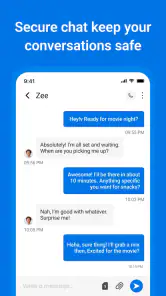
In today's digital age, security is paramount, and this app takes it seriously. It offers end-to-end encryption, ensuring that your conversations remain private and secure. You can chat with peace of mind, knowing that your messages are safe from prying eyes. Additionally, they have a handy feature that allows you to lock the app with a password or fingerprint, adding an extra layer of protection.
I would treat privacy claims and device safeguards as separate questions before relying on any messaging app for sensitive discussions. An app lock can help prevent someone casually opening your messages on your phone, while encryption concerns how messages are protected in transit; one should not be assumed to guarantee the other. For highly confidential conversations, I prefer a service whose security approach is clearly explained and suited to that need, rather than choosing on appearance alone.
That distinction matters in ordinary use, too. A phone passed around at home, left on a desk, or used to show someone a photo can expose message previews even when the app itself is locked. I make a habit of checking notification previews at the device level and keeping particularly personal details out of lock-screen alerts. Those small choices can reduce accidental exposure without changing how I communicate.
For everyday coordination, I would avoid putting sensitive account details or private information into a text simply because it is convenient to find later. Search makes old messages easier to retrieve, which is useful for an address or meeting point, but it also means a stored thread can remain a record on the phone. I think of search as a convenience for ordinary logistics, not as a reason to keep confidential material in a message history.
Who will get the most from it
The app is free, rated for Everyone, and developed by Calendar 2025 Planner. It has an average rating of 4.1 from around four thousand ratings, with roughly 161 written reviews and over 500,000 installs. It was released on April 23, 2024; version 17.0 supports Android 6.0 and later. That makes it an accessible option for people using an older Android device as well as those who simply want a no-cost texting app, though the fit still depends on personal preferences and the phone’s messaging setup.
My recommendation is strongest for someone who texts often, likes to distinguish conversations visually, and wants search to help retrieve practical details. It is not the choice I would make for a person who needs one inbox synchronized across several platforms, relies on elaborate group chats, or expects every modern messenger feature in an SMS-focused tool. Those needs are better served by an app built around that wider communication style.
It may also suit someone who wants a little more control over the feel of a familiar communication habit without asking friends or family to install the same service. That is a meaningful advantage over a network-based messenger when the other person’s app preferences are unknown. On the other hand, anyone who rarely sends standard texts and already has a dependable shared chat space may gain little from changing their routine.
One sensible way to make the app work for you is to customize only the conversations where a distinction helps: perhaps a different tone for an important contact and a calmer default for everyone else. Then use search as a way to retrieve information, not as a reason to keep every thread active in your attention. That balance keeps personalization useful instead of turning it into another source of noise.
My overall view is that this is a focused choice for people who want ordinary texting to feel more personal and easier to revisit. Its strongest case is a day made up of small exchanges: confirming a time, sharing a location, or answering when a spare moment appears. Its weaker case is a communication routine built around large groups, shared online features, or demanding privacy needs. I would choose it for the former, and keep a different tool for the latter.
Overall, Messages: Text Message, SMS is a reliable and feature-rich app that caters to both traditional SMS lovers and those looking for a modern messaging experience. Whether you're customizing your chat interface or ensuring your conversations are secure, this app delivers on all fronts. Give it a try, and you might find yourself wondering how you ever texted without it. Enjoy texting like never before!
Messages: Text Message, SMS Frequently Asked Questions
Is Messages: Text Message, SMS free to download, and which devices can run it?
Messages: Text Message, SMS is a free communication app, so you can try it without paying for the download. It is designed for Android devices running version 6.0 or later. Before installing, check your device’s Android version and make sure you are comfortable using an app whose main purpose is texting. Its age rating is Everyone.
Who develops Messages: Text Message, SMS, and what is its general reputation?
The app is developed by Calendar 2025 Planner and focuses on text messaging. It has an average rating of 4.1 from around 4,000 ratings, with 161 written reviews and over 500,000 installs. Those figures suggest that it has reached a substantial audience, though individual experiences can differ. Reading recent user feedback can help you decide whether its approach suits your needs.
What features does the Messages: Text Message, SMS app offer?
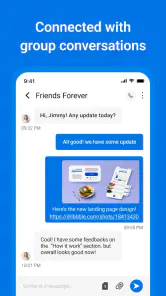
The Messages app provides a comprehensive suite of features including sending and receiving SMS and MMS, group messaging, message scheduling, and customizable notifications. The app also supports multimedia sharing, allowing users to send pictures, videos, and audio messages. Additionally, it includes powerful search functionality and the ability to back up and restore messages, ensuring that important conversations are never lost.
Is the Messages app secure and private?
Yes, the Messages app prioritizes user security and privacy. It incorporates end-to-end encryption for messages to ensure that only the intended recipients can read them. The app also respects user privacy by not storing messages on its servers, and it offers features such as passcode protection to prevent unauthorized access to your conversations.
Can I use the Messages app on multiple devices?
The Messages app is designed to function primarily on a single device per user account due to its SMS and MMS capabilities, which are tied to a specific phone number. However, some versions offer cloud synchronization features that allow you to view and send messages from a secondary device, such as a tablet or desktop, when linked to the primary account.
Pros
- User-friendly interface
- Supports multimedia messages
- Group chat feature
- Customizable notifications
- Lightweight and quick
Cons
- Limited message scheduling
- No end-to-end encryption
- Ads in free version
- No cloud backup support
- Limited customization options

- Category
- Communication
- Version
- 17.0











