Messages: SMS Texting
- 17.00
- 4.0
- Installs
- 100.00K
- Price
- Free

Screenshots
Analysis by Reviewed
Choosing an SMS app is less about finding the one with the most features and more about deciding what you want from everyday texting. I’d look first at whether you mainly exchange ordinary text messages, whether you rely on internet-based chats and group tools, and how much you want your messaging app to do beyond sending a note. Messages: SMS Texting is aimed at people who want a straightforward place for SMS conversations rather than a broad communication hub.
Fit your messages to the tool
Before switching, I’d think about the messages I send most often: quick practical notes, longer conversations, or group plans that depend on everyone using the same service. That distinction matters because the right app is often the one that fits the people I contact, not the one with the longest feature list. A focused SMS app can be useful as a simple route to people who prefer regular texts, while an internet messenger may suit a group that already shares photos and ongoing updates there.
I’d also consider how often I need to find old details. If I regularly search past messages for an address, meeting time, or delivery instruction, it is worth testing that real workflow early rather than judging an app after sending only a greeting. A few minutes spent checking familiar conversations can reveal whether the layout and contact handling feel comfortable enough for everyday use.
A practical choice for everyday texting
Start with the kind of conversations you have
If most of your messages are quick check-ins, appointment updates, or practical notes to people in your contacts, a dedicated SMS messaging app can be a sensible fit. Messages: SMS Texting, published by unseenapps, is a free communication app for that focused purpose. Its emphasis is on keeping text conversations clear and uncomplicated, rather than asking you to adopt another social network or chat service.
That focus is useful when you want a familiar way to reach people who may not use the same internet messaging service as you. Think of a family member who prefers regular texts, a neighbor coordinating a key handoff, or a short message to confirm where to meet. For these exchanges, a simple SMS-first option can be easier to understand than an app built around channels, profiles, or online communities.
The practical question is whether you want a new SMS app at all. On Android, people often already have a messaging app on their phone, so switching only makes sense if you prefer this app’s approach or want to try a simpler alternative. The store summary gives a clear sense of its purpose, but the right choice still depends on how its actual conversation handling feels on your device.
Where a focused SMS app earns its place
The strongest case for Messages: SMS Texting is restraint. It is designed around conversations with your contacts, not around a stream of unrelated features. That can make it a reasonable option for someone who finds more expansive communication apps distracting, or for a user who wants a dedicated home for ordinary texting.
You May Like

Clash of Clans Is Won Between the Battles

Android Auto Makes the Case for Quieter Car Software

MobiOffice: Transforming Mobile Productivity with Seamless Integration

EA SPORTS FC™ Mobile Soccer: Redefining Mobile Sports Gaming

How Microsoft OneDrive Became a Mobile Productivity Giant

How Google Translate Breaks Language Barriers Effortlessly
A small but useful habit is to treat SMS as the dependable channel for short, time-sensitive coordination, not as a replacement for every kind of conversation. I would use a focused app like this to confirm a pickup, send a brief address, or follow up when I do not know which internet chat service someone uses. Keeping longer discussions in the service the other person already checks can prevent the familiar problem of splitting one conversation across several apps.
Another practical consideration is contact-based organization. Because the app is described as working with your contacts, it makes the most sense when your address book is reasonably tidy. Before relying on any new messaging app, I’d check that the people I text most often appear as expected and that I can recognize the right conversation at a glance. That simple check matters more than installing an app and assuming every contact will be effortless to identify.
Messages: SMS Texting has an average rating of 4.0 from around 185 ratings, and it has been installed over 100,000 times. Those figures suggest that other users have tried it, but they do not tell me whether it will suit a particular phone, contact list, or texting routine. I would weigh them as context, not as a substitute for trying the core task: opening a conversation and sending the kind of message I use every day.
A realistic test before making it your default
Here is the kind of ordinary test I’d use: imagine I’m running late to meet someone and need to send a quick update, then later I want to check the address they sent. I’d try both actions with a familiar contact and see whether I can identify the thread quickly and return to the earlier detail without fuss. This is more revealing than judging the app by a single new message, because texting is often about picking up a conversation again at the right moment.
I’d also check a contact whose number is saved in an unusual format or whose name resembles someone else’s. That is a practical way to spot address-book confusion before a rushed message goes to the wrong person. It is not a special capability to expect from this app; it is simply a useful trial for any contact-based SMS choice, especially if your address book has accumulated duplicates over time.
What it does not replace
SMS and internet-based messaging solve overlapping but different problems. A standard text is useful when you need to reach someone through their phone number, while a chat service may be the better home for frequent group conversations, rich media, shared files, or ongoing discussions among people who all use that service. I would not choose an SMS-focused app expecting it to become a universal inbox for every communication platform.
This is also where expectations matter. The app’s purpose is clear, but I would not assume that “simple” means it includes every convenience found in a feature-heavy alternative. If you depend on particular extras such as advanced group controls, cross-device continuity, or specialized conversation tools, compare those needs against the app on your own device before making it your main choice. A product can be well suited to basic texting and still be the wrong fit for a more elaborate workflow.
For someone who mostly communicates through an internet messenger, moving to an SMS app may actually add friction: friends may continue writing elsewhere, and conversations can become scattered. In that case, keeping the current service is probably better. Likewise, if the messaging app already installed on your phone handles your daily needs comfortably, there may be little practical benefit in changing just to have another option.
Which alternative makes more sense?
The usual alternatives fall into two broad groups: the SMS app already on the phone and internet-based chat services. I would compare Messages: SMS Texting with the first group by asking whether it makes ordinary texting easier for me to handle. With the second, I’d compare the kind of communication rather than assume one is better: if a group relies on shared online conversations and media, staying with that service is likely more convenient; if I need a direct text to a contact, an SMS-focused choice is more aligned with that task.
There is also a useful trade-off in keeping conversations in their natural home. A dedicated SMS option can keep phone-number-based messages distinct from app-specific chats, which may help me avoid checking the wrong place for a short update. But splitting communication across tools can make it harder to remember where a detail was sent. I’d choose a simple rule—use SMS for direct practical notes and keep ongoing group discussions where they already happen—rather than moving conversations back and forth without a reason.
What switching really involves
Changing a messaging app is not just a matter of tapping install. Before making Messages: SMS Texting your everyday choice, I’d check whether the app behaves as expected for the messages I care about and whether the phone’s messaging setup allows it to handle SMS in the way I want. I would also look at how existing conversations appear and confirm that replies go through the intended app. These are sensible checks for any SMS app, not reasons to assume a problem.
A low-risk way to evaluate it is to start with a few ordinary conversations rather than moving your whole routine at once. Send a short coordination message, reply to an existing thread, and make sure you can find that conversation again. Then try a message to someone whose contact details are saved in a different format, if that is common in your address book. This reveals whether the app fits your real habits without requiring you to rebuild them immediately.
There is also a human side to switching. People do not always notice which app you prefer, and an SMS app cannot make someone who uses a different service check texts more often. I’d keep the transition simple: use it for the conversations that naturally belong in SMS, while leaving app-specific group chats where their participants already expect them. That avoids turning an uncomplicated app choice into a complicated social migration.
Who should try it—and who should pass
I’d consider Messages: SMS Texting if I wanted a dedicated, uncluttered option for regular text conversations, especially when I communicate with people who do not share one preferred chat platform. It may also appeal to someone who wants a basic communication app without paying for the download; it is free, rated for Everyone, and the current version is 2.0.0. It requires Android 10 or later, so checking the phone’s operating system is a straightforward first step.
I’d pass if I needed one app to combine SMS with several online messaging services, or if my daily communication depends on capabilities beyond ordinary texting. I would also hesitate to switch from a familiar default app when it already makes conversations easy to manage. In those cases, a broader chat service or the phone’s existing messaging option may be the more natural choice, depending on how the people around me communicate.
The app was released on September 14, 2026, and its current version is 2.0.0. I treat release timing and version details as useful context when deciding whether to test an app, but they do not answer the more personal question of whether its day-to-day flow suits me. A brief trial with real contacts is more informative than choosing based on a version number alone.
My recommendation
My recommendation is to try Messages: SMS Texting when your goal is specifically to keep ordinary text conversations straightforward. Its appeal is not that it promises to replace every communication tool; it is that it stays focused on the kind of message many people still need to send. For quick plans, simple updates, and reaching contacts without asking them to join another service, that narrow purpose can be a genuine advantage.
I would not make it the automatic choice for everyone. If your current app already handles SMS well, or if most of your conversations happen in feature-rich online chats, switching may offer little in return. But if you want a free, dedicated SMS option and your device runs Android 10 or later, it is reasonable to give it a practical test. The best reason to choose it is a real preference for focused texting, not the assumption that one messaging app should do everything.
Overall, I see Messages: SMS Texting as a candidate for people who value a clear, direct SMS routine and are willing to check that it fits their phone and contacts before settling in. Start with everyday messages, keep other services for conversations they already serve well, and judge the app by whether it makes those simple exchanges easier. That is the decision that matters more than any broad promise about messaging.
A final way to decide
If you are still weighing the switch, I’d ask whether the benefit is concrete: do you want a separate, focused place for direct SMS, or are you simply looking for a new app because it is available? If the answer is the first, a trial with a couple of real conversations can tell you more than browsing feature comparisons. If the answer is the second, the default messaging app may already be the simpler option.
For me, the strongest reason to keep using this kind of app would be that it makes a specific routine feel easier without pulling me away from the services my friends and groups already use. The main cost is not a price, since the app is free; it is the attention needed to test the switch and avoid scattering conversations. I’d make that change only if the focused SMS experience earns a place in my daily habits.
Messages: SMS Texting Frequently Asked Questions
What is Messages: SMS Texting used for?
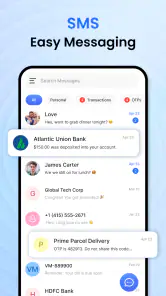
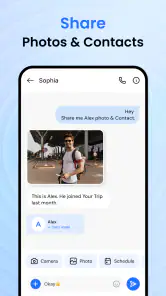
Messages: SMS Texting is designed for sending and receiving text messages, typically through your device’s SMS and MMS services. Depending on the app’s features and your phone, it may also let you organize conversations, share photos or other attachments, and personalize the way chats look. Available functions can vary by device, Android version, and app update, so check its store listing before downloading.
Does Messages: SMS Texting require an internet connection?
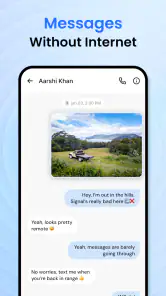
Traditional SMS messages are sent through your mobile carrier and generally do not need Wi-Fi or mobile data, though carrier coverage and messaging charges may apply. MMS messages, such as texts containing photos or other media, may require mobile data or specific carrier settings. If the app supports any internet-based features, those may need a data connection. Check your plan and the app’s permissions and listing for details.
Is Messages: SMS Texting free to download and use?
The app may be available to download without an upfront charge, but that does not necessarily mean every part of using it is free. Your carrier may charge for SMS or MMS messages, particularly if your plan has limits or you are messaging internationally. The app may also offer optional purchases or advertising. Review the current store listing and your mobile plan to understand any costs before use.
Can I use Messages: SMS Texting as my default messaging app?
On compatible Android devices, a messaging app may need to be selected as the default SMS app before it can manage your text conversations and send messages in the usual way. The exact setup steps depend on your Android version and device manufacturer. On iPhone, third-party apps generally cannot replace Apple’s built-in app for standard carrier SMS in the same way. Confirm platform compatibility in the app listing.
Is Messages: SMS Texting safe, and what permissions might it need?
A messaging app may request access to SMS, contacts, notifications, photos, or other device features so it can display conversations and support messaging functions. Only grant permissions that make sense for the features you intend to use, and review the developer’s privacy information in the app store. Avoid sharing sensitive information in ordinary SMS, which generally does not provide the same protections as end-to-end encrypted messaging.
Pros
- Supports SMS and MMS for sharing text
- photos
- and other media.
- Conversation view makes it easy to follow message exchanges.
- Contact integration helps identify who is messaging you.
- Useful search tools make older conversations easier to find.
- Notification controls let you manage alerts for conversations.
Cons
- SMS and MMS charges may apply depending on your carrier plan.
- Features and availability can vary by device
- carrier
- and region.
- Messages sent by SMS are not end-to-end encrypted.
- Large media attachments may be compressed or fail to send.
- Accidentally deleted conversations may be difficult to recover.

- Category
- Communication
- Version
- 2.0.0











