Messages : SMS & Private Chat
- 363.00
- 3.9
- Installs
- 1.00M
- Price
- Free

Screenshots


Analysis by Reviewed
I’d judge any SMS app by a simple test: does it make everyday texting easier without making me rethink how I handle messages? Messages: SMS & Private Chat is aimed at that familiar job, with a straightforward focus on conversations rather than a wider social network. Its appeal is clearest if you want a dedicated place for texts and prefer a familiar messaging routine over moving friends to a new platform.
What the free price does—and doesn’t—tell you
The app is free to download, so trying it does not require an upfront purchase. It also offers in-app purchases ranging from $2.99 to $49.99 per item. That is useful to know before you explore any paid options, but the range alone does not tell me what each item includes or whether it is necessary for ordinary texting. I would start with the free experience and only consider paying after checking the specific purchase shown in the app.
That distinction matters: free access gives you a low-risk way to see whether this particular SMS experience suits you, while paid value depends on what you personally want from its optional extras. I wouldn’t treat the highest listed purchase as a measure of what messaging itself should cost, or assume that paying is required to send everyday texts.
What I would check before making it my everyday inbox
There is a practical question worth answering before you switch: will this app work with the way you already receive and send messages? I would test it first with a few routine conversations, then check that new replies arrive where I expect and that I can find older exchanges without changing my habits. This matters more than a quick tour of the interface because the value of a messaging app depends on whether it fits into a real day, not just whether its screens look tidy.
I would also make the change at a quiet moment rather than just before an appointment or a long trip. When your phone is serving as the contact point for a pickup, a delivery, or a family plan, an unfamiliar inbox can create needless uncertainty. Keeping the previous setup available while you test the new one gives you a simple fallback if an important thread does not appear as expected.
Another useful habit is to decide what information you want to keep easy to retrieve. Texts often contain details people later need—times, addresses, or a quick confirmation—and a conversation list is not the same thing as a task manager. I would use the app to read and reply, but move genuinely important commitments into whatever reminder or calendar routine I already trust. That small distinction prevents a convenient chat inbox from becoming an unreliable memory system.
All-in-One Messaging
Messages: SMS & Private Chat brings all your conversations under one roof. Whether you're texting your friend about weekend plans or having a heart-to-heart with a loved one, this app ensures you don’t have to hop from one app to another. It’s like having a unified inbox for all your chats, and honestly, it’s a breath of fresh air.
You May Like

Clash of Clans Is Won Between the Battles

Android Auto Makes the Case for Quieter Car Software

MobiOffice: Transforming Mobile Productivity with Seamless Integration

EA SPORTS FC™ Mobile Soccer: Redefining Mobile Sports Gaming

How Microsoft OneDrive Became a Mobile Productivity Giant

How Google Translate Breaks Language Barriers Effortlessly
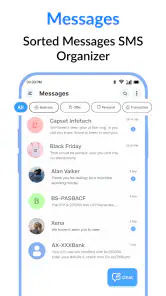
User-Friendly Interface
One of the first things I noticed was how intuitive the interface is. The design is clean, straightforward, and won't have you scratching your head trying to find a feature. It's like the app just knows what you need, and it delivers without any fuss. The layout is sleek and aesthetically pleasing, making my messaging experience not just efficient, but also enjoyable.
That simple approach is most valuable when you open a conversation to find a practical detail quickly: an appointment time, an address, or the last message in a busy family thread. I’d use the conversation list as a lightweight daily inbox, then deal with time-sensitive messages before they disappear beneath newer chats. If you rely on texts for reminders, it’s worth building the habit of acting on important information rather than assuming an SMS app will manage tasks for you.
Privacy at Its Core
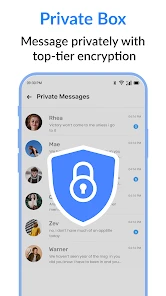
In an era where privacy is more than just a buzzword, this app takes it seriously. With end-to-end encryption, you can chat away knowing your conversations are safe from prying eyes. It's like having a secret handshake with your app – just between you and your chat buddy. I found this particularly reassuring in a world where data breaches seem to make the headlines regularly.
For privacy-conscious readers, I’d still separate the feeling of a private chat from the practical limits of ordinary texting. SMS is not the same as an encrypted internet messenger, and the protections available can depend on the conversation and the other person’s app. I would avoid sending highly sensitive information by text simply because a messaging app presents itself as private; for that, choose a channel whose security properties you and the recipient both understand.
That distinction also affects what I would recommend to a group. If everyone in a conversation needs the same security expectations, I would first make sure the channel they use actually provides them consistently. A privacy label alone is not a substitute for checking whether the other person is using a compatible service and whether the conversation is protected in the way you expect. For everyday coordination, texts can be convenient; for confidential documents, account details, or anything that could cause harm if exposed, I would choose a channel designed for that sensitivity.
Seamless Integration
For those worried about transitioning from other messaging apps, fear not! The integration process is as smooth as butter. The app allows easy importation of your existing chats, so you won’t feel like you're starting from scratch. It's like moving into a new house and finding all your furniture exactly where you want it – no hassle, no stress.
In practice, I’d make any change gradually: check that familiar conversations appear as expected, then keep the app you used before available until you’re comfortable with the new setup. This is especially sensible if you keep old texts for reference, such as delivery details or family plans. A smooth import can make switching less intimidating, but I’d still verify that the messages I care about are present before relying on the new inbox as my only record.
A good test is to search for an older message you know you may need, rather than only glancing at the newest threads. If you regularly refer back to a gate code, an agreed meeting place, or a confirmation from a service provider, check that those exchanges are available after the move. I would not delete or abandon the old setup until I had confirmed the conversations that matter to me, especially if I use texts as a record of arrangements.
Customizable Features
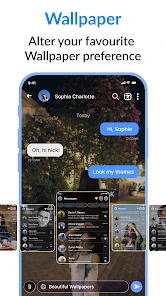
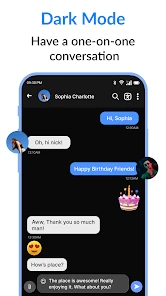
Customization is where the app really shines. From themes to chat bubble colors, you can tweak it to reflect your personal style. Feeling blue? Switch to a calming theme. Want something more vibrant? The app’s got you covered. It’s like having a wardrobe for your chats, allowing you to dress them up however you like.
I see visual changes as a comfort feature, not a reason on their own to switch. If a different appearance makes a long list of conversations easier for you to look at, it can make daily use more pleasant. But I would keep the first setup simple and change one thing at a time. That makes it easier to tell whether a theme or color choice genuinely improves readability, rather than creating a fresh look that is harder to scan in a hurry.
Where it fits among messaging choices
Compared with the usual alternatives, this app is best considered as a focused SMS and messaging option, not a replacement for every communication service. A standard texting app is often the natural choice when you mainly need carrier-based messages; a separate internet messenger may suit you better when your contacts already use it for group conversations or richer online communication. I would not switch an entire friend group just for a new inbox. The app makes more sense when you want to change your own texting experience while keeping the people you message in mind.
A realistic use case is a busy day of coordinating a pickup: I can check the latest message, confirm a time, and keep the exchange together rather than searching through unrelated social feeds. The trade-off is that an SMS-focused routine does not automatically solve every messaging problem. If most of your conversations happen in another service, keeping that service may be simpler than splitting attention between apps.
The choice also depends on who you need to reach. SMS can be useful when you want to contact someone without asking them to join a new social platform, while an internet messenger can be a better fit for a group that already coordinates there. I would not assume that one app will keep every conversation together if contacts use different services. Before installing, think about whether your main need is a different way to manage texts or a shared place for a whole group to chat; those are related needs, but they are not identical.
Who is likely to get value
The app is a reasonable fit for someone who wants a dedicated communication app, appreciates a clean layout, and is curious about a different way to handle texts. It is also approachable for people who prefer familiar one-to-one conversations over a feature-heavy social platform. The developer is listed as SMS, Messages & Text Messaging, and the app is rated for Everyone, which may help families assess whether it is age-appropriate for their household; adults should still use their own judgment about a child’s messaging habits.
I’d skip it if your main priority is one specific feature that you cannot confirm before installing, or if your friends and family already communicate almost entirely through another service. It may also be a poor fit if you expect an SMS app to function as a universal chat network. Before switching, think about where your important conversations actually happen and whether you want a new default inbox or simply another app to maintain.
For someone deciding whether to pay, my rule would be to use the free version long enough to identify a specific problem it solves. If the basic experience already handles your routine and you do not need an optional extra, there is no reason to buy something just because it is offered. If you find a purchase that addresses a concrete preference, read its description and price carefully before confirming. The stated purchase range is broad, so value depends on the exact item rather than on a general assumption that paid means better.
Availability and version context
Messages: SMS & Private Chat is a free Android communication app from SMS, Messages & Text Messaging. It has an average rating of 3.9 from around ten thousand ratings, with roughly 363 written reviews, and has been installed over a million times. It was released on July 28, 2023, and version 1.9.8 requires Android 7.0 or later. Those figures suggest it has reached a substantial audience, but they do not guarantee that its current behavior will suit your phone or messaging habits. I’d check compatibility and the latest app details before changing my default messaging setup.
The rating and audience give me a little context, but I would not use popularity as a substitute for trying the workflow myself. Messaging apps can feel very different depending on how many conversations you have, whether you use texts for practical records, and how often your contacts choose other platforms. If your phone meets the minimum Android requirement, the next useful question is personal: does the app make your own conversations easier to manage without adding another routine to maintain?
The practical decision is straightforward: try the free version if you want to explore a different SMS inbox, and approach optional purchases as separate choices rather than necessary upgrades. I would keep my expectations specific—better fit and convenience for my own texting, not a guaranteed replacement for every chat tool. If its layout and workflow feel natural after a little real use, it may earn a place on your phone; if not, there is little reason to force the switch.
In conclusion, Messages: SMS & Private Chat is not just another messaging app; it's your personal communication hub. With its user-friendly design, robust privacy features, and endless customization options, it’s transformed the way I stay connected. If you’re looking for an app that’s got it all, this might just be it. So, why not give it a shot and see how it fits into your digital life? You might just wonder how you ever managed without it!
Messages : SMS & Private Chat Frequently Asked Questions
Is Messages: SMS & Private Chat free to download, and does it include purchases?
Messages: SMS & Private Chat is free to download, so you can try its messaging features without paying upfront. The app also offers in-app purchases, with prices ranging from $2.99 to $49.99 per item. If you are considering a purchase, check the options shown in the app and decide whether they suit your needs before proceeding.
Which devices and operating systems can run Messages: SMS & Private Chat?
Messages: SMS & Private Chat is an Android messaging app, and it requires Android 7.0 or later. Before downloading, check the Android version on your device to make sure it meets that requirement. The app is intended for text messaging and private chat, so it may be a suitable option if you want those functions in one communication app.
What features does Messages: SMS & Private Chat offer?
Messages: SMS & Private Chat offers a comprehensive messaging platform that includes standard SMS and MMS capabilities, as well as private chat features for more secure communication. Users can enjoy encrypted messaging, group chats, and multimedia sharing. The app also supports customization of chat themes and notifications, providing a personalized messaging experience.
Is Messages: SMS & Private Chat secure for private conversations?
Yes, Messages: SMS & Private Chat emphasizes security by providing end-to-end encryption for private messages. This ensures that only the intended recipient can read your messages. Additionally, the app includes features like secure chat locks and self-destructing messages to further enhance privacy and control over your communications.
Can I use Messages: SMS & Private Chat on multiple devices?
Currently, Messages: SMS & Private Chat is designed for use on a single device at a time. The app does not yet support multi-device synchronization. This means you'll need to choose your primary device for messaging. However, the developers are working on updates to potentially include multi-device support in the future.
Pros
- User-friendly interface
- Secure private chat options
- Customizable themes
- Supports multimedia messaging
- Seamless syncing across devices
Cons
- Limited free features
- Occasional ads
- No video call support
- Requires internet for full features
- Privacy policy concerns

- Category
- Communication
- Version
- 1.9.8











