Messages - SMS, Chat Messaging
- 1.81K
- 4.6
- Installs
- 1.00M
- Price
- Free

Screenshots

Analysis by Reviewed
I like trying a messaging app on an ordinary day, not just judging it by its theme options. The real test is whether I can find the right conversation quickly, tell which kind of message I’m sending, and feel comfortable making it my default. Messages - SMS, Chat Messaging is a communication app from Phase Zero Apps that puts a more decorative spin on everyday texting. It is free to install, rated for Everyone, and has a 4.6 average from around 17,000 ratings, so it has drawn a sizeable audience without needing to replace the familiar idea of a text inbox.
Where it fits in a messaging routine
The app’s appeal is clearest if you still rely on SMS but would like more control over how your inbox looks. It is not automatically a substitute for every messenger your friends use: people may still expect you to meet them on their preferred chat service. I see it as a practical home for everyday texting, especially when some contacts are reachable by SMS and others use chat, rather than a promise that one app can make every conversation happen in the same way.
That distinction matters when choosing a default. SMS is useful for reaching people without asking them to join the same messaging platform, while internet-based chats depend on compatible services and connectivity. Keeping those expectations straight helps avoid assuming that a message sent in one mode will behave like a message sent in another. If your social circle already lives in a particular messenger, that service may remain the better place for group features and shared habits.
Choosing it as your everyday default
A useful test before switching is to think about the messages you actually send in a normal week. If most are short updates, appointment details, and one-to-one check-ins, a combined SMS-and-chat inbox can suit that pattern. If most of your conversations rely on a particular service’s group tools, media sharing, or established community, changing the appearance of your SMS app will not remove that dependency. I would keep the service your friends already use for those conversations and judge this app on whether it makes your regular texting easier.
There is also a practical distinction between having two message modes nearby and having one universal network. A familiar screen can make it easier to choose how to contact someone, but the other person’s service and connection still shape what happens. Before sending anything time-sensitive, I would check which mode the conversation is using and whether the message has gone through. That habit is especially useful when coordinating a pickup or confirming a change of plans, where a text and an internet chat may not have the same delivery expectations.
Connecting Made Simple
First off, let me tell you, the simplicity of Messages - SMS, Chat Messaging is what really pulls you in. The app offers a clean, intuitive interface that makes sending SMS and chat messages a breeze. You can easily switch between SMS and chat modes, which I find super handy, especially when one of my friends is a bit off the grid and prefers the good old SMS over online chat. It’s like having the best of both worlds at your fingertips.
Features That Stand Out
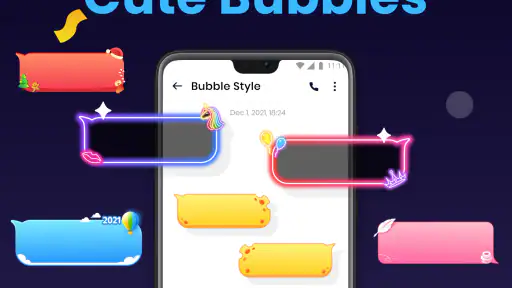
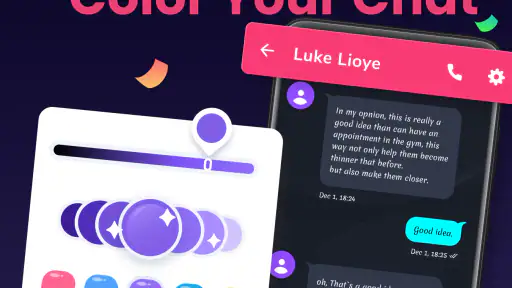
Now, onto the features that really make this app pop. One of my favorites is the customizable themes. I mean, who doesn’t like a little personalization? You can tweak the appearance to match your style or mood, and let’s be honest, a splash of color can really brighten up those text threads. Plus, the app supports multimedia messaging, so you can send pictures, videos, and audio clips without a hitch.
You May Like

Clash of Clans Is Won Between the Battles

Android Auto Makes the Case for Quieter Car Software

MobiOffice: Transforming Mobile Productivity with Seamless Integration

EA SPORTS FC™ Mobile Soccer: Redefining Mobile Sports Gaming

How Microsoft OneDrive Became a Mobile Productivity Giant

How Google Translate Breaks Language Barriers Effortlessly
Another cool feature is the smart replies. They save so much time when you’re in a rush and need to shoot off a quick response. It’s almost like the app knows exactly what you want to say. Besides, the app is integrated with other platforms, making it seamless to switch between apps without losing track of your conversations. It’s like the app was designed to keep you flowing smoothly from one chat to the next.
Small choices that make texting easier
For a useful everyday routine, I would treat visual customization as more than decoration: choose a theme that keeps message text easy to read, then leave it alone long enough to see whether it works in bright daylight and at night. A striking color is fun, but legibility matters more when you are replying quickly or checking a message on the move. If you often hand your phone to someone else to show a photo, remember that a messaging screen can expose conversation previews; close the thread or return to the inbox before passing the device over.
Smart replies are best used as a starting point, not a substitute for checking the tone. They can be handy for a short acknowledgment when you are carrying groceries or stepping out of a meeting, but a suggested reply may not fit a sensitive conversation. I would read it once before sending, especially if the answer could sound abrupt. That small pause keeps a time-saving shortcut from creating avoidable confusion.
Making media messages work for you
Picture and audio messages are useful when a plain sentence would take longer to explain: a photo can show which item you mean, and a short voice clip can be easier than typing while your hands are occupied. I would still think about the recipient and the moment before sending. Someone may be in a place where audio is inconvenient to play, and a picture may reveal more than intended if it includes a document, address, or other personal detail. A quick review of the attachment before sending is a sensible routine in any messaging app.
For practical coordination, I find it helps to keep the message itself simple and explicit. If you are sending a photo to identify a meeting spot, add a short note saying what the recipient should look for rather than relying on the image alone. Likewise, if you use a suggested reply, make sure it answers the actual question. These little checks are not special features; they are ways to get more dependable results from the app’s combination of quick replies and multimedia messaging.
Staying Secure and Private
In today’s world, privacy is a big deal, and this app takes that seriously. With end-to-end encryption, your messages are safe from prying eyes, which gives me peace of mind every time I hit send. It’s reassuring to know that my chats are just between me and the person on the other end, without any third-party interference.
Moreover, the app offers a nifty feature to block unwanted numbers, which is a lifesaver for avoiding those pesky spam messages. You can also archive chats you want to keep but not necessarily see every day, keeping your inbox neat and tidy.
What to consider before relying on it
Messaging involves choices beyond the look of the inbox. Before making any app your main place for conversations, I recommend checking the permission prompts Android presents and deciding whether each request makes sense for the task you are doing. I would also review the phone’s available notification and lock-screen controls if message previews could reveal something personal. Those are practical checks a user can make without assuming anything about how an app handles information behind the scenes.
Blocking and archiving solve different problems: blocking is for stopping contact from a number, while archiving is for moving a conversation out of the way without treating it as unwanted. For a busy inbox, archiving old delivery updates or one-off appointment threads can make active conversations easier to scan. I would avoid archiving a thread that still needs a reply, though; a tidy inbox is not useful if it makes an important follow-up easy to forget.
Keeping control of sensitive conversations
When a conversation contains a code, travel detail, or private personal information, I would treat the phone’s visible screen as part of the privacy decision. A message can be protected in transit yet still appear in a notification preview or remain visible when someone is looking over your shoulder. Checking the phone’s notification settings and locking the screen when you set it down are straightforward steps that keep control with you. They matter regardless of which theme or reply option you choose.
If an unexpected message arrives, blocking is a direct way to keep that number from contacting you through the app, while archiving is not a privacy or safety measure; it simply moves a conversation out of the active view. I would not use a neat inbox as proof that a contact has been dealt with. Decide whether you want to retain a conversation, stop further messages, or simply hide it from view, then use the option that matches that purpose.
Who will get the most from it
I can see this working well for someone who wants a familiar texting routine with extra visual choice, or for a household where SMS remains the simplest way to reach people who do not share one chat service. Picture arranging a pickup: one person is online, another only checks texts, and you need to send a short update without asking everyone to install the same platform. Having SMS and chat options close together can make that routine feel less fragmented.
It is less compelling if your main need is a single, shared platform for large groups, calls, or a community that already organizes everything elsewhere. In that situation, the app’s styling may not outweigh the inconvenience of splitting attention between services. I would also skip it if you prefer a bare-bones interface and have no interest in themes or extra presentation choices; the standard messaging app on your phone may be simpler to maintain.
Where the trade-offs show up
Compared with a phone’s basic SMS app, this one makes personalization and quick-response conveniences a bigger part of the experience. That can be a welcome change if you spend time in text threads and want them to feel more like your own. The trade-off is that more choices can mean more to evaluate: you may need to settle on a readable theme, learn which mode fits a conversation, and decide whether paid extras are worthwhile. If you value the fewest possible settings, the default inbox may be the more comfortable option.
Compared with a dedicated internet messenger, the advantage is not that it automatically replaces that service. The useful difference is having SMS and chat options available in one messaging routine, while your existing messenger may still be the natural home for its own groups and community. I would use this app where it reduces friction, not force every contact into it. That approach avoids duplicating conversations or missing a reply because the people involved are still using another platform.
Questions worth settling before switching
One practical question is whether it costs anything to start. The app is free to install, with in-app purchases priced from $3.99 to $23.99 per item. I would begin with the free experience and only consider a purchase if its purpose is clear to me; the existence of optional purchases does not mean they are needed for ordinary texting. Checking the purchase screen before confirming anything also keeps an accidental tap from becoming an unwanted expense.
Another question is whether it fits a particular phone. The current version, 2.2.9, requires Android 8.0 or later, so a device on an older system is not compatible with that version. If you are considering replacing your usual SMS app, I would also check your phone’s default messaging settings and try a few low-stakes conversations first. That gives you a chance to see whether the inbox and mode choices fit your habits before you depend on it for an important update.
For a sense of its reach, it has more than one million installs and around 1,800 written reviews, alongside its 4.6 average rating from around 17,000 ratings. It was released on February 10, 2022, and its age rating is Everyone. Those details suggest that it is an established option for general audiences, but they do not replace the personal test: whether its style, controls, and messaging routine suit you.
Why You Should Give It a Try
Overall, Messages - SMS, Chat Messaging is a solid choice for anyone looking to enhance their messaging experience. It combines the reliability of SMS with the versatility of chat messaging, wrapped up in a user-friendly package. Whether you're sharing a quick update, a funny meme, or just keeping in touch, this app covers all the bases.
The app is free, though it includes optional in-app purchases priced from $3.99 to $23.99 per item, so I would check the purchase screen before choosing anything paid. It was released on February 10, 2022, and version 2.2.9 requires Android 8.0 or later. Those details make it easier to judge basic fit: if your phone runs an older system, this version is not a match, and if you only want a messaging inbox, you can decide whether any paid extras are worth considering rather than treating them as essential.
If you’re tired of the same old messaging apps and want something that’s both functional and fun, give it a whirl. You might just find it becomes your go-to app for all things messaging. Trust me, once you start using it, you’ll wonder how you ever got by without it.
Messages - SMS, Chat Messaging Frequently Asked Questions
Can I set Messages - SMS, Chat Messaging as my default SMS app?
If you want to use Messages - SMS, Chat Messaging for everyday texting, check whether your Android device offers it as a default SMS app during setup or in its messaging settings. Making an app the default can affect where new SMS conversations appear, so consider how you currently manage texts before switching. The app is designed for SMS and messaging, with themes and stylish fonts among its highlighted features.
What should I check before switching my existing conversations to this app?
Before making Messages - SMS, Chat Messaging your main place for texting, think about how you want to handle your current conversations and notifications. Check the app’s settings and your phone’s messaging settings so you understand which app will receive new SMS messages. You can also explore its appearance options first, helping you decide whether its themes and fonts suit your preferences.
Is Messages - SMS, Chat Messaging free to download, and are there optional purchases?
Messages - SMS, Chat Messaging is free to download, so you can try it without paying upfront. The app also offers in-app purchases, with items ranging from $3.99 to $23.99. These purchases are optional, and the app is rated for Everyone. If you prefer to avoid extra spending, check the purchase options in the app before buying anything.
Will Messages - SMS, Chat Messaging work on my Android device?
Messages - SMS, Chat Messaging is an Android communication app that requires Android 8.0 or later. Check your device’s operating system before downloading to make sure it meets that requirement. The app is developed by Phase Zero Apps, and its current version is 2.2.9. If your device is compatible, you can decide whether its messaging features and customization options suit the way you communicate.
What features does the Messages app offer beyond basic texting?
The Messages app offers a variety of features beyond basic texting, including group messaging, multimedia sharing, voice notes, and read receipts. It also supports emojis and GIFs for more expressive communication. Additionally, the app can integrate with other services for a richer messaging experience, such as using chatbots and sending money directly through the app.
Pros
- User-friendly interface
- Supports multimedia messages
- Group chat functionality
- Customizable themes
- End-to-end encryption
Cons
- Contains ads
- Limited cloud storage
- No video calling
- Occasional delivery delays
- Not available on all platforms

- Category
- Communication
- Version
- 2.2.9











