Marathon Rewards
- 3.05K
- 4.8
- Installs
- 1.00M
- Price
- Free
Screenshots
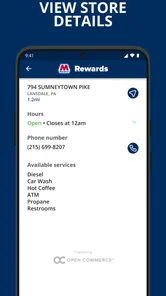
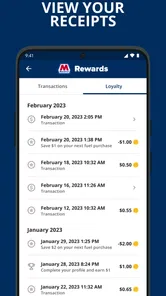
Analysis by Reviewed
I tend to judge fuel-rewards apps by whether they fit into a routine I already have, rather than by how many offers they put on screen. Marathon ARCO Rewards is most useful when the driver filling the car is also the person who can keep track of the account and redeem its benefits. In a household where one person usually handles fuel stops, that can be simple; when several people take turns, a little coordination matters more than the app itself.
One account, one regular fuel routine
Picture a weekday when one person takes the car to work and another uses it for errands later. If the household already prefers Marathon or ARCO stations, having the rewards app with the person who normally pays can make the routine easier to manage. Instead of relying on someone to remember a paper offer or to pass along a separate card, the account holder can check the app before a stop and keep the reward activity in one place.
That arrangement is less tidy when different drivers make purchases but no one has agreed who owns the rewards account. Before treating the app as a shared household tool, decide whose account it is, who will use it at the pump, and how the household will handle any savings. Those are practical boundaries, not complicated rules: they help avoid confusion over who is signed in and whether a reward has already been used.
I would not assume that a shared phone or a family group automatically means shared rewards access. The app is built around a member earning and applying benefits, so it makes more sense to treat the account as belonging to a specific adult unless the household has a clear reason to organize it otherwise. If several drivers need separate records, individual use may be cleaner than passing one signed-in device around.
Setting up without making it a household project
Getting started is not a difficult task, but I would do it at home rather than beside a busy pump. A driver can take a moment to create an account and understand where the rewards information appears before a fuel stop becomes time-sensitive. That small bit of preparation is especially helpful if the person using the app is not the person who usually manages phone accounts or loyalty programs.
The original setup guidance mentions linking a payment method, but I would not treat that as a reason to put everyone’s payment details into one account. Keep the account and payment choices aligned with the person who is actually responsible for the transaction. If another household member is borrowing the car, agreeing ahead of time on whether they should use the rewards account is more sensible than asking them to sort it out while standing at the pump.
For someone who wants a loyalty benefit without tying it to a shared device, a personal phone is the clearer option. A household can still coordinate the destination and compare fuel plans without sharing sign-in access. That approach may mean the driver has to remember the app on their own, but it avoids making account access another chore for the family.
More From Our News Desk

Weather by Xiaomi Review: Clear at a Glance, Less Clear Up Close

X Under Pressure: Can It Recover When Posting Goes Wrong?

Clash of Clans Is Won Between the Battles

Android Auto Makes the Case for Quieter Car Software

MobiOffice: Transforming Mobile Productivity with Seamless Integration

EA SPORTS FC™ Mobile Soccer: Redefining Mobile Sports Gaming
Coordination matters more than a complicated system
A useful household routine can be as simple as checking the app before the regular driver leaves, then mentioning a relevant offer to whoever is taking the car. The app’s rewards tracking can help the account holder follow activity, while a quick conversation makes sure the driver knows which account is intended for the purchase. I would avoid relying on someone else to interpret an offer at the last minute; a fuel stop is not the best time to work out who is meant to use what.
There is also a trade-off between convenience and keeping a clean record. One household account may be easier when a single person handles most fuel purchases. If drivers rotate frequently, separate habits can be easier to understand, even if that means fewer people are actively managing the same rewards balance. The right choice depends on whether the household values one shared view or clear personal responsibility more.
For a road trip, I would have the account holder check the app before departure and tell the other driver which stations are practical stops. The locator can help when the route or surroundings are unfamiliar, but I would still plan around the journey rather than wait until the tank is nearly empty to search. That is a small but meaningful distinction: the app can support a decision, while the driver remains responsible for choosing a safe, convenient stop.
Age, trust, and who should hold the account
The app is rated for Everyone, but that does not mean every young passenger should be responsible for an account or a payment decision. For a household, I see it primarily as a tool for the adult who manages fuel spending. A younger driver may be able to use the app with a parent’s guidance, but the family should decide who controls the account and how any payment arrangements work before handing over a phone.
Trust is also about keeping expectations realistic. Rewards and offers can make a familiar station more appealing, but they should not pressure a driver to take an inconvenient detour or choose a stop that does not suit the trip. I would compare the actual route and fuel needs first, then let the app help with the loyalty side. A discount is only useful if it fits a stop the driver would reasonably make.
For an older relative who is comfortable using a phone but dislikes managing multiple loyalty programs, the straightforward purpose may be a plus: check rewards, look for a nearby station, and use the account during a routine fill-up. If that person does not regularly visit Marathon or ARCO, though, adding another app may create more upkeep than value. A familiar payment method or a station they already prefer could be the simpler choice.
How it fits beside other ways to save
Compared with paying at the pump and ignoring loyalty programs, this app gives a Marathon or ARCO customer a place to follow rewards and look for offers. Compared with a general fuel-price app, its emphasis is different: it is tied to a particular station loyalty routine rather than serving as a broad comparison tool for every nearby brand. I would use it when I already expect to stop at one of these stations, not as my only way to decide where fuel is best for a longer trip.
That distinction is important for drivers who choose a station mainly by price, route, or convenience. A dedicated rewards account can be worthwhile when the stations fit the regular commute, but it is less compelling if the household changes brands constantly. In that case, checking the overall cost and location may matter more than collecting benefits in one program. I would not let a reward balance turn a flexible driver into a loyal customer by default.
There is also a difference between tracking savings and proving that a purchase was the cheapest available choice. Seeing rewards accumulate can make the benefit easy to notice, but it does not replace comparing a station’s price with nearby alternatives. My practical approach would be to use the app as a helpful layer on top of normal fuel decisions, not as a substitute for them.
For the person wondering whether a membership costs anything, the app is free to download. That makes trying it less of a commitment, although it still asks for attention: the user has to set up an account, remember to use it, and decide whether the available stations fit their routine. I would try it if Marathon or ARCO is already a regular stop, then keep using it only if the rewards are easy to incorporate.
What is Marathon ARCO Rewards?
In a nutshell, Marathon ARCO Rewards is a loyalty program app designed to give you discounts and rewards on fuel purchases at Marathon and ARCO stations. It’s like having a little secret weapon in your pocket that saves you money every time you fill up. And let's be honest, who doesn’t want to save a few bucks at the pump?
Getting Started
Setting up the app is a breeze. You download it, sign up, and boom, you're ready to start earning rewards. The interface is pretty straightforward, so even if you're not the most tech-savvy person, you’ll find it easy to navigate. Just link your payment method, and you’re good to go!
Features that Stand Out
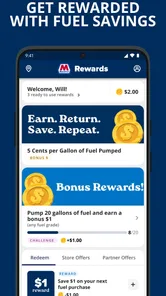
One of the coolest features of the app is its ability to track your rewards and discounts in real-time. Every time you make a purchase, you can see your savings adding up. It’s a bit addictive, to be honest! Moreover, the app often has special promotions and bonus offers that can really boost your savings.
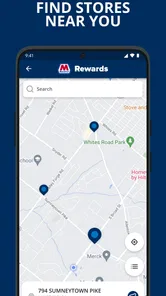
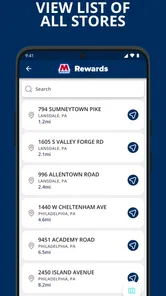
Another neat aspect is the station locator. If you’re traveling or just in an unfamiliar area, the app helps you find the nearest Marathon or ARCO station. It’s a lifesaver when you’re running low on gas and need to find a place quickly.
My Personal Experience
Now, let me share a bit about my own experience. I live in an area where both Marathon and ARCO stations are pretty common, so using this app has been a game changer for me. I love checking the app to see how much I’ve saved over the month. It’s surprising how quickly those discounts add up. Plus, the special promotions are a fun way to get even more out of my fuel budget.
There was this one time when I was on a road trip, and the station locator feature was incredibly handy. I was able to find a station just in time, avoiding the dreaded empty tank scenario. Talk about a relief!
Final Thoughts
All in all, I’d say the Marathon ARCO Rewards app is a fantastic tool for anyone looking to make their fuel dollars stretch a bit further. It’s user-friendly, packed with features, and definitely worth checking out if you frequent Marathon or ARCO stations. Give it a try and see how much you can save!
So, next time you're at the pump, think about the rewards waiting for you with this handy app. Happy fueling, and happy saving!
Who will get the most from it
The strongest fit is a driver whose regular routes already pass Marathon or ARCO stations and who is willing to check the app as part of a normal fuel stop. Stuzo, LLC develops this free Auto & Vehicles app, and its focused loyalty purpose is easy to understand: it is not trying to replace navigation, trip planning, or a broad search across every fuel brand. That focus is an advantage for a regular customer, but a limitation for someone who rarely visits either station.
The app has an average rating of 4.8 from around 36,000 ratings, and it has been installed over 500,000 times. Those figures suggest that many people have tried it, but I would still judge it by my own driving pattern. A high rating cannot make an inconvenient station convenient, and a rewards balance is not a reason to change a route that already works well.
Its release date was October 5, 2022, and the current version is 25.7.0. The minimum operating-system requirement is version 9. I would check that a phone meets the requirement before planning to rely on the app during a trip, especially if the device is an older spare phone shared around the household. The content rating is Everyone, which describes its age classification, not whether a child should manage an adult’s account or payment choices.
Small habits that make the app more useful
I would make checking offers a brief pre-trip habit rather than something to do while choosing a pump. That gives the driver time to decide whether an offer fits a planned stop and avoids making the rewards screen the focus of a busy forecourt. If an offer is not relevant to the purchase or the location, there is no need to force it into the trip.
For households that share driving, it helps to agree on a single routine: the account holder checks the reward information, tells the driver what matters, and reviews the activity afterward. This keeps the app from becoming a source of uncertainty about who used a benefit. It also avoids treating a shared phone as if it automatically creates a shared account arrangement.
On longer journeys, I would use the locator as a backup planning aid rather than as the entire route plan. Search for a suitable station while there is still time to compare options, then choose based on the route and the driver’s comfort. The app’s practical value is strongest when it reduces a small bit of friction; it cannot make a poorly timed stop or an unsuitable detour a good decision.
Where I would draw the line
I would skip this app if I seldom fuel at Marathon or ARCO, if I do not want another account to maintain, or if I prefer choosing stations solely by immediate price and location. It is also not the right primary tool for a household that expects a complete view of every driver’s purchases across multiple brands. A general fuel search or simply paying at the most convenient station may suit those needs better.
For a frequent customer, the main question is whether the rewards routine remains easy after the novelty wears off. If checking the app and applying benefits feels natural, it can add useful value to a regular stop. If I find myself making special trips just to use it, or spending more attention on offers than on the actual fuel decision, I would step back and compare the whole trip rather than focus on the reward alone.
My household verdict is straightforward: I would recommend it to the person who regularly fills up at Marathon or ARCO and wants a simple way to keep rewards in view. I would keep account responsibility clear, coordinate with other drivers before a shared-car trip, and treat the locator and offers as aids rather than instructions. Used that way, it can fit neatly into an existing routine; without those station habits, it is easy to leave unused.
Marathon Rewards Frequently Asked Questions
Can I use Marathon ARCO Rewards at every gas station?
The rewards program is intended for participating Marathon and ARCO locations, rather than every gas station. Before making a trip based on a reward, check the offer details in the app and confirm that your chosen station is included. This is especially useful if you regularly fuel up at more than one location, since participation and available offers can affect whether a particular stop fits your plans.
Do I need to create an account to use Marathon ARCO Rewards?
Marathon ARCO Rewards is designed for members, so creating an account is part of getting started with the rewards program. After downloading the app, follow its on-screen sign-up steps to set up your account. Once you are enrolled, you can use the app to access rewards and check offers. Reviewing the sign-up prompts before you begin can help you understand what the app asks you to provide.
Can Marathon ARCO Rewards help me save on fuel?
Yes. Marathon ARCO Rewards is centered on helping members earn rewards and apply them toward fuel savings. The practical benefit depends on the offers available to you and whether you buy fuel at participating locations. If Marathon or ARCO stations are already part of your regular routine, checking the app before a fuel purchase can help you see which current rewards may be useful.
Is Marathon ARCO Rewards available for my phone?
Marathon ARCO Rewards is available for Android and iOS, so it may suit you if you use either type of smartphone. On Android, the app requires version 9 or later. Before downloading, check your device’s operating system and make sure you have enough room for another app. Keeping the app updated can also help you access its current features.
Who is Marathon ARCO Rewards intended for?
The app is aimed at people who want to earn rewards through fuel purchases at participating Marathon and ARCO locations. Its age rating is Everyone, and it is listed in the Auto & Vehicles category. If you already stop at these stations, the rewards program may fit naturally into your routine; the value of using it depends on the offers available to you and where you buy fuel.
Pros
- User-friendly interface enhances accessibility.
- Offers valuable rewards for marathon participation.
- Tracks running progress efficiently.
- Encourages healthy lifestyle choices.
- Connects users with a community of runners.
Cons
- Limited to marathons supported by the app.
- Occasional glitches in reward redemption.
- Requires constant internet connection.
- Battery drain due to GPS usage.
- Some users may find limited customization.













