Gulf Pay
- 273.00
- 4.7
- Installs
- 100.00K
- Price
- Free

Screenshots
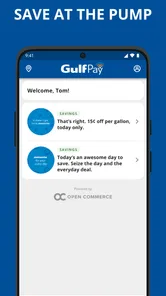
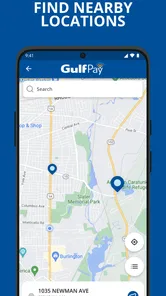
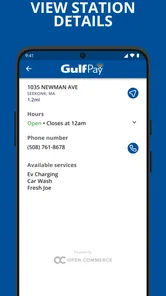
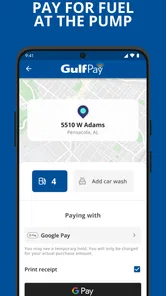
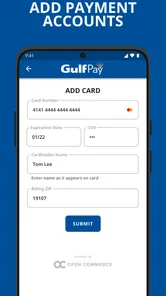
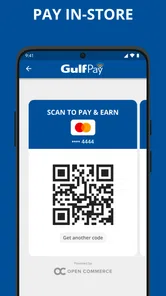
Analysis by Reviewed
Paying for fuel is one of those everyday tasks where a small amount of friction feels surprisingly expensive. When I am already at a station, watching the queue move, I want the payment step to be clear and quick rather than another task that sends me through several screens. Gulf Pay is built around that narrow but useful purpose: it brings fuel and station-product purchases to a phone instead of making the whole visit depend on handling cash or a physical card.
After using it as an Auto & Vehicles app, I see its value less as an all-purpose wallet and more as a focused companion for Gulf station visits. It is free, rated for Everyone, and developed by PAR Retail. The current release is version 26.5.0, and the app supports Android 9 or later. Those details make it reasonably approachable for people who do not use the newest phone, although the real experience still depends on the phone’s condition, screen, connection, and the station environment.
How the app feels when readability and navigation matter
The most important design question for a fuel-payment app is not whether it contains a long list of options. It is whether I can understand the next step while standing beside a vehicle, possibly wearing gloves, dealing with noise, bright daylight, or a passenger asking a question. Gulf Pay’s focused purpose works in its favor because I am not opening it to browse a complicated catalog. I am opening it to complete a practical station transaction.
I found that the app makes more sense when I treat it as part of a routine rather than something to explore casually. Before arriving, I would keep my phone unlocked enough to reach the payment flow without searching through unrelated apps. At the station, I would take a moment to read each screen instead of tapping repeatedly. That habit matters because speed is useful only when it does not create a mistaken payment or a missed confirmation.
For people with reduced vision, readability is more than large text. Contrast, spacing, the order of labels, and whether important actions are visually distinct all affect confidence. I would recommend checking the app with the phone’s own display settings before relying on it during a busy stop. If text appears cramped or an action is hard to distinguish, increasing system text size or display scaling may help, but users should test that adjustment in advance because very large settings can sometimes make interfaces less comfortable to scan.
One practical strength is that a dedicated fuel app can reduce the mental load compared with juggling a general banking app, a payment wallet, and a station loyalty tool at the same time. Gulf Pay keeps the reason for opening it obvious. That is especially helpful for someone who prefers predictable routines, has difficulty remembering multi-step processes, or becomes distracted by crowded interfaces.
There is still a difference between a simple purpose and guaranteed simplicity. A first-time user may need to understand how the station purchase is initiated, what amount is being authorized or charged, and where the completed transaction is shown. I would not rush through the setup or first payment. Completing an initial test when the station is quiet is a better approach than learning the workflow while a queue is waiting behind me.
More From Our News Desk

Weather by Xiaomi Review: Clear at a Glance, Less Clear Up Close

X Under Pressure: Can It Recover When Posting Goes Wrong?

Clash of Clans Is Won Between the Battles

Android Auto Makes the Case for Quieter Car Software

MobiOffice: Transforming Mobile Productivity with Seamless Integration

EA SPORTS FC™ Mobile Soccer: Redefining Mobile Sports Gaming
Making a repeat visit easier to manage
The best accessibility improvement often comes from preparation. I would keep the phone charged, place the app where it is easy to find, and avoid beginning a payment while driving or while the vehicle is moving. If another person normally helps with phone tasks, doing the first setup together can establish a dependable sequence: open the app, identify the station action, review the amount, complete the payment, and verify the result.
This sequence is also useful for older drivers. They may not want to learn a broad digital wallet with many unrelated functions, but a fuel-specific routine can be easier to remember. The trade-off is that the person must be comfortable using a smartphone at the station. Someone who prefers handing over cash or a card may find a traditional counter or card terminal more natural.
Motor and sensory considerations at the station
A phone payment method can reduce some physical handling. I do not have to take out a wallet, select a card, insert it, and put everything away while standing beside the pump. For users with limited dexterity, that may be a meaningful benefit. It can also reduce the number of small objects to manage, which is useful when one hand is occupied with a fuel nozzle, a walking aid, or a child’s hand.
At the same time, Gulf Pay does not remove every motor challenge. The user still needs to hold a phone, tap accurately, and respond to whatever confirmation the transaction requires. A cracked screen, a protective case with a raised edge, wet fingers, or gloves can make precise interaction harder. I would avoid using the app for the first time in those conditions. A calm trial run reveals whether the buttons and confirmation steps are comfortable for the individual user.
Users with tremors or limited reach may benefit from setting the phone on a stable surface when that is safe and practical, rather than trying to operate it one-handed beside the vehicle. I would never place the phone where it could fall into a travel lane or interfere with fueling. The accessibility advantage is real only if the workflow remains physically safe.
For people with hearing loss, a visual confirmation is particularly important. I would look for an on-screen indication that the transaction has finished instead of depending on a sound or spoken prompt. Conversely, users with low vision may prefer spoken feedback from the phone’s accessibility tools, provided those tools can interpret the app’s controls clearly. I cannot treat that as automatic: screen readers and magnification features do not behave identically in every app, so testing before a real purchase is sensible.
Sensory overload is another consideration. A fuel station combines engines, announcements, traffic, bright signs, and time pressure. Gulf Pay’s narrower purpose may help because it avoids the distraction of a general shopping application, but the surrounding environment can still make reading and decision-making difficult. If noise or glare is a problem, I would move to a safer, quieter position after fueling and finish checking the transaction there, without blocking the pump or standing near moving vehicles.
Why a phone can be easier than a physical card, and when it is not
For me, the phone approach is most convenient when I already have the device in my hand and want one continuous process from station arrival to payment confirmation. It can be less demanding than finding a card in a crowded wallet. It also gives users who dislike handling cash a more controlled digital routine.
The physical-card alternative remains better for some people. A card terminal provides a familiar tactile action and does not require navigating a phone screen. It may suit a driver who has poor battery life, limited mobile confidence, or a phone that is difficult to read outdoors. A general mobile wallet may also be preferable for someone who wants one payment method across fuel stations, supermarkets, transit, and other purchases rather than a station-focused application.
That comparison is important because convenience is personal. Gulf Pay is not automatically more accessible than every alternative. It is strongest for users who can comfortably operate a phone and who value a dedicated fuel-payment flow. It is weaker for anyone who wants a universal payment tool or who finds touchscreen confirmation unreliable.
Situational access: the moments that decide whether it helps
A realistic example is a driver arriving after work with a low fuel level, a passenger in the car, and a queue forming behind them. In that moment, Gulf Pay can be useful if the account and payment details are already ready. The driver can focus on the station transaction instead of opening a bank app, searching for a card, and managing several unrelated screens. The benefit is not just speed; it is reducing the number of decisions made in a noisy environment.
The same situation exposes the app’s main practical dependency: preparation. If the user has never completed the setup, has forgotten a sign-in detail, or is dealing with a weak connection, the promised convenience can disappear. I would not make the app the only payment plan on an important journey until I had used it successfully at least once. Keeping a physical card available is a sensible backup, especially for long trips or unfamiliar stations.
For a driver with limited mobility, avoiding a counter may reduce walking and standing. That could make a meaningful difference when the station layout is inconvenient or when waiting in line is tiring. However, the user still needs to reach the pump, handle the nozzle, and position the phone safely. The app can simplify the payment portion without solving every physical part of refueling.
For a caregiver helping another adult, the app may support a shared routine, but privacy and control deserve attention. I would make sure the person using the phone understands which payment action is being approved and can recognize the final result. A helper should not assume that a large button means the transaction is complete. Reviewing the final screen together is a small step that prevents confusion.
For users with cognitive disabilities, predictability is more valuable than a large collection of features. I would create a short personal checklist and use the same order every time. The checklist might include stopping safely, opening Gulf Pay, reading the station action, checking the payment amount, confirming, and verifying completion. This is one of the more useful ways to make the app approachable: not by adding complexity, but by turning the existing task into a repeatable sequence.
Travel context also changes the decision. A person who regularly visits Gulf stations may gain more from learning this dedicated workflow than someone who stops there only once. For occasional visitors, a card or broadly accepted wallet can be less demanding because there is no new station-specific habit to establish. Gulf Pay makes the most sense when its focused purpose matches the user’s normal driving routine.
Remaining barriers and the trade-offs I would plan for
The first barrier is dependence on the phone itself. Battery level, screen condition, accessibility settings, and the user’s familiarity with touch controls all become part of the payment experience. A physical card is more independent of those factors. I would therefore regard Gulf Pay as a convenient primary method for prepared users, not as a reason to stop carrying any backup.
The second barrier is environmental. Bright sunlight can reduce readability, while nighttime glare can make a screen uncomfortable. Noise can make audio prompts easy to miss, and gloves can reduce touch accuracy. These are not flaws unique to this app, but they matter more for a payment tool used outdoors than they would for an app used on a sofa. The best workaround is to prepare before reaching the pump and to complete any careful review from a safe position away from traffic.
The third barrier is confidence around transaction status. A user who cannot easily distinguish a pending action from a completed payment may worry about paying twice or leaving without confirmation. I would advise waiting for a clear visual result and checking the transaction record or confirmation available within the workflow before repeating a tap. When the screen is unclear, asking station staff for help is safer than guessing.
Another limitation is that a focused station app may not replace every financial tool. If I want to manage several payment methods, compare spending across unrelated categories, or use one interface everywhere, a general wallet or banking application may be a better center of my routine. Gulf Pay’s specialization is an advantage at the pump, but it can also mean one more app to maintain.
Privacy and device-sharing habits also deserve practical thought. I would use a personal phone lock, avoid handing an unlocked device to someone unnecessarily, and review the payment details before confirming. These are sensible habits for any payment application, but the rushed setting of a fuel station makes them easy to overlook. A few seconds of checking is worthwhile when the alternative is correcting a mistaken transaction later.
Finally, the app is not the right choice for someone who cannot reliably use a touchscreen and has no helper available. In that case, a staffed payment option or physical card may provide a more dependable experience. Accessibility is not about forcing every person into the same digital channel; it is about giving each person a method they can use safely and confidently.
My inclusive verdict after using Gulf Pay
Gulf Pay succeeds because it concentrates on a familiar need: paying for fuel and station products from a phone. Its free price removes an obvious entry barrier, and its Everyone age rating makes it suitable for a broad household audience. With an average rating of 4.7 from around 2.9 thousand ratings and more than 100 thousand installs, it has clearly attracted a substantial group of Android users. I read that popularity as encouraging, though not as proof that every driver will find the interface equally comfortable.
For me, the strongest case is a regular Gulf customer who wants a repeatable, phone-based payment routine and can prepare the account before arriving. The app can reduce wallet handling, shorten the mental path to a fuel purchase, and make the station visit less dependent on a physical card. It is also potentially helpful for users who find walking to a counter or managing several payment objects tiring.
I would be more cautious recommending it as the sole option for someone with low phone confidence, unreliable battery access, severe touchscreen difficulty, or a strong preference for tactile payment. Those users may be better served by a physical card, staffed station assistance, or a general wallet that they already know. The most inclusive approach is to test Gulf Pay during an easy visit, keep a backup method, and adapt the routine to the user’s own vision, hearing, movement, and attention needs.
My final view is positive but practical: this is a useful specialized tool, not a universal answer to every payment situation. Its accessibility comes mainly from a focused purpose and the possibility of reducing physical card handling, while its limitations come from the phone, the outdoor environment, and the need to understand the confirmation flow. If those conditions fit your routine, I would recommend giving it a careful trial. If they do not, choosing a familiar alternative is not a failure of digital adoption; it is the more sensible and inclusive decision.
Gulf Pay Frequently Asked Questions
Can I use Gulf Pay at a fuel station, and what can I buy with it?
Gulf Pay is presented as a phone-based way to buy fuel and products, making it relevant for drivers who want to handle a purchase from their mobile device. What you can buy and where you can use it may depend on participating locations and the services available in your area. Check the app’s current options before relying on it for a particular stop.
What is Gulf Pay, and what can I use it for?
Gulf Pay is a digital payment application designed to help users manage everyday transactions from a mobile device. Depending on the services available in your country, it may support bill payments, mobile top-ups, money transfers, merchant payments, and other financial services. Before downloading, check whether the app supports your local bank, currency, and the specific payment features you need.
Is Gulf Pay safe to use for payments and money transfers?
Gulf Pay may include standard security measures such as account authentication, encrypted connections, transaction confirmations, and device-based verification. However, security also depends on how you use the application. Download it only from an official app store, keep your phone and app updated, use a strong password or PIN, and never share verification codes or banking details with anyone claiming to represent Gulf Pay.
Do I need a bank account or identification to register for Gulf Pay?
Registration requirements can vary according to your location, the services you want to use, and local financial regulations. You may be asked to provide a mobile number, email address, identification document, or bank and card information. Some features may remain unavailable until your identity is verified. Review the registration screen and privacy policy carefully before submitting personal information.
Are there fees, limits, or extra charges when using Gulf Pay?
Some Gulf Pay services may be free, while others can involve transaction fees, card charges, transfer costs, currency-conversion fees, or limits based on your account level and location. Fees may also differ between merchants, banks, and payment methods. Check the app’s fee information before confirming a transaction, especially when sending money, withdrawing funds, or paying internationally.
Pros
- Fast and convenient digital payments through the Gulf Bank ecosystem.
- Supports secure authentication features for safer account access.
- Useful for checking balances and reviewing recent transactions on the go.
- Reduces the need to carry cash or visit a bank branch.
- Clean interface makes common banking tasks easy to find.
Cons
- Requires a compatible device and stable internet connection to work properly.
- Some features may be limited to eligible Gulf Bank customers or accounts.
- Transaction availability can depend on bank maintenance or service outages.
- Users may need to complete identity verification before accessing all services.
- Fees
- limits
- or supported payment options may vary by account and transaction type.













