

Manheim
- 22.00
- 4.0
- Installs
- 10.00K
- Price
- Free

Screenshots

Analysis by Reviewed
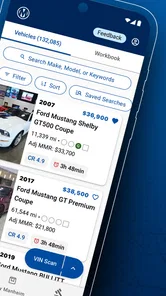
Buying or bidding on vehicles from a phone sounds convenient until the experience becomes a race against a weak signal, a crowded screen, or a missed update. After spending time with Manheim, I see it as a focused mobile tool for people who already work with vehicle auctions and need access while away from a desk. It is a free Auto & Vehicles app from Manheim by Cox Automotive, and its purpose is straightforward: help users browse, bid, and buy from different locations.
Manheim is most useful when mobility matters more than browsing comfort. I would not treat it as a general car-shopping app for someone casually comparing family vehicles. Its audience is closer to dealers, automotive professionals, and experienced buyers who understand auction listings and can make decisions without needing a long educational tour. The app’s 4.1 average from around 50 ratings suggests a generally positive reception, while its 10K-plus installs show that it has a real but specialized audience rather than the reach of a mainstream consumer marketplace.
How the app feels when the connection is doing the real work
The central experience is network-dependent. Browsing inventory, checking information, and taking part in a bidding workflow all rely on the phone receiving current information at the right moment. That makes connectivity more than a background technical detail: it becomes part of the buying process. With a stable connection, the app can turn a spare moment into useful auction work. With an unreliable connection, the same convenience can become hesitation, delay, or uncertainty.
I found the mobile format best suited to short, purposeful sessions. Instead of sitting down for a long research period, I can imagine opening the app to review a vehicle already on my radar, check its position in a buying workflow, or act when timing matters. That is a different rhythm from using a desktop auction platform, where a larger display encourages broader comparison and more deliberate scanning.
The important distinction is between access and confidence. A phone can give me access to auction activity almost anywhere, but confidence still depends on the quality and freshness of what appears on screen. Before bidding, I would want to pause long enough to verify that the listing details, vehicle identity, and current auction state have loaded properly. A fast tap is not automatically a smart purchase.
When a mobile auction workflow makes sense
A realistic use case is a dealer moving between appointments while keeping an eye on a vehicle that fits a customer’s needs. Rather than returning to a computer, the dealer can use the app to browse and respond from a phone. That can be genuinely valuable when the alternative is missing a time-sensitive opportunity simply because the user is away from the office.
Another useful situation is a buyer working through a prepared shortlist. If I had already decided what type of vehicle, condition, and spending limit made sense, mobile access would help me monitor candidates without opening a full workstation. The app is less compelling when I am still learning the market, comparing many vehicles, or trying to inspect every detail side by side. For that work, a larger browser window or a desktop-oriented auction environment is usually easier on the eyes and better for disciplined comparison.
More From Our News Desk

 Gmail
GmailGmail in a Busy Inbox: Who Benefits Most?
From first account to crowded workday, Gmail earns its place through dependable search and flexible sorting—but its best fit depends on how much inbox maintenance you can tolerate.

 Prime Video
Switching to Prime Video: What Changes in Your Viewing Routine
Prime Video can make a compelling second home for streaming, but switching means learning a different catalog, rental layer, and route from browsing to playback.

 Universal TV Remote Control
Universal TV Remote Control Works Best as a Reliable Backup
A phone remote earns its place through quick setup and reliable habits. Here is how to get more from Universal TV Remote Control—and where its limits show.

 Weather - By Xiaomi
Weather by Xiaomi Review: Clear at a Glance, Less Clear Up Close
Xiaomi’s weather app makes everyday forecasts quick to scan, but its calm surface can leave useful details and recovery paths harder to find than they should be.

 X
XX Under Pressure: Can It Recover When Posting Goes Wrong?
A resilience-focused review of X, examining setup, mistaken posts, interruptions, weak connections, and the gaps that matter when recovery needs to be dependable.

 Clash of Clans
Clash of Clans Is Won Between the Battles
Its raids are quick; its community is a long-term project of coordination, teaching, rivalry, and shared responsibility—with all the friction that entails.
Latest News



My practical tip is to separate research from action. Use a comfortable setting to build a shortlist, then use the phone for monitoring and selected decisions. That reduces the temptation to make a rushed bid merely because the app makes access easy.
What changes when I use it away from a desk
The strongest part of the app is also the source of its main trade-off. A phone is always close, but it offers less room for context. On a desktop, I can keep several pieces of information visible and compare them without constantly changing views. On a mobile screen, I am more likely to focus on one listing or one action at a time. That can be efficient, but it also makes a checklist essential.
Before acting, I would keep my own notes outside the app: the maximum amount I am prepared to spend, the reason the vehicle is on my list, and the details that need a second look. This is a simple workflow improvement, but it matters. Mobile convenience can encourage impulsive decisions, especially when a user is checking the app in a parking lot, at a dealership, or between conversations.
Manheim also makes more sense for someone comfortable with auction language and buying responsibility. A first-time buyer who expects the app to explain every risk in plain language may find the experience less reassuring than a consumer marketplace with extensive guidance. The app’s role is access to Manheim’s vehicle-buying environment, not a substitute for inspection, budgeting, or professional judgment.
Weak signals, interruptions, and recovery habits
Connectivity problems deserve serious attention because bidding is time-sensitive. A page that loads slowly, an interrupted session, or a delayed update can leave me unsure whether an action was completed or whether I am looking at current information. I would never respond to that uncertainty by tapping repeatedly. Repeated actions are exactly how confusion can turn into an unintended result.
My preferred recovery routine is cautious: stop, check whether the screen has changed, reconnect if necessary, and confirm the current state before trying again. If the app becomes unresponsive, I would move to a stronger connection and use another trusted route to verify what happened rather than assuming the last tap succeeded. That may feel slower, but it is safer than treating a network delay as a failed bid or a successful one without confirmation.
This is one area where the app cannot remove the risks of mobile use. No interface can make a weak signal reliable. The best it can do is make auction access available, leaving the user responsible for recognizing when conditions are too uncertain for a financial decision. I see that as a limitation of the use case rather than a reason to dismiss the app, but it should shape how carefully it is used.
A second recovery habit is to avoid making the phone the only record of a decision. I would note the vehicle reference and my intended limit before entering a high-pressure session. If the connection fails, I still know what I was trying to do and can reassess instead of reconstructing the situation from memory.
Using mobile data without turning convenience into waste
Because the app is designed for browsing and buying activity, data-conscious use is sensible. I would avoid repeatedly refreshing the same listing while moving through an area with poor reception. A weak connection can consume time and battery while providing no dependable improvement in what I can see. If I need to make a serious decision, I would wait for a stable connection rather than repeatedly pulling the same information during a commute.
Short sessions are another practical advantage. Opening the app with a clear purpose—review a saved candidate, check a specific auction activity, or complete a prepared task—should be more efficient than endlessly browsing. This is not just about conserving data; it also reduces decision fatigue. The more casually I scroll through vehicles, the easier it becomes to lose track of why a listing mattered in the first place.
I would also be careful with public networks. Auction activity involves decisions with financial consequences, so I prefer a connection I trust when reviewing sensitive account activity or placing a bid. The app’s mobile nature makes public use tempting, but convenience should not override basic caution. A private, stable connection is the better choice whenever the action matters.
There is a useful trade-off here. Mobile access can reduce the need for a dedicated computer, but it can also encourage users to act in unsuitable environments. A quiet office, dealership, or reliable home connection is better for final decisions than a noisy station or a moving vehicle. The app travels well; that does not mean every place is a good place to use it.
Where Manheim fits beside ordinary alternatives
Compared with general vehicle marketplaces, Manheim feels aimed at a more specialized buying process. A consumer listing app is often built around browsing, messaging, and arranging a private purchase. Manheim’s appeal is different: it brings auction-oriented access to the phone for people who already understand that environment. If I want casual discovery or a simple private sale, a mainstream marketplace may feel more natural. If I need mobile access to Manheim activity, this app is the more direct option.
Compared with a desktop browser, the app wins on immediacy and portability. I can use it while moving through a working day instead of being tied to a desk. The browser wins when I need a broad visual overview, careful comparison, or a longer research session. I would not choose one permanently over the other. The sensible combination is desktop or large-screen research when possible, followed by mobile monitoring when circumstances require it.
Compared with relying on calls or messages, the app offers a more direct path into the digital auction workflow. That can reduce friction for a user who needs to act independently. Still, direct access also means fewer natural pauses. A conversation with another person may prompt questions that a quick mobile action does not. Buyers should create those pauses for themselves before committing.
Who should install it, and who should skip it
I would recommend Manheim to automotive professionals and experienced buyers who need to browse, bid, or buy while away from a computer. It is especially suitable for someone with a defined purchasing process, a reliable mobile connection, and enough auction knowledge to evaluate a vehicle without expecting the app to make the decision for them.
I would be more cautious about recommending it to a first-time car buyer, someone who wants extensive consumer education, or anyone who mainly wants to compare privately listed vehicles. Those users may prefer a broader marketplace with more familiar shopping tools and a slower, more explanatory path from search to purchase. The app’s focused purpose is a strength for its intended audience, but it narrows its usefulness for everyone else.
It is also not the right tool for someone who frequently works in places with unstable reception and cannot afford uncertainty during time-sensitive actions. Mobile access is valuable only when the user can confirm what is happening. If connectivity is consistently unreliable, a desktop setup on a dependable network is the safer primary method.
Device details and the practical commitment
The app is free, carries an Everyone age rating, and requires at least OS 12. Its current version is 1.14.0, so users should keep their device software and app installation in a condition that supports that requirement. The free price lowers the barrier to trying it, although the cost of using an auction platform is obviously separate from downloading an app. I would judge the installation decision by whether Manheim’s buying access fits my work, not by the download price alone.
Its release on January 16, 2026, places it in a relatively recent stage of its public availability. That makes it sensible to approach the app as a focused tool that may become more familiar through regular use, rather than expecting it to replace every part of an established buying operation immediately. I would begin with low-risk browsing, learn how the mobile workflow behaves on my device and connection, and only then rely on it for more consequential actions.
My final take on connected buying
Manheim succeeds when I treat it as a mobile extension of an auction workflow, not as a complete replacement for careful vehicle research. Its value comes from letting me stay connected to browsing, bidding, and buying activity when a desk is unavailable. That is a meaningful advantage for the right user, particularly someone who already knows what to look for and needs timely access.
The app’s limitations are equally clear. A small screen can reduce context, unstable connectivity can create uncertainty, and the convenience of a phone can encourage rushed decisions. None of those issues makes it a poor choice, but they demand a disciplined routine: prepare a shortlist, set a firm limit, use a dependable connection, and verify the result before moving on.
After weighing that balance, I see Manheim as a practical specialist app rather than a universal car-shopping recommendation. If your work already involves Manheim and you need reliable mobile access, it is worth trying; if you want leisurely consumer research, a broader alternative will probably serve you better. The best experience comes from knowing when the phone is the right tool and when a larger screen, stronger connection, or slower decision process is the smarter choice.
For me, that is the real connectivity verdict: the app makes auction activity more reachable, but it does not make the underlying decisions simpler. Used with preparation and restraint, it can fit neatly into a mobile working day. Used casually on a weak signal, it can add friction exactly when accuracy matters most.
Manheim Frequently Asked Questions
What devices and operating systems support the Manheim app?
Manheim is a mobile app for automotive professionals who want to browse, bid, and buy from a phone or tablet. It is available for Android and iOS, and the current version is 1.14.0. Check that your device is running a compatible operating system before downloading; the app requires Android 12 or later. Keeping the app updated can help ensure you have access to its current features and improvements.
What is the Manheim app used for?
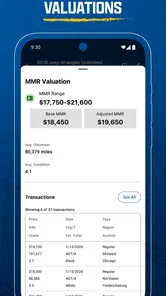
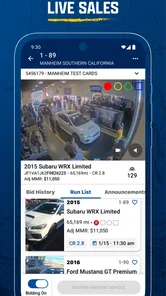
The Manheim app is designed for automotive dealers and other approved industry users who buy and sell vehicles through Manheim’s wholesale marketplace. After signing in, users can typically browse available inventory, review vehicle details and condition information, search auctions, follow buying activity, and manage relevant account tasks from a mobile device. Access and available tools may depend on the user’s account, location, and eligibility.
Can anyone download and use Manheim?
Anyone may be able to download the Manheim app from a supported app store, but downloading it does not necessarily mean that every feature will be available. Manheim primarily serves registered automotive professionals, dealers, and authorized auction participants. You may need an approved account, valid business information, and appropriate buying privileges before you can view certain vehicles, participate in auctions, place bids, or complete purchases through the platform.
Can I buy vehicles directly through the Manheim app?
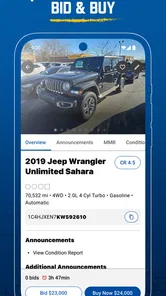
The app can provide access to vehicle listings and digital auction services, but the exact buying process depends on your account permissions and the specific Manheim marketplace you use. Eligible users may be able to review listings, inspect condition reports, monitor auction activity, and bid or purchase vehicles where supported. Before bidding, carefully check fees, transportation arrangements, title information, sale conditions, and any applicable auction rules.
Does Manheim provide vehicle condition reports and important listing details?
Manheim listings may include useful information such as photographs, mileage, vehicle specifications, auction details, announcements, and condition-related documentation. However, the amount of information can vary by vehicle and sale type. A digital report should not replace your own due diligence. Before committing to a purchase, review every available disclosure, confirm the vehicle identification details, understand arbitration policies, and investigate any fees or restrictions shown in the listing.
Pros
- Detailed vehicle listings with photos
- specifications
- and auction information.
- Useful search filters help narrow results by make
- model
- location
- and sale type.
- Online bidding makes it possible to participate without attending an auction.
- Saved searches and alerts can help track vehicles matching your preferences.
- Established marketplace for dealers and businesses buying wholesale vehicles.
Cons
- Many listings are aimed at licensed dealers rather than private buyers.
- Vehicle condition can vary
- so an in-person inspection may still be necessary.
- Auction fees and additional charges can increase the final purchase price.
- Some features and inventory may depend on your location and account type.
- Bidding competition can make desirable vehicles more expensive than expected.











