Magic SMS - Text Messages
- 1.62K
- 4.5
- Installs
- 1.00M
- Price
- Free

Screenshots

Analysis by Reviewed
Text messaging is one of those phone tasks where speed matters more than spectacle. I want to open an app, find the right conversation, write a clear message, and send it without fighting through a crowded interface. Magic SMS - Text Messages takes that straightforward idea and adds a more personal visual layer through themes. After using it as a communication app, I see it as an option for Android users who still rely heavily on SMS and want something more expressive than the default messaging tool.
The important distinction is that this is not a replacement for every kind of chat service. It is built around SMS texting, so its usefulness depends on how often you communicate through your phone’s regular text-message system rather than through internet-based services. That makes the app easy to understand, but it also sets a clear boundary around what it can do for you.
How Magic SMS feels in everyday use
The app comes from Snug Apps and is listed in the Communication category. Its store summary focuses on fast, simple SMS messaging with themes, and that description matches the central experience I found: the app tries to make ordinary texting feel less plain without turning it into a complicated social platform.
When I think about the best use case, I picture a normal weekday situation. Someone sends me a quick message about a change of plans, I open the conversation, reply, and move on. Magic SMS is suited to that rhythm. It does not ask me to create a separate identity or convince every contact to install the same service. For ordinary carrier-based texting, that familiarity is a genuine advantage.
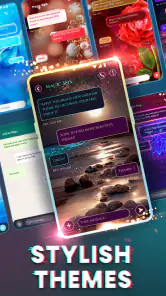
The theme angle gives it a little more personality than a basic stock inbox. That matters if you spend a lot of time looking at message threads and dislike the visual sameness of the phone’s built-in app. I would not call themes a reason to switch by themselves, but they can make the application feel more like your own space rather than a utility that came preinstalled.
The strongest reason to try it is simple: it makes familiar SMS conversations feel more personal without requiring a new messaging network. That is a narrower promise than the one made by internet chat platforms, but it is also easier to understand.
Setup and the first practical questions
Magic SMS is free to install, and it is intended for Everyone. It supports Android devices starting with version 6.0, which gives it a broad compatibility range for people using older phones. The current version is 1.3.4.51, so anyone deciding whether to install it should still check how it behaves on their particular device, especially if the phone uses an unusual manufacturer interface.
You May Like

Clash of Clans Is Won Between the Battles

Android Auto Makes the Case for Quieter Car Software

MobiOffice: Transforming Mobile Productivity with Seamless Integration

EA SPORTS FC™ Mobile Soccer: Redefining Mobile Sports Gaming

How Microsoft OneDrive Became a Mobile Productivity Giant

How Google Translate Breaks Language Barriers Effortlessly
Because the app is centered on SMS, the first thing I would check after installation is whether it becomes the messaging app I actually want to use for daily conversations. A messaging application is only useful when incoming threads, replies, and notifications fit naturally into my routine. If I install it but continue opening the previous app out of habit, the visual customization will not justify the change.
Another practical question is whether the people I contact use SMS regularly. Magic SMS does not remove the basic limitation of carrier texting: the recipient’s messaging setup still matters. If most of my conversations happen in WhatsApp, Signal, Messenger, Telegram, or another internet-based service, this application will not consolidate those chats into one place. It is best judged as an SMS-focused tool, not as a universal inbox.
What the free access gives you
The free entry point is important here. I can try the core experience without committing money first, which makes the app relatively easy to evaluate on my own phone. That is especially useful for a messaging app because comfort depends on small details: how quickly I find a thread, whether the design remains readable, and whether the theme options suit my taste.
There are in-app purchases ranging from $0.99 to $26.99 per item. I treat that range as a reason to explore the free experience before buying anything. The presence of optional purchases does not automatically make the app poor value, but it does mean that the word “free” should be understood as free access to try and use the application, while some additional value may sit behind purchases.
I would not pay simply because a theme looks attractive in a preview. I would first use the app for several days, switch between the available visual choices, and decide whether the customization improves my actual texting routine. If I only send a few messages each week, paid personalization is difficult to justify. If I spend hours in SMS threads and care about the look of the inbox, the calculation is different.
The app has an average rating of 4.5 from around 18 thousand ratings, with roughly 1.6 thousand written reviews. It has also passed a million installs. Those figures suggest that the concept has found a substantial audience, but they do not tell me whether every device handles it equally well or whether the available themes match my preferences. I still see the free version as the best test.
The visual value is more useful than it first appears
Theme support can sound cosmetic, yet it has a practical side. A distinctive appearance can help me recognize the SMS app quickly when several communication tools share similar icons. It can also make long conversations easier to tolerate visually, provided the chosen design keeps text readable and does not make message bubbles too busy.
My advice is to choose a theme for clarity first and decoration second. A colorful design may look appealing for a few minutes, but messaging is an activity I repeat throughout the day. Strong contrast, comfortable text visibility, and a layout that does not distract from the message matter more than novelty. This is one of the less obvious trade-offs: the app’s main differentiator can improve comfort, but only when personalization stays out of the way.
I would also avoid changing themes too often if I use visual cues to find conversations quickly. Consistency helps the application become part of muscle memory. Once I settle on a readable style, the benefit is less about showing off a design and more about making the inbox feel familiar.
Where it compares well with the default SMS app
The built-in messaging application usually wins on convenience because it is already present and often closely integrated with the phone. Magic SMS has to earn its place by offering a more enjoyable presentation and a texting experience that feels better suited to the user. For someone satisfied with the default app, the switch may feel unnecessary.
For someone who finds the stock interface dull, the alternative is more appealing. Magic SMS gives that person a way to personalize regular texting without moving every contact to a new service. That is a meaningful difference from many chat platforms, where the other person needs the same app and an internet connection.
At the same time, internet messaging services are usually the better choice for richer conversations, group communities, media-heavy exchanges, or communication across multiple devices. Magic SMS does not become a full collaboration or social platform just because it has themes. I would choose it over those services only when the conversation is naturally an SMS conversation and visual customization is valuable to me.
Small workflows that make the choice clearer
One useful workflow is to keep Magic SMS for contacts who still text directly while leaving specialized services for their intended purposes. I might use it for appointment reminders, family updates, delivery messages, or quick coordination with someone who does not share my preferred chat platform. This avoids expecting one app to handle every communication style.
A second workflow is to use the free period as a comparison test rather than an instant replacement. I would send normal messages, receive replies, search through older threads, and check how naturally the app fits into a busy day. The key question is not whether the theme looks nicer for five minutes; it is whether I prefer opening this app repeatedly.
A third insight concerns purchase timing. Since the paid items vary from $0.99 to $26.99, I would separate functional need from decorative preference. If a purchase only changes appearance, I would wait until I know I will keep the app. That approach protects the value of the free trial and avoids paying for customization that I may stop noticing after the first week.
Limitations I would consider before switching
The biggest limitation is the app’s narrow focus. If I want encrypted internet messaging, desktop continuity, voice and video calls, large group spaces, or a single inbox for several services, this is not the right destination. Those needs belong to different categories of apps, and themes cannot compensate for missing communication formats.
There is also a possible habit cost. Switching a default messaging app can create friction even when the replacement is attractive. I have to remember where conversations are, adapt to a new visual layout, and decide whether the change is worth maintaining. For a person who sends only occasional SMS messages, the answer may simply be no.
The purchase range creates another point to think about. Free access lowers the risk of trying Magic SMS, but the top end of the listed per-item range is significant compared with the basic function of sending a text. I would be comfortable exploring optional purchases only after confirming that the free experience is stable and genuinely preferable to the phone’s original app.
Privacy expectations also deserve common sense. SMS remains a carrier-based form of communication, so I would not choose this app because I expect it to transform ordinary texts into a private encrypted chat. For sensitive conversations, I would select a service designed specifically around that need instead of assuming a themed SMS interface provides the same protections.
Who is most likely to get value from it?
Magic SMS is a good fit for Android users who send regular SMS messages, want a more attractive inbox, and do not want to persuade friends or relatives to join another platform. It also makes sense for someone using an older compatible phone who wants a refreshed messaging experience without replacing the device.
It may suit people who communicate with a mix of smartphone users and less technical contacts. A relative who only knows how to send standard texts can continue doing exactly that, while the person using Magic SMS gets a more personalized interface on their own side. That is a practical advantage over app-based messengers that work best when everyone participates.
I would be more cautious about recommending it to heavy group-chat users, people who move between phone and computer all day, or anyone who considers strong privacy controls essential. Those users are likely to gain more from a dedicated internet messaging service. I would also skip it if the built-in SMS app already feels fast, clear, and pleasant enough.
For families, the app can be a reasonable choice when the main goal is making routine texting less bland rather than adding advanced communication tools. For businesses or teams, however, I would look elsewhere. Workflows involving files, shared channels, searchable history across devices, and structured collaboration need more than a themed SMS client.
My value judgement after using it
I see the value in layers. The first layer is the free ability to try a focused SMS application. The second is the convenience of keeping standard texting familiar to recipients. The third is personalization through themes. Only the third layer is clearly optional in the way the purchase range suggests, so I would not judge the app as though paid extras were necessary for everyone.
That makes the app easier to recommend to curious users than to decisive buyers. There is little reason not to test it if I want a different SMS interface and my Android phone is compatible. The harder question is whether I should spend on customization. My answer is personal: only if I use SMS often enough for the visual change to remain useful after the initial novelty fades.
The rating of 4.5 and the audience of more than a million installs make Magic SMS look established enough to deserve a fair trial. Still, popularity is not a substitute for matching the app to my communication habits. A person who rarely texts will not suddenly gain major productivity from a prettier SMS inbox, while a frequent texter may appreciate that small improvement every day.
My recommendation
I recommend Magic SMS to Android users who want ordinary SMS conversations to look more personal and who prefer a free starting point before considering optional purchases. Its best quality is its focused purpose: it improves the feel of carrier texting without demanding that contacts move to a new network.
I would skip it for anyone searching for a complete replacement for WhatsApp, Signal, Messenger, or similar services. I would also remain with the default app if it already handles my messages cleanly and I have no interest in themes. In those cases, installing another SMS tool adds a change without solving a real problem.
For me, the final verdict is positive but specific. Magic SMS - Text Messages is worth trying as a customizable SMS app, not as an all-purpose communication hub. Install it, use the free experience in real conversations, judge readability and routine convenience, and only then consider an optional purchase. If the themes make you enjoy opening your message inbox and the app fits the way you already text, it delivers useful value. If your communication life has already moved beyond SMS, another kind of messenger will serve you better.
Magic SMS - Text Messages Frequently Asked Questions
Is Magic SMS - Text Messages available for iPhone?
Magic SMS - Text Messages is listed as an Android app, and its stated system requirement is Android 6.0 or later. If you are using an iPhone, check the iOS App Store for availability before expecting to install it or use it as your messaging app. App availability and system capabilities can differ between Android and iOS, so confirm compatibility on the device you plan to use.
Who makes Magic SMS - Text Messages, and is it free to download?
Magic SMS - Text Messages is made by Snug Apps and is free to download. It is a communication app focused on text messaging, with themes as part of its appeal. Some optional in-app purchases are available, so downloading it does not necessarily mean every customization option is included at no cost. Check the purchase choices in the app before buying anything.
What Android version does Magic SMS - Text Messages support?
Magic SMS - Text Messages supports Android 6.0 and later, so it may suit both older and newer Android devices that meet this requirement. Before downloading, check your phone’s software version in its settings. The app is rated for Everyone, but device compatibility still depends on your phone and the version available through its app store.
Who develops Magic SMS - Text Messages, and what do users think of it?
Magic SMS - Text Messages is developed by Snug Apps and is a communication app for handling text messages. It has an average rating of 4.5 from around 18,000 ratings, with roughly 1,600 written reviews and over 1 million installs. These figures offer a broad sense of its reception, but checking recent user feedback can help you judge whether it suits your needs.
What is Magic SMS - Text Messages, and what can I do with it?
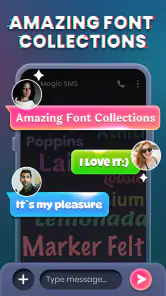
Magic SMS - Text Messages is a messaging application designed for sending and receiving text messages with a more personalized interface than a standard phone messaging app. Depending on your device and carrier, you can use it to manage conversations, organize contacts, customize the appearance of chats, and handle incoming and outgoing SMS messages. Its usefulness largely depends on whether it is compatible with your phone’s default messaging settings.
Pros
- Simple interface makes sending and reading texts quick.
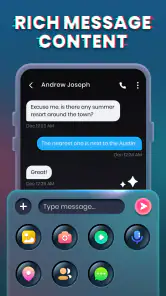
- Supports multimedia messaging for sharing photos and other content.
- Conversation view keeps replies organized in one place.
- Lightweight design runs smoothly on many Android devices.
- Customizable notifications help you notice important incoming messages.
Cons
- Some features may require permissions that privacy-conscious users dislike.
- Compatibility can vary across Android versions and device manufacturers.
- Advanced messaging options may be limited compared with newer chat apps.
- Advertising may interrupt the experience in the free version.
- No built-in cross-platform messaging network for users without SMS access.

- Category
- Communication
- Version
- 1.3.4.51











