Liveuamap
- 204.00
- 3.0
- Installs
- 1.00M
- Price
- Free

Screenshots



Analysis by Reviewed
I find Liveuamap most useful when I treat it as a way to orient myself in a developing story, rather than as a replacement for every news source I read. Its map-first approach makes it easier to see where reports are coming from and how events relate geographically. That shift in perspective is the app’s main appeal, but it also means it works best when I pause to check the context behind a marker instead of treating the map as a complete account.
A practical routine for following a story
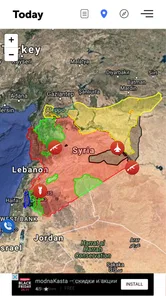
My usual workflow is to open the map, scan the area I care about, then select individual event markers to read their descriptions and sources. I use the map to spot clusters or nearby developments, and then read the linked context before deciding what deserves more attention. That is a more useful habit than repeatedly zooming around without a question in mind: choose a region or topic first, then use the map to investigate it.
For example, if I see a developing international story while checking the news in the morning, I can use the map to understand where the reported events are taking place and whether nearby items add useful context. I still compare important claims with fuller reporting elsewhere. A map can make location and sequence easier to grasp, but it cannot by itself explain every political, historical, or human detail behind an event.
A practical variation is to give each check a small purpose. I might ask whether reports are concentrated in one area, whether a story has moved to nearby locations, or whether a marker points me toward a source worth reading. That keeps a short visit from turning into an aimless tour of the whole map. It also helps me remember that geographic proximity is a clue for further reading, not proof that two reports share a cause.
Settings and choices worth making deliberately
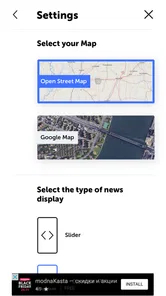
The filtering option is worth using early. A map showing many kinds of events can become busy, so narrowing the view to the subjects I am following makes scanning less tiring. I would avoid leaving a narrow filter on indefinitely, though: it can hide other developments that change how a story should be understood. When I finish following one topic, I reset my view or deliberately broaden it again.
I also make a point of opening the event details rather than relying on icon color or position alone. Descriptions and sources provide more to work with, while the social-media integration can offer another perspective. Those elements are starting points, not a guarantee that every post is independently verified. For consequential news, I check the underlying source and look for corroboration before sharing or acting on a claim.
My most useful “setting” is really a choice about how narrowly to look. When I am just catching up, a broad view is less likely to leave out a nearby development. When I am tracking one issue, a focused filter reduces visual noise. I switch between those modes intentionally instead of assuming that the most selective view is always the best one; a clean map can be easier to read while also being less complete.
More From Our News Desk

Weather by Xiaomi Review: Clear at a Glance, Less Clear Up Close

X Under Pressure: Can It Recover When Posting Goes Wrong?

Clash of Clans Is Won Between the Battles

Android Auto Makes the Case for Quieter Car Software

MobiOffice: Transforming Mobile Productivity with Seamless Integration

EA SPORTS FC™ Mobile Soccer: Redefining Mobile Sports Gaming
Faster habits—and the trade-offs
Once I know what I am looking for, I can make a quick pass: scan a chosen region, open only markers relevant to my question, and leave deeper reading for the items that seem important. Zooming in and out helps me move between local detail and the wider picture. This is handy during a short break, but it can also make the app feel more certain than the reporting warrants; a precisely placed marker is still a report to assess, not proof on its own.
Compared with a conventional headline feed, Liveuamap gives me a stronger sense of geography and proximity. A standard news app is often better for longer articles, background, and a familiar chronological reading routine. I use the map when “where is this happening?” is my first question, and turn to established reporting when I need a fuller explanation. The two approaches complement each other more than they compete.
For a repeatable check, I keep the sequence simple: choose an area, scan for relevant markers, open a small number of details, and then decide whether the story needs more research elsewhere. I avoid treating the number of visible items as a measure of importance. A map is useful for noticing relationships, but it does not automatically rank events by significance or tell me which one deserves the most attention.
Who will get the most from it?
I can see this being a good fit for readers who follow international affairs, emergencies, or several regions at once and want a visual way to keep track. It may be less comfortable for someone who prefers a calm, editor-curated list of complete articles; a live map can feel dense, and scanning markers is not the same as sitting down with a reported story. It is also not the tool I would rely on alone for urgent personal safety decisions. In those situations, I would check official local guidance and trusted local reporting.
One useful question is whether the app can replace my usual news reader. In my view, it cannot—and does not need to. It adds a spatial layer that a headline list usually lacks, while the usual reader remains better for sustained coverage and analysis. I also keep in mind that a live feed can move quickly, so a brief check is a snapshot rather than a complete record of a complicated event.
I would especially recommend it to someone who regularly wonders how developments in different places fit together. A reader who follows one local beat through a trusted newspaper, or who mainly wants opinion and long-form reporting, may get more from staying with that publication’s app. The choice comes down to the question you bring: Liveuamap is useful when location is part of the story, but it is not a shortcut around reading the story itself.
Getting Started with Liveuamap
Upon downloading the app, the first thing that struck me was its user-friendly interface. Seriously, even if you’re not tech-savvy, navigating through Liveuamap is a breeze. The app opens up to a world map dotted with colorful icons representing various kinds of events happening around the globe. Whether it’s political unrest, natural disasters, or public health updates, it’s all there, neatly categorized for your convenience.
Features That Stand Out
One of the coolest features of the app is its real-time updates. I was amazed at how quickly information is updated, which means you’re always in the loop. There’s also a neat filtering option where you can choose to view only specific types of events. So, if you’re particularly interested in military conflicts or natural disasters, you can customize your feed accordingly.
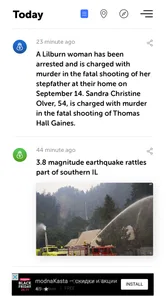
Another feature worth mentioning is the detailed descriptions and sources provided for each event. It’s not just about pinpoints on a map; you get comprehensive information that gives you context and understanding. Plus, the integration with social media platforms allows for a broader perspective on each event.
That combination makes the event card more important than the pin itself. I use the marker to decide what to inspect, then judge the description and cited material on their own merits. If a report matters to me, I follow its source and compare it with independent coverage rather than assuming that a short summary settles the question. This is a useful discipline for any fast-moving feed, and particularly so when a map makes individual events look neatly bounded.
User Experience
What I really appreciated during my time with the app was its simplicity. You don’t need to jump through hoops to find the information you need. The icons are intuitive, and the map itself is responsive, allowing for easy zooming in and out. I found myself quickly getting the hang of it, and it became my go-to source for news updates.
Plus, for someone who’s always on the move, the app’s performance is pretty solid. I didn’t experience any major lags or crashes, which is a big plus in my book. The developers have clearly put effort into making sure the app runs smoothly.
There is still a small learning curve in deciding what to ignore. A map with many markers can encourage me to open too many items, even when I only meant to check one region. I get a better result when I set a stopping point—such as reviewing the few reports related to my question and then switching to fuller coverage if needed. That personal boundary matters more than trying to inspect every symbol.
Beyond the first quick scan
As a news and magazines app developed by Altwork, Liveuamap takes a different route from a typical publication: the map is the organizing idea, not merely an illustration alongside an article. That makes it particularly handy when a story spans several places. I can look for geographic connections first, then use conventional coverage to understand why those connections matter. Readers who mainly want essays, interviews, or a single editor’s selection may find a standard news app more satisfying.
For a repeatable routine, I would keep a broad view for general awareness and narrow the filters only when I am actively following a subject. If a marker catches my attention, I open its details, note the source, and avoid drawing a conclusion from its location alone. That small sequence helps me use the map efficiently without confusing a fast overview with a complete investigation. It also makes short visits more purposeful than scrolling through every visible item.
The app is free to download, though it includes in-app purchases priced from $1.99 to $4.49 per item. Its average rating is 3.0 from around 4.8 thousand ratings, which suggests experiences are mixed rather than universally smooth. I would approach it with that in mind: the map concept is compelling, but whether it becomes a daily habit depends on how much you value spatial news browsing and how comfortable you are checking sources yourself.
Practical expectations before relying on it
Liveuamap has been available since December 15, 2014, and its current version is 3.0.58. It has over 500 thousand installs and is rated for Everyone 10+. It supports Android 6.0 and later. Those details make it accessible to many Android users, but I would still judge it by how it fits my routine rather than by longevity or popularity alone.
A sensible everyday use is a quick check before a commute or during a lunch break: scan the area or topic you care about, open a few relevant reports, and then leave the app when you have enough orientation. If you need a verified answer about a local hazard, a map-based news feed should not be your sole source; seek official instructions and direct local updates. The distinction matters because being fast to browse is not the same as being authoritative for every decision.
Another question is whether I need to create a complicated system to benefit from the app. I don’t think so. A consistent habit—start broad, filter with a purpose, inspect details, and cross-check consequential claims—is enough to make the map more useful. The main trade-off is attention: a busy global view can invite constant checking, so I prefer opening it with a specific question and closing it once that question is answered.
For instance, if I have a few minutes between errands, I can check one region, open a report that appears relevant, and save the deeper reading for when I have time to compare sources. That is more realistic than expecting a quick map scan to deliver a finished understanding. If the story could affect a decision I need to make, I pause the routine and consult official guidance or detailed local reporting instead.
Final Thoughts
In a world inundated with information, having an app like Liveuamap can be a game-changer. It’s not just about getting news; it’s about getting reliable and timely information. Whether you’re a news junkie or just someone who likes to stay informed, this app caters to both ends of the spectrum. I would definitely recommend giving it a try and seeing how it fits into your daily routine.
So, if you’re ready to dive into the world of real-time global updates, you know where to head. Just remember, with great power comes great responsibility—so use the information wisely!
My recommendation is conditional but positive: try it if seeing events in their geographic context would change how you follow the news. Keep a regular article-based source alongside it, and use the filters as a way to focus rather than as a reason to ignore everything outside one topic. That is where I think the app earns its place: not as a complete news desk, but as a practical map for asking better questions about what is happening and where.
Liveuamap Frequently Asked Questions
What is Liveuamap and how does it work?
Liveuamap is a real-time mapping platform that provides users with live updates on conflicts, protests, and other global events. It aggregates information from various news sources and social media, presenting it on an interactive map. Users can click on specific locations to get detailed reports, images, and videos about the events happening there. This tool is essential for staying informed about global happenings as they unfold.
What should I know about Liveuamap before downloading it?
Liveuamap is a news and magazines app developed by Altwork, with the short description “Liveuamap” and a store summary describing it as a live newsfeed on the map. It is free to download, is rated for Everyone 10+, and has an average rating of 3.0 from around 4.8K ratings. Its current version is 3.0.58, and it requires Android 6.0 or later.
Is Liveuamap available for both Android and iOS devices?
Yes, Liveuamap is available for both Android and iOS devices. Users can download the app from Google Play Store for Android devices and the Apple App Store for iOS devices. The app is designed to work seamlessly on both platforms, providing the same level of detail and functionality to all users.
Does Liveuamap provide information in multiple languages?
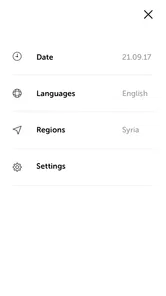
Liveuamap offers its content in multiple languages to cater to a diverse global audience. Users can select their preferred language within the app settings. This multilingual support helps in understanding complex news in a user-friendly manner, ensuring that language barriers do not hinder access to important information.
Can I use Liveuamap without paying, and are there in-app purchases?
Liveuamap is free to download and offers access without requiring a subscription. In-app purchases are available, priced from $1.99 to $4.49 per item, so users may encounter optional paid items. The app has been available since December 15, 2014, and has more than 500,000 installs. You can decide whether to make a purchase based on your needs.
Pros
- Real-time updates on global events.
- User-friendly map interface.
- Comprehensive coverage of various regions.
- Customizable alerts for specific areas.
- Offers news from multiple sources.
Cons
- Occasional delayed notifications.
- Limited offline functionality.
- Some regions less detailed.
- Ads can be intrusive at times.
- Requires good internet connection.











