

Light Show Creator for Tesla
- 25.00
- 3.2
- Installs
- 10.00K
- Price
- Free
Screenshots
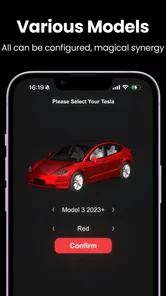
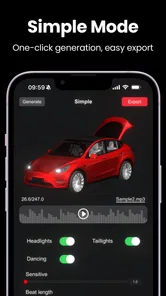
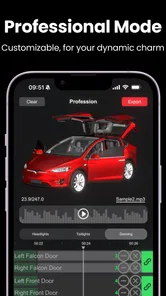
Analysis by Reviewed
I approached Light Show Creator for Tesla as a practical tool rather than a novelty app. Its purpose is clear: help Tesla owners prepare a custom light show without needing to build the whole process around a desktop computer. That sounds simple, but the experience depends on several things working together, including the phone, the vehicle, the chosen show material, and the final transfer or playback step. In my experience, that is where most of the real friction appears.
The app comes from Bamboo Game and sits in the Auto & Vehicles category. It is free to install, with optional in-app purchases priced from $9.99 to $19.99 per item. It is rated for Everyone, so the interface is aimed at a broad audience rather than technical Tesla owners alone. The current version is 3.7.01, and it runs on Android devices using version 6.0 or later.
I would recommend it to someone who wants to experiment with a personal Tesla light show and is willing to check each step carefully. I would not recommend it to anyone expecting a completely automatic experience where a single tap creates, validates, transfers, and plays a polished show without any preparation. The app can make the creative side more approachable, but it does not remove the practical responsibilities around the car and the playback setup.
Where the experience usually gets stuck
The first surprise is that “creating” a light show is not the same as simply choosing a visual theme. A custom show has to be prepared in a way the vehicle can use, and small mistakes can make the result appear broken even when the app itself is functioning normally. A user may think the app failed because nothing happens in the car, while the real issue is an incomplete preparation step, an incompatible file arrangement, or a vehicle that is not ready to play it.
That distinction matters because the app’s store summary promises a quick way to make a custom Tesla light show, but quick does not mean careless. I found the best results came from treating the process like a short checklist rather than an instant effect. Before touching the creative controls, I would decide what the final show is meant to do, where it will be played, and whether I am testing it privately or preparing something to share with other people.
Another common sticking point is expecting the phone to behave like the car’s own interface. A mobile creator can help organize and prepare content, but the vehicle still controls the actual lights and playback conditions. If the car is locked, not in the right state, or unable to read the prepared material, repeated taps inside the app are unlikely to solve the problem.
The most useful mindset is to separate creation, transfer, and playback. When those stages are treated as one action, troubleshooting becomes confusing. When they are treated separately, it becomes much easier to identify whether the problem is inside the app, in the prepared content, or in the Tesla’s own environment.
More From Our News Desk

 Gmail
GmailGmail in a Busy Inbox: Who Benefits Most?
From first account to crowded workday, Gmail earns its place through dependable search and flexible sorting—but its best fit depends on how much inbox maintenance you can tolerate.

 Prime Video
Switching to Prime Video: What Changes in Your Viewing Routine
Prime Video can make a compelling second home for streaming, but switching means learning a different catalog, rental layer, and route from browsing to playback.

 Universal TV Remote Control
Universal TV Remote Control Works Best as a Reliable Backup
A phone remote earns its place through quick setup and reliable habits. Here is how to get more from Universal TV Remote Control—and where its limits show.

 Weather - By Xiaomi
Weather by Xiaomi Review: Clear at a Glance, Less Clear Up Close
Xiaomi’s weather app makes everyday forecasts quick to scan, but its calm surface can leave useful details and recovery paths harder to find than they should be.

 X
XX Under Pressure: Can It Recover When Posting Goes Wrong?
A resilience-focused review of X, examining setup, mistaken posts, interruptions, weak connections, and the gaps that matter when recovery needs to be dependable.

 Clash of Clans
Clash of Clans Is Won Between the Battles
Its raids are quick; its community is a long-term project of coordination, teaching, rivalry, and shared responsibility—with all the friction that entails.
Latest News



Why a successful-looking setup can still fail
A custom light show is easy to judge incorrectly because the final result is visual and immediate. If a sequence does not play as expected, users often change several things at once: they edit the show, move files, restart the app, and try the car again. That makes it difficult to know which change helped. I prefer changing one part at a time and keeping a known simple test available.
For example, if a basic show works but a custom one does not, that points toward the custom material or its organization rather than the phone’s general connection. If no show works at all, the vehicle’s state or the transfer method deserves attention first. This simple comparison is more valuable than repeatedly reinstalling the application.
The modest public reception also gives me a realistic view of the product. It has an average rating of 3.2 from around 70 ratings, with roughly 25 written reviews and over 10 thousand installs. That does not make it unusable, but it suggests the experience may be uneven across devices, cars, and user expectations. I would install it for experimentation, not for a time-sensitive event where there is no opportunity to test beforehand.
Setup checks that prevent wasted attempts
I would begin with the phone itself. The app supports Android 6.0 and newer, but meeting the minimum operating-system requirement does not guarantee an equally smooth experience on every device. Before creating anything important, I would make sure the phone has enough free storage, a stable battery level, and the latest available version of the app. These are ordinary checks, yet they matter when the workflow involves preparing or moving media.
Next, I would make the first test deliberately small. A short, uncomplicated sequence is better than a large ambitious project because it gives a clear answer about whether the basic workflow works. Once that test succeeds, I would add more creative detail. This avoids spending time polishing a show that later turns out to be unusable in the car.
I would also keep the phone and vehicle close during the initial setup and avoid switching between several networks or connection methods without noting what changed. If the app depends on a particular transfer path in your situation, changing that path halfway through can make the result look random. A calm, repeatable setup is more helpful than trying to force the process while standing outside with other people waiting.
Before playback, I would check the vehicle’s own status rather than assuming the app can override it. The car should be parked safely, ready for the intended light-show function, and able to access whatever content has been prepared. If the vehicle displays an error or does not recognize the material, I would read that message as a car-side clue instead of immediately blaming the creator.
A practical first-session routine
Install the app and open it before planning a full show. This confirms that the phone can run the current release and gives you a chance to understand the available workflow without pressure.
Prepare one simple test rather than a complicated sequence. Keep the first attempt focused on proving that the complete path from phone to vehicle is working.
Record what you changed. If the test fails, note whether the problem appeared during creation, transfer, recognition, or playback.
Test the same material again before editing it. Repeating the exact attempt can reveal a temporary connection or vehicle-state issue.
Only then move on to a more personal or elaborate show. This saves time and gives you a reliable baseline for comparison.
This routine is especially useful for a group gathering. Imagine preparing a show for a weekend meet-up: you have limited time, several people are watching, and the car is parked somewhere unfamiliar. Testing a basic version at home first is far less stressful than discovering at the event that the phone can create the content but the car cannot use it in the expected way.
What the free download does and does not imply
The free installation makes it easy to explore, but I would not assume every creative possibility is included without cost. Optional purchases range from $9.99 to $19.99 per item, so I would inspect what each purchase changes before paying. The important question is not only whether a paid item looks attractive, but whether it improves the part of the workflow you actually need.
If your goal is simply to test whether your Tesla can play a custom show, I would start with the free experience and a basic project. If the essential workflow is already awkward, paying for additional material is unlikely to fix a transfer or vehicle-state problem. On the other hand, someone who enjoys designing several shows may find a paid item worthwhile after confirming that the underlying process works on their own phone and car.
I also appreciate that the age rating is Everyone, but that should not be confused with a guarantee of simplicity. A family-friendly rating describes the content suitability, not how much patience the setup requires. A younger user may enjoy the creative result, while an adult will probably need to handle the vehicle preparation and troubleshooting.
Recovering when a show does not work
When playback fails, I would resist the urge to start over immediately. First, I would identify the exact point of failure. Did the app close while creating the show? Did the transfer appear to finish but leave nothing usable in the car? Did the vehicle recognize the show but refuse to start it? Each answer suggests a different next step.
If the app becomes unresponsive during creation, I would close it normally, reopen it, and try a smaller project. I would avoid making several edits before confirming that the simpler version behaves consistently. Keeping the first test modest also reduces the chance that storage pressure or a particularly complex project is making the phone struggle.
If the show appears to transfer but cannot be found in the vehicle, I would check the destination and the physical or wireless connection being used. I would also confirm that the phone completed the operation rather than merely showing a progress state. A transfer that was interrupted can leave behind something that looks present but is not complete enough for the car to use.
If the vehicle sees the show but playback fails, I would return to the simplest known-working material. This is one of the most useful troubleshooting techniques with a creative tool: compare the custom result with a basic result instead of changing the entire environment. If the basic result plays, inspect the custom project. If neither plays, focus on the car’s readiness and the transfer process.
How to keep troubleshooting controlled
I would use a short recovery loop: stop, return to the last known good step, repeat it unchanged, and change only one variable. For instance, do not edit the show and change the connection method in the same attempt. That creates two possible causes and makes the next failure harder to interpret.
It is also worth giving the vehicle time to finish recognizing new content before trying another command. Rapidly repeating actions can create the impression that the app is ignoring you when the car is still processing the previous step. I would rather wait and confirm the result than stack several attempts on top of one another.
Another practical tip is to keep an original copy of any custom material before modifying it. If an edited version fails, you can return to the earlier copy and determine whether the change introduced the problem. This is particularly helpful for users who plan to make several variations of one show for different occasions.
Finally, do not judge the application by one failed attempt in an unusual location. A crowded event, weak connectivity, low phone battery, or unfamiliar vehicle state can all make a normally manageable process feel unreliable. A controlled home test gives a fairer view of what the app can do.
When the app is not the cause
It is tempting to blame the creator because it is the part of the process visible on the phone. However, the app cannot correct every condition inside the vehicle. If the Tesla is not ready for playback, has not recognized the prepared material, or is being operated in a way that prevents the light show from starting, the creator may be working exactly as intended.
The same applies to the phone. An older Android device may meet the operating-system requirement yet still have limited storage, background restrictions, or unstable connectivity. I would check whether other file transfers and media tasks work normally on that phone before concluding that this particular app is defective.
There is also a difference between a creative result that is technically accepted and one that looks good. If timing feels awkward or the sequence is visually disappointing, that may be a design issue rather than a software failure. I would preview and simplify before purchasing more content. A shorter, cleaner idea often works better than a crowded one that tries to use every available effect.
This is where the app differs from the usual alternatives. A general video editor gives you more familiar tools for cutting and arranging media, while a desktop-oriented Tesla workflow may offer greater control for users comfortable with files and technical preparation. Light Show Creator is more attractive when the priority is convenience on a phone and a direct path toward experimenting with a vehicle light show. It is less attractive when you need advanced editing control, precise professional timing, or a workflow that has already been proven for a formal event.
Who should use it and who should skip it
I think it suits Tesla owners who enjoy trying small creative projects, want to prepare a show from a mobile device, and are comfortable performing a few setup checks. It can also be useful for someone who wants to make a personal sequence for a private celebration, provided they test it well before guests arrive.
I would skip it if you need guaranteed repeatability without rehearsal, dislike handling files or transfer steps, or expect the app to control every vehicle condition automatically. I would also choose a more established desktop workflow if I were preparing a carefully timed public presentation and needed detailed control over every part of the production.
For families, the app can be a fun shared project, but I would keep the adult in charge of vehicle preparation and playback. The Everyone rating makes the content broadly suitable, yet the car remains a real vehicle with its own safety requirements. The creative part can be collaborative; the parking and playback decisions should remain sensible and controlled.
My practical verdict after using the workflow
Light Show Creator for Tesla is best understood as an accessible starting point for custom light-show experiments, not as a complete replacement for careful preparation. Bamboo Game has made the idea approachable enough for phone-first users, and the free entry point lowers the barrier to trying it. The app’s strongest quality is convenience: it lets you explore the concept without immediately committing to a more technical computer-based process.
Its weakness is the gap between the simple promise and the number of conditions involved in a successful result. When something goes wrong, users must distinguish app problems from phone limitations, transfer interruptions, project issues, and vehicle readiness. The average rating of 3.2 reflects why I would approach it with realistic expectations rather than assuming a flawless experience.
My advice is to begin with a small test, keep an untouched copy of your original work, and change one thing at a time when troubleshooting. Do not wait until a gathering to discover how your particular phone and Tesla behave together. If the basic workflow works reliably, the app becomes a pleasant way to personalize a light show. If the initial setup already feels like too much technical work, a more controlled desktop alternative may be the better choice.
Overall, I would install it for curiosity, personal projects, and informal events. I would not buy optional items until the core process is proven on my own equipment. Used with that practical attitude, this free Auto & Vehicles app can turn a Tesla light show from a technical project into an enjoyable experiment, while still leaving enough responsibility with the user to make testing and safe vehicle preparation essential.
Light Show Creator for Tesla Frequently Asked Questions
Is Light Show Creator for Tesla free to download, and are there any costs?
Light Show Creator for Tesla is free to download, so you can try it without paying upfront. The app also offers in-app purchases, with items priced from around ten to twenty dollars. Check the purchase details shown in the app before confirming anything, and consider whether the available features meet your needs before spending money.
What is Light Show Creator for Tesla, and what can I use it for?
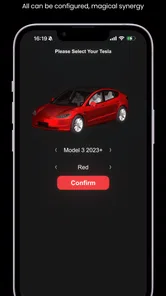
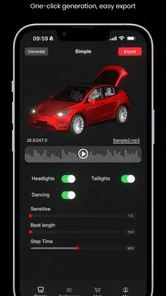
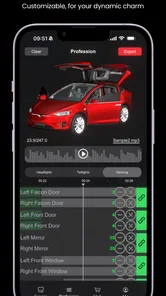
Light Show Creator for Tesla is designed to help Tesla owners create, edit, and organize custom light show sequences for compatible vehicles. You can typically combine lighting effects with music or other timing cues, preview the arrangement, and prepare a show for use in the car. It is mainly intended for creative customization rather than everyday driving or vehicle control.
Is Light Show Creator for Tesla compatible with every Tesla model?
Compatibility can vary depending on the Tesla model, model year, software version, and the specific light show features supported by the vehicle. Before downloading, check the app’s current compatibility information and confirm that your Tesla supports custom light shows. Some effects may also work differently across models, so a sequence created on one vehicle may not look exactly the same on another.
Do I need special equipment or a USB drive to use the light shows?
In many cases, creating a show only requires the app, but transferring and playing it in a Tesla may require a properly prepared USB storage device, depending on the workflow supported by the app and your vehicle. You may also need compatible audio files and correctly formatted show data. Follow the app’s instructions carefully, because folder names, file formats, and USB formatting can affect whether the car recognizes the show.
Can I use my own music and create completely custom sequences?
The app is intended for users who want more control than the standard Tesla light show experience, and it may allow custom timing, effects, and audio depending on its current feature set. However, supported music formats, file sizes, timing precision, and export options can differ. Make sure you have the rights to use any music you import, especially if you plan to share the resulting show publicly or use it at an event.
Pros
- Turns Tesla’s exterior lights into a synchronized visual show.
- Lets you preview show effects before starting them on the car.
- Useful for parties
- meetups
- holidays
- and Tesla owner events.
- Simple interface makes creating custom light sequences approachable.
- Can add a memorable personal touch to parked Tesla displays.
Cons
- Requires a compatible Tesla model and supported vehicle software.
- Shows may drain the vehicle’s battery if played repeatedly.
- Outdoor use can be limited by weather
- location
- or local regulations.
- Some advanced controls may require time to learn and configure.
- Not suitable for use while driving or in areas where lights distract others.











