Layla
- 75.00
- 3.9
- Installs
- 1.00K
- Price
- $19.99

Screenshots





Analysis by Reviewed
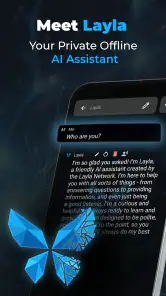
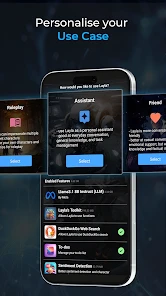
I judge an offline chatbot by what it can do when I’m away from a reliable connection, not by grand promises about artificial intelligence. Layla is an entertainment app from Layla Network.AI built around private, on-device conversations. That focus makes it a different proposition from the cloud-based chatbots many people already use: it is intended to work without internet access, so a connection is not part of every interaction. For quick questions, brainstorming, or a bit of company on a journey, that distinction is the main reason I’d consider it.
Where an offline chatbot fits into a normal day
The most useful way to approach Layla is to give it a job that does not depend on live information. I might use a quiet stretch of a commute to turn a vague idea into a short list of options, or ask for help wording a message before I send it. Those are modest tasks, but they suit a chatbot that can be available when reception drops away. If I need today’s opening hours, a current news update, or a result that must be checked against a reliable source, I would switch to an online service instead.
There is also a practical difference between using a chatbot for ideas and treating it as a reference book. I find the former more forgiving: an imperfect suggestion can still help me get started, while an incorrect factual answer can send me in the wrong direction. A useful habit is to ask for a draft, outline, or set of possibilities, then make the final decision myself. That keeps the tool in a role where conversational help is valuable without asking it to be more dependable than it is.
What to expect from speed and everyday use
Offline operation changes the speed question. There is no need to wait for a request to travel to an online service and back, but that alone cannot guarantee instant answers: the work happens on your device, and performance can vary with the phone or tablet. I’d try a few ordinary prompts before relying on it for a long, involved conversation. That gives you a feel for how quickly your particular device responds and whether the wait suits the way you plan to use it.
When a conversation gets demanding
Short exchanges are a sensible starting point. Ask for a few ideas, refine one, and see whether the app keeps the discussion useful before moving on to a lengthy task. Longer prompts and follow-up questions can make an on-device model work harder, so I wouldn’t assume every device will feel equally responsive. A practical tip is to break a complicated request into smaller steps; it can make the conversation easier to steer and help you spot where an answer needs clarification.
That also helps set expectations about what an offline chatbot is best at. I’d use it to draft a message, explore possible approaches to a personal project, or think through a simple plan while travelling. I would not treat a fluent answer as proof that it is correct, especially for important health, financial, or time-sensitive decisions. The convenience is having a conversational tool available without a connection, not a guarantee that every response deserves to be acted on.
For a more involved task, I would make the conversation easier to manage by stating the goal, adding only the context that matters, and asking for one step at a time. If an answer misses the point, a focused correction is usually more useful than repeating the full request with extra details piled on. This approach also gives me a natural point to stop: if several turns are not improving the result, I can switch methods rather than spending time trying to force a better answer.
More From Our News Desk

Weather by Xiaomi Review: Clear at a Glance, Less Clear Up Close

X Under Pressure: Can It Recover When Posting Goes Wrong?

Clash of Clans Is Won Between the Battles

Android Auto Makes the Case for Quieter Car Software

MobiOffice: Transforming Mobile Productivity with Seamless Integration

EA SPORTS FC™ Mobile Soccer: Redefining Mobile Sports Gaming
Reliability, privacy, and practical limits
Because the app is designed to run on the device, its central appeal is being able to chat without internet access. That is useful in places with patchy reception and for people who would rather not send each prompt to an online chatbot. Still, offline access is not the same as a promise that every device will perform identically, and I’d test it in the situations that matter to me before depending on it. I’d also avoid entering sensitive details unless I had checked the app’s own privacy information and understood how it handles them.
There is a trade-off against familiar online alternatives. A cloud chatbot may be a better choice when you need a service that depends on a live connection or want to compare several online tools. Layla makes more sense when having an offline option is the priority and you are comfortable with device-dependent performance. If your phone already feels stretched by demanding apps, try a brief session first rather than assuming an on-device model will be light on resources.
For reliability, I would test the exact routine I expect to use rather than relying on one successful opening conversation. Try a short prompt, a follow-up, and then a longer request, ideally in the place where offline access matters. If the app becomes less responsive, I would first reduce the task to a simpler question and give it another try. That does not guarantee recovery in every case, but it helps distinguish an unusually demanding exchange from a broader mismatch between the workload and the device.
Privacy deserves the same practical care. On-device operation is appealing if I want to avoid sending every question to an online chatbot, but I would not take that as a reason to type passwords, financial identifiers, or deeply personal information. Before using any chatbot for sensitive topics, I would read the app’s privacy details and keep prompts general where possible. That small adjustment preserves much of the convenience without turning casual conversation into a place for information I would rather protect.
Who is likely to get the most from it?
I can see it suiting someone who commutes through dead zones, travels without dependable data, or simply wants a chatbot available for casual conversation and idea generation. For example, on a train with an unreliable signal, I might ask it to help outline a weekend plan, then refine the options as the conversation develops. A useful habit is to keep prompts focused and give relevant context up front; that can reduce the need for repeated back-and-forth and make an offline session feel more purposeful.
Someone who likes working through an idea out loud may also appreciate the conversational format, especially when the first version of a plan is all they need. I might ask it to sort a loose collection of thoughts into a draft itinerary, then check transport and opening times separately once I am back online. That split workflow is more realistic than expecting one chatbot to handle both creative thinking and up-to-date verification equally well.
By contrast, I would skip it if I mainly wanted live search, a source-backed answer, or a connected assistant that can act on current events. It may also be a poor fit for someone who dislikes testing apps on their own device or who needs consistently quick replies during long sessions. The choice is not simply whether offline access sounds useful; it is whether that benefit matters often enough to accept device-dependent performance and the need to verify important answers elsewhere.
It is also worth thinking about cost before settling in: the app is listed at $19.99, with in-app purchases ranging from $4.99 to $29.99 per item. I’d check which paid options are relevant to my intended use before spending, rather than assuming the initial price covers everything I might want.
Device fit and the final call
The app is rated for Everyone and requires Android 9 or later. Its current version is 6.2.0, and it has a 3.9 average from around 269 ratings, with over 1,000 installs. Those figures offer a little context, but they do not tell me how it will feel on a particular device; a quick personal trial is more informative for judging response times and stability. If a session slows down or stops being useful, I’d simplify the prompt, start a fresh exchange, and see whether the problem was tied to a particularly demanding request.
For a fair test, I would try Layla in three situations: a simple everyday question, a short creative task, and a follow-up that asks it to refine its first answer. That gives me a better sense of conversational usefulness than a single novelty prompt. I would also notice whether the phone remains comfortable to use during the exchange; an offline model still depends on the device doing the work, so the experience is personal rather than guaranteed by the app’s basic premise.
My performance verdict is therefore cautious but positive for the right person. Layla’s strongest reason to exist is that it offers an offline route to casual chatbot conversations, not that it can outperform every connected alternative or answer every question with authority. I’d recommend it to someone who often loses reception and enjoys brainstorming or drafting on the go. If speed, live information, or dependable reference answers matter more, I’d choose an online option for those jobs and keep this one only if offline access earns its place in my routine.
Overall, Layla is most compelling as an offline-first chatbot, not as a universal replacement for connected assistants. Its value depends on whether local availability matters enough to you to justify the price and whether your device handles its workload comfortably. I’d recommend giving it a measured try if you want conversational AI when a connection is unavailable, while keeping an online alternative for tasks that need current information or a dependable live service.
Ever stumbled upon an app that makes you go, "Whoa, where have you been all my life?" That's precisely the vibe I got when I first tried out Layla. It’s like that magical Swiss Army knife of apps that you never knew you needed but can’t imagine living without once you've got it.
Your All-in-One Personal Assistant
Right off the bat, Layla impresses with its sleek and intuitive interface. It's like having a personal assistant who never sleeps. Whether you’re looking to organize your day, track your health, or even find a new recipe for dinner, Layla’s got your back. Seriously, it’s like having a little helper in your pocket that’s always ready to lend a hand.
Stay Organized, Stay Productive
One of the standout features is its organizational prowess. The calendar and task management tools are so well integrated that they almost feel like magic. You can set reminders, create to-do lists, and even sync with other calendars seamlessly. I mean, who doesn’t love ticking off items from a checklist?
Health and Wellness at Your Fingertips
For those of us who are a bit health-conscious, Layla's health tracking capabilities are a godsend. From monitoring your daily steps to keeping tabs on your hydration levels, it’s got it all. Plus, the app offers some pretty nifty tips on maintaining a balanced lifestyle.
Whip Up Something Delicious
And if you’re anything like me, always on the lookout for new culinary adventures, Layla’s recipe suggestions are a delight. It tailors recommendations based on your dietary preferences and previous cooking habits. It’s like having a master chef whispering ideas in your ear.
Layla is one of those apps that you find yourself wondering how you ever managed without. It's packed with features that cater to a broad spectrum of needs, making it an essential tool for anyone looking to streamline their daily routine. So, if you haven’t already, give Layla a try and let it work its magic. Trust me, you won’t be disappointed.
Layla Frequently Asked Questions
What is Layla and what does it do?
Layla is a versatile lifestyle application designed to help users manage their daily activities and improve productivity. It offers features such as task management, reminders, and personalized recommendations to streamline your day. Whether you're looking to organize personal tasks or work-related activities, Layla provides a user-friendly interface to enhance your productivity on both Android and iOS devices.
Is Layla free to use, or does it require a subscription?
Layla offers a free version with basic features available for all users. However, for those looking to unlock more advanced options, there is a premium subscription plan. This plan includes enhanced functionalities, such as additional customization settings, exclusive reminders, and priority customer support. Users can choose the plan that best fits their needs and budget.
Can I synchronize my data across multiple devices using Layla?
Yes, Layla supports synchronization across multiple devices. By creating an account, users can sync their tasks, reminders, and preferences between their Android and iOS devices. This feature ensures that all your important information is up-to-date, allowing you to access your schedule and tasks from anywhere at any time, seamlessly integrating into your lifestyle.
What kind of support does Layla offer if I encounter issues?
Layla provides comprehensive customer support to assist users with any issues they may encounter. Support is available through multiple channels, including email and an in-app help center. Premium subscribers receive priority support, which ensures faster response times. Additionally, Layla's online community and FAQ section offer solutions to common problems and tips for maximizing app usage.
How secure is my personal data with Layla?
Layla takes user privacy and data security seriously. The app employs advanced encryption methods to protect personal data and ensure privacy. Layla's privacy policy is transparent, detailing how user data is collected, used, and stored. Users have control over their data, and the app complies with major data protection regulations, ensuring a secure and trustworthy experience.
Pros
- User-friendly interface for easy navigation.
- High-quality audio and video streaming.
- Compatible with various devices and platforms.
- Extensive library of music and podcasts.
- Offline listening available for premium users.
Cons
- Limited features in the free version.
- Occasional app crashes reported.
- Some content is region-locked.
- Ads can be intrusive in the free version.
- Premium subscription can be pricey.
- Category
- Entertainment
- Version
- 6.2.0











