

Lacoste USA: Polo & Sneakers
- 90.00
- 4.7
- Installs
- 50.00K
- Price
- Free

Screenshots


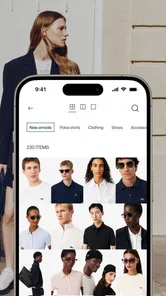

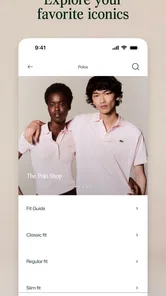
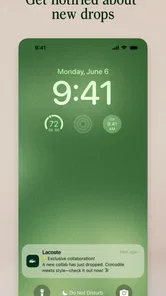

Analysis by Reviewed
I approached Lacoste USA: Polo & Sneakers as a shopping companion rather than a simple product catalogue. The first impression is very focused: this is the official Lacoste experience from LACOSTE, built around the brand’s clothing, sneakers, and broader sportswear style. I found it most useful when I already had a clear idea of what I wanted, but it also worked well as a way to browse seasonal outfits without opening a general marketplace full of unrelated sellers.
The app is free, aimed at Everyone, and sits in the Shopping category. Its current version is 1.20.0, and it supports devices running Android 9 or newer. Those details matter because this is the kind of app I would install for occasional shopping, not necessarily something I would keep open every day. It is lightweight in purpose: discover Lacoste pieces, inspect them on a phone, and move closer to a purchase decision.
How the Lacoste shopping experience feels on a phone
The strongest part of the experience is the direct connection to the brand. Instead of comparing an authentic Lacoste polo with dozens of visually similar products from different labels, I can stay within one design language. That makes browsing calmer than using a broad fashion marketplace, especially when I am looking for a recognizable polo, a pair of sneakers, or sportswear that fits the same general wardrobe.
I also like the distinction between shopping with a brand app and shopping through a general retailer. A marketplace can be better for comparing prices, delivery options, and competing brands in one place. This app is better when the brand itself is the starting point. If I have decided that I want Lacoste, the narrower catalogue becomes an advantage rather than a limitation.
The app’s store summary points toward polos, sneakers, and sportswear, and that focus is reflected in how I would use it. I would not open it expecting a universal fashion search engine. I would open it to explore the Lacoste lifestyle collection, check whether a particular type of item suits my needs, and build a shortlist before making a decision.
That narrow focus also creates the first important trade-off. If I am trying to outfit an entire family across many brands, a retailer app may save time. If I need very specific technical details or want to compare several labels side by side, a wider shopping service may be more practical. The Lacoste app makes the most sense when brand consistency and a direct browsing experience matter more than maximum choice.
When the connection becomes part of the experience
Shopping apps depend heavily on the network during the moments that matter most. Product imagery, catalogue content, item details, and the steps leading toward checkout are all the kinds of information I expect to load dynamically. That means the quality of the experience depends not only on the phone but also on the connection available at the time.
More From Our News Desk

 Gmail
GmailGmail in a Busy Inbox: Who Benefits Most?
From first account to crowded workday, Gmail earns its place through dependable search and flexible sorting—but its best fit depends on how much inbox maintenance you can tolerate.

 Prime Video
Switching to Prime Video: What Changes in Your Viewing Routine
Prime Video can make a compelling second home for streaming, but switching means learning a different catalog, rental layer, and route from browsing to playback.

 Universal TV Remote Control
Universal TV Remote Control Works Best as a Reliable Backup
A phone remote earns its place through quick setup and reliable habits. Here is how to get more from Universal TV Remote Control—and where its limits show.

 Weather - By Xiaomi
Weather by Xiaomi Review: Clear at a Glance, Less Clear Up Close
Xiaomi’s weather app makes everyday forecasts quick to scan, but its calm surface can leave useful details and recovery paths harder to find than they should be.

 X
XX Under Pressure: Can It Recover When Posting Goes Wrong?
A resilience-focused review of X, examining setup, mistaken posts, interruptions, weak connections, and the gaps that matter when recovery needs to be dependable.

 Clash of Clans
Clash of Clans Is Won Between the Battles
Its raids are quick; its community is a long-term project of coordination, teaching, rivalry, and shared responsibility—with all the friction that entails.
Latest News



On a strong home or office connection, browsing feels like a deliberate activity. I can move between categories, inspect several products, and compare colour or style choices without feeling rushed. On a mobile connection, the experience is more sensitive to interruptions. A weak signal can turn a quick look at sneakers into a sequence of loading pauses, particularly when I am moving between product pages rather than staying in one section.
This is worth considering before starting a serious shopping session. I would browse casually while commuting, but I would avoid making a final purchase decision in a place where the signal keeps dropping. A product page that has not fully loaded can leave me unsure whether I have seen every available option or whether an image, size choice, or important detail is still waiting for the connection.
My practical tip is to separate discovery from commitment. When I have only a few minutes, I use the app to identify products that catch my eye. When I am ready to examine them carefully, I return from a stable connection and take time with the product pages. This simple habit reduces the chance of confusing a loading problem with a product limitation.
Useful mobile situations, and where the phone is less ideal
The phone format suits several everyday scenarios. One is shopping between appointments: I can browse a polo or sneaker style without needing a laptop. Another is checking ideas before visiting a store or deciding what to try on. I can also imagine using it while packing for a trip, when I want to think through whether a sportswear item fits with clothes I already own.
A particularly realistic use is preparing for a gift. Rather than sending someone a random search result from a general retailer, I can browse the Lacoste selection, narrow the style direction, and then share my thoughts verbally or show the product on my screen. The app helps with discovery, although the final gift decision still depends on personal preferences such as fit, colour, and intended use.
The phone is less comfortable when I want to compare many details at once. A larger screen can make side-by-side reasoning easier, especially if I am switching between several products or checking how different styles might work together. The app is convenient for short sessions, but convenience should not be confused with a complete replacement for careful evaluation.
I would also avoid treating a small screen as a substitute for trying on clothing. Images can help me judge colour and overall design, but they cannot fully answer how a polo will sit on my shoulders or how a sneaker will feel during a long day. My best workflow is to use the app for narrowing choices, then rely on the available shopping and fitting options that suit the purchase.
What happens when browsing is interrupted
Network interruptions are especially frustrating in shopping because they can occur at several different points. A page may take longer to appear, an image may fail to finish loading, or a transition may pause just as I am trying to move forward. I do not see connectivity as a minor technical detail here; it shapes whether the app feels reassuring or uncertain.
When something stalls, I would first wait briefly rather than repeatedly tapping. Rapidly repeating an action can make it harder to tell whether the app is processing the first request or whether nothing happened at all. If the screen remains unchanged, I would return to the previous view and try again after checking the connection. This is basic advice, but it is valuable in any shopping flow where an accidental duplicate action would be inconvenient.
I also recommend reviewing the screen after reconnecting instead of assuming the last action succeeded. If I was browsing, I would reopen the product and confirm that the selected information is still visible. If I was moving through a purchase flow, I would look for clear confirmation before repeating anything. That cautious approach is more useful than blaming the app immediately, because the interruption may have come from the network rather than the catalogue itself.
The recovery experience is therefore part of my judgement. The app is pleasant when the connection behaves, but shopping confidence depends on knowing where I am after a pause. I would be more comfortable using it for final decisions on a reliable network, while treating unstable mobile coverage as a reason to postpone the last step.
Using the app without wasting mobile data
Fashion shopping naturally involves images, and image-heavy browsing can consume more mobile data than a text-based shopping task. I would not scroll through every category on a limited data plan just for entertainment. Instead, I would begin with a specific goal, such as finding a polo or checking sneaker styles, and stop once I have a manageable shortlist.
A useful routine is to do broad discovery on Wi-Fi and reserve mobile data for targeted checks. That does not require turning the app into a daily habit. It simply means using the more demanding browsing sessions at home, then opening the app on the move when I already know which products or categories deserve attention.
I would also avoid refreshing the same pages repeatedly when the connection is slow. If an image is taking time, giving it a moment is usually more sensible than restarting the page several times. Repeated loading does not improve the product information, and it can make a limited connection feel even less dependable.
For people who shop infrequently, this approach is easy to remember: shortlist on a stable connection, review carefully, and use mobile browsing for confirmation rather than endless exploration. It keeps the app useful without making it unnecessarily demanding on a phone plan.
Who will appreciate the focused catalogue
This app is a good match for someone who already likes Lacoste and wants a direct route to its clothing and footwear selection. It is also useful for shoppers who prefer a clean brand environment over a marketplace where product quality, presentation, and seller identity can vary. The official connection to LACOSTE gives the experience a clear purpose, and the app’s focus makes it easier to stay within that purpose.
I think it will appeal particularly to people who shop from a phone and want to browse at their own pace before deciding. The free price removes a barrier to trying it, and the Everyone age rating makes it broadly approachable. Its reception is encouraging as well, with a 4.7 average from around 285 ratings and more than 50 thousand installs, which suggests that the app has found an audience beyond a handful of early users.
That said, I would not recommend it as the only shopping tool for everyone. Someone looking for the lowest available price across multiple retailers may prefer a comparison service. Someone who needs extensive filtering across brands may find the focused catalogue restrictive. And someone with unreliable connectivity may prefer to research when a stable browser connection is available, rather than depending on a mobile shopping session at the wrong moment.
Small decisions that make browsing more effective
My first suggestion is to decide what kind of purchase you are making before opening the app. A polo for everyday wear, sneakers for regular use, and sportswear for active routines call for different questions. Starting with that purpose helps prevent attractive visuals from becoming the only basis for a decision.
Second, I would compare items by role rather than by appearance alone. A bright sneaker may stand out immediately, while a simpler pair may work with more of the wardrobe you already own. The app is good for presenting the brand’s visual identity, but the shopper still needs to translate that presentation into real-life use.
Third, I would treat the app as a shortlist builder. Instead of trying to make an instant decision after seeing one appealing product, I would inspect several related options, note which details matter, and then return to the strongest candidates. This is especially helpful when the network is inconsistent, because it turns a potentially fragmented session into a series of smaller, manageable checks.
Finally, I would keep the actual purchase moment separate from casual browsing. A quick look while walking is fine for inspiration, but I prefer a stable connection and enough time to review the final choices. That habit improves confidence and reduces the risk of acting on incomplete information.
Version, reach, and everyday practicality
The app was released on May 7, 2025, and the current version is 1.20.0. I would not install it on an older device without checking compatibility first, since Android 9 is the minimum operating system. For a relatively recent phone, that requirement should be straightforward, but it is still relevant if this is an older spare device used for shopping.
The install figure is over 50 thousand, while the review count is around 90. I would read those numbers as evidence of a real but specialized audience rather than as a reason to expect a huge social ecosystem around the app. This is a shopping tool, so its value depends more on catalogue relevance and dependable browsing than on community activity.
The free price makes experimentation easy. I can install it, explore the selection, and decide whether the direct brand approach suits me without paying for access. The more important question is not cost but fit: do I want a Lacoste-focused experience, and can my usual shopping situations provide a reliable connection when I need the app most?
My connectivity verdict
After using the app with connectivity in mind, I see it as a focused mobile storefront that works best when browsing is intentional. It is not trying to replace every fashion retailer or every price-comparison tool. Its strength is giving Lacoste shoppers a direct place to explore polos, sneakers, and sportswear while keeping the brand experience consistent.
The main limitation is practical rather than conceptual: network quality can influence how smoothly the catalogue feels, and mobile data is worth managing during image-heavy browsing. I would use Wi-Fi for relaxed exploration, mobile data for targeted checks, and a stable connection for any final shopping step. That workflow makes the app more dependable without requiring complicated preparation.
My recommendation is simple: install it if Lacoste is already one of your preferred brands and you want a convenient way to browse its collection from your phone. Skip it if your priority is comparing many brands, finding the absolute lowest price, or shopping in places where your connection is consistently unreliable. For the right shopper, the app is focused, approachable, and genuinely useful; for everyone else, a broader shopping service may be the better everyday companion.
Lacoste USA: Polo & Sneakers Frequently Asked Questions
Is Lacoste USA: Polo & Sneakers free to download, and which devices can run it?
Lacoste USA: Polo & Sneakers is a free shopping app from LACOSTE. It is intended for devices running operating system version 9 or later, so check your device’s software version before downloading. The app is rated for Everyone. Its focus is shopping the Lacoste lifestyle collection, from polos and sneakers to Sportswear.
Who is the app for, and what does it offer beyond browsing products?
The app is for people interested in shopping Lacoste’s lifestyle collection in the United States, including its polos, sneakers, and Sportswear. It has an average rating of 4.7 from around 285 ratings, with 90 written reviews and over 50,000 installs. Those figures offer a quick sense of its standing, while the app’s main purpose is to help users explore and shop Lacoste products.
What can I buy through the Lacoste USA: Polo & Sneakers app?
The Lacoste USA app is designed for browsing and shopping the brand’s collection in the United States. It typically includes iconic polo shirts, sneakers, clothing, accessories, and seasonal releases for men, women, and children. Product pages generally provide images, descriptions, available colors and sizes, pricing, and care information, helping you compare items before placing an order.
Does the Lacoste USA app offer exclusive products or app-only promotions?
The app may feature selected launches, limited collections, seasonal campaigns, and promotions available through Lacoste’s online store. Availability can change depending on your location, account status, and the current campaign. Before downloading, it is worth checking the sale and new-arrivals sections, enabling notifications if offered, and reviewing the promotion terms because discounts may exclude certain products or require a minimum purchase.
Can I check product availability, sizes, and store options in the app?
Yes, the shopping experience normally allows you to review size and color availability before purchasing. Some products may also provide store-related options, such as locating a nearby Lacoste shop or checking whether a selected item is available for pickup. Inventory can change quickly, particularly for popular polo shirts and sneakers, so an item shown as available may become unavailable during checkout.
Pros
- Easy browsing of Lacoste’s latest clothing
- polo shirts
- sneakers
- and accessories.
- Detailed product photos make it easier to inspect colors
- materials
- and design.
- Secure account access helps manage orders
- saved items
- and personal details.
- Official brand app provides confidence in product authenticity and current collections.
- Store and delivery information can simplify shopping from the Lacoste catalog.
Cons
- Some products or sizes may be unavailable depending on your location.
- Premium Lacoste pricing may not suit shoppers on a limited budget.
- The app may feel less useful if you only want to browse without buying.
- Delivery times and shipping options can vary by region and order destination.
- Promotional offers may be limited compared with general fashion marketplaces.











