LA Times: Essential California
- 1.41K
- 2.9
- Installs
- 500.00K
- Price
- Free

Screenshots



Analysis by Reviewed
I wouldn’t treat LA Times: Essential California as a neutral window onto every headline. I see it as a way to follow California through the reporting and editorial priorities of the Los Angeles Times, with the greatest value for readers who want a state-focused perspective rather than an endless stream of national alerts. That focus can make daily reading feel more coherent, though it also means the app is not a substitute for checking other sources when a story matters to you.
A California lens, not an everything feed
The app comes from NantMedia Holdings, LLC, and sits in the crowded news and magazines category. Its central appeal is geographic: if you live in California, have family there, or keep tabs on the state from elsewhere, a dedicated publication can give local issues more room than a general news aggregator typically does. I’d use it to build a regular reading habit around the state, not as my only route to breaking news.
That distinction matters in practice. A broad aggregator is useful when I want headlines from many publishers in one place; a newspaper app is more appealing when I want one newsroom’s reporting, photographs, and videos presented together. With an average rating of 3.1 from around 3,700 ratings, readers appear to have mixed experiences, so I’d approach it as a publication-specific tool and judge whether its coverage suits my routine rather than expecting a universally loved app.
Where it fits into an ordinary day
Picture checking the news before work, then returning to a story during a lunch break because it connects to a local issue you have been hearing about. A California-centered edition can make that second read more useful than skimming unrelated trending items: you can follow the state context across several days instead of treating each headline as an isolated update. I’d save the most relevant stories for a calmer moment, especially when a topic needs more than a quick glance.
It can also serve readers who no longer live in Los Angeles but still care about what is happening there. The trade-off is that statewide interest and personal relevance are not the same thing. If most of your daily concerns are outside California, a national or local outlet closer to home will probably earn more space on your phone.
Price, access, and the subscription question
The app is free to install, and it has in-app purchases ranging from $0.99 to $19.98 per item. I’d check what an individual purchase unlocks and whether it suits how often I read before committing. Occasional readers may be comfortable dipping in, while someone who expects to read extensively should look carefully at the options shown in the app and decide whether the cost makes sense for their own habits.
It has been available since January 20, 2011, and its current version is 5.0.98. It has reached over 500,000 installs, which gives it a substantial audience, but popularity alone does not tell me whether the reading experience or access model will suit you. The age guidance is Everyone 10+, a useful point for families deciding whether it belongs on a shared device.
More From Our News Desk

Weather by Xiaomi Review: Clear at a Glance, Less Clear Up Close

X Under Pressure: Can It Recover When Posting Goes Wrong?

Clash of Clans Is Won Between the Battles

Android Auto Makes the Case for Quieter Car Software

MobiOffice: Transforming Mobile Productivity with Seamless Integration

EA SPORTS FC™ Mobile Soccer: Redefining Mobile Sports Gaming
Who I’d recommend it to
I’d put this on the shortlist for California residents who want a recognizable newspaper’s reporting in a mobile format, and for former residents who like keeping a connection to the state. It is also a reasonable choice for readers who prefer a publication’s own selection of stories over an aggregator’s mixed-source feed. If you mainly want quick alerts, a broad overview of world headlines, or coverage tailored to another region, I’d choose a different app for that job and use this one only as a supplement.
One useful way to evaluate it is to try a simple routine for a few days: open it when you have time to read, note whether the California stories are relevant, and pay attention to whether the purchase options match your actual use. That tells you more than installing it during a breaking-news moment, when any single app can seem unusually compelling.
Reading across a busy week
For a more revealing trial, I’d check the app at two different points in the day rather than judge it from one quick launch. A morning scan can show whether its selection helps me understand what is on the state agenda; a later visit tells me whether there are stories worth returning to once I have more time. This is especially useful if I’m considering a purchase: I can first learn whether I naturally reach for the app and whether its coverage adds something distinct to the sources I already use.
That routine also helps answer a practical question: does the app suit a casual reader, or does it reward someone who follows California closely? If I only want an occasional headline, free access may be enough for my purposes. If I expect to read regularly, I’d inspect the purchase choices before settling into a habit, so I understand the access arrangement rather than discovering a limit at the moment I want to continue a story.
When a focused edition helps—and when it narrows the view
A state-centered publication can be especially handy when a local decision has consequences beyond one city. Rather than relying on a single headline, I can use the app to follow how the issue develops and keep the California context in view. The trade-off is selection: one publication’s priorities shape what rises to the top. When I need a fuller picture of a contentious subject, I’d compare its reporting with another credible outlet instead of mistaking a convenient daily reading source for the whole news landscape.
This is also why I would not choose it as my only app for emergencies or a fast-moving event. A push alert can point me toward a story, but I’d still want the full article and, where decisions affect me directly, current information from relevant official sources. The app’s role is strongest as a newsroom’s reporting destination, not as a universal monitoring system for every kind of update.
Hey there! So, I've been diving into the world of news apps lately, and I stumbled upon something pretty intriguing: LA Times: Essential California. If you're like me and love keeping up with the latest happenings, especially from the Golden State, then this app might just be your new best friend. Let me walk you through what I found.
Getting Started with the App
Jumping into the LA Times: Essential California app is like stepping into a news wonderland. The download was a breeze, and setting it up took no time at all. As soon as I launched it, I was greeted with a clean, slick interface that made navigation super intuitive. Whether you're tech-savvy or not, you'll find your way around without breaking a sweat.
The Content: What’s Inside?
Now, onto the juicy part—what do you actually get with this app? Well, the app is packed with a wide array of news stories, features, and local insights that are updated daily. It's like having the heartbeat of California right at your fingertips. Whether you're interested in politics, culture, or lifestyle, there's something here for everyone.
One of my favorite features is the "Morning Briefing" section. It’s like having a personal assistant who summarizes the most important stories of the day for you. Perfect for those mornings when you're rushing out the door with a coffee in hand.
User Experience: Smooth Sailing?
As someone who's used a fair share of news apps, I can honestly say that the user experience here is top-notch. The app runs smoothly, and I haven't experienced any crashes or glitches. The articles load quickly, which is perfect for those of us who are perpetually on the go.
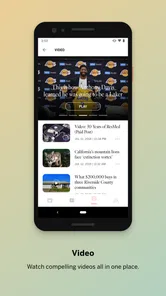
The app does a great job of balancing visuals with text. There are plenty of high-quality images and videos that accompany the articles, making the reading experience more engaging. It's not just about reading—it's about immersing yourself in the story.
Customization: Make It Yours
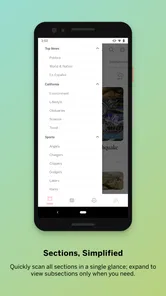
What’s cool about this app is that it lets you customize your news feed. You can tailor it to focus on the topics you care about most. Whether you're into tech, sports, or entertainment, you can prioritize what matters to you. It’s like having a personalized news buffet!
Notifications and Alerts: Stay in the Loop
I'm a sucker for notifications—especially when they're relevant. The app sends out timely alerts for breaking news, ensuring you’re always in the know. You can also adjust the notification settings to your liking, which is great if you don’t want to be bombarded with alerts all day long.
Offline Reading: News on the Go
One of the standout features for me is the offline reading capability. You can download articles to read later, which is perfect for those times when you're stuck on a plane or in a no-signal zone. It’s a lifesaver for those of us who hate wasting time during commutes.
Final Thoughts: Is It Worth It?
So, after spending some quality time with LA Times: Essential California, I'm genuinely impressed. It's a well-rounded app that delivers a comprehensive news experience. Whether you're a California native or just interested in the state's happenings, this app offers a wealth of information in a user-friendly package.
In a world where information is constantly at our fingertips, having a reliable source like this is invaluable. If you're looking for a way to stay informed and connected to California, I definitely recommend giving this app a try. Trust me, you won't regret it!
A practical way to use the tools
I’d keep the Morning Briefing for a quick scan, then use the topic choices to steer later reading toward what I genuinely follow. That small habit helps prevent a personalized feed from becoming a narrow one: I’d occasionally step outside my preferred subjects so that local developments I did not search for can still catch my attention. For a commute, I’d prepare articles before leaving rather than assume every story will be available offline; the useful point is to plan reading around connectivity, not to rely on a live connection at the last minute.
Notifications are most helpful when they earn their place on the lock screen. I’d start with a restrained alert setup and loosen it only if I find myself missing updates I care about. Breaking-news pings are not the same as a full account of a developing story, so I would use an alert as a cue to read and verify context, not as the complete picture. That approach makes the app less intrusive and keeps quick updates from replacing considered reporting.
What to expect from the reading experience
Photos and videos add texture, particularly when a report depends on a place or an event that is easier to understand visually. They can also make mobile reading less efficient when I only have a minute, so I’d treat them as a reason to open a feature when I have time rather than a promise that every article is a quick read. If you prefer plain-text headlines and rapid scanning, a wire-focused news app may suit you better; if you value visual storytelling alongside newspaper reporting, this format has a clearer advantage.
The interface impression in my original use was positive, but no app is friction-free for every phone or reading habit. A version number alone cannot guarantee that it will behave identically on every device, and anyone who runs into a loading or navigation annoyance should consider whether the app’s California coverage is valuable enough to keep using it. I would also avoid assuming that a smooth opening experience settles the question of long-term value: what matters is whether the stories keep earning your attention.
My recommendation in context
For someone deciding whether to install it, I’d separate three needs: local perspective, convenience, and breadth. This app is strongest when California perspective is the priority; an aggregator is usually better for comparing many outlets quickly, while a national publication makes more sense when state coverage is only occasional. If you already follow several sources, it can still fill a specific gap rather than replace them all.
My overall view is that LA Times: Essential California is worth considering as a focused companion, especially if California stories are part of your everyday interests. I would not recommend it as the sole news source for someone seeking broad international coverage or a completely publisher-neutral feed. Start with the stories and reading rhythm that matter to you, keep alerts selective, and make a deliberate decision about any in-app purchase. If that focused mix fits your day, the app has a clear role; if it does not, a broader alternative will be a better match.
LA Times: Essential California Frequently Asked Questions
Who publishes the LA Times: Essential California app, and what is it for?
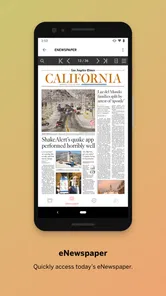
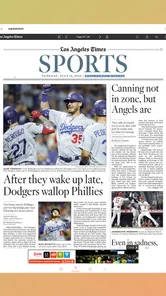
Published by NantMedia Holdings, LLC, LA Times: Essential California is a news and magazines app for readers who want access to reporting focused on California. Its store description highlights exclusive reporting, photos, and videos that readers can access wherever they are, making it a way to follow news and explore multimedia stories on a mobile device.
What features does the LA Times: Essential California app offer?
The LA Times: Essential California app provides users with access to the latest news, in-depth reporting, and exclusive stories from across California. It features personalized news feeds, breaking news alerts, and multimedia content such as videos and photo galleries to enhance the reading experience.
Is the LA Times: Essential California app free to use?
The app is free to download and offers both free and premium content. While users can access a selection of articles without charge, full access requires a subscription. Subscriptions unlock all articles, exclusive content, and a more personalized user experience, ensuring you stay informed about California news. Optional in-app purchases range from $0.99 to $19.98 per item.
How often is the content updated on the app?
Content on the LA Times: Essential California app is updated continuously throughout the day. Users receive real-time updates on breaking news and can explore new articles as they are published. This ensures that you are always up-to-date with the latest developments in California.
Can I customize the news I receive on the LA Times: Essential California app?
Yes, the app allows for personalized news feeds based on your interests. You can select specific topics, regions, or types of stories you want to follow. This customization helps you focus on the news that matters most to you, providing a tailored reading experience.
Pros
- Comprehensive local news coverage.
- User-friendly and intuitive interface.
- Real-time notifications for breaking news.
- Customizable news categories.
- Offline access to saved articles.
Cons
- Requires subscription for full access.
- Occasional ads in free version.
- Limited international news coverage.
- Some features need internet connection.
- App size may be large for older devices.











