Kagi News
- 36.00
- 4.2
- Installs
- 10.00K
- Price
- Free

Screenshots

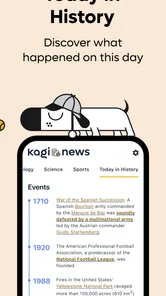

Analysis by Reviewed
I like news apps best when they help me make a deliberate choice about what to read, rather than giving me an endless feed to keep scrolling. Kagi News is built around that quieter goal: it is a news and magazines app from Kagi Inc. that aims to make catching up feel more manageable. My first impression is that it suits readers who want a focused daily routine, not a stream of alerts and recommendations competing for attention.
That distinction matters if you are deciding what to install. A news app can be a destination in itself, a shortcut to a favorite publication, or simply a starting point for finding stories worth following. I see this one fitting best into that last role: a place to begin a reading session, then decide whether a subject deserves more time elsewhere.
A calmer starting point for the daily news habit
I find a news routine works best when I decide what I want from a visit before opening the app. This section focuses on keeping that first check-in short and useful, then moves into the small choices that can make the reading experience fit your day. A clear starting habit also makes it easier to tell whether the app is reducing friction or simply adding another stop.
Build a baseline routine before adding complexity
The most useful way to approach Kagi News is to treat it as a regular check-in, not as a replacement for every source of information you use. I would open it at a predictable moment—over breakfast, during a commute, or when taking a break—and decide how much time I actually have. That small boundary matters: a news reader can save time only if I do not turn it into another open-ended scroll.
For a quick morning pass, I would scan the available stories, choose a few that seem relevant, and leave the rest for later or for another source. That is a more practical test of the app than trying to read everything in one sitting. On a busy day, even a short, intentional visit can provide a useful overview; when a story affects work or a decision, I would still follow it through additional reporting rather than rely on a headline alone.
This makes the app a good fit for people who want to keep up without constantly checking several publications one by one. It may also suit readers who are trying to reduce the time spent bouncing between browser tabs. The trade-off is that a curated-feeling routine depends on whether the material available in the app matches your interests. If you mainly want one specific local outlet, specialist publication, or live source, a direct app or website may be more dependable for that narrower need.
A practical test is to notice what happens after the first few visits. Do you find enough to follow up on, or do you repeatedly leave to look for the same missing topics? That answer is more useful than trying to judge a news reader from a single session. I would give the app a place in my routine only if it reduces the effort of getting oriented without making me feel that I need to check another feed immediately afterward.
More From Our News Desk

Weather by Xiaomi Review: Clear at a Glance, Less Clear Up Close

X Under Pressure: Can It Recover When Posting Goes Wrong?

Clash of Clans Is Won Between the Battles

Android Auto Makes the Case for Quieter Car Software

MobiOffice: Transforming Mobile Productivity with Seamless Integration

EA SPORTS FC™ Mobile Soccer: Redefining Mobile Sports Gaming
Use it as a reading layer, not your only source
I would think of Kagi News as a place to orient myself and find worthwhile reading, rather than as a guarantee of complete coverage. That distinction is especially useful on a breaking-news day. A compact news-reading habit can help me notice what deserves attention, but fast-moving events often require checking the original reporting and following updates as they develop.
For example, if I see a story that could affect a planned trip, I would use the app to spot the issue, then confirm practical details with the relevant official source. If I am following a complex policy debate, I would compare reporting from more than one perspective instead of treating a short summary as the whole story. That workflow keeps the convenience of a news app without asking it to do work that belongs to primary sources or deeper research.
The same approach works well for a topic that develops over several days. I can use one brief check-in to notice a new development, then keep a note of the question I still need answered before opening a longer report or an official document. This is a small but useful guardrail: it turns reading into a search for context rather than a succession of headlines, and it makes it easier to stop when I have enough information for the moment.
Check the settings that shape your reading
Before settling into a routine, I would spend a little time reviewing the settings that are actually available in the installed version. The useful principle is simple: adjust only what changes how you read. If an option affects presentation or notifications, decide whether it supports your habits rather than enabling everything by default. I would not assume that a particular control exists until I can see it in the app.
Notifications deserve special attention in any news tool. If Kagi News offers notification controls on your device, I would keep only the alerts that serve a clear purpose and let the rest wait for my planned check-in. If it does not offer the kind of alert control you need, the operating system’s notification settings can still help you limit interruptions. The goal is not to miss important information; it is to avoid letting every update dictate when you look at the news.
It is also worth checking the reading experience on the device you use most. Text size, display preferences, and system accessibility options can make longer sessions more comfortable when supported by the app or platform. I would test these during an ordinary article, not just while browsing a list, because the real question is whether I can read for several minutes without fighting the screen.
I would make these checks one at a time rather than change several preferences together. If the app feels easier to use afterward, I know which adjustment helped; if it feels no different, I can restore the previous choice. This is especially useful for accessibility and display settings, where the best arrangement depends on the screen and the way you hold your device. A quick test with a longer story is a better guide than choosing a setting just because it sounds helpful.
Make repeatable habits do the work
Experienced users often get more value from a consistent workflow than from hunting for clever shortcuts. I would create a simple sequence: open the app at a chosen time, scan the main selection, read the stories that matter, and stop when I have reached my time limit. Repeating that pattern makes it easier to notice whether the app is genuinely helping or merely adding another place to check.
A useful variation is a two-pass routine. In the first pass, I look for topics that affect my day and avoid opening every interesting headline. In the second, I return only if I have time for deeper reading. This is a practical way to keep a morning session short without pretending that every story can be fully understood at a glance. It also makes the app easier to use during a commute or between tasks, when attention is limited.
Another small but effective habit is to separate reading from verification. I can use a news app to discover a subject, then open the publisher or a primary source when accuracy, context, or a specific detail matters. This prevents a quick scan from becoming a false sense of expertise. It is particularly valuable for health, finance, public safety, and local decisions, where a headline-level understanding may not be enough.
For a realistic weekday example, I might check the app over breakfast, mark mentally which one or two subjects could affect my plans, and leave background stories alone until I have more time. At lunch, I can decide whether one of those subjects still matters and look for fuller reporting. The benefit is not a magic shortcut; it is avoiding the repeated, distracted checks that make even a brief news habit feel much longer than it needs to be.
Know where the faster patterns stop helping
There is a point at which optimizing a news routine becomes its own distraction. I would not spend time searching for undocumented gestures, hidden controls, or elaborate ways to organize stories. Use the controls that are visibly present, learn the navigation you naturally repeat, and keep the routine simple. That is a more reliable approach than expecting advanced tools that may not be part of the app.
Likewise, a news reader cannot remove the judgment involved in deciding what deserves attention. A story selection may be convenient, but I still need to consider source quality, missing context, and whether a topic is relevant to me. If I need full control over a reading list, publication-specific alerts, or a particular editorial viewpoint, a dedicated publication app, a feed reader, or a browser bookmark routine may serve me better.
Offline reading is another practical question to settle through use rather than assumption. If I expect to read without a connection, I would test the app before relying on it during travel: open it while online, see what remains available after connectivity changes, and plan a backup if necessary. The same trial-and-check approach applies to sharing, saving, and other convenience options. A feature is only useful if it is present and behaves as needed on my device.
The comparison with familiar alternatives comes down to control versus convenience. A publication’s own app can be the better choice if I want its specific coverage and presentation; a feed reader is stronger when I want to assemble and manage sources myself; browser bookmarks are enough for someone who already has a short list of trusted sites. Kagi News makes more sense when I want a single place to start and do not want source management to become a separate project.
Who is likely to enjoy it—and who may prefer something else
Kagi News is most appealing to readers who want a calmer way to check current events and are willing to make the app part of a repeatable habit. It can be a sensible choice for someone who is tired of hopping between sources and wants one place to begin a reading session. It is less compelling for someone who wants an always-on breaking-news ticker, deep specialist coverage in a single niche, or a highly customized feed they can tune in detail.
The app is free, rated for Everyone, and has an average rating of 4.2 from around 300 ratings, with over 10,000 installs. Those figures suggest that it has attracted a real audience, but they cannot tell me whether its approach matches an individual reader’s needs. I would judge it by trying the everyday routine: does it help me find useful stories with less friction, and do I leave the app feeling informed rather than pulled into more scrolling?
It is also worth knowing the software context before installing. The current version is 1.4.0, it was released on September 1, 2025, and it requires operating system version 7.0 or later. Those details make the compatibility check straightforward, especially if you use an older device. Since this is a news app, I would also keep the app updated when convenient and revisit the settings after a major update, because interface changes can affect a habit that depends on familiar navigation.
For a reader who mainly wants a quick overview, the free price makes it easy to try without turning the decision into a commitment. I would still compare its first few sessions with my existing routine: if I already get the right mix from a local news app and a couple of saved sites, adding another stop may not help. If I spend too much time opening sources individually, however, having a shared starting point could make the daily check feel less scattered.
My verdict: useful when the routine fits
After considering how I would use it day to day, I see Kagi News as a practical starting point for readers who want to make their news check-ins more intentional. Its strongest promise is not that it can replace every publication or answer every question; it is that it can help turn news reading into a bounded, repeatable part of the day. That is a modest goal, but it is one I value more than another feed designed to hold my attention indefinitely.
I would recommend giving it a fair trial if you want a focused news-reading routine and are comfortable checking important stories against original sources. I would skip it if your priority is a specific outlet, comprehensive live coverage, or fine-grained feed controls that you cannot find in the app. The best test is to use it for a few ordinary check-ins, notice whether it saves effort, and keep only the habits and settings that genuinely improve your reading.
In short, Kagi News works best as a thoughtful entry point into the day’s reading, not as a substitute for curiosity or verification. That balance is what makes it worth considering: it can help me spend my attention more deliberately, while leaving room to go deeper when a story deserves it.
Kagi News Frequently Asked Questions
What is Kagi News?
Kagi News is a news-reading app designed to help you follow current events through a curated feed of stories from multiple publications. Instead of requiring you to visit each publisher separately, it brings articles together in one place and offers tools for browsing topics and sources. The available features and content can vary by platform, region, and app version, so check the listing and app settings before downloading.
Is Kagi News free to use?
Kagi News may be available to download without an upfront charge, but access to some Kagi services or features may depend on a paid plan or account. Pricing and included benefits can change, and they may differ between the App Store, Google Play, and regions. Before subscribing, review the current in-app pricing, trial terms, renewal date, and cancellation instructions so you know what you will be charged.
Can I choose which news topics and sources appear in Kagi News?
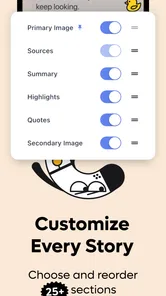
The app is intended to make news discovery more manageable by presenting stories from different sources, and its options may let you adjust what you follow or how your feed is organized. The exact controls can depend on the current version and your account. If you have specific interests or want to exclude certain publications, inspect the feed and personalization settings after installation to confirm they meet your needs.
Does Kagi News provide full articles, or will I need a publisher subscription?
Kagi News can help you find and read stories, but access to the complete article may depend on the publisher. Some publications make their reporting freely available, while others use paywalls, registration requirements, or limits on free reading. A link in the app may therefore open a publisher’s website or ask you to subscribe. Check each source’s terms if uninterrupted access to particular articles is important to you.
Is Kagi News available on Android and iOS, and what should I check before downloading?
Availability can depend on your country, device compatibility, and the current app release, so search for Kagi News in the official Google Play Store or Apple App Store before downloading. Review the listed developer, supported operating-system version, permissions, privacy details, and recent user feedback. Using an official store helps ensure you get the legitimate app and lets you confirm whether its current features suit your device.
Pros
- Clean
- uncluttered layout makes stories easy to browse.
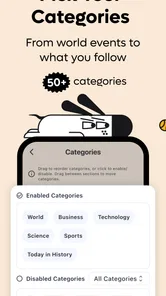
- Lets you follow topics that matter to you.
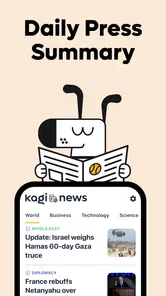
- Offers concise summaries for quick news catch-ups.
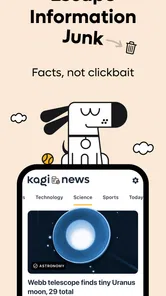
- Designed to avoid attention-grabbing ads and clickbait.
- Available across devices with a Kagi account.
Cons
- A paid Kagi subscription is required for full access.
- News coverage may be narrower than on major aggregators.
- Some stories link to publishers that require their own subscription.
- Personalization can take time to reflect your interests.
- Availability and features may vary by platform or region.











