

جلكان
- 15.00
- 4.7
- Installs
- 50.00K
- Price
- Free

Screenshots
Analysis by Reviewed
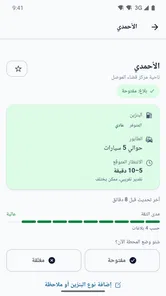
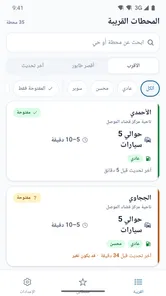
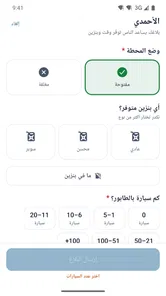
When I need fuel, the most useful question is often not where the nearest station is but whether it is open and how long I might wait. جلكان is built around that practical problem in Mosul: it helps drivers check a station’s reported status, queue length, and when that information was last checked. I like the focus. Instead of trying to be a broad navigation or vehicle-management tool, it puts attention on details that can change whether a fuel stop is worth making.
That narrow purpose also sets expectations. This is an Auto & Vehicles app for people whose plans depend on local fuel availability, not a general-purpose map or a promise that every station will have fuel. I would treat its information as a useful planning signal, then use common sense when conditions are changing quickly.
Why a recent station check matters
Fuel availability is local and time-sensitive. A station marked open may have changed its situation since someone last checked, while a queue estimate can become less useful as cars arrive or leave. The inclusion of a last-checked time is therefore more than a small detail: it gives me a way to judge how much confidence to place in a status before changing my route.
My practical approach would be to read the three pieces of information together. An open status answers whether a visit may be possible; the queue gives a rough sense of the likely delay; and the check time helps distinguish a fresh report from one that may have gone stale. The timestamp is part of the decision, not decoration. If the report is old, I would avoid treating the queue estimate as a guarantee.
This is particularly helpful when choosing between heading out now and waiting, or when deciding whether to stop at a familiar location or try another part of the city. It does not remove uncertainty, but it can make a fuel run less dependent on guesswork. That is a worthwhile role for a small local utility.
How connectivity changes the decision
Because the useful information concerns current station conditions, connectivity shapes the experience. I would want a working connection when checking the app before a trip, and I would be cautious about relying on a screen that has been left open for a while. A station’s status and queue are exactly the kind of details that can lose value as time passes.
That makes the best routine simple: check shortly before leaving, note the station’s last-checked time, and look again if there is a substantial delay or a change of plan. If the app cannot refresh at the moment I need it, I would not assume that a previously displayed report still reflects what is happening. The safer choice is to treat old information as a clue rather than a live confirmation.
More From Our News Desk

 Gmail
GmailGmail in a Busy Inbox: Who Benefits Most?
From first account to crowded workday, Gmail earns its place through dependable search and flexible sorting—but its best fit depends on how much inbox maintenance you can tolerate.

 Prime Video
Switching to Prime Video: What Changes in Your Viewing Routine
Prime Video can make a compelling second home for streaming, but switching means learning a different catalog, rental layer, and route from browsing to playback.

 Universal TV Remote Control
Universal TV Remote Control Works Best as a Reliable Backup
A phone remote earns its place through quick setup and reliable habits. Here is how to get more from Universal TV Remote Control—and where its limits show.

 Weather - By Xiaomi
Weather by Xiaomi Review: Clear at a Glance, Less Clear Up Close
Xiaomi’s weather app makes everyday forecasts quick to scan, but its calm surface can leave useful details and recovery paths harder to find than they should be.

 X
XX Under Pressure: Can It Recover When Posting Goes Wrong?
A resilience-focused review of X, examining setup, mistaken posts, interruptions, weak connections, and the gaps that matter when recovery needs to be dependable.

 Clash of Clans
Clash of Clans Is Won Between the Battles
Its raids are quick; its community is a long-term project of coordination, teaching, rivalry, and shared responsibility—with all the friction that entails.
Latest News



This is different from using a conventional map, where the main benefit is usually location and route guidance. A map can help me find a place, but it may not answer whether it is currently open or what the queue looks like. جلكان’s value is the local operating picture; a map remains useful for the actual route. For a driver, using both in sequence can make more sense than expecting either one to do everything.
Useful in the car, but best checked before moving
The app fits naturally into a few moments around a fuel stop: at home while planning an errand, before leaving work, or after parking somewhere safe. If I were already on the road, I would check before setting off toward a station rather than trying to make decisions while driving. The information is most useful when it can guide the next choice without becoming a distraction.
Consider a routine evening trip across Mosul. I notice the fuel is low before leaving, open the app while parked, and compare the reported status and queue at the stations I am considering. A recently checked location with a manageable line may be a better bet than a nearer option whose report is old. If the first choice no longer looks sensible by the time I arrive, I can reassess rather than assuming the earlier update was still accurate.
There is another useful habit for people who make the same journey often: pay attention to how the information behaves over time, not just to a single report. If one station’s status tends to be checked more recently than another’s, that may affect which report I trust when choosing between them. This is not a hidden feature; it is a way of reading the information carefully and making it work better for a real routine.
The mobile context also brings a limitation. A quick glance is convenient, but rapidly changing conditions can make any crowd- or report-based snapshot imperfect. I would not plan a long detour solely on a queue estimate, especially if the last check is not recent. The app can help narrow choices; it cannot promise that a station will remain open or that the line will stay the same.
When an update is delayed or the plan fails
Local information tools are most valuable when they are current, so a failed refresh or an unexpectedly old check time matters. If I open the app and the reports do not seem fresh, I would pause before making a trip based on them. Checking again later, choosing a station already along my route, or relying on another way to confirm conditions may be more sensible than driving across town on a weak assumption.
A second point is that “open” and “short queue” should not be read as a guarantee of a successful stop. Conditions may change between the report and arrival, and a queue description is an estimate rather than a reservation. I would keep a backup option in mind when fuel is low, especially if the preferred station requires a detour. This is a small planning step, but it prevents the app from turning uncertainty into false confidence.
If I were helping a family member use it, I would explain the same distinction: the app is a guide to reported conditions, not a promise about what they will find at the pump. That expectation makes the tool more useful, not less. It encourages a driver to combine the status, queue, and check time rather than relying on just one label.
Keeping the check focused and data-conscious
For an app used to make a fairly specific decision, I would keep my visits purposeful: open it when planning a fuel stop, compare the relevant reports, and close it once I have a plan. That is a sensible way to use any connected service whose main value is timely information. It also keeps the interaction short when I am away from home or trying to conserve a limited mobile connection.
I would avoid repeatedly reopening the same station page—or whatever view is available—without a reason. If the report is already old, checking it again immediately may not resolve the underlying uncertainty. A better use of attention is to compare another option or wait until closer to departure and check once more. This workflow is especially practical for drivers making a planned errand rather than reacting from the roadside.
There is a clear trade-off here: the app’s usefulness depends on information being refreshed, but a driver should not mistake frequent checking for certainty. One timely check before leaving is more helpful than many checks that do not change the decision. For a moving trip, I would pull over before interacting with the screen and keep navigation separate from the fuel-status decision.
Who will get the most from it
جلكان is best suited to drivers in Mosul who want a quick local view before choosing a fuel stop. It may be especially useful if a queue could disrupt a tight schedule, if someone is unfamiliar with which station to try, or if they prefer to compare options before leaving. The focus on open or closed status and reported waiting conditions gives the app a job that a generic map does not necessarily handle.
It is less compelling for someone who rarely needs to check fuel conditions, already has a reliable way to confirm a preferred station, or mainly wants turn-by-turn directions. In those cases, a map or a direct check with the station may be a better fit. It is also not the right tool to rely on as the sole source of truth when a report is old or the trip would be costly to reverse.
The app is free, and its Everyone age rating makes it broadly accessible. TNLMS is the developer. It has a 4.7 average from around 130 ratings, with over 50K installs; those figures suggest that drivers have found a reason to try this focused local service, though they do not replace checking whether its reports suit my own routine.
A focused tool with a sensible role
The current version is 1.0.4, and it runs on Android 7.0 or later. For someone with a compatible phone who regularly needs fuel in Mosul, that makes it easy to consider as a practical companion to a map. I would install it for the station-condition information, not expect it to replace navigation, and make a habit of checking the freshness of a report before setting off.
My overall view is positive but measured. جلكان is most helpful when its reports are recent and you use them to choose between options, not as a guarantee. Its local focus is a genuine strength, while changing conditions and dependence on current information are real limits. If you often face uncertainty about which station to try, it is a useful free check before a trip; if you need certainty or comprehensive route planning, pair it with another source and keep a backup plan.
Choosing a sensible backup before you leave
One decision the app can help me make is not simply which station to visit, but how much flexibility to keep in the plan. If I have enough fuel for more than one option, I can choose a station with a recent report and keep another location in mind in case the queue has changed. If I am close to empty, the same uncertain report deserves more caution: I would favor a practical stop already on my route over a speculative detour based only on a favorable status.
That distinction makes the tool more useful for different kinds of trips. On a short errand, a less-than-perfect queue estimate may be an acceptable risk because turning around is easy. Before a longer drive or a tightly timed appointment, I would want a stronger fallback and would avoid treating a single snapshot as enough to commit. The app informs the choice, while the cost of being wrong should determine how much I rely on it.
What to expect from the local focus
Its Mosul-specific purpose is a strength for residents and drivers whose journeys take them through the city, but it also defines the audience. Someone travelling elsewhere should not assume that the same local picture will be useful beyond Mosul. For a visitor, the app may help with a fuel decision in the area when its reports are current; for wider trip planning, a map and other local sources remain more appropriate.
Compared with calling around or asking someone nearby, a quick status-and-queue check can be a more convenient first step when I am planning from home or work. Those direct methods may still be better when a report is stale and the trip matters, because a recent listing is not the same as live confirmation. I see the app as a way to decide where to investigate or go first, not as a reason to stop using judgment.
A practical fit for ordinary routines
I would find it most worthwhile if fuel stops are a recurring uncertainty rather than a rare event. A driver who regularly crosses Mosul, has several stations that could fit a journey, and wants to avoid arriving at a long queue has a clear reason to check it. Someone who always uses one nearby station and can already confirm its condition may gain much less from adding another step to their routine.
For a household sharing driving duties, the useful lesson is to pass along the report’s freshness as well as the station choice. “This one looks open” leaves out the important question of when it was checked; “this report is recent, but keep another option in mind” communicates the uncertainty more honestly. That small habit helps prevent another driver from treating an earlier screen as a promise.
There is no need to turn every fuel stop into a research task. I would check when the choice could save time or avoid a wasted trip, and skip the extra comparison when the familiar option is convenient and conditions are not a concern. Used that way, the app stays a lightweight aid rather than becoming another screen to monitor throughout the day.
جلكان Frequently Asked Questions
What is جلكان, and what can I use it for?
The name جلكان alone does not identify a specific app with enough certainty to describe its features reliably. Before downloading, check the app-store listing for its developer, description, screenshots, and supported functions. These details can help you confirm that it is the app you intended to find and avoid confusing it with another app that has a similar name.
Is جلكان available for Android and iOS?
Availability depends on the particular app and the country or region associated with your store account. Search for جلكان in Google Play or the Apple App Store and compare the listing’s name, developer, and icon before installing. If it does not appear, it may not be offered for your device or region; avoid unofficial download sites unless you can verify the source and file.
Is جلكان free to download, and does it include purchases or subscriptions?
The price and payment options cannot be confirmed from the app name alone. Check the store listing for the download price, in-app purchases, subscription details, and any trial terms. If you install it, review the payment screen carefully before confirming a purchase, and check how recurring subscriptions can be cancelled through your device’s app-store account.
What permissions or personal information might جلكان require?
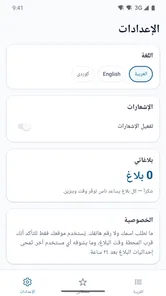
Permissions vary according to the app’s actual purpose, so review the requested access during installation and the privacy information on its store page. Grant only permissions that make sense for the features you plan to use. You can usually manage permissions later in your device settings, but limiting access may affect certain functions or prevent them from working as intended.
How can I check whether جلكان is safe and compatible with my device?
Use the official Google Play or Apple App Store listing where possible, and verify the developer name, recent update history, user reviews, and privacy disclosures. Check the minimum operating-system requirements before downloading. No app can be guaranteed safe based on its name alone; keep your device updated, avoid suspicious links, and uninstall the app if it behaves unexpectedly or requests unrelated access.
Pros
- Simple interface makes it easy to get started.
- Useful for keeping related content in one place.
- Lightweight design should work well on many devices.
- Suitable for quick
- casual use.
- The focused feature set may feel less overwhelming than larger apps.
Cons
- The app’s purpose and features may not be clear at first.
- Limited functionality may not meet every user’s needs.
- A small user base could mean fewer shared resources.
- Compatibility and performance may vary by device.
- Check permissions and privacy details before sharing personal information.











