Instapaper
- 855.00
- 4.7
- Installs
- 500.00K
- Price
- Free

Screenshots




Analysis by Reviewed
When I come across a useful article at the wrong moment, I want to save it without turning my browser tabs into a second inbox. Instapaper is built for that simple habit: collect pages as I browse, then return to them when I have time to read. It is a free news and reading app from Instant Paper, Inc., with optional in-app purchases ranging from $1.00 to $59.99 per item. Its 4.7 average from around 12,000 ratings and more than 500,000 installs suggest it has found a steady audience, though popularity alone does not make every reading workflow a good fit.
A reading queue that starts with one small decision
The first decision is not how to organize everything; it is whether a page is worth saving at all. I find the app works best when I use it for pieces I expect to read, rather than treating it as a warehouse for every link I might someday want. That distinction matters because a saved article is not automatically a read article. A short, deliberate queue feels like a useful invitation, while an unfiltered pile can become one more source of guilt.
That makes the app especially useful for people who discover stories in scattered places: a newsletter, a search result, a friend’s message, or a browser session that has already accumulated too many open tabs. Instead of leaving the page open and hoping I remember it, I can move it into a separate reading routine. The benefit is not that I consume more news by default; it is that I can choose when to give a story my attention.
What is Instapaper?
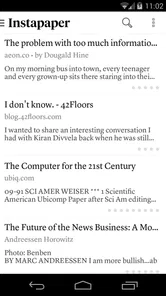
Imagine you're scrolling through your favorite news site or blog, and you stumble across an article you just have to read, but there's no time. That's where Instapaper steps in. This app allows you to save articles, videos, and other web content to read later, even offline. It's like a virtual "read it later" stack that you can access wherever you are.
Getting Started with Instapaper
Signing up is a breeze. You can use your email or log in with Facebook or Google. Once you're in, you can start saving content from any browser or device. The interface is sleek and intuitive, making it easy to navigate. Just install the browser extension or use the app's share function, and voilà, your reading list is ready to grow.
The practical trick is to treat saving and reading as separate steps. When an article catches my eye during a commute or between tasks, I send it to the list and keep moving; later, I open the app when I can give it proper attention. That makes the queue useful rather than a promise to read every interesting thing immediately. I also find it helps to be selective: saving only pieces I genuinely expect to finish keeps the list from becoming another source of clutter.
Use the reading view for the right kind of page
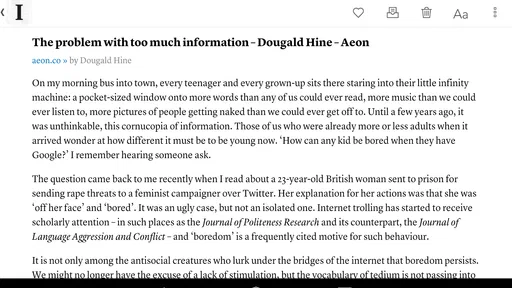
One of my favorite features is the text-to-speech option. When I'm on the go, I love having articles read out loud to me. It's like having a podcast, but with content I've specifically chosen. The app also offers a clean reading experience by stripping away ads and other distractions, leaving you with just the pure, unadulterated content.
More From Our News Desk

Weather by Xiaomi Review: Clear at a Glance, Less Clear Up Close

X Under Pressure: Can It Recover When Posting Goes Wrong?

Clash of Clans Is Won Between the Battles

Android Auto Makes the Case for Quieter Car Software

MobiOffice: Transforming Mobile Productivity with Seamless Integration

EA SPORTS FC™ Mobile Soccer: Redefining Mobile Sports Gaming
That simplified view is a real strength for ordinary article pages, but I would not assume every web page will become a perfect copy of its original. Stories that depend on interactive graphics, embedded elements, or a carefully designed layout can lose some of their context when presented as text. If the visual itself is the point, I keep the original page available rather than relying only on a pared-back reading view.
Text-to-speech is most helpful when my eyes and hands are occupied but my attention is still available, such as during a walk or a routine chore. It is less suitable for a piece that asks me to compare a chart, inspect a photograph, or pause over technical details. I treat listening as a convenient alternative for the right article, not a universal replacement for reading.
Keep highlights useful, not ceremonial
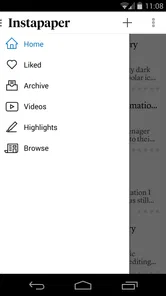
Another standout feature is the ability to highlight and comment on articles. It's perfect for those "aha!" moments you want to remember. Plus, you can organize your saved items with folders and tags, making it easier to find what you need later on.
A practical way to use those tools is to save a piece first and decide later whether it deserves annotation. If I am reading casually, I can leave it alone; if I spot a claim, idea, or passage I may need again, a highlight gives me a more direct route back to it. A brief comment can preserve why the passage mattered to me, which is often more useful than collecting highlighted text without any personal context.
Folders and tags are most valuable when they answer a question I will actually ask later. A small set of labels such as “work,” “ideas,” or “read soon” is easier to keep consistent than a detailed taxonomy that requires thought every time I save something. If I cannot remember where I would file an article, I keep the system simple and rely on the reading queue rather than turning every save into an organizing task.
Settings and Habits That Make Reading Easier
Before building a large queue, I would check the reading and display options that suit your eyes and routine, then settle on a consistent way to file pieces you may need again. The useful payoff is not a complicated system; it is being able to tell at a glance what is for casual reading and what deserves a note or highlight. If you save reporting for work or study, a small number of clear folders is easier to maintain than a maze of categories.
I would also make the reading setup a one-time adjustment rather than a repeated project. Try the available display choices with a few different kinds of articles: a short news story, a long feature, and something with more complex formatting. That gives you a better sense of when the clean view is comfortable and when the original page is worth keeping in mind. The goal is to remove friction, not to spend more time tuning the app than reading.
A realistic routine might look like this: I spot a long feature while checking the news in a lunch break, save it instead of opening another tab, and read it on the way home. If an important detail stands out, I highlight it and add a comment while the point is fresh. Later, that saved note can help me locate the passage without rereading the whole piece. For audio, I’d reserve text-to-speech for walks or chores, where listening is convenient; dense articles with charts, quotations, or complex formatting are usually better read on screen.
Make the handoff from browsing repeatable
The share function is the key handoff in this workflow: it lets me move from discovering a page to saving it without first opening a new app and rebuilding the context. A useful habit is to save the article at the moment I decide not to read it, then close the original tab. If I leave both the tab and the saved item in place, I have duplicated the clutter instead of solving it.
For a busy day, I might save one thoughtful article from a morning newsletter, skip opening it between meetings, and read it later when I can focus. That small separation protects the time-sensitive task in front of me while keeping the article from disappearing into browser history. At the end of the day, I can make a quick choice: read it, keep it for a clear reason, or remove it. This is more sustainable than assuming I will eventually finish every item I save.
For people who read on more than one device, the useful question is whether their normal sharing route is comfortable on each one. The app’s purpose is straightforward, but a smooth routine depends on being able to send a page from wherever it catches your attention. I would test that handoff early, before moving a large reading habit into the service, and use the app’s share option or browser extension where it fits the device and browser I already use.
Where It Fits—and Where It Doesn't
Compared with bookmarking a page in a browser, Instapaper is more focused on returning to the article itself in a calmer reading view. A general notes app may be better if your main goal is to collect research alongside documents and project notes, while a news app is better for discovering stories and following publishers. Instapaper makes the most sense when you already find things to read and need a dependable place to put them.
That difference is worth keeping clear: this is a place to manage your own reading, not a personalized news feed that solves discovery for you. A browser bookmark is often enough when I only need to revisit a page in its original form or keep a site for reference. A notes app has the advantage when I want to connect articles with meeting notes, documents, and a larger research project. Instapaper is the more focused choice when the important action is simply “save this story so I can read it properly.”
There are trade-offs. A cleaned-up article view can be easier on the eyes, but pages that rely on interactive elements, unusual layouts, or visual context may not translate as well as the original website. Saving is also only half the job: if you never revisit the queue, it can grow into a backlog. I recommend a quick weekly pass to read, organize, or remove items that no longer matter. If you need a full research archive or prefer to browse news inside one publication’s own app, another tool may suit you better.
I would also skip it if what I want most is instant news discovery, alerts, or a shared workspace. A focused personal reading list cannot replace those different jobs, and trying to make it do so would add unnecessary steps. It is also not an ideal home for material whose value depends on the complete original webpage. For those cases, I would keep a browser bookmark, use the publisher’s own experience, or choose a research tool designed around connected notes.
Who gets the most from a quiet reading shelf
If you're someone who loves to consume content but often finds yourself short on time, Instapaper is a game-changer. It's like having a personal assistant dedicated to curating your reading list. Whether you're on a long flight or just lounging at home, you'll have a treasure trove of articles at your fingertips.
I think it is a particularly good fit for readers who already have sources they trust and want to take stories away from the noise of their browser. It can also suit students or professionals who need to return to selected articles and mark particular passages, provided they do not expect it to behave like a complete reference manager. The distinction is practical: it helps with reading and revisiting, while a larger research project may need a separate system for citations, files, and connected notes.
It is aimed at a general audience, and the app’s Everyone age rating makes it suitable for a broad range of readers. The service dates back to June 3, 2012, and its continued presence in the news and magazines space reflects the appeal of a focused read-later tool. Still, I would not choose it for someone who wants a social feed, live news alerts, or a replacement for a comprehensive note-taking system. Its strength is keeping a personal reading queue manageable, not doing every kind of information work.
There is no need to turn the list into a second job. If all I want is to save a few long reads and return to them on a quiet evening, I can leave most items untagged and use highlights only when I have a reason. If I am gathering material for a project, I can be more selective and put only reusable articles into a clearly named folder. The right level of organization depends on how I plan to find the piece again, not on how many labels the app can hold.
Because the app is free to install but offers in-app purchases, I would begin with the basic reading routine and decide whether any optional purchase is worthwhile for my own needs. The listed purchase range is $1.00 to $59.99 per item, so those options should be considered individually rather than assumed to be part of a required subscription or a fixed plan. For someone who only wants to save and read articles, the sensible first step is to try the core workflow before spending money.
A recommendation with a clear boundary
Overall, Instapaper is a must-have app for anyone looking to streamline their information intake. It's not just about saving articles; it's about enhancing the way you interact with content. So next time you're overwhelmed with too much to read and not enough time, give Instapaper a try. You won't be disappointed!
My advice is to start with one repeatable pattern: save from the share menu when you cannot read, then set aside a regular moment to work through the list. Add highlights or comments only when you want to preserve a specific thought, rather than turning every article into a project. That modest routine is where the app feels most useful to me. If you want a quiet reading shelf for web stories and are willing to return to it, it is an easy app to recommend; if discovery, collaboration, or a complete archive matters more, I’d look elsewhere.
Instapaper Frequently Asked Questions
Can Instapaper save articles from websites I find while browsing?
Yes. Instapaper is designed to save web pages for reading later, so you can keep useful articles in one place rather than trying to find them again in your browser history. Its clean, text-focused reading view helps make saved pages easier to revisit. It is a practical choice for collecting stories and other web content you want to read when you have more time.
What is Instapaper and how does it work?
Instapaper is a popular bookmarking app that allows users to save web articles, videos, and other content for offline reading anytime, anywhere. It's designed to simplify reading by providing a clean, text-focused interface without ads or distractions. You can highlight text, add notes, and organize saved items into folders, making it easy to manage your reading list efficiently.
Is Instapaper free to use?
Yes, Instapaper offers a free version with basic features such as unlimited article saving, offline reading, and text-to-speech. However, there is also a premium subscription available that unlocks additional features like full-text search, speed reading, and the ability to create unlimited notes. This subscription helps enhance the overall user experience.
Can I use Instapaper across different devices?
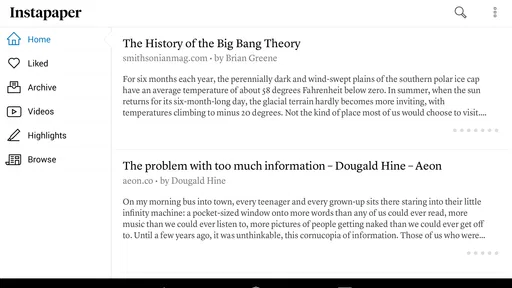
Absolutely! Instapaper syncs seamlessly across multiple devices, including smartphones, tablets, and desktop computers. Whether you’re using an Android device, iPhone, iPad, or a web browser, you can access your saved articles and continue reading from where you left off. This cross-platform compatibility makes it a flexible tool for avid readers.
How does Instapaper enhance the reading experience?
Instapaper enhances the reading experience by stripping away unnecessary clutter from web pages, presenting only the essential text and images in a clean, easy-to-read format. It offers customization options such as text size, font style, and background color adjustments. Additionally, features like highlighting, note-taking, and speed reading are available to personalize and improve your reading sessions.
Pros
- Easy-to-use interface for saving articles
- Offline reading capability
- Syncs across multiple devices
- Supports highlighting and commenting
- Integrates with other apps
Cons
- Limited free account features
- Occasional sync issues
- No built-in text-to-speech
- Ads in free version
- No advanced search options











