Inoreader: News & RSS reader
- 921.00
- 2.9
- Installs
- 500.00K
- Price
- Free

Screenshots
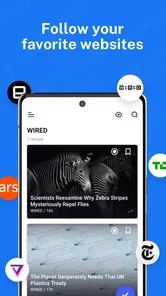
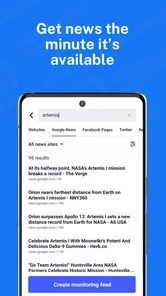
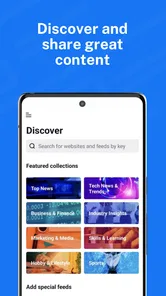
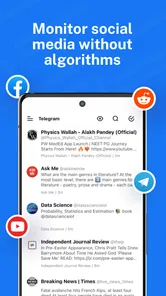


Analysis by Reviewed
Ever found yourself swamped with numerous articles and news updates, not knowing how to keep up? Well, that's where Inoreader: News & RSS Reader steps in to save the day. As someone who's always on the lookout for the latest buzz in tech, lifestyle, and world events, I decided to give this app a spin. Spoiler alert: it didn't disappoint!
How I Set Up a More Manageable Reading Routine
What makes this kind of reader useful is not simply having more headlines in one place; it is being able to make a routine that fits the time I actually have. I would begin with a short list of publications I already trust, then group them by the reason I read them: quick updates, deeper analysis, or something I want to browse only when I have spare time. That approach gives the app a clear job from the start, instead of turning it into another endless feed.
One small but useful habit is to treat saving and organizing as separate decisions. If I save every interesting article, the saved list can become a second backlog. I prefer to save something only when I have a real plan to read it later, and use categories or tags to make that later visit easier. This makes a difference for people who read in short bursts, because they can return to a few deliberate choices instead of facing a pile of loosely remembered links.
Speed Expectations Without Chasing Every Headline
Inoreader is a free news and magazine app from Innologica, and its central appeal is bringing RSS reading into one place. I find that its speed depends partly on how much I ask it to do: opening a short, focused feed is a different experience from sorting through a large collection of sources. Rather than treating a long feed as a problem with the app, I recommend checking a few chosen folders first and leaving broader browsing for when you have time.
A realistic routine is to scan a handful of technology sources over breakfast, save the pieces that need proper attention, and return to them during a commute or a quiet break. That separation makes the app more useful than a stream of headlines that keeps pulling me away from what I meant to read. Saved items are especially handy when I find a good article at the wrong moment; offline reading can help when I later have no connection, though it is sensible to save what I want before going offline.
Getting Started with Inoreader
First things first, installing Inoreader is a breeze. Available on both Android and iOS, it's just a quick download away from becoming your go-to news hub. Once you've got it on your device, the app greets you with a clean and intuitive interface. I must say, the layout is pretty straightforward, making navigation a walk in the park even for first-timers.
When the App Gets Busy
The more sources and interests I try to follow, the more valuable organization becomes. Categories and tags are not just tidying tools: they let me divide quick daily news from topics I only want to explore occasionally. A useful habit is to make a small, high-priority reading route instead of starting each session with every feed. It reduces the feeling of backlog and makes search more purposeful when I remember a subject but not the article’s source.
More From Our News Desk

Weather by Xiaomi Review: Clear at a Glance, Less Clear Up Close

X Under Pressure: Can It Recover When Posting Goes Wrong?

Clash of Clans Is Won Between the Battles

Android Auto Makes the Case for Quieter Car Software

MobiOffice: Transforming Mobile Productivity with Seamless Integration

EA SPORTS FC™ Mobile Soccer: Redefining Mobile Sports Gaming
Compared with reading each publication in its own app or relying on a general news feed, an RSS reader gives me more control over which sources shape the day. The trade-off is that I have to choose and arrange those sources myself. Readers who enjoy a ready-made mix of headlines may prefer a conventional news app; people who already know the sites they trust are more likely to appreciate Inoreader’s customizable approach.
Making the Reading Experience Work for You
For a student or someone following a changing subject at work, the value is less about reading everything and more about being able to revisit the right material. I might keep regular reporting separate from specialist commentary, then use a tag for a project that draws on both. That gives me a practical way to collect background reading without losing the distinction between a source I check every day and one I consult for a particular question.
There is also a useful trade-off between breadth and attention. Adding sources can expose me to a wider range of perspectives, but it also makes each visit more demanding. I would rather subscribe to a few publications with different strengths than add many sites that repeat the same stories. If a feed is consistently noisy, removing or reorganizing it is often more helpful than trying to read faster.
Features that Catch the Eye
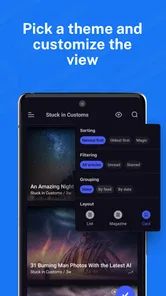
Now, let's dive into what makes this app tick. The customization options are honestly where Inoreader shines. You can tailor your feed to your heart's content, ensuring you get the news that truly matters to you. From tech blogs to cooking tips, everything is just a tap away. And for the organizational geeks out there, the app lets you categorize your feeds, making everything neat and tidy.
Another cool thing I noticed is the ability to save articles for later. It's perfect for those moments when you stumble upon an intriguing piece but don't have the time to read it right away. Plus, with its offline mode, you can catch up on your saved articles without needing an internet connection. How nifty is that?
Reliability and Device Fit
For everyday use, I would judge reliability by whether I can return to my reading routine without having to rebuild it each time. Keeping feeds organized and saving articles as I go gives me a practical fallback when a busy day interrupts a session. I would still avoid assuming that offline reading replaces every part of online browsing: it is most useful as a way to revisit saved material, not as a reason to postpone preparing for a disconnected stretch.
The app is rated for Everyone and requires Android 6.0 or later. That makes the stated Android requirement clear, but I would still consider how comfortable it is to read on my particular device and how much content I plan to keep in my routine. A smaller screen can make a crowded feed feel busier, so I would start with a few sources and add more only when the organization feels manageable. The current version is 7.9.6; as with any app, a version number alone cannot promise that every device will feel equally responsive.
For a long reading session, I would also think about the conditions around the app rather than assume that every sluggish moment has one cause. A large queue of unread articles, a weak connection, and a small display can each make catching up feel harder. Keeping the routine focused and saving selected stories before travel are practical ways to reduce friction; they do not require me to turn every spare minute into a reading session.
Why Inoreader Stands Out
Alright, let's talk about what really sets this app apart from the rest. The keyword here is integration. Inoreader doesn't just limit you to reading; it also allows you to connect with other platforms. You can sync it with services like Pocket, Evernote, and even social media accounts. This means sharing your favorite articles or saving them for future reference is as easy as pie.
Moreover, the app's search capabilities are top-notch. Whether you're looking for a specific article or just exploring topics, its powerful search function is bound to impress. And if you're like me and enjoy staying organized, you'll appreciate the tag system that helps you keep track of your interests.
Search is most useful when I have a question in mind, rather than when I am simply trying to clear every unread marker. If I remember a topic but not which publication covered it, searching across a thoughtfully maintained reading collection can be more direct than reopening several separate apps. Tags can add another layer: I can mark material for a particular project or theme without moving it away from the source category that helps me understand where it came from.
Who It Suits, and What to Consider
I would recommend this approach to readers who have specific publications they want to follow, people who like sorting articles by subject, and anyone who regularly finds interesting reading at inconvenient times. It is less compelling if you want an editor-curated selection with almost no setup, or if you prefer to get all your news from one publication’s own app. Inoreader’s freedom comes with a small responsibility: feeds, categories, and tags work best when I keep them intentional rather than adding every source I encounter.
The app has an average rating of 2.9 from around 9,500 ratings, with roughly 919 written reviews, so the overall response is mixed rather than universally enthusiastic. It has been installed over 500,000 times and is free to download, with in-app purchases ranging from $8.99 to $89.99 per item. I would try the free experience with a modest set of sources first and decide whether its workflow fits before considering any purchase.
That cautious start also answers a practical question: do I need to organize everything before I can get value from it? I would not. A few sources and a simple division between routine reading and saved-for-later stories are enough to test whether RSS suits me. If I find myself wanting more control, I can build on that foundation; if I keep wishing an editor would choose the day’s stories for me, a conventional news app may be a better match.
Families should also note the Everyone content rating, while anyone choosing a device should distinguish the listed Android requirement from the experience on a specific handset. The stated minimum is Android 6.0, but reading comfort depends on more than compatibility: screen size, how densely I fill my feeds, and whether I prefer short scans or long sessions all matter. I would keep a smaller collection on a device where a crowded list is tiring to browse.
Final Thoughts
Rounding up my experience with Inoreader, I can confidently say it's a keeper. It's not just an app; it's a comprehensive tool for anyone who loves to stay informed without the hassle. Whether you're a news junkie or someone who just likes a daily dose of updates, Inoreader has got you covered.
In conclusion, if you're on the hunt for a reliable and feature-rich RSS reader, give Inoreader: News & RSS Reader a try. It's a seamless blend of functionality and ease-of-use that truly enhances your news reading experience. And hey, who doesn't love an app that makes life just a little bit easier?
My Performance Verdict
I see this as a reader whose pace is shaped as much by my choices as by the app itself. A deliberately small reading route makes quick check-ins feel practical, while an expansive collection asks for more sorting and attention. I would not install it expecting an automatic editor to keep a perfect shortlist waiting; I would choose it because I want to decide which sources deserve space in my day.
For a commuter, a curious reader, or someone tracking several subjects, that control can be worth the setup. For a person who only wants a brief selection of major headlines with no feed maintenance, the usual news aggregator is likely simpler. My advice is to start with a few trusted sources, save only stories I truly intend to revisit, and expand gradually. That is the point where Inoreader feels like a useful reading tool rather than another place to manage an ever-growing queue.
Inoreader: News & RSS reader Frequently Asked Questions
Is Inoreader suitable for someone who wants to build a personalized newsfeed?
Yes. Inoreader is designed for readers who want to build their own newsfeed by bringing together websites, blogs, and news outlets they choose to follow. Instead of checking each source separately, you can manage subscriptions in one place and browse their updates through a centralized feed. Its News & RSS reader format makes it a flexible option for keeping up with topics that interest you.
What is Inoreader and how does it work?
Inoreader is a comprehensive news and RSS reader that allows users to follow their favorite websites, blogs, and news outlets all in one place. By aggregating content from various sources, Inoreader provides a centralized feed where users can easily manage and read their subscriptions. Its powerful search and filter functions help users find relevant content quickly, making it an essential tool for news enthusiasts and information seekers.
Is Inoreader free to use, or are there any subscription plans?
Inoreader offers a free version with essential features, suitable for most casual users. However, for those seeking enhanced functionalities, there are several subscription plans available. These premium plans unlock additional features such as offline mode, advanced filtering, and integration with third-party services. Subscriptions are available on a monthly or annual basis, providing flexibility depending on user needs. In-app purchases range from $8.99 to $89.99 per item, so check the available options in the app before choosing one.
Can I use Inoreader offline?
Yes, Inoreader offers an offline mode, but it is available only for premium subscribers. This feature allows users to download articles and access their feeds without an internet connection. Offline access is particularly useful for users who travel frequently or have limited connectivity, ensuring they can stay updated with their selected content anytime, anywhere.
How does Inoreader handle content organization and filtering?
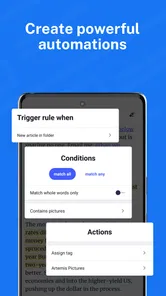
Inoreader excels in content organization and filtering by providing users with tools to categorize their subscriptions into folders and tags. The platform also allows users to set up rules to automatically filter and prioritize content based on specific keywords or topics. This enables a highly personalized reading experience, ensuring users can focus on the information that matters most to them.
Pros
- Highly customizable user interface.
- Supports a wide variety of feeds.
- Offers offline reading mode.
- Integrates with other apps effortlessly.
- Fast and responsive performance.
Cons
- Premium features require subscription.
- Initial setup can be confusing.
- Limited free version functionality.
- Occasional sync issues reported.
- Ads present in free version.











