InnoCaption Live Call Captions
- 1.68K
- 4.2
- Installs
- 500.00K
- Price
- Free

Screenshots

Analysis by Reviewed
When I use a captioning app for a phone call, the first question isn’t whether every word will appear perfectly. It’s whether the text helps me stay involved, follow the conversation, and catch details I might otherwise miss. That is the practical promise of InnoCaption: it brings live captions to phone calls, with a focus on accessibility for people who are deaf or hard of hearing and those affected by tinnitus. I find that focus useful, but it also means it is worth understanding where the app fits—and where it doesn’t—before relying on it for an important conversation.
Where Call Captioning Can Get Tricky
In my view, the most useful thing to understand is that captions support a phone conversation; they don’t remove every source of difficulty. A caller who speaks quickly, uses unfamiliar names, or is hard to hear can still make a transcript difficult to follow. When a caption looks wrong, I would treat it as a prompt to clarify a word rather than assume the app has captured it perfectly. Asking the other person to repeat a name or spell a detail is still a sensible part of the call.
This distinction matters most for details that have consequences, such as an appointment time or a number. I’d read those back to the caller before relying on them. Captions can help me stay oriented while listening, but they aren’t a substitute for confirming important information directly.
Seamless Setup and User-Friendly Interface
Setting up InnoCaption is a breeze. You download it from your app store, go through a straightforward registration process, and you’re good to go. The interface is clean and intuitive, which means you spend less time figuring out how it works and more time enjoying its benefits. You know that feeling when you open an app and it just makes sense? That’s what this app delivers. No unnecessary bells and whistles—just straight-up functionality.
Checks That Make a First Call Easier
Before depending on any call-captioning tool for something important, I’d try it with a familiar caller and give myself time to learn the flow. Make sure the phone is running an operating system the app supports: InnoCaption’s minimum requirement is Android 7.0. It is free, rated for Everyone, and developed by MEZMO Corporation. It has an average rating of 4.2 from around 5,400 ratings, with over 500,000 installs, but those figures don’t tell you whether your particular phone, call conditions, or reading preferences will suit it.
One practical tip is to reduce competing noise where you can and ask the person on the other end to speak clearly, especially when sharing names or figures. This is not a special setting; it is a simple way to give live transcription a better chance. If the text is hard to follow, I’d pause the conversation and confirm the key point rather than trying to catch up while the caller moves on.
How It Works: Real-Time Captions
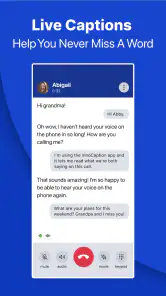
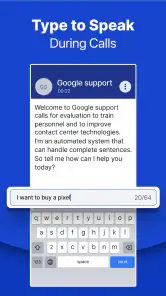
The magic of InnoCaption lies in its real-time captioning feature. As the person on the other end starts talking, the app transcribes their words instantly and displays them on your screen. It’s like having a live transcriptionist right in your pocket. The captions are accurate, and there’s almost no lag, which is crucial when you’re trying to keep up with a fast-paced conversation.
You May Like

Clash of Clans Is Won Between the Battles

Android Auto Makes the Case for Quieter Car Software

MobiOffice: Transforming Mobile Productivity with Seamless Integration

EA SPORTS FC™ Mobile Soccer: Redefining Mobile Sports Gaming

How Microsoft OneDrive Became a Mobile Productivity Giant

How Google Translate Breaks Language Barriers Effortlessly
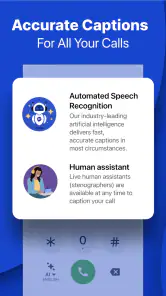
What’s more, the app offers the option to choose between live stenographers or automated speech recognition for your captions. This flexibility means you can tailor your experience based on your preferences or the nature of your calls. Whether it's a quick chat with a friend or an important business call, InnoCaption has got you covered.
Recovering When a Call Goes Off Track
If captions seem to stop helping, I’d first separate a transcription problem from a call problem. Check whether the call itself is still connected and whether the other person can hear you. If the conversation is continuing but the text is confusing, ask for a slower repeat of the last key phrase and confirm what you understood. If the call has dropped, reconnecting is the first priority; captions can’t restore a connection that has ended.
For a longer conversation, I’d avoid waiting until the end to check a detail that matters. A quick spoken confirmation at the moment a date, name, or instruction comes up is easier than trying to reconstruct it later. Choosing between the stenographer and automated recognition options can also be a practical personal preference, but I wouldn’t assume one is always better: the type of caller and the situation can affect which feels easier to follow.
Designed with Accessibility in Mind
One of the standout features of InnoCaption is its commitment to accessibility. It’s designed specifically for individuals who are deaf or hard of hearing, but it’s also incredibly useful for non-native speakers or anyone who just prefers to read along. The app is a testament to how technology can bridge gaps and make communication more inclusive. I mean, why should anyone miss out on a conversation just because they can’t hear clearly?
Another cool aspect is that the app is free for eligible users in the U.S., thanks to funding from the FCC. This makes it even more accessible to those who need it most, without the burden of additional costs.
Making the Caption Choice Work for You
The choice between live stenographers and automated speech recognition is more than a technical detail: it gives you two approaches to try against your own habits. If you find it easier to read a steady stream of text, one option may feel more comfortable; if you prefer another style, the alternative is worth testing. I wouldn’t make that choice based on a single difficult call. Try each during ordinary conversations, then judge by whether you can follow the speaker and respond naturally.
A useful way to evaluate the experience is to notice what causes you to lose your place. Is it unfamiliar vocabulary, a fast speaker, or the effort of switching between reading and talking? That distinction can guide your next step. You might ask a caller to pause after giving a key detail, or choose a quieter moment for a sensitive conversation. The app can provide text, but a small adjustment to the rhythm of the call can make that text much easier to use.
When the App Isn’t the Cause
Not every frustrating call points to a captioning failure. A weak or interrupted phone connection, background noise, or an unclear speaker can make a conversation difficult before the words ever appear on screen. If the call audio itself is breaking up, I’d focus on the connection and try again when it is clearer. If only a particular word is uncertain, I’d ask the caller to repeat or spell it. These small checks help avoid blaming the app for a problem that may be happening elsewhere.
InnoCaption is a communication app rather than a general-purpose transcription service. That makes it a better fit for people who want captions while handling phone calls than for someone looking to transcribe an in-person meeting or create written notes from unrelated audio. Compared with relying only on hearing, it gives you text to follow during a call; compared with asking someone else to interpret every conversation, it can offer a more direct way to keep up. But anyone who needs a verbatim record should not treat live captions as a guaranteed transcript.
A Realistic Routine for Important Calls
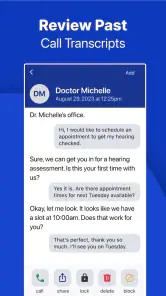
For a call to a clinic, I’d have the reason for calling and any details I need to confirm in mind before dialing. During the conversation, I’d use the captions to follow the exchange, then pause when the caller gives an appointment date, location, or instruction. I’d repeat that information back and ask for clarification if the text and what I understood don’t match. That routine is useful because it treats the captions as a real-time aid, not as a record to trust later.
The same approach can help with a service provider or a family member sharing plans. If a call is lengthy, I’d check my understanding at natural pauses instead of trying to read every line while the speaker continues. That may feel slower, but it reduces the chance of missing the one detail that matters. For a quick, low-stakes chat, I’d be more relaxed and use the captions simply to stay with the conversation.
Who Will Get the Most from It?
I’d recommend trying it if hearing phone conversations is difficult and you want a way to read along while speaking with family, a clinic, or a service provider. A realistic use might be calling to confirm an appointment: follow the conversation on screen, then repeat the date and time aloud before ending the call. That workflow uses captions as support while keeping the important confirmation between you and the person you called.
It may be less suitable if you rarely make phone calls, need captions for face-to-face conversations, or expect every word to be flawless without checking. People who prefer to communicate by text may find messaging more convenient for routine exchanges. InnoCaption’s current version is 4.2.12, and I would still check that the app works comfortably on your own device before depending on it for an important call.
Questions Worth Settling Before You Rely on It
If you’re wondering whether it replaces ordinary calling, I’d think of it as a captioned way to handle phone conversations, not as a reason to abandon messaging or other communication methods. For a quick exchange where written communication is easier, a text may still be the simplest choice. For a conversation that needs back-and-forth discussion, live captions can help you take part while speaking directly with the other person.
If you’re unsure whether your phone is compatible, the practical check is to compare its operating system with the Android 7.0 minimum and then try the app on your own device. The listed current version is 4.2.12. A trial call with someone patient is more useful than assuming the experience will be identical across phones and callers. That gives you a chance to learn how the captions appear and how quickly you can read them without pressure.
People also ask whether they can treat the captions as a perfect written record. I would not. Names, numbers, and fast or unclear speech deserve confirmation, and a live conversation is not the right place to assume every line is exact. If an accurate record is essential, use a method intended for that purpose and confirm any critical information with the person speaking.
Final Thoughts: A Must-Have App
In a world where communication is key, having a tool like InnoCaption can make all the difference. It’s reliable, efficient, and most importantly, it empowers users to engage in conversations with confidence. Whether you’re catching up with family or handling business calls, this app is a fantastic companion that ensures you’re always in the loop. So why not give it a try? You might just find it’s the app you never knew you needed.
My practical verdict is more measured: its purpose is clear, and the choice between human stenographers and automated recognition gives users a useful way to approach live captions. I’d start with an ordinary call, learn how the text fits my pace, and keep confirming important details out loud. For someone who needs accessible phone conversations, that is a worthwhile tool to try; for other kinds of transcription or for guaranteed word-for-word records, a different approach may be a better match.
My Practical Recommendation
MEZMO Corporation’s communication app has an average rating of 4.2 from around 5,400 ratings and more than 1,700 written reviews, and it has passed 500,000 installs. Those figures suggest that many people have found a reason to try it, but they can’t tell you whether the caption style will suit your reading pace or whether it matches the calls you make. I’d treat them as context, then make the decision based on a calm test call and your own comfort.
The app is free and its content rating is Everyone, which makes the initial decision to try it straightforward. Its release date is June 20, 2018, and the current version is 4.2.12. I would still keep the main question personal: does having text alongside the call help you respond with less strain? If yes, it may be a valuable part of how you manage phone conversations. If the calls you need are mostly face-to-face, or you need a guaranteed transcript, a different tool or communication method is likely a better fit.
InnoCaption Live Call Captions Frequently Asked Questions
Who is InnoCaption intended for?
InnoCaption is intended for people who are deaf, hard of hearing, or experience tinnitus and want captions while making phone calls. It is a communication app focused on accessibility, rather than a general-purpose transcription tool. Before downloading, consider whether live call captions fit the way you communicate and whether you are comfortable using an app as part of your calling routine.
What is InnoCaption and how does it work?
InnoCaption is an app designed to provide real-time captions for phone calls, helping individuals with hearing impairments communicate more effectively. It works by using a combination of automatic speech recognition (ASR) and live stenographers to deliver fast and accurate captions. Users simply need to download the app and register to start receiving captions during their calls.
Is InnoCaption free to use?
Yes, InnoCaption is free for users who are hard of hearing or deaf. The app is funded by the Federal Communications Commission (FCC) and is available at no cost to eligible users. However, users must register and verify their hearing impairment status to access the service free of charge.
What devices are compatible with InnoCaption?
InnoCaption is compatible with most iOS and Android devices. Users can download the app from the Apple App Store or Google Play Store. It requires a stable internet connection to function properly, whether through Wi-Fi or cellular data. Check the app's specifications for any additional device requirements before downloading. On Android, the listed minimum operating system requirement is version 7.0, so check your device's software version before installing.
How accurate are the captions provided by InnoCaption?
The captions provided by InnoCaption are highly accurate, thanks to its use of both automatic speech recognition and live stenographers. While ASR offers quick transcription, live stenographers ensure accuracy and context understanding. However, the accuracy may vary depending on factors such as call quality and clarity of speech, but it generally maintains a high standard.
Pros
- Accurate real-time captions
- User-friendly interface
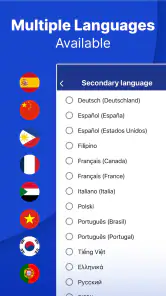
- Supports multiple languages
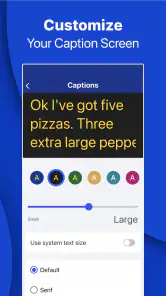
- Customizable caption appearance
- Free for eligible users
Cons
- Requires stable internet
- Limited to specific devices
- Occasional lag in captions
- No offline mode
- Ads in the free version

- Category
- Communication
- Version
- 4.2.12











