InmateSales
- 501.00
- 3.8
- Installs
- 500.00K
- Price
- Free

Screenshots
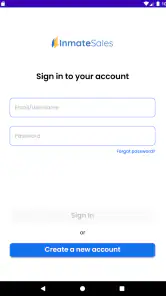
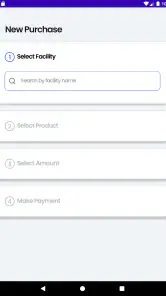
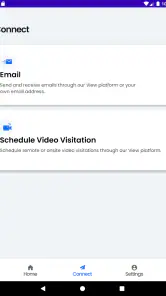
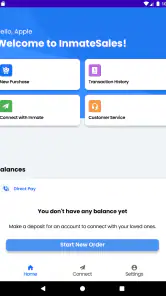
Analysis by Reviewed
InmateSales is a focused communication app from Combined Public Communication LLC for people who need to manage an InmateSales account and make deposits connected with certain correctional facilities. I found its purpose refreshingly narrow: it is not trying to become a general messaging platform, a social network, or a digital wallet for every situation. It is built around a specific administrative task, and that focus is both its main strength and the reason many people will never need it.
My overall view is that InmateSales is most useful when convenience matters during a stressful, time-sensitive account task. If you already use the service supported by your facility, having a mobile way to reach your account can be more practical than relying on a desktop browser or searching for the correct payment page each time. At the same time, this is not an app I would recommend casually downloading without first knowing that your facility and account are compatible with it.
What the app is really for
The name can make the purpose sound broader than it is. In practice, this is a communication-category app centered on InmateSales account management and deposits at participating facilities. That distinction matters because it sets the right expectation: the app is not a universal way to contact every incarcerated person, and it is not a replacement for every service a facility may use.
I would think of it as a mobile access point for a particular service relationship. The important question before installing is not whether you need a communication app in general, but whether the correctional facility involved uses the InmateSales system for the kind of account activity you need to complete. If the answer is yes, the app has a clear job. If the answer is no, its usefulness drops immediately.
The app is free, carries an Everyone content rating, and works on devices running Android 8.0 or later. Those details make it approachable for a wide range of users, including people who may be using an older phone rather than a recent flagship. I also appreciate that the age rating does not make the app feel unnecessarily complicated or targeted at a narrow technical audience.
Its public reception is mixed but substantial enough to provide some context. InmateSales has an average rating of 3.8 from around 1.5 thousand ratings, with roughly 501 written reviews, and it has passed 500 thousand installs. I read those figures as evidence of a real user base rather than proof that every account experience will be smooth. Account and deposit apps are especially dependent on facility rules, account status, and transaction circumstances, so a middling rating can reflect more than the interface itself.
The practical workflow I would use
If I were helping a family member get started, I would begin by confirming the facility rather than installing first and hoping for the best. That small change in order can prevent a lot of frustration. Once compatibility is established, I would install the app, open the existing InmateSales account, and keep the relevant account details nearby. The goal would be to avoid treating the app like a discovery tool when it is really an access tool.
You May Like

Clash of Clans Is Won Between the Battles

Android Auto Makes the Case for Quieter Car Software

MobiOffice: Transforming Mobile Productivity with Seamless Integration

EA SPORTS FC™ Mobile Soccer: Redefining Mobile Sports Gaming

How Microsoft OneDrive Became a Mobile Productivity Giant

How Google Translate Breaks Language Barriers Effortlessly
For a routine deposit, I would prepare the recipient and facility information before opening the app. That makes the process easier to check as I move through it and reduces the chance of selecting the wrong person in a household where several relatives may be involved. I would also review the final details carefully before confirming anything. In a financial workflow, a few seconds of checking is more valuable than speed.
One useful habit is to separate account management from emotional urgency. A call from an incarcerated relative may create pressure to complete a deposit immediately, but rushing can lead to mistakes in names, facilities, or account destinations. The app may make access faster, yet it cannot remove the need to verify what is on screen. I consider that an important trade-off: convenience helps most when it supports a careful routine rather than replacing one.
Another practical tip is to treat the app as one part of the process, not as a guarantee that a deposit or account action will resolve every issue. If something looks wrong, I would capture the relevant wording or note the time and details before trying repeated actions. Repeating a transaction without understanding the status can create unnecessary confusion. That is not a special feature of InmateSales; it is simply sensible behavior whenever an app handles account activity.
Where the focused design works well
The strongest part of InmateSales is its narrow purpose. A general payment app would not know which facility-related workflow I was trying to complete, while a normal messaging app would not be designed around account deposits. By putting the InmateSales service in a mobile format, the app can be more relevant to its intended users than a collection of unrelated tools.
I can see the value most clearly in an everyday situation where a family member is away from a computer. Imagine someone commuting home after work and receiving a message that funds are needed for an account connected with a facility. If the facility supports the service, opening a dedicated app is more direct than remembering a web address, navigating a general browser, and trying to locate the correct account area on a small screen. That is a modest convenience, but for recurring responsibilities, modest conveniences add up.
The mobile format also suits people who manage these tasks from different places. A person may not have a personal computer, may share one with other family members, or may simply prefer handling account responsibilities from a phone. Since the app supports Android 8.0 and above, its compatibility reaches beyond only the newest devices. That can matter when replacing a phone is not a priority.
I also like that the app’s purpose is easy to explain to another person. If a relative asks which tool to use, I can describe it as the app for managing the InmateSales account and making supported facility deposits. That is clearer than directing them toward a broad payment platform and asking them to find the right service inside it.
The limitation that matters most
The biggest weakness is not necessarily a missing button or an awkward screen. It is the dependency on facility participation and service compatibility. The app’s usefulness is conditional from the start. A person can install it for free, but that does not mean it will be relevant to the specific facility or account they need to manage.
This makes InmateSales less flexible than general alternatives. A browser-based account page may be preferable if the service is easier to access through a facility’s official website or if the user needs to move between several related services. A general payment method may be better for ordinary transfers that have nothing to do with InmateSales. The dedicated app wins when the supported workflow is the one you need; it loses when your situation falls outside that workflow.
I would also avoid assuming that the app can answer every question about facility procedures. Correctional facilities can have their own rules and processes, and an account-management app should not be treated as a substitute for checking those requirements. If a deposit is delayed, restricted, or associated with the wrong account, the problem may involve the facility or the account setup rather than the app’s interface.
That distinction is important when judging the rating. An average of about 3.8 suggests a service that works well enough for many people but leaves room for frustration. I would not interpret it as a reason to avoid the app automatically. I would interpret it as a reminder to keep expectations realistic: the app can provide access to a service, but it cannot control every part of the service environment around it.
Small decisions that make the experience easier
My first recommendation is to confirm the recipient and facility before beginning a deposit. This sounds obvious, but it is the kind of step people skip when they are responding to an urgent request. If more than one person in your family uses related services, pause at the selection stage and check the details rather than relying on a familiar name alone.
Second, I would keep the login and account information organized in a secure way. The app is intended for account management, so repeatedly guessing credentials or creating duplicate accounts can make a simple task harder. If another trusted family member needs to help, agree on who is responsible for checking the account and who is responsible for the deposit. Clear ownership reduces accidental repetition.
Third, I would use the mobile app for recurring access only after the first successful session has established that it fits my facility and account. The first session is the right time to learn the layout, verify the account identity, and understand the sequence of actions. Later sessions can then be quicker without becoming careless.
Fourth, I would compare the app’s convenience with the browser experience instead of assuming the dedicated app is automatically better. Some users prefer an app because it is always visible on the phone. Others prefer a browser because they do not want another account-related application installed. If the browser route is clearer for a particular user, there is no reason to force a mobile app into the routine.
Finally, I would update the app when a new version is available through the normal app-store process. The current version is 1.10.1-b605150303, and keeping software current is a sensible way to avoid using an outdated build. I would still review the screen carefully after an update, especially before making a deposit, because familiar workflows can change subtly over time.
Who should use it, and who should skip it
InmateSales is a good fit for relatives, friends, or account holders who already know that their facility uses the service and who want a direct mobile route for account management or supported deposits. It is particularly suitable for people who handle these responsibilities regularly, rely on an Android phone, and value having a dedicated place for this task.
It may also help someone who is not especially comfortable with technology. The app’s purpose is narrower than a full financial platform, so there are fewer unrelated areas to navigate. That does not make every step effortless, but it gives the user a clearer starting point. I would still recommend that a first-time user proceed slowly and verify the account destination before confirming anything.
I would skip it if I were looking for general person-to-person payments, ordinary messaging, or a universal correctional communication directory. Those needs call for different tools. I would also skip it until checking facility compatibility if I had only heard the name from another person without knowing whether it applies to my situation.
For iPhone users, the key decision is the same: does the relevant facility and account use InmateSales? The verified product details identify it as an app for this service, but the practical value comes from that connection, not from the phone brand. I would choose it because it matches the supported workflow, not simply because it is available as a mobile option.
How it compares with the usual alternatives
Compared with using a browser, the dedicated app has a more focused identity. It can be easier to return to when the task is repeated, and it avoids searching through bookmarks or browser history. The browser alternative may still be better for users who prefer not to install a separate app, who work across several services, or who want to handle account tasks on a larger screen.
Compared with a general payment app, InmateSales is more relevant to its intended transaction context but much less broadly useful. A regular payment service is the better choice for everyday transfers unrelated to a correctional-facility account. It should not be judged by the same standard because the two tools solve different problems.
Compared with contacting a facility directly, the app can be more convenient for routine account actions, while direct contact may be more appropriate for questions about facility-specific rules, eligibility, or an unusual account problem. I would not use the app as a replacement for official guidance when the issue goes beyond managing the supported account.
That comparison leads to my central judgment: InmateSales is not the best communication app in a broad, everyday sense, but that is not its purpose. Its success depends on whether it removes friction from one particular responsibility. For the right user, that specialization is valuable. For everyone else, it is simply unnecessary software.
My final recommendation
After looking at the app as a practical tool rather than a general-purpose platform, I would recommend InmateSales to anyone who already needs the service it supports. The free price and Everyone rating make trying it straightforward, and the Android 8.0 minimum keeps it accessible on older compatible phones. Its reach, with over 500 thousand installs, also shows that it serves a sizeable audience.
My recommendation comes with one condition: verify the facility and account context first. That single check determines whether the app will be useful or whether a browser, direct facility contact, or another payment method will make more sense. I would not install it just because the name sounds relevant to inmate communication.
The app’s strongest quality is practical focus. It gives the intended user a dedicated route to manage an InmateSales account and make deposits at supported facilities. Its main weakness is equally clear: the experience depends on circumstances outside the app, and the app cannot turn an unsupported facility or unclear account situation into a supported one.
In short, I see InmateSales as a worthwhile utility for a specific audience, not a universal recommendation. If this is the service your facility uses, it is worth testing as a regular mobile tool and using carefully for repeat account tasks. If your needs are broader, or if your facility does not rely on this service, I would choose a more appropriate alternative rather than expecting this focused app to do a job it was not designed to handle.
InmateSales Frequently Asked Questions
What devices and operating systems can run InmateSales?
InmateSales is an app for managing an account and making deposits at certain facilities. Before downloading, check that your device meets the minimum operating-system requirement: Android 8.0 or later. The app is free, and its content rating is Everyone. Keeping your device’s software up to date can also help with compatibility and security when using account or payment features.
Who develops InmateSales, and what is its general user feedback like?
InmateSales is developed by Combined Public Communication LLC and is listed in the Communication category. Its average rating is 3.8, based on around 1,500 ratings, with 501 written reviews. Feedback can reflect different facilities, services, and individual experiences, so consider whether the app supports the institution you need before deciding whether it is the right option for you.
What is InmateSales and what can it be used for?
InmateSales is a communication and account-management service designed to help people stay in contact with incarcerated individuals. Depending on the facility and available services, users may be able to manage messaging, video visits, phone-related features, deposits, or other approved communication options. Availability can vary significantly by correctional institution, so you should confirm that the intended facility is supported before creating an account or making a payment.
Is InmateSales available for every correctional facility?
No. InmateSales services are generally connected to participating correctional facilities, and the features offered may differ from one location to another. Before downloading or registering, search for the relevant facility and review the services listed for it. Some institutions may support messaging or video visitation, while others may offer only selected account or payment functions. Facility rules ultimately determine what is available.
How much does InmateSales cost?
The application itself is free to download, but many communication services available through InmateSales can involve separate charges. Costs may include message fees, video visitation charges, deposits, service fees, taxes, or other facility-specific rates. Prices and refund policies can change, so review the total amount shown before confirming a transaction. Also remember that the incarcerated person’s facility may apply its own restrictions.
Pros
- Convenient way to schedule approved inmate phone calls and visits
- Supports account management directly from a mobile device
- Can reduce waiting time compared with handling requests in person
- Useful notifications help users keep track of scheduled activities
- Designed specifically for correctional facility communication needs
Cons
- Availability depends on whether the facility supports InmateSales
- Some features may require prior approval from facility staff
- Call and visit costs can vary and may become expensive
- App usefulness is limited outside participating correctional facilities
- Technical issues may disrupt time-sensitive calls or scheduling

- Category
- Communication
- Version
- 1.10.1-b605150303











