inCarDoc Pro | OBD2
- 314.00
- 4.3
- Installs
- 100.00K
- Price
- $4.99
Screenshots
Analysis by Reviewed
My first reaction to inCarDoc Pro | OBD2 is that it makes car diagnostics feel approachable: instead of treating a warning light as a mystery, I can use my phone to check what the car is reporting. The first-week appeal is strongest for curious drivers who enjoy learning about their vehicle, but I think its lasting value depends on whether you use the information to make better decisions rather than simply watching numbers move.
What makes the first week useful
For a new user, the most satisfying moment is reading a diagnostic trouble code and having a concrete starting point for a conversation with a mechanic. The app can also clear codes, but I would treat that as a reset, not a repair: if the underlying issue remains, the warning may return. That distinction matters because clearing a light can otherwise create false reassurance.
It needs an OBD2 adapter, so it is not a phone-only solution. Once connected, the app can show live readings such as speed, RPM and fuel consumption, along with trip logs. I would begin with a simple routine: take a short drive, look at a few readings afterward, and note anything that seems unusual. That is more useful than trying to monitor every value while driving.
Start with a question, not a screen full of readings
The easiest way to get value from an OBD2 tool is to decide what you want to learn before opening it. If a warning light has appeared, the relevant task is to read and save the code; if I am comparing fuel use, I would focus on trips taken under roughly similar conditions. Browsing every available reading without a reason can make the car seem more complicated than it is, and a number that looks unusual is not automatically evidence of a fault.
I would also make a small record outside the live display: the date, the code, any symptoms, and whether the warning returned. That gives a mechanic useful context and prevents me from relying on memory when the same issue comes back weeks later. It is a simple habit, but it turns a one-time scan into a timeline rather than a collection of disconnected results.
Getting Under the Hood with inCarDoc Pro
First things first, let’s talk about how the inCarDoc Pro | OBD2 works. The app connects to your car’s OBD2 (On-Board Diagnostics) system, which is like the brain of your vehicle. Once connected, the app can read all sorts of data from your car. It’s like having a mechanic riding shotgun with you, except way less chatty.
A Drive into Features
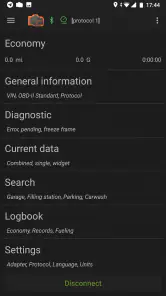
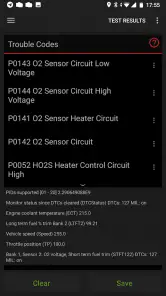
Now, let’s dive into the features. This app is packed with functionalities that are both impressive and super useful. It can read and clear diagnostic trouble codes (DTC), which means it can tell you if there’s anything wrong with your car and help you reset the check engine light. Handy, right?
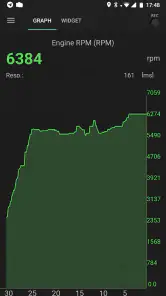
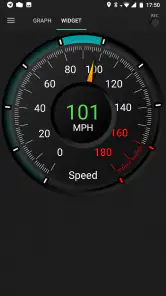
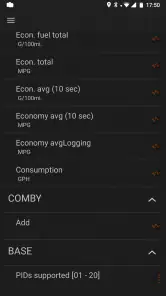
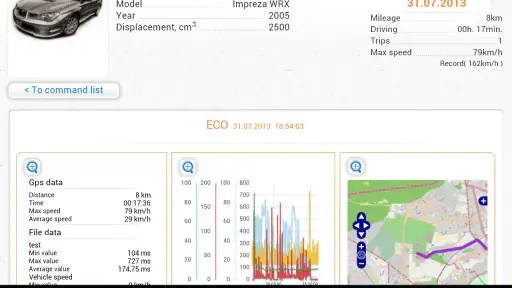
Not just that, but it also monitors real-time data like your car’s speed, RPM, and fuel consumption. Imagine having all that information right on your phone while you drive. It’s like being in a high-tech cockpit. And if you’re someone who loves stats, the app provides detailed trip logs that track your driving habits, so you can see how efficient you really are behind the wheel.
Using it month to month
In everyday use, I see the trip logs as more valuable when I compare patterns than when I inspect one journey in isolation. For example, if I am trying to understand why a commute seems less economical, I can look for changes across several trips rather than blame one slow or unusually busy drive. The app gives me a way to observe; it does not explain every cause, so I would pair the readings with basic maintenance records and what the car is doing.
A realistic use is a check-engine light appearing before a planned trip. I could read the code at home, record it, and decide whether to arrange a professional inspection before setting off. That is a better use than clearing the light immediately and assuming the car is fine. Compared with a basic code reader, the phone-based setup can put diagnostics and trip information together; compared with a mechanic’s scan and inspection, it remains a first look, not a substitute for diagnosis or repair.
When the readings help with a mechanic visit
If I were taking the car in, I would use the app to arrive with observations rather than a self-diagnosis. I would note when the warning first appeared, whether the engine felt different, and the code the car reported. That can make the conversation more focused, but the mechanic still needs to verify the cause. A code can point toward a system or condition without proving which component has failed, so I would resist ordering parts based on a quick search or a single scan.
This distinction is especially useful when the car seems to drive normally. A warning that comes and goes may still deserve attention, while a code on its own does not tell me how urgent the situation is. If the vehicle has serious symptoms, I would treat those symptoms as more important than a reassuring-looking screen and seek professional help rather than use the app to decide that driving is safe.
Setup, upkeep, and limits
The app is from PNN SOFT, and the paid Pro edition costs $4.99. It has been available since March 5, 2013, and version 7.8.9 supports Android 6.0 or later. Its Everyone age rating makes it broadly accessible, though the OBD2 terms and readings may still feel technical to a first-time user. I would check that an adapter is compatible with both my car and phone before buying one; the app itself cannot connect to the vehicle without that hardware.
Maintenance here is mostly a habit rather than a chore: reconnect when I want a reading, keep notes on recurring codes, and avoid treating a cleared warning as proof that a fault is gone. The friction is that the adapter has to be available and connected, and a stream of live data can become noise if I have no specific question. I would not choose this as my only option if I want a hands-off warning service, an expert repair diagnosis, or a tool that works without extra hardware.
The adapter is part of the decision
Before spending time configuring the app, I would check the adapter as carefully as the software. The phone and vehicle both need to work with the particular hardware, so buying an adapter on the assumption that every model behaves the same can lead to a frustrating first session. If I already have a compatible reader, the app is an easier proposition; if I do not, the overall cost and setup include that separate purchase as well as the app.
There is also a practical question of when to leave the adapter connected. I would use it when I need to scan or review data, then follow the adapter’s own guidance rather than assume it should remain plugged in indefinitely. The app is most convenient when the small piece of hardware is easy to find and the connection process is familiar. If I only reach for it once a year, remembering where the adapter is and how to reconnect can become the main maintenance burden.
User Experience
Let’s talk about the user experience. The app is pretty straightforward to use. Once you’ve got your OBD2 adapter, just plug it into your car, connect your phone, and you’re good to go. The interface is clean and intuitive, making it easy for anyone to navigate through the app without a hitch.
What I really appreciate is the app’s simplicity. Even if you’re not tech-savvy, you’ll find it easy to use. Plus, it supports multiple languages, which is a big plus for those who prefer to use apps in their native tongue.
Where the routine can wear thin
The novelty of watching live values wears off quickly unless I have a reason to return. Daily checking would not make sense for every driver: it risks turning ordinary variation into worry without changing what I do about the car. I would keep the app for occasional checks, warning-light investigations, and comparisons that answer a practical question, not as another dashboard to watch on every commute.
It may also be the wrong fit for someone who expects a plain-language verdict such as “safe to drive” or “replace this part.” The app helps me see what the vehicle is reporting, but interpreting that information takes care. A dedicated mechanic is better for diagnosis, while a simple reader may be enough for someone who only wants to retrieve a code once. The advantage here is the combination of diagnostics and trip information; that combination only matters if I will use both.
Worth paying for?
Its 4.3 average from around 11,000 ratings and 100,000-plus installs suggest that many drivers find a reason to keep it around, though popularity alone does not tell me whether it fits my car or habits. I would get the most from it if I already own a compatible adapter, want to understand warning codes, and enjoy keeping an eye on driving patterns. If I only need a one-off diagnosis, borrowing a reader or visiting a garage may be simpler than buying an app and hardware together.
Before relying on any code, I would write it down and check the symptoms alongside it. A code identifies what the vehicle reported, not necessarily the failed part, so replacing components based on a quick interpretation can waste money. That small discipline turns the app from a light-reset button into a more useful record for a mechanic and for future comparisons.
Who is likely to keep it installed
I can see this suiting a driver who owns a compatible adapter, does basic upkeep, and wants more context before calling a garage. It can also make sense for someone with an older car who prefers to keep track of recurring warning codes and driving patterns, provided they understand that readings are clues, not a complete health report. For those people, the occasional scan can be reassuring in a useful way: it replaces guesswork with something concrete to discuss.
I would skip it if I rarely drive, dislike troubleshooting, or want an app to monitor the car and make decisions for me. It is also not a replacement for scheduled servicing or a professional inspection. The best fit is not necessarily the most technically minded driver; it is someone willing to pause, record what the app shows, and use that information sensibly instead of expecting an instant answer.
Wrapping It Up
So, what’s the final verdict? Well, if you’re looking for a cost-effective way to keep tabs on your car’s health, inCarDoc Pro | OBD2 is a solid choice. It’s like having a mini mechanic in your pocket, ready to decode the mysteries of your vehicle whenever you need it. Just imagine all the trips to the garage you can save.
All in all, this app is a game-changer for car enthusiasts and everyday drivers alike. Give it a spin, and you might just find yourself wondering how you ever drove without it!
Does it earn a lasting place?
For me, the answer depends less on how interesting the first scan feels and more on whether I return to it with a clear purpose. A warning light, a change I want to compare across trips, or a mechanic visit gives the app a recurring role. Without those moments, the readings can become background noise and the adapter another item to keep track of.
That is why I would think of it as a useful part of a small maintenance routine rather than a permanent companion on every drive. Keep the code, note the symptoms, compare trip patterns only when there is a question to answer, and let a qualified mechanic handle diagnosis and repair. Used that way, it offers practical value beyond the first-week novelty; used as a substitute for judgement or professional work, it promises more than an OBD2 app can deliver.
inCarDoc Pro | OBD2 Frequently Asked Questions
What does inCarDoc Pro cost, and what should I know before downloading it?
inCarDoc Pro is a paid Auto & Vehicles app from PNN SOFT, listed at $4.99. It is intended for drivers who want to connect a phone to a car’s OBD2 system, so keep in mind that downloading the app alone does not provide the physical connection to your vehicle. The app is rated for Everyone, and the listed Android minimum is version 6.0.
What is inCarDoc Pro and how does it work?
inCarDoc Pro is a professional-grade app designed to interface with your vehicle's OBD2 system. It allows you to monitor real-time data, read diagnostic trouble codes, and perform various tests on your car. Simply connect your smartphone to your vehicle using an OBD2 adapter, and the app will provide insights into your car’s performance and potential issues.
Is inCarDoc Pro compatible with my vehicle?
inCarDoc Pro is compatible with most vehicles manufactured after 1996 that have an OBD2 port. However, compatibility can vary based on the car's make and model. It is advisable to check your vehicle's manual or contact the manufacturer to ensure compatibility. Additionally, the app is available for both Android and iOS devices, offering a wide range of user accessibility.
What are the main features of inCarDoc Pro?
inCarDoc Pro offers a variety of features including real-time data monitoring, diagnostic trouble code reading, and the ability to perform tests such as oxygen sensor monitoring and fuel economy tracking. The app also provides detailed reports and allows data export for further analysis, making it a comprehensive tool for car diagnostics and maintenance.
Do I need any additional hardware to use inCarDoc Pro?
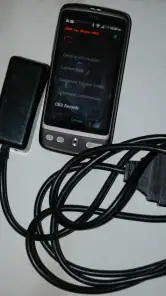
Yes, to use inCarDoc Pro, you will need an OBD2 adapter that connects your smartphone to your vehicle’s OBD2 port. These adapters can be purchased separately and are available in both Bluetooth and Wi-Fi versions. Ensure that the adapter you choose is compatible with your smartphone and vehicle for optimal performance.
Pros
- Comprehensive diagnostics features.
- Real-time vehicle monitoring.
- User-friendly interface.
- Supports a wide range of vehicles.
- Detailed error code descriptions.
Cons
- May require additional hardware.
- Occasional connection issues.
- Limited free features.
- Complex for beginners.
- In-app purchases can be costly.

- Category
- Auto & Vehicles
- Version
- 7.8.9











