Hush: Android Auto Audio Fix
- 66.00
- 4.9
- Installs
- 1.00K
- Price
- $1.49

Screenshots

Analysis by Reviewed
I’d start with one practical question: does audio behaving unpredictably through Android Auto bother you enough to pay for a dedicated fix? Hush: Android Auto Audio Fix is a paid Android app from Zeroed, listed at $1.49. That is a one-time price in the information available here, not a free download with a stated subscription; I’d treat it as a small purchase aimed at a specific annoyance rather than a general audio upgrade.
What that price needs to deliver
The appeal is focused: Hush is intended for people who want to play audio through Android Auto without the sudden volume changes that can make a drive uncomfortable. If that problem happens regularly in your car, even a modest purchase can feel worthwhile because the benefit is measured in calmer trips, not extra entertainment features. If your audio already behaves well, the same price may buy very little you would notice.
Before deciding, I’d check that your phone meets the Android requirement and that your vehicle setup actually uses Android Auto. The app’s current version is 1.4, and it is rated for Everyone. Its price is clear, but the more important value question is whether your own car-and-phone combination has the volume issue Hush is meant to address. I wouldn’t buy it just because the problem sounds familiar in theory.
Ever been on a drive, connected your phone to your car's audio system, and suddenly the music blares through the speakers, startling you and your passengers? If this scenario sounds familiar, then let me introduce you to Hush: Android Auto Audio Fix. This nifty app aims to address the common annoyance of sudden volume spikes when using Android Auto.
Smoother listening on the road
Picture this: you're cruising down the highway, the sun setting in the distance, and your favorite playlist on shuffle. Then, out of nowhere, a notification comes in, and the music volume skyrockets. It’s not just a mood killer; it’s downright distracting. This is where Hush comes to the rescue. The app seamlessly integrates with your Android Auto, ensuring that volume levels remain consistent, regardless of incoming notifications or alerts.
Installation and setup
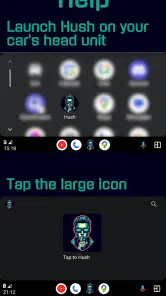
Getting started with Hush is as easy as pie. You simply download it from the Play Store, and within minutes, you're all set. The app walks you through a straightforward setup process, ensuring you link it correctly with your Android Auto. If you ever get stuck, there’s a handy setup guide within the app that’s as clear as day.
User experience and practical expectations
The beauty of Hush lies in its simplicity. Once installed, it quietly runs in the background, doing its thing without requiring any intervention from you. The interface is intuitive, with minimal settings to fiddle with. And honestly, that's how it should be. The best apps are those that you install and forget, yet they enhance your experience in subtle but meaningful ways.
More From Our News Desk

Clash of Clans Is Won Between the Battles

Android Auto Makes the Case for Quieter Car Software

MobiOffice: Transforming Mobile Productivity with Seamless Integration

EA SPORTS FC™ Mobile Soccer: Redefining Mobile Sports Gaming

How Microsoft OneDrive Became a Mobile Productivity Giant

How Google Translate Breaks Language Barriers Effortlessly
That low-intervention approach suits a driving companion: I would rather finish setup before setting off than have to open an audio utility during a trip. Still, I’d treat “install and forget” as a goal rather than a guarantee. Android Auto involves a phone, a vehicle, and an audio system, so a change in how one part behaves can affect the result. If the sound issue returns, check the setup while parked instead of trying to correct it on the road.
Why a focused fix can stand out
There are a few similar apps on the market, but what makes Hush shine is its reliability. It doesn't just promise a solution; it delivers. Many users have noted the absence of glitches or random crashes, which is a breath of fresh air in the age of buggy apps. Plus, the app is lightweight, ensuring it doesn’t hog your phone’s resources.
Hush also receives frequent updates, which means the developers are actively working to improve the app and keep it compatible with the latest Android Auto updates. It’s reassuring to know that the team behind the app is committed to maintaining its performance and utility.
For comparison, the usual alternatives are not necessarily other apps. You can adjust the phone or car audio controls, change notification behavior, or accept the interruption. Those approaches are free and may be perfectly adequate if the problem is occasional. Hush is more appealing when you want a dedicated intervention rather than another manual adjustment to remember, but it should not be confused with a music player, an equalizer, or a way to redesign Android Auto.
When another approach makes more sense
Hush is best understood as a narrow audio helper, not a replacement for Android Auto, a music player, or your car’s sound controls. The usual alternatives are to adjust the phone or vehicle volume yourself, change notification behavior, or simply tolerate the interruption. Those options cost nothing, but they may not solve the same problem as conveniently. I’d try the controls already available in your setup first if the issue is rare; a paid specialist app makes more sense when the surprise happens often enough to disrupt driving.
A useful way to judge it is to test the situation that usually causes trouble while parked: connect Android Auto, play the audio you normally use, and check what happens when alerts arrive. Don’t experiment with settings or troubleshoot while moving. If the problem persists and Hush’s setup guide gets you through configuration, that gives you a more grounded reason to keep it than relying on the promise of a general fix.
One practical wrinkle is identifying what actually changed the sound. A notification, navigation prompt, call, and a car’s own audio adjustment are not necessarily the same kind of event. Before deciding Hush has failed, note which source triggers the spike and whether it happens consistently. That simple distinction can keep you from paying for an app to solve a problem that is really a vehicle setting—or from dismissing it after testing the wrong situation.
Who is likely to get value
I’d consider Hush if you regularly drive with Android Auto, share the car with passengers, or listen at a volume where abrupt changes are genuinely startling. It may be especially useful for someone who wants to set up a solution once rather than remember to adjust audio every trip. With 1K+ installs, a 4.9 average from 94 ratings, and 66 reviews, it has a positive reception, though those figures can’t guarantee the same result on every phone and car.
A daily commute is a good example of where a small improvement could matter: you start a playlist before pulling out, follow navigation, and receive an alert during the drive. If the sound jump has become predictable enough that you brace for it, a dedicated helper may remove a recurring distraction. If it has only happened once, I’d first see whether changing the relevant phone or vehicle controls addresses it; that costs nothing and avoids buying a tool you may rarely notice.
It can also be worth thinking about who else rides in the car. A sudden change may be more irritating when a passenger is resting or when you regularly drive with family, but Hush still makes sense only if the underlying issue occurs in your Android Auto setup. I wouldn’t purchase it solely because a passenger dislikes loud notifications in general; first establish that the Android Auto audio behavior is the cause.
Who should skip it, and what to check
On the other hand, skip it if you don’t use Android Auto, your audio is already stable, or you expect a full set of entertainment or sound-customization tools. Hush’s stated purpose is specific, so I wouldn’t pay for it expecting broader control over music, navigation, or every sound the phone can produce. If your car’s own audio settings already solve the issue, those may be the simpler choice.
The app is for Android, so it is not the answer for someone using an iPhone or a setup that does not run Android Auto. Its minimum operating-system requirement is Android 9. That makes checking your phone’s Android version a sensible first step, especially if you are considering buying it for an older device. The Everyone content rating describes its age suitability; it does not mean the app will work with every vehicle or phone combination.
Hush is also a poor fit if your real need is to balance bass and treble, manage several music services, or control the whole car stereo. Those jobs belong to other settings or tools. Keeping the purpose narrow is useful here: the app’s appeal is avoiding a particular sort of audio disruption, not adding a broad collection of audio features. If you cannot name a repeatable Android Auto problem it should address, I’d hold off.
A realistic way to decide
Imagine leaving for a commute with a playlist on, then receiving a navigation prompt or phone alert that changes the balance of what you’re hearing. If that has happened repeatedly, the useful question is whether Hush keeps the listening experience steadier after setup—not whether it adds features you don’t need. Give it a cautious, stationary test first, then judge it on ordinary trips. That approach also helps separate a persistent Android Auto audio annoyance from a one-off change caused by the car’s controls or phone settings.
I’d make the test deliberate rather than trying to judge it from memory. Use the same phone, car, connection method, and kind of audio that usually bring on the problem, and compare what happens before and after setup. Keep the first check stationary, then pay attention during normal trips without changing settings while driving. If the behavior is inconsistent, repeat the check on another occasion before deciding whether the app has earned its place.
People often want to know whether setup will be complicated, whether the app replaces their player, and whether they need to keep adjusting it. The practical expectation is that Hush is an Android Auto-focused helper with a setup guide, not a media library or a new way to choose music. The intended appeal is that it can run quietly after configuration. I’d still revisit the guide if Android Auto or the car setup changes, because a previously working arrangement may need another check.
Another question is whether it will fix every sudden change in sound. I would not treat it as a universal volume controller: its purpose is specific, and the cause of a spike matters. If the car changes volume independently, or the phone’s settings are responsible, a different adjustment may be more direct. That is why identifying the trigger before paying is not busywork; it is the best way to judge whether this particular solution matches your problem.
Cost, support, and lasting value
At $1.49, the decision is less about whether the app is expensive in the abstract and more about whether you will use its narrow purpose often. It is a paid app, not a free alternative with an advertised subscription attached. For someone who encounters the issue on most drives, the cost may be easier to justify than repeatedly managing settings. For someone who uses Android Auto only occasionally or has no recurring audio trouble, even a low price can be wasted.
Zeroed is the developer, and the app’s current version is 1.4. I find the positive user reception encouraging, but ratings are only a starting point: different phones and cars can behave differently. I’d place more weight on a careful test in your own setup than on assuming other drivers’ results will transfer directly. If the app does what you need consistently, its focused nature is a strength; if not, its modest cost does not turn it into a useful purchase.
There is a trade-off between a one-purpose tool and a broader, free workaround. Manual changes preserve your money and give you direct control, but they can become a routine chore and may not address the same interruption in the way you want. A specialized app is more convenient only if it genuinely improves the repeated situation. I’d avoid buying on the hope that it will improve sound quality overall; the value to look for is steadier behavior in the particular Android Auto scenario that bothers you.
The verdict
In a world where we're constantly connected and bombarded with notifications, having a tool like Hush can make a significant difference in your driving experience. It’s a small addition to your phone, but it provides substantial peace of mind. So, if you’re tired of those unexpected audio shocks, give Hush a try. Your ears—and your passengers—will thank you!
My recommendation is conditional: at $1.49, Hush is a reasonable buy if you can identify recurring volume spikes in your Android Auto routine and want a dedicated solution. It is not an automatic purchase for every driver, and free adjustments may be enough for occasional trouble. For me, the deciding factor would be simple: if the annoyance keeps returning after checking the car and phone controls, the focused purpose is the point; if it doesn’t, save the money.
Hush: Android Auto Audio Fix Frequently Asked Questions
What does Hush’s price and age rating mean before I download it?
Hush is a paid app priced at $1.49, so you can factor that cost in before installing. Its content rating is Everyone, making it suitable for a general audience. The app is in the Auto & Vehicles category, and its purpose is to let you play what you want through Android Auto.
Who develops Hush: Android Auto Audio Fix, and is it actively maintained?
Hush: Android Auto Audio Fix is developed by Zeroed. The app was released on April 27, 2024, and its current version is 1.4. It has a 4.9 average rating from around 94 ratings, with 66 reviews and over 1,000 installs. Those details offer a sense of its availability and user reception, though they do not guarantee how it will behave on every phone or car.
What is Hush: Android Auto Audio Fix and how does it work?
Hush: Android Auto Audio Fix is an app designed to enhance your Android Auto experience by resolving common audio issues. It works by automatically managing audio focus and notifications, ensuring that your music or other audio playback isn't interrupted by notifications or other apps. This seamless integration helps maintain a smooth audio experience while driving.
Is Hush: Android Auto Audio Fix compatible with all Android devices?
Hush: Android Auto Audio Fix is designed to work with Android devices running Android 9 or later, but compatibility may still vary depending on your device's make, model, and operating system version. Before downloading, consider whether your phone meets that minimum requirement and whether Android Auto works with your setup. Keeping Android updated can help support a smoother experience.
Does Hush: Android Auto Audio Fix require any special permissions?
Yes, Hush: Android Auto Audio Fix requires certain permissions to function correctly. These include permissions to access notifications and manage audio settings. These permissions are necessary to allow the app to control audio focus and handle interruptions effectively. Rest assured that the app uses these permissions solely to enhance your audio experience and does not collect personal data.
Pros
- Enhances audio quality for Android Auto.
- Easy to install and configure.
- Compatible with most Android devices.
- Regular updates for improved performance.
- Minimal impact on device battery.
Cons
- Limited support for non-Android Auto users.
- Requires Android 8.0 or higher.
- May occasionally disrupt other audio apps.
- No built-in customer support chat.
- Initial setup can be confusing.
- Category
- Auto & Vehicles
- Version
- 1.4