HomeWAV
- 4.43K
- 3.6
- Installs
- 1.00M
- Price
- Free

Screenshots



Analysis by Reviewed
Staying in touch with someone who is incarcerated can take more planning than an ordinary call, so I value tools that make the routine clearer. HomeWAV is a communication app from HomeWAV LLC, built around connecting incarcerated people with family and friends. I’d consider it when in-person visits are difficult, but I’d also approach it with a practical mindset: the facility and the people involved shape how useful any communication service can be.
A sensible first routine
I would begin by installing the app, creating an account, and checking whether the relevant facility and person are available through it. Then I’d look at the steps for arranging a visit and make sure I understood what needs to happen before the appointment. That small check matters: an app can organize the process, but it does not remove the need to coordinate around facility procedures or the other person’s availability.
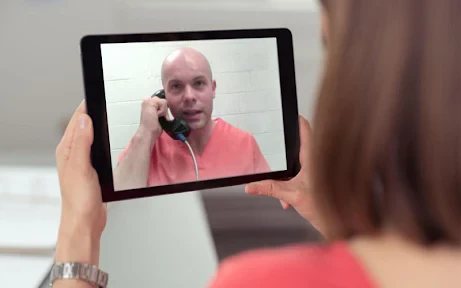
For a family member with a busy week, a video visit can be easier to fit around work, childcare, or a long drive than an in-person trip. I’d still treat it as a planned appointment rather than an on-demand call. Choosing a time, checking the device beforehand, and keeping the person’s contact details handy can make a visit less stressful when the day arrives.
Preparing the phone and the people involved
Before relying on a scheduled conversation, I’d test the phone in the place where I expect to take the call. A quiet room, a charged device, and a stable connection can make it easier to focus on the person rather than troubleshoot during a limited window. I’d also close other apps that might compete for attention and tell anyone sharing the space that I need some privacy for the visit.
If another relative is helping, agree on the practical jobs ahead of time. One person can keep track of the planned visit while another handles account questions, but both should know who is responsible for making changes. This simple division reduces the chance of duplicate actions or confusion when several family members are trying to help from different places.
Connecting Made Simple
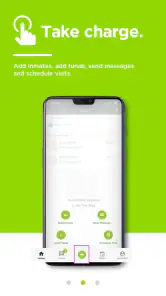
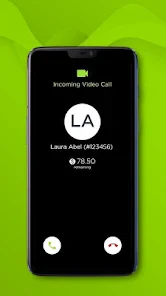
First off, HomeWAV is super user-friendly. I downloaded it, set up an account, and I was ready to roll in no time. The app’s interface is clean and intuitive, which makes navigating through it a breeze. The main feature here is video visitation, which is pretty straightforward. I just had to select the facility, find my loved one, and schedule a visit. It’s as easy as booking a dinner reservation online.
Features That Stand Out
What really caught my eye were a few features that make HomeWAV stand out. Aside from video calls, there’s a messaging system that works like a charm. It’s not just about instant communication; you can also send photos and even short video clips. The app notifies you when your loved one is online, so you don’t miss a chance to connect. Pretty neat, right?
You May Like

Clash of Clans Is Won Between the Battles

Android Auto Makes the Case for Quieter Car Software

MobiOffice: Transforming Mobile Productivity with Seamless Integration

EA SPORTS FC™ Mobile Soccer: Redefining Mobile Sports Gaming

How Microsoft OneDrive Became a Mobile Productivity Giant

How Google Translate Breaks Language Barriers Effortlessly
Those options suit different kinds of contact: a scheduled visit gives you time to talk, while a short message or photo can be a simpler way to share a moment. I’d avoid relying on a notification as the whole plan, though. If the conversation matters, I’d agree on a rough time with my loved one when possible and keep an eye on the app, rather than assuming an alert will arrive at exactly the right moment.
Making the routine easier
After the first setup, I’d keep a repeatable checklist: confirm the right facility and contact, check the visit details, and make sure the phone is ready before the planned time. For a household sharing responsibility, it also helps to decide who will arrange the visit and who will handle account tasks. That avoids last-minute confusion over which person is expected to act.
For example, someone working a shift might use a break to check messages, then arrange a video visit for a time when they can give the conversation their full attention. A relative who cannot travel regularly could use that planned call to stay involved, while keeping messages for brief updates. This is where the app’s mix of communication options can be more practical than treating every interaction as a full visit.
HomeWAV is free to download, and its Everyone age rating makes the listed audience broad; that does not mean every feature or communication arrangement will suit every family. It has a 3.6 average from around ten thousand ratings, and more than a million installs. I’d read those figures as a reminder that people’s experiences can vary, not as a guarantee that the app will work the same way for every facility or user.
Money, settings, and sensible checks
Another cool thing? The app lets you manage your funds smoothly. You can easily add money to your account straight from your phone, ensuring that your communication never hits a dead-end due to lack of funds. Plus, you can keep track of all your transactions with just a few taps.
Before adding money, I’d check which account or communication need the funds are intended for and review the transaction details carefully. Keeping a simple personal note of when I added funds and what the app shows afterward would make it easier to spot a mismatch. This is a useful habit for any service involving account balances, especially if more than one family member helps manage contact.
I’d also take a moment to review the settings that are actually available in the app and choose contact or profile options deliberately. The original account setup is a good time to use a strong, private password and make sure the account is being accessed by the right person. I wouldn’t assume a setting can override facility rules, so I’d treat app controls as account-level choices rather than a promise about how a visit or message is handled.
Settings worth checking before sharing
There is a useful distinction between keeping your own account tidy and controlling what happens at the facility. I’d review the profile and contact information for accuracy, then check any privacy controls before sending a photo or clip. If relatives share a device, I’d sign out when appropriate and avoid leaving account details visible to someone who is not meant to use them.
For families who want to share updates, it helps to agree on what belongs in a message and what is better saved for a visit. A short note can handle a quick piece of news; a more sensitive conversation may deserve a scheduled call and a quieter setting. That is not a special trick in the app, but a sensible way to use its different communication formats without expecting a short message to carry the weight of a longer conversation.
Security and Privacy
Now, you might be wondering about security. That’s a biggie, and HomeWAV doesn’t disappoint. The app employs stringent security measures to ensure all your communications are private and secure. They’ve got encryption protocols in place, which gave me peace of mind knowing my interactions are safe from prying eyes.
There’s also a hefty dose of privacy settings you can tweak according to your comfort level. Whether it’s blocking certain contacts or controlling who can see your profile, the app gives you control over your personal information.
Because privacy is personal, I’d check those controls before sharing photos or other details, and I’d avoid sending anything I would not want handled within a monitored communication environment. That is a more cautious approach than using ordinary social messaging, where users may expect a private conversation by default. If your priority is casual chatting with friends outside the correctional setting, a standard messaging app is the more natural choice; HomeWAV is for a specific connection and workflow.
Where it may not fit
The main trade-off is that this is not a general-purpose video chat app. Its value depends on whether the facility and the person you want to reach can use the service, and on the practical arrangements around visits and communication. If you are looking for open-ended calls with anyone, or a simple replacement for everyday messaging, I’d choose a familiar video-call or chat app instead.
HomeWAV makes more sense for relatives who need a dedicated way to keep in contact and are willing to plan around the available process. I would not recommend downloading it expecting every communication option to be immediately available in every situation. First, confirm that the relevant facility is listed and that the person you want to contact can be found; then set up the account and decide which tools you are likely to use.
What to do when plans change
A planned visit can be disrupted by a late change in availability, a phone problem, or a household schedule shifting at short notice. I’d keep the app as one part of the plan rather than the only way I organize the day: note the appointment time somewhere I’ll see it, make sure the phone is ready beforehand, and leave room to reschedule if the circumstances change. That keeps an unexpected snag from turning into a frantic search through the app at the last minute.
If the app does not show the facility or contact I need, I’d pause before creating multiple accounts or trying unrelated workarounds. The first useful step is to check with the facility about the communication process and whether this service is available for that person. This is one of the clearest differences from ordinary social apps: a family cannot simply invite someone and assume the connection will work independently of institutional arrangements.
That dependence is also why I would not judge the app solely by how quickly it opens or how familiar its menus feel. A smooth interface is helpful, but the important test is whether the family can use the available process consistently. For someone who needs a dependable routine, a brief written checklist of the facility, contact, appointment details, and account task can be more valuable than repeatedly navigating from memory.
Who benefits most from this approach
I’d recommend considering it for a relative who expects to make ongoing contact and values having visits and shorter communications gathered in one dedicated place. It may be particularly useful when travel is difficult or when family members live far apart and need to coordinate around a planned conversation. The best fit is someone comfortable with a little preparation and with checking whether the facility’s process supports the contact they have in mind.
It is less suitable for a person who only wants casual video calls with friends, or who expects messaging to behave exactly like a mainstream chat service. Those users are better served by ordinary calling and messaging apps for their everyday conversations. HomeWAV is most relevant when the correctional setting is the reason for choosing a communication tool, not simply because someone wants another way to send a message.
Compatibility and practical expectations
The app was released in 2012, and version 2.23.5 supports devices running Android 7.0 or later. That makes checking compatibility worthwhile before relying on an older phone for a scheduled visit. HomeWAV LLC develops the app, and its long presence in this space is useful context, but I’d still judge it by whether its current workflow fits the facility and family using it.
It is a communication app rather than a substitute for facility guidance, so I’d use the facility as the source for questions about local procedures and use the app for the tasks it makes available. That distinction helps set expectations: the app can support contact, but it cannot make every practical constraint disappear. I’d also make sure the phone is compatible before planning around a visit, particularly if it is an older device.
A measured verdict for staying connected
All in all, HomeWAV is a game-changer for anyone looking to maintain a strong connection with loved ones behind bars. It’s efficient, secure, and incredibly easy to use. I’d say give it a try if you’re in a situation where traditional visitation just isn’t feasible. The app is available for both Android and iOS, so you can download it and start connecting right away. Trust me, it’s definitely worth checking out!
My practical verdict is a little more measured: I’d try it when someone I care about needs this particular kind of connection, and I’d make the first session a low-pressure test of the account, device, and schedule. If that setup goes smoothly, the combination of visits, messaging, and account tools can support a repeatable routine. If access or facility requirements become the obstacle, I’d contact the relevant facility for guidance rather than assume another app can substitute for its process.
HomeWAV Frequently Asked Questions
Who is HomeWAV intended for?
HomeWAV is designed for friends and family who want to stay in touch with someone who is incarcerated. It provides a way to connect through communication services associated with correctional facilities. Before downloading, consider whether the facility where your loved one is held supports HomeWAV and review its rules for using the service, since facility policies shape how communication is arranged.
What is HomeWAV and how does it work?
HomeWAV is a communication app that facilitates video and voice calls between inmates and their loved ones. Users can schedule calls, send messages, and even share photos. The app requires users to create an account, add funds to make calls, and schedule sessions according to the facility's rules. It's designed to provide a secure and monitored way to maintain connections with incarcerated individuals.
Is HomeWAV secure and private for users?
Yes, HomeWAV implements strict security measures to ensure all communications are secure and monitored. The app complies with correctional facility regulations, meaning all interactions are recorded and reviewed to prevent misuse. Users should be aware that privacy is limited due to the nature of the service, and all communication is subject to monitoring by the facility's authorities.
How do I add funds to my HomeWAV account?
To add funds to your HomeWAV account, log into the app and navigate to the account or billing section. You can use a credit or debit card to top up your balance. The app provides detailed instructions on how to manage your funds, ensuring you have enough balance to make calls or send messages. Keep track of your spending to avoid running out of funds during important calls.
Are there any technical requirements for using HomeWAV?
Yes, to use HomeWAV effectively, you need a compatible Android or iOS device with a stable internet connection. The app requires a working camera and microphone for video and audio calls. Ensure your device's operating system is updated to avoid compatibility issues. It's also recommended to use headphones for clearer audio during conversations.
Pros
- User-friendly interface for easy navigation.
- Secure video calls ensure privacy.
- Flexible scheduling for visits.
- Affordable pricing for families.
- Accessible from multiple devices.
Cons
- Requires stable internet for smooth calls.
- Limited features in free version.
- Occasional login issues reported.
- Not available in all facilities.
- Customer support can be slow.

- Category
- Communication
- Version
- 2.23.5











